
- Automation Management
- Automation Management Permissions
- Automation Management Playbooks
- Automation Management Playbook Triggers
- Pre-Built Automation Management Playbooks
- Automation Management Advanced Playbooks
- Automation Management Rule-Based Playbooks
- Filter Automation Management Playbooks
- Find Automation Management Playbooks
- Enable or Disable an Automation Management Playbook
- Reorder an Automation Management Playbook
- Delete an Automation Management Playbook
- Automation Management Services
- Automation Management Actions
- Create an Automation Management Action
- Clone an Automation Management Action
- Edit an Automation Management Action
- Deploy an Automation Management Action
- Preview Automation Management Action Code
- View Automation Management Action Run History
- View Automation Management Action Version History
- View Automation Management Action Audit Log
- Delete an Automation Management Action
- Refresh Automation Management Action List
- Automation Agents
Create Case Pre-Built Playbook
Create a case if an alert risk score is greater than or equal to 90 or if a correlation rule outcome is defined to create a Threat Center case using the Create Case pre-built playbook.
Create Case is a fully configured pre-built playbook that is enabled by default.
Playbook Logic
There are two possible triggers for the playbook: alert created and alert modified. If the playbook is enabled, the playbook automatically runs when a Threat Center alert is created or an alert is modified.
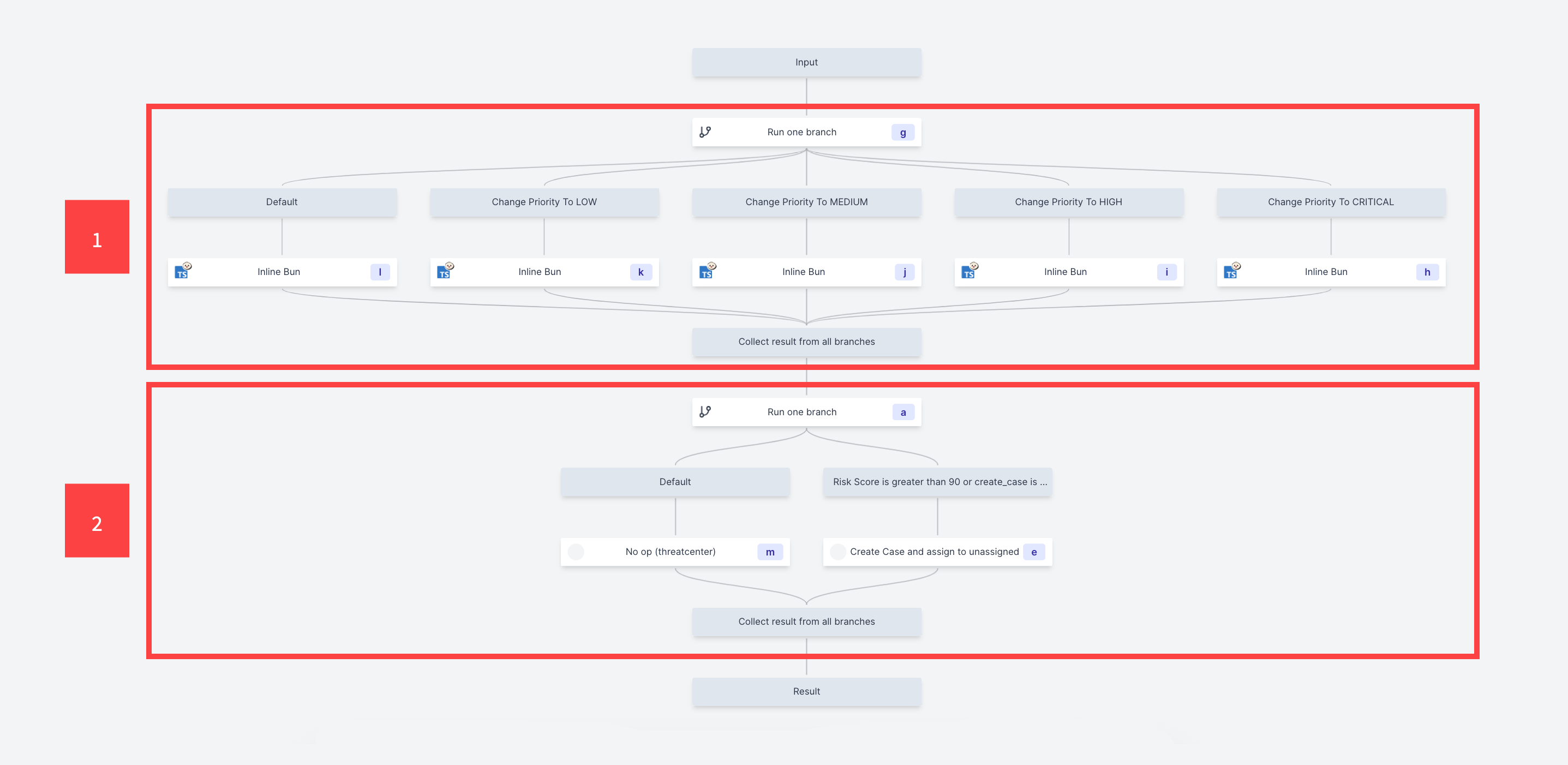
1 The playbook first runs a branch to one. In this branch to one, all branches return a certain priority value depending on the alert risk score and current priority:
Default – If none of the other branches are true, the branch returns the priority.
Branch 1 (Change Priority To LOW) – If the alert risk score is less than 25 and the priority is not Low, the branch returns the Low priority.
Branch 2 (Change Priority To MEDIUM) – If the alert risk score is greater than or equal to 25 and less than 50 and the priority is not Medium, the branch returns the Medium priority.
Branch 3 (Change Priority to HIGH) – If the alert risk score is greater than or equal to 50 and less than 75 and the priority is not High, the branch returns the High priority.
Branch 4 (Change Priority To CRITICAL) – If the alert risk score is greater than or equal to 75 and the priority is not Critical, the branch returns the Critical priority.
2 The playbook then runs another branch to one. In this branch:
Default – If the other branch is false, nothing is executed.
Branch 1 (Risk Score is greater than 90 or create_case is true) – If the alert risk score is greater than or equal to 90 or if a correlation rule outcome is defined to create a Threat Center case, Automation Management creates a case with the following properties:
Alert ID – the ID of the alert that triggered the playbook
Assignee – Unassigned
Priority – The result of the first branch to one.
Queue – Unassigned
Stage – New