
- Get Started with Outcomes Navigator
- Use Outcomes Navigator with the MITRE ATT&CK® Framework
- Use Outcomes Navigator with the Threat Detection, Investigation, and Response (TDIR) Use Case Categories Framework
- Use Outcomes Navigator for Compliance
- Use Outcomes Navigator with the OWASP Top 10 for Agentic Applications Framework
- View Recommendations for Improving Your Configuration
- Share Information in Outcomes Navigator
- Outcomes Navigator Coverage Calculation
- The Role of Parsed Fields in Coverage Calculation
- Prerequisites for Calculating Coverage
- Types of Coverage Scores
- Use Case Coverage Score
- MITRE Coverage Score
- Compliance Framework Coverage Score
- Control Coverage Score
- OWASP Agentic AI Coverage Score
- OWASP Risk Coverage Score
- Advanced Analytics Rules Coverage Calculation
- Correlation Rules Coverage Calculation
- Dashboards Coverage Calculation
- Coverage Over Time Calculation
- Outcomes Navigator Parser Calibration Tier Average Calculation
Understand Your OWASP Top 10 for Agentic Applications Coverage
To create a strategy for configuring your environment, get an overview of your overall OWASP Top 10 for Agentic Applications coverage in Outcomes Navigator.
After you select OWASP Agentic AI as a framework to use in Outcomes Navigator, an OWASP Agentic AI tab appears. Under this tab you can:
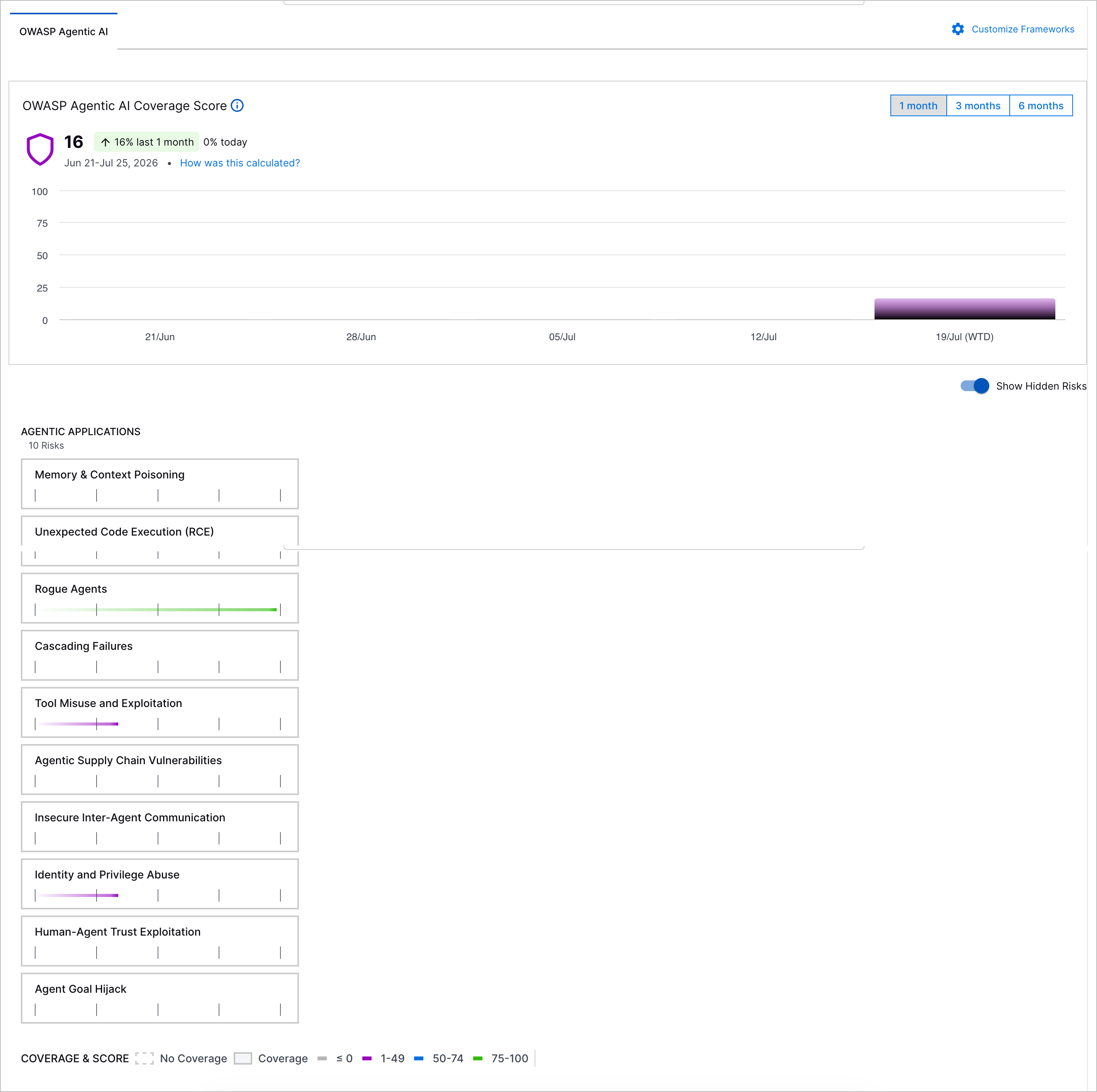
View a summary of your OWASP Top 10 for Agentic Applications coverage
Use a security-trained AI assistant to answer any question about your security posture and coverage
Use this information to evaluate your overall security posture and which security risks are important for you to address.
Summarize Your OWASP Top 10 for Agentic Applications Coverage
Understand your overall OWASP Top 10 for Agentic Applications coverage at a glance using the overall OWASP Agentic AI Coverage Score.
OWASP Agentic AI Coverage Score
Under OWASP Agentic AI Coverage Score:
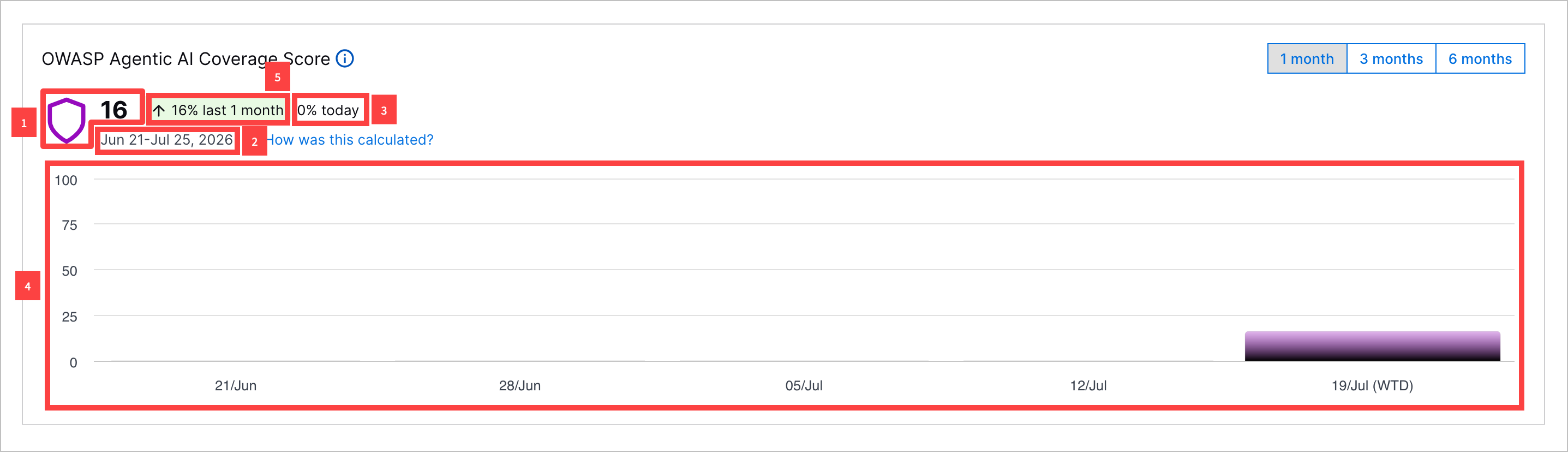
1 View your current OWASP Agentic AI Coverage Score for the compliance framework. The Coverage Score for is an average of the OWASP Risk Coverage Scores across all security risks. The OWASP Agentic AI Coverage Score is calculated once per day.
2 The OWASP Agentic AI Coverage Score is calculated once per day. View the date and time it was last calculated.
3 View the relative change in the OWASP Agentic AI Coverage Score since the last time the score was calculated.
4 To identify trends in the OWASP Agentic AI Coverage Score, you can view a bar chart depicting the OWASP Agentic AI Coverage Score over a period you specify: one month, three months, or six months.
If you toggle the chart to depict the OWASP Agentic AI Coverage Score over three months or six months, each bar represents the average OWASP Agentic AI Coverage Score in a given month. If you toggle the chart to depict the OWASP Agentic AI Coverage Score over one month, each bar represents the average OWASP Agentic AI Coverage Score in a given week.
5 View the relative change in the OWASP Agentic AI Coverage Score over the specified period.
Explore Security Risks by Coverage
To identify specific security risks of concern, view all security risks and the OWASP Risk Coverage Score for each security risk.
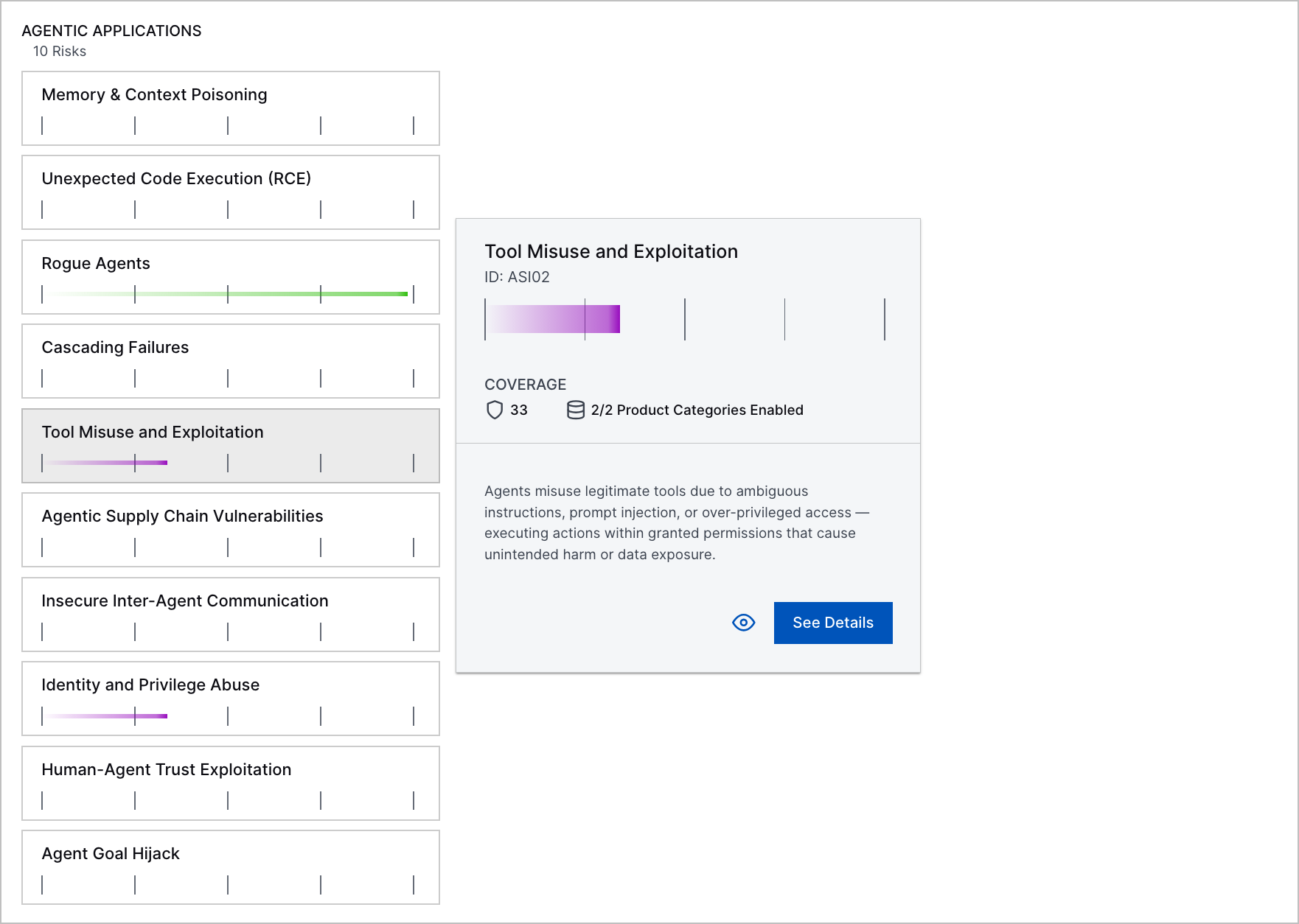
To learn about what a specific security risk is and get a summary of how well your environment protects against that security risk, hover over the security risk.
Hide a Security Risk
To focus on the most relevant threats to your organization, you can hide a security risk. You might consider hiding techniques that have empty or incomplete data or aren't pertinent to your specific environment. Hidden techniques are excluded from the calculation for the OWASP Agentic AI Coverage Score.
To hide a security risk, hover over the security risk, then click  .
.
To remove hidden security risks from view, toggle Show Hidden Risks off.