
- Connector Migration Overview
- Cloud Collectors Overview
- Navigate the Cloud Collectors UI
- Which Collector to Use?
- Hybrid Deployment Experience
- Supported Regions for Cloud Collectors
- Access the Cloud Collectors Service
- Set up a New Cloud Connectors Instance
- Early Access Cloud Collectors
- Armis Cloud Collector
- Armis Context Collector
- AWS Inspector Cloud Collector
- AWS Redshift Cloud Collector
- Cybereason Cloud Collector
- Google Workspace Context Cloud Collector
- OneLogin Cloud Collector
- Palo Alto Networks SaaS Security Cloud Collector
- Rest API Context Cloud Collector
- Symantec CloudSOC Cloud Collector
- Troubleshooting Cloud Collectors
PrevNext
Prerequisites to Configure Armis Cloud Collector
Before you configure the Armis Cloud Collector, you must obtain the API Secret key.
Obtain the Secret Key
Use the following steps to obtain the API or secret key.
Create an Armis user with Read-Only permissions for Alerts. You can use the OOTB Read Only role, and assign this role to your user.
Generate an API Secret Key for this user using the Armis API Management UI (see screenshot below), and record the secret key.
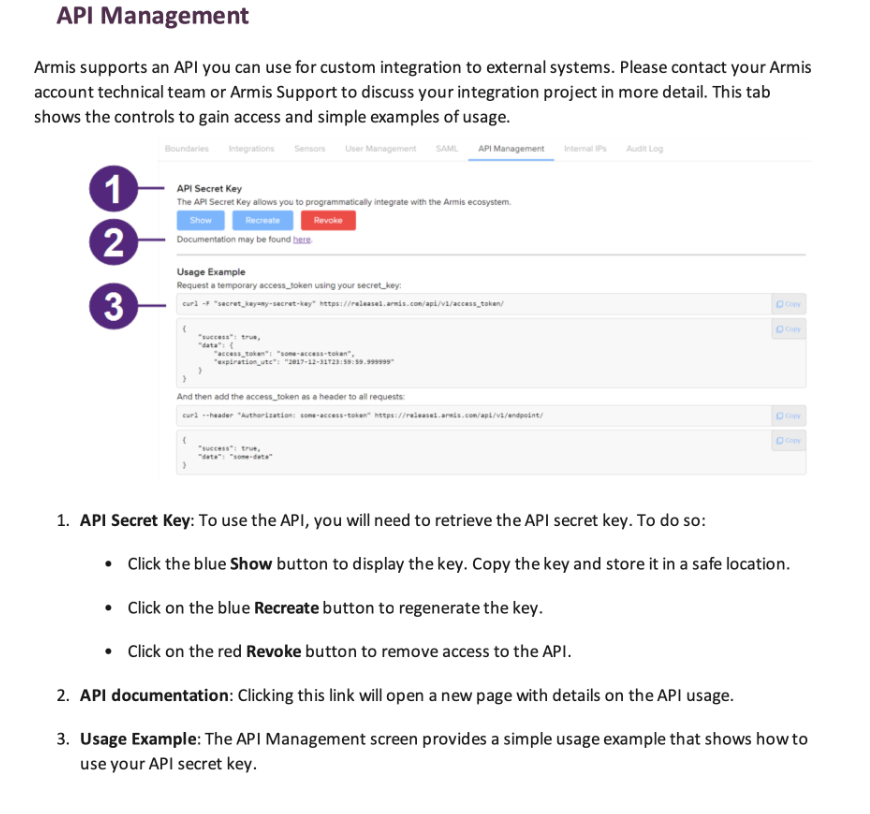
Use the secret key while configuring the Armis cloud collector.