
- Welcome to the New-Scale Security Operations Platform
- Licenses
- Supported Regions for Data Residency
- Get Started with the New-Scale Security Operations Platform
- Universal Role-Based Access
- Exabeam Nova
- Monitoring
- Export Your Exabeam Data
Add a Webhook
You must add webhooks to your environment before you can use them in your applications. They are added in the Exabeam Security Operations Platform settings.
To add a webhook:
Note
If you selected Add a new webhook in settings from the Define Rule Outcomes page of Correlation Rules, skip to step 2.
Open the Exabeam Security Operations Platform and on the lower-left side of the page, click Settings
 , and then click Webhooks.
A settings page displays with a list of the available webhooks.

Click + New Webhook.
The New Webhook dialog displays.
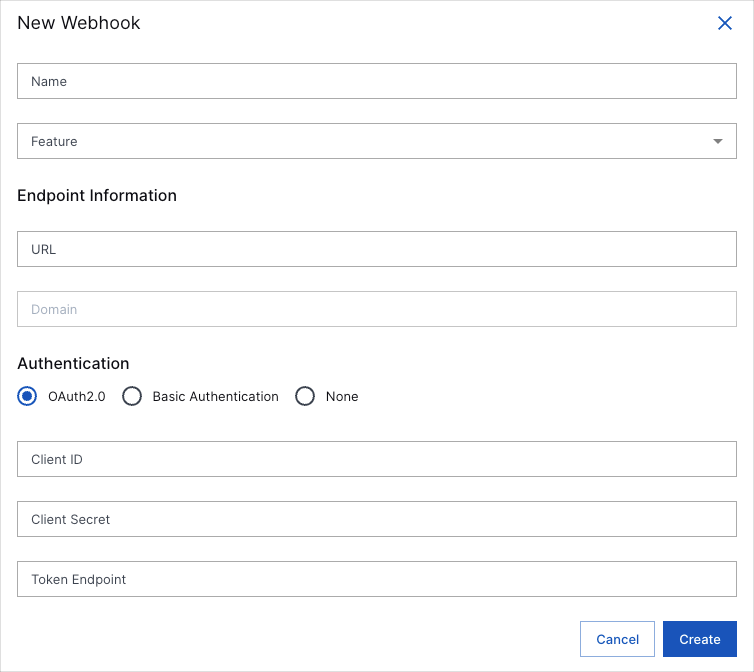
Name your webhook.
Select a Feature from the drop-down menu.
Provide a URL for the webhook.
The Domain field is auto-filled based on the URL you provide.
Select an Authentication option, and then do the following if you selected OAuth2.0 or Basic Authentication.
If you selected OAuth2.0:
Enter a Client ID.
Enter a Client Secret.
Enter a Token Endpoint.
If you selected Basic Authentication:
Enter a Username.
Enter a Password.
Click Create.