
- Log Stream Overview
- Parser Manager
- Parsers Overview
- View Parser Details
- Create a Custom Parser
- Import Sample Logs
- Define a Subset of the Sample Logs
- Add Conditions
- Add Basic Parser Information
- Extract Event Fields
- Extract Mapped JSON Fields
- Select JSON Fields from a List of Key/Value Pairs
- Select Tokenized JSON Fields from the Values in the Sample Log
- Manually Enter JSON Path Expressions
- Sample JSON Path Expressions for Manual Entry
- Reorder Mapped JSON Fields
- Review the Matching JSON Fields and Values
- Add Logic to JSON Field Extraction
- Expressions for JSON Parser Field Extractions and Enrichment Mapping
- Extract Fields Using Regular Expressions
- Reserved Fields
- Extract Mapped JSON Fields
- Add Event Builder Rules
- Review and Save Parser
- Manage Existing Custom Parsers
- Tokenize Non-Standard Log Files
- Customize a Default Parser
- Duplicate a Parser
- Enable or Disable Parsers
- Parser Updates
- Supported Vendors and Products
- Live Tail
- Enrichments
- Event Filtering
- Log Stream APIs
Fields Tab
The Fields tab in the bottom panel of the Parser Details page provides information about the fields the selected parser is configured to extract. The tab contains two Field Definition sections. One is a chart that shows the overall completeness of the parser field definitions and the other lists each of the fields the parser extracts, along with their status and regex definitions.
The Field Definition chart at the top shows the number All fields defined for extraction and a breakdown of the number of Core, Detection, Informational, Other, and Custom fields that are defined for extraction.
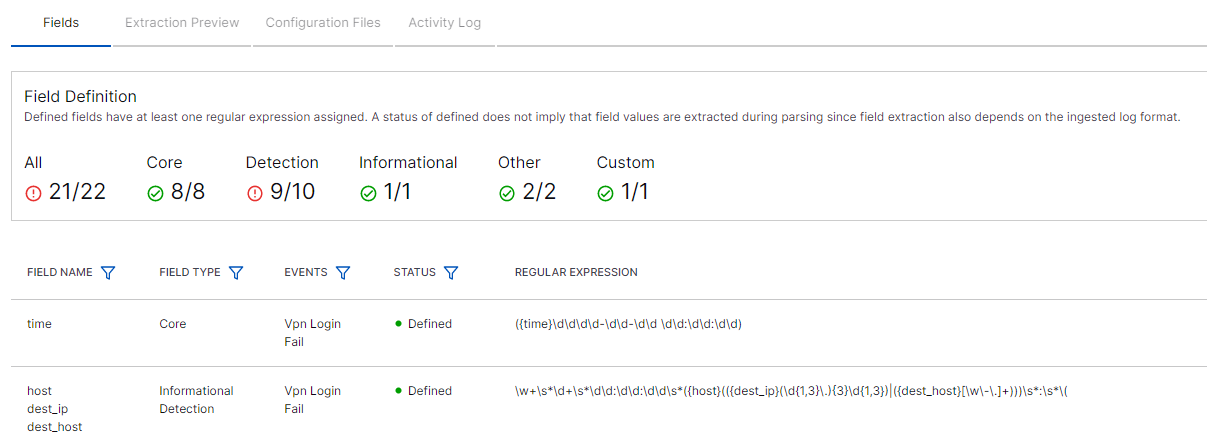 |
For example, in the image above, a total (All) of 53 fields are defined for extraction, 13 out of 13 Core fields are defined, 20 out of 24 Detection fields, and 4 out of 5 Informational field. In addition, 10 Other fields and 6 Custom fields are also defined.
Note
Identifying which Core, Detection, or Informational fields are missing for any given activity type, allows you to determine how well the parser adheres to the common information model. It helps pinpoint where fine tuning is needed to improve the compliance.
The Field Definition list at the bottom of the tab shows the status of each field and how it's defined for data extraction. The chart contains the following columns:
Field Name – Shows a specific field name.
Field Type – Shows which common informational model type each field represents: Core, Detection, Informational, Other.
Events – Show which events each field supports.
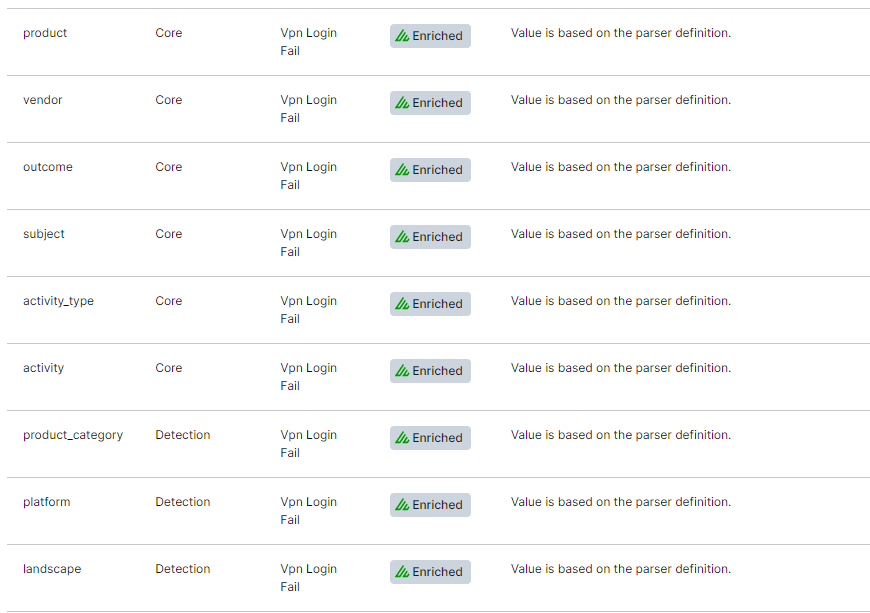
Status – Shows whether a field is Defined (extracts data based on a regex definition in the parser), Enriched (extracts data based on a field populated by context enrichment rather than by the parser), or Undefined (is not defined to extract data).
Regular Expression – Shows the regex definition used to extract each field that is currently in a Defined status. If a field is in Enriched status, this column indicates that it is defined on the basis of an enriched field rather than a parser definition. If a field is in Undefined status, this column is empty.
Note
Enriched fields include contextual fields such as
product,vendor,outcome,subject, andactivity_type.
 |