
- Log Stream Overview
- Parser Manager
- Parsers Overview
- View Parser Details
- Create a Custom Parser
- Import Sample Logs
- Define a Subset of the Sample Logs
- Add Conditions
- Add Basic Parser Information
- Extract Event Fields
- Extract Mapped JSON Fields
- Select JSON Fields from a List of Key/Value Pairs
- Select Tokenized JSON Fields from the Values in the Sample Log
- Manually Enter JSON Path Expressions
- Sample JSON Path Expressions for Manual Entry
- Reorder Mapped JSON Fields
- Review the Matching JSON Fields and Values
- Add Logic to JSON Field Extraction
- Expressions for JSON Parser Field Extractions and Enrichment Mapping
- Extract Fields Using Regular Expressions
- Reserved Fields
- Extract Mapped JSON Fields
- Add Event Builder Rules
- Review and Save Parser
- Manage Existing Custom Parsers
- Tokenize Non-Standard Log Files
- Customize a Default Parser
- Duplicate a Parser
- Enable or Disable Parsers
- Parser Updates
- Supported Vendors and Products
- Live Tail
- Enrichments
- Event Filtering
- Log Stream APIs
Log Stream in Audit Logs
Information related to specific types of Log Stream activity is stored in audit logs in the New-Scale Security Operations Platform. These audit logs are accessible in the Search query interface. The easiest way to find them in Search is from the Audit Logs tab when using the Basic Search mode (see the procedure below). For more information about audit log types and visibility, see Audit Logs in theNew-Scale Security Operations Platform Guide.
Audit log are available for the specific activity and operation types listed below. For the activity types, links are provided for specific pages in the Common Information Model Library where you can find detailed information about the fields available for searching. (The links open a GitHub repository.)
event-enricher-create
event-enricher-delete
event-enricher-disable
event-enricher-enable
event-enricher-force-update
event-enricher-import
event-enricher-modify
event-enricher--reorder
For an easy way to access Log Stream audit logs:
Log into the New-Scale Security Operations Platform and navigate to Search.
Choose the Basic Search mode and click in the search bar at the top. Select the Audit Logs tab.
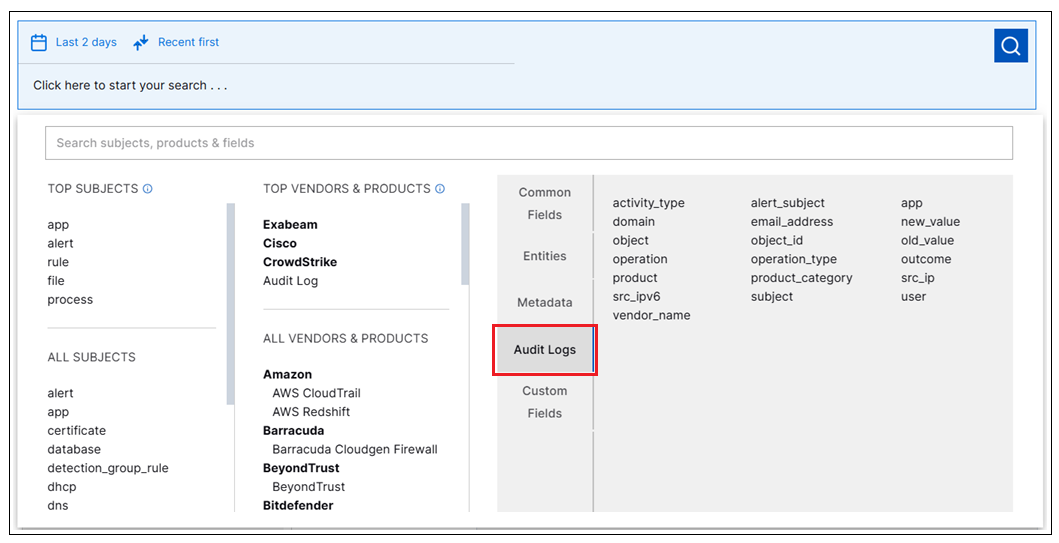
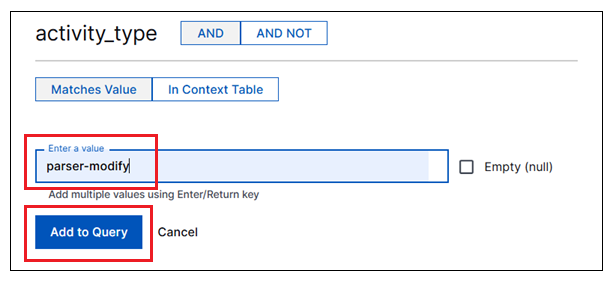
Select one of the following search fields, enter a specific Log Stream value, and click Add to Query.
Search Field
Log Stream Values
app
Log Stream
activity_type
audit-log (for all event enricher audit logs)
parser-create
parser-delete
parser-disable
parser-enable
parser-import
parser-modify
operation
Event Enricher create
Event Enricher delete
Event Enricher disable
Event Enricher enable
Event Enricher force update
Event Enricher import
Event Enricher modify
Event Enricher reorder
Parser create
Parser delete
Parser disable
Parser enable
Parser import
Parser modify
operation_type
event-enricher-create
event-enricher-delete
event-enricher-disable
event-enricher-enable
event-enricher-force-update
event-enricher-import
event-enricher-modify
event-enricher-reorder
parser-create
parser-delete
parser-disable
parser-enable
parser-import
parser-modify
Select a time range for the query and run the search.