
- Log Stream Overview
- Parser Manager
- Parsers Overview
- View Parser Details
- Create a Custom Parser
- Import Sample Logs
- Define a Subset of the Sample Logs
- Add Conditions
- Add Basic Parser Information
- Extract Event Fields
- Extract Mapped JSON Fields
- Select JSON Fields from a List of Key/Value Pairs
- Select Tokenized JSON Fields from the Values in the Sample Log
- Manually Enter JSON Path Expressions
- Sample JSON Path Expressions for Manual Entry
- Reorder Mapped JSON Fields
- Review the Matching JSON Fields and Values
- Add Logic to JSON Field Extraction
- Expressions for JSON Parser Field Extractions and Enrichment Mapping
- Extract Fields Using Regular Expressions
- Reserved Fields
- Extract Mapped JSON Fields
- Add Event Builder Rules
- Review and Save Parser
- Manage Existing Parsers
- Tokenize Non-Standard Log Files
- Duplicate a Parser
- Enable or Disable Parsers
- Parser Updates
- Supported Vendors and Products
- Live Tail
- Enrichments
- Event Filtering
- Log Stream APIs
Access Log Stream
Log Stream is available from a tile on the New-Scale Security Operations Platform home page.
Accessing the Log Stream Home Page
Log on to the New-Scale Security Operations Platform.
Select the Log Stream tile.
The Log Stream home page appears. There are several tabs on the home page:
Controlling Log Stream Permissions
User access to Log Stream is managed through Universal Role-Based Access (URBA) on the Exabeam Security Operations Platform. URBA includes two permission levels for Log Stream users:
Read Access – Read only permissions. This level of access allows users to view parsers, parser updates, enrichment rules, and event filters. It does not provide access to make any modifications.
Note
Any options in the Log Stream UI that allow creating, editing, or deleting anything are not available to users with this level of access.
Manage Access – Read, write, and delete permissions. This level of access allows users to create and edit parsers, parser updates, enrichment rules, and event filters. The full set of all Log Stream options is available to users with this level of access.
You can assign Log Stream access levels to default user roles that exist in your Exabeam Settings, or you can create custom roles and define specific permissions. The table below shows the Log Stream permissions that are available to assign and it also shows which default roles already include those permissions. Permission settings for Log Stream look like the following:
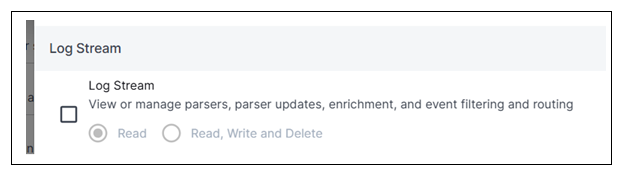
For more information about managing user permissions and creating custom roles, see User Roles and Local Users in the Security Operations Platform Guide.
Permission | Description | Access | Default Roles |
|---|---|---|---|
Log Stream | View or ManageParsers, Parser Updates, Enrichment, and Event Filtering and Routing | Read, Write, Delete |
|
Read | Tier 3 Analyst |
Note
Tier 1 and Tier 2 Analyst user roles do not have any access to Log Stream by default. Those users will not see the Log Stream tile in the New-Scale Security Operations Platform.