
- Log Stream Overview
- Parser Manager
- Parsers Overview
- View Parser Details
- Create a Custom Parser
- Import Sample Logs
- Define a Subset of the Sample Logs
- Add Conditions
- Add Basic Parser Information
- Extract Event Fields
- Extract Mapped JSON Fields
- Select JSON Fields from a List of Key/Value Pairs
- Select Tokenized JSON Fields from the Values in the Sample Log
- Manually Enter JSON Path Expressions
- Sample JSON Path Expressions for Manual Entry
- Reorder Mapped JSON Fields
- Review the Matching JSON Fields and Values
- Add Logic to JSON Field Extraction
- Expressions for JSON Parser Field Extractions and Enrichment Mapping
- Extract Fields Using Regular Expressions
- Reserved Fields
- Extract Mapped JSON Fields
- Add Event Builder Rules
- Review and Save Parser
- Manage Existing Parsers
- Tokenize Non-Standard Log Files
- Duplicate a Parser
- Enable or Disable Parsers
- Parser Updates
- Supported Vendors and Products
- Live Tail
- Enrichments
- Event Filtering
- Log Stream APIs
Import a Custom Parser
Use these instructions to import an existing custom parser and event builder. Ensure that you import sample logs that represent the type of information you want to ingest. The sample logs ensure that your parser can properly extracts the appropriate data.
On the Parsers Overview tab of the Log Stream home page, click the Import icon (
 ).
).The Import Parser dialog appears.
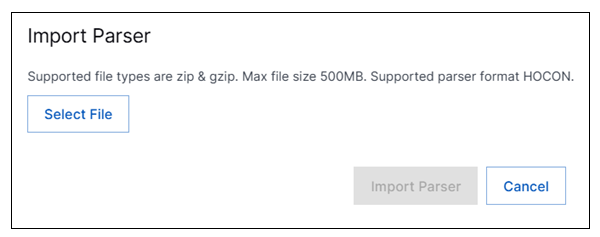
Click Select File, then upload a ZIP or GZIP file containing your parsers and event builders. These files must follow certain requirements:
The ZIP or GZIP file must be no more than 500 MB.
Your parsers and event builders must be in HOCON format.
The parser file must be named
parsers.conf. You can include multiple parsers in this file.The event builder file must be named
event_builder.conf. You can include multiple event builders in this file.
Note
If the files you are attempting to import do not conform to the requirements, you will see a message listing the errors and you will be unable to import the parsers.
Click Import Parsers.
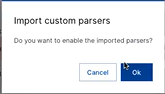
Click Ok to enable the imported parsers.
The parser appears in the list of custom parsers.
Validate that the parser is accurately parsing and mapping data as expected. You can validate the data ingestion by viewing incoming logs in Live Tail or by running queries for specific fields in the Search application.