Responses are generated using AI and may contain mistakes.

New-Scale Security Operations PlatformNew-Scale Security Operations Platform Release Notes

December 2025

The New-Scale Security Operations Platform includes the following addressed features and new features for <Month> 2025.

Attack Surface Insights

Feature

Description

User Entity Linking Using Custom Context Tables

To ensure related identities are accurately unified under a single user entity, you can now control how Attack Surface Insights links identities to entities by defining relationships in a new customizable pre-built context table, the User Entity Links context table.

By default, the User Entity Links context table has four columns: KeyType1, Key1, KeyType2, and Key2. You can configure these columns and add data to the context table, either programmatically using APIs or manually.

Attack Surface Insights prioritizes enriching user entities with context data from the User Entity Links context data first, alongside Microsoft Active Directory and before any other context source.

Extended Entity Deletion Window

To more easily maintain entities over the long term, you now have a larger window to delete obsolete entities. You can now delete entities created in the past 1,000 days.

Cloud Collectors

Feature

Description

Azure Blob Storage Cloud Collector

The Azure Blob Storage Cloud Collector is now available as part of Cloud Collectors to facilitate ingestion of the logs from Azure data sources such as threat detections, security alerts, and defender OTP logs.

Azure Virtual Network Flow Cloud Collector

The Azure Virtual Network Flow Cloud Collector is now available as part of Cloud Collectors to facilitate ingestion of the virtual network flow logs.

Early Access Collectors

Gemini Enterprise Cloud Collector

The Gemini Enterprise Cloud Collector is now available as part of Cloud Collectors Early Access program, to facilitate ingestion of the Model Armor prompts logs of Gemini Enterprise Apps via GCP Pub/Sub topic.

The early access program offers you an opportunity to gain access to the latest cloud collectors before their official release. To participate, see Sign Up for the Early Access Program.

Gmail BigQuery Cloud Collector

The Gmail BigQuery Cloud Collector is now available as part of Cloud Collectors Early Access program, to facilitate ingestion of the gmail logs.

The early access program offers you an opportunity to gain access to the latest cloud collectors before their official release. To participate, see Sign Up for the Early Access Program.

Context Management

Feature

Description

New Attack Surface Insights Context Table

Context Management now provides a new pre-built Attack Surface Insights context table. The new table is the User Entity Links context table. It supports the detection and enrichment rule activities of of the Attack Surface Insights application by providing mapping information for custom user entities.

For more information about Attack Surface Insights context tables, see Pre-Built Detection Context Tables in the Context Management Guide.

New Condition Operators Available for Filtered Tables

Additional condition options have been made available for creating a custom filtered context table in Context Management. Previously, data could only be filtered based on whether is was equal to or contained in a specific value. Now the set of available filtering operators are expanded to include all of the following:

  • Equals

  • Contains

  • Equals Ignoring Case

  • Starts With

  • Not Starts With

  • Not Equals

For more information about filtered context tables, see Working with Filtered Context Tables in the Context Management Guide.

Correlation Rules

Feature

Description

Granular Correlation Rule Detection Grouping by Detection ID

You can now create a unique case for each correlation rule detection using a detection grouping rule. Detection grouping rules can now group correlation rule detections into a case by their detection ID, a unique identifier assigned to a detection when it's created.
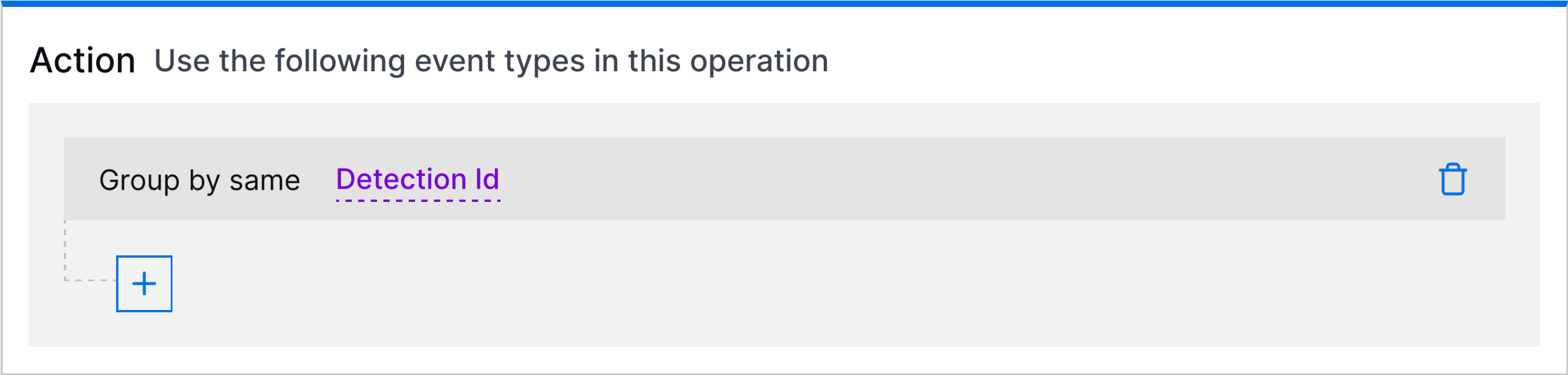
The action of a detection grouping rule showing grouping by detection ID.

If you're grouping detections by detection ID, the only additional field by which you can group detections is rule name.

Log Sources

Feature

Description

Enhancements to the Log Source Policy

You can now use the following enhancements for Log Source policies:

  • Editable Log Source Policy Conditions – You can now edit the log source policy conditions in the existing log source polices.

  • Date Filter – You can now apply a filter to the last seen log sources of a particular log source policy. You can select a date range to view the log sources for a specific time or clear the filter to view the records that were visible before.

  • Duration of Log Source Retention – You can now set the Time-to-live (TTL) value while creating a log source policy to ensure optimal storage and performance.

Log Stream

Feature

Description

Enhanced Host to IP Enrichment

New-Scale Host to IP enrichment has been enhanced so that the default condition covers an expanded set of filters. It now includes all of the mapping functionality that was available in Advanced Analytics static mapping. In addition, early access opportunities are available to customize the enrichment condition or to exclude specific entities from the enrichment process. See the note below.

For more information about this type of enrichment, see Host to IP Enrichment in the Log Stream Guide.

Note

Early Access Opportunity

An early access opportunity is available to customize the host to IP enrichment functionality. You may want to take advantage of this opportunity if any of the following reasons apply to your environment:

  • You want to limit host to IP enrichment to specific scenarios. You can work with Exabeam to develop a custom condition for deciding which logs to enrich. Instead of using the default set of activity types listed above, you can condition the enrichment to be implemented on a more limited set of activity types, in combination with specific outcomes, vendors, or other fields.

  • You want to exclude domain controllers or other specific servers from the host to IP enrichment process. To implement the exclusion process, contact the Log Stream early access team for help.

If you would like to take advantage of this early access customization, email the following group: [email protected].

New-Scale Platform

Feature

Description

Global Token Revocation

When editing or adding a new identity provider, you can now enable Global Token Revocation (Universal Logout) when using Auth0 with Okta Workforce Identity.

With Global Token Revocation if a user is logged out with the identity provider, such as during an admin-initiated logout or a security event, they will also be logged out of all applications, including Exabeam.

For more information, see Set up Okta as your Identity Provider in the New-Scale Security Operations Platform Administration Guide.

Webhook View Details

When viewing the details of a webhook with a large amount of recent calls, the dialog could take a long time to load or fail to load the responses entirely.

Now, only the 10 most recent responses are displayed over the last 48 hours to ensure no issues with loading the View Details dialogue for webhooks.

For more information, see View Details/Edit a Webhook in the New-Scale Security Operations Platform Administration Guide.

Search

Feature

Description

Improvements to the Timeline View of Search Results

The layout and functional behavior of the Timeline view of search results has been enhanced to both reduce visual noise and make the investigational workflow more intuitive. For easier scanning and to provide a more streamlined view of events, the display of parsed fields can be toggled on and off from an option at the top of the results list. In addition, fewer clicks are now needed to drill into events and detection when looking for detailed information.

For more information, see Timeline View of Search Results in the Search Guide.

Increased in Storage Retention for Some Licenses

Default search retention has been extended from 31 days to 45 days for customers using New-Scale Analytics and New-Scale Fusion licenses. For information about the storage capacity available for your specific license, see Exabeam Product Entitlements.

For more information about different types of storage, see Log Retention in the Search Guide.

Service Health and Consumption

Threat Center

Feature

Description

Granular Correlation Rule Detection Grouping by Detection ID

You can now create a unique case for each correlation rule detection using a detection grouping rule. Detection grouping rules can now group correlation rule detections into a case by their detection ID, a unique identifier assigned to a detection when it's created.

The action of a detection grouping rule showing grouping by detection ID.

If you're grouping detections by detection ID, the only additional field by which you can group detections is rule name.

New Case Global Notification Enhancement

To ensure you can immediately access important case information from anywhere, you can now get more detailed Threat Center global notifications when a case is created.

Global notifications sent when a case is created now include:

  • Case name

  • Exabeam Nova Investigation Summary

  • Risk score

  • Classification

  • Threat vector

Threat Detection Management

Feature

Description

Analytics Rules Insights

To troubleshoot over-triggering analytics rules, you can now view suggestions for exclusion expressions that reduce noise for the analytics engine and prevent them from over-triggering. The analytics engine automatically generates the suggestions during training.

The COMPATIBILITY column has been renamed the RULE INSIGHTS column. Under the RULE INSIGHTS column, an analytics rule that is most likely to generate false positives is marked as having Insights.

The analytics rule Rule Insights column highlighted in a red rectangle.

To view suggested exclusion expressions for the analytics rule, click Insights. You can then copy the exclusion expression and use it to create an exclusion for the analytics rule.

If there are no suggested exclusions available, a message suggests that you review the analytics rule.
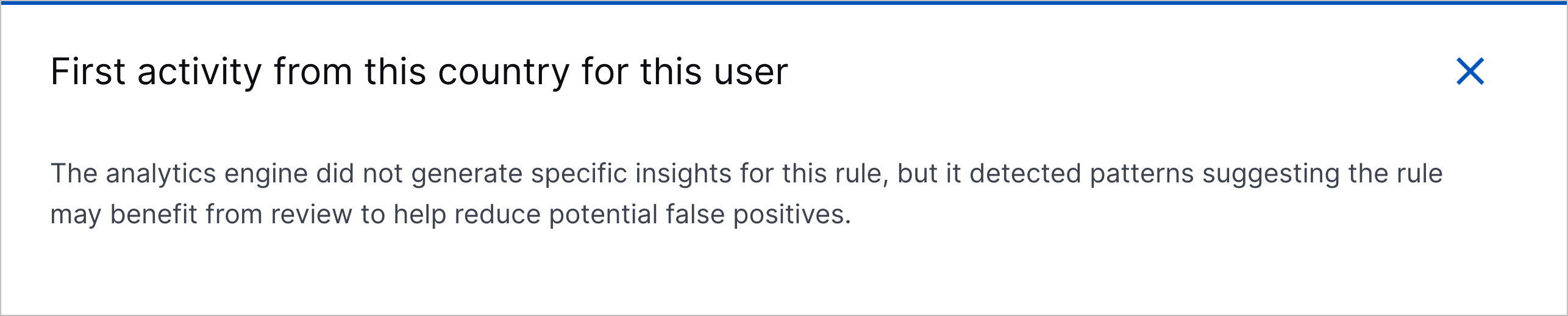
threatdetectionmanagement-december2025releasenotes-analyticsruleinsights-noexclusionsuggestions.png

JSON Configuration in Analytics Rule Details

To copy or reference the JSON configuration of an analytics rule, you can now view the JSON configuration under the JSON tab in the analytics rule details.
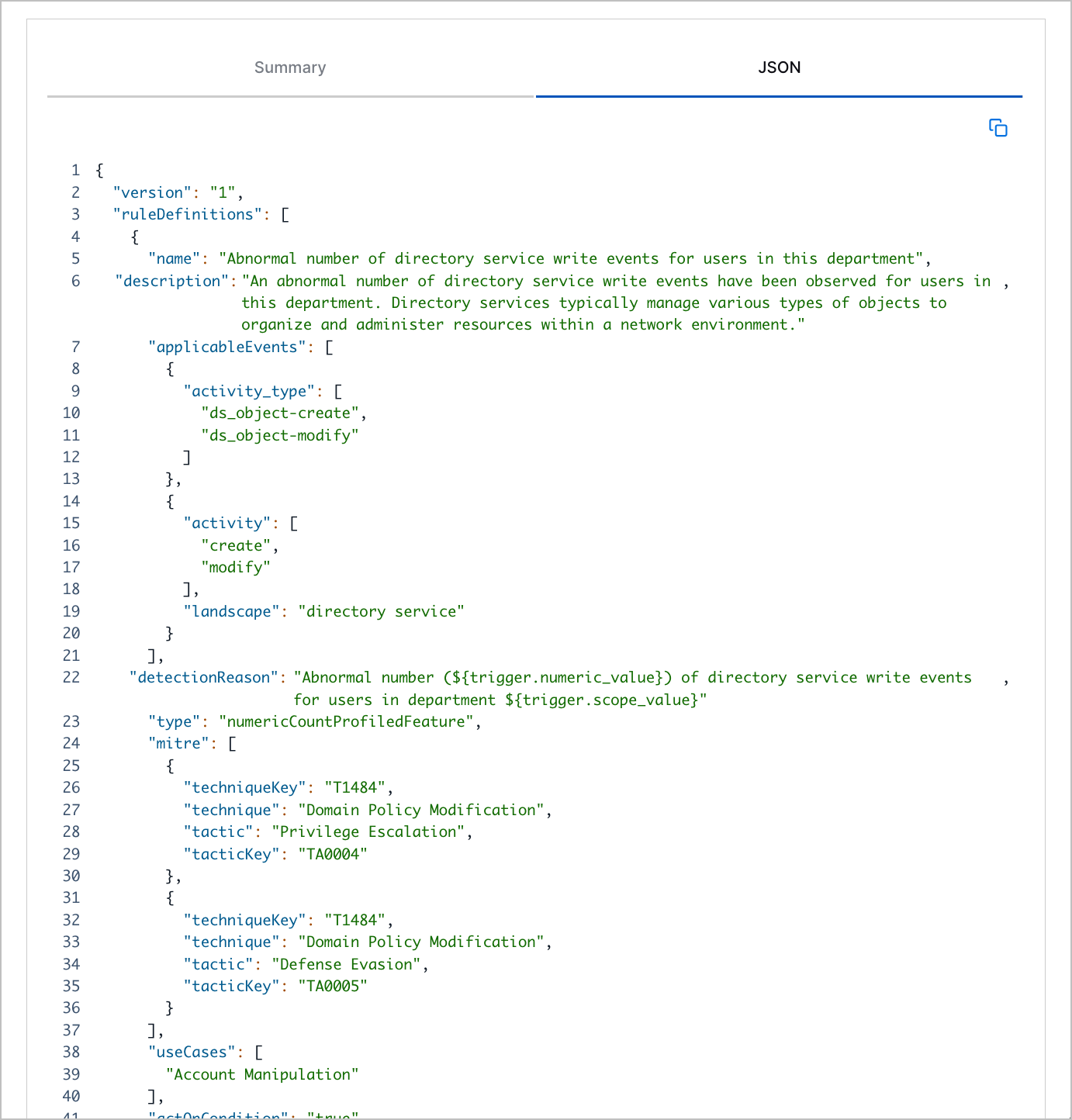
The JSON tab in the analytics rule details.

Required Event Fields in Analytics Rule Details

To determine if events have the necessary fields for an analytics rule to trigger, you can now review those required fields under REQUIRED EVENT FIELDS in the analytics rule details. This list of fields is automatically generated and used by Outcomes Navigator to calculate coverage scores.
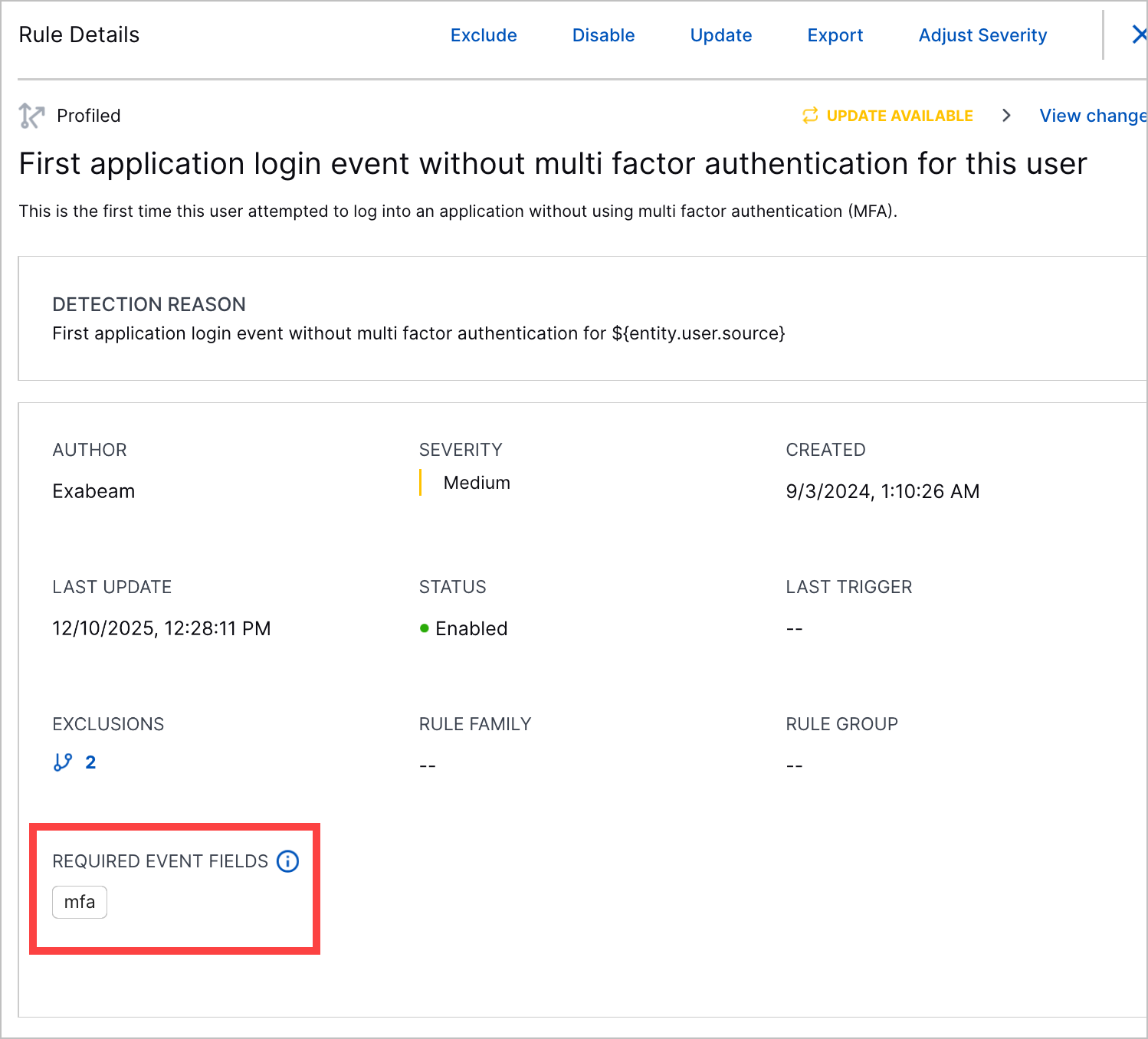
The Required Event Fields section in the analytics rule details highlighted in a red rectangle.

Prerequisite for Enabling and Deleting Exclusions

To prevent changes to exclusions from inadvertently retraining analytics rules, you can no longer enable or delete exclusions while you have pending analytics rule changes. You must apply or revert the pending changes first. If there are any pending changes, you receive an error.
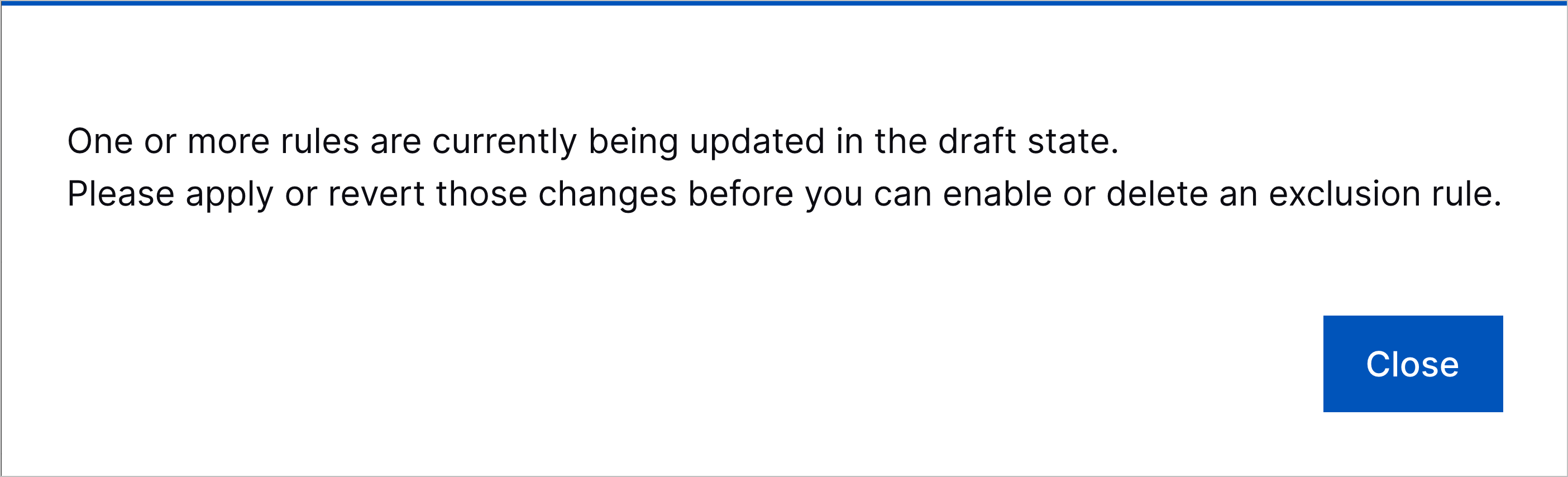
The error that appears when you try to enable or delete an exclusion while you have pending analytics rule changes.

Granular Correlation Rule Detection Grouping by Detection ID

You can now create a unique case for each correlation rule detection using a detection grouping rule. Detection grouping rules can now group correlation rule detections into a case by their detection ID, a unique identifier assigned to a detection when it's created.

The action of a detection grouping rule showing grouping by detection ID.

If you're grouping detections by detection ID, the only additional field by which you can group detections is rule name.

New and Updated Pre-Built Analytics Rules

You can now better detect defense evasion, persistence, privilege escalation, and reconnaissance with new and updated analytics rules.

New pre-built analytics rules include:

  • Fact-PCwevtutil-EventTracingClear – The WEvtUtil (Windows Event Utility) process has been used to clear an ETW (Event Tracing for Windows). This sigma rule is authored by @neu5ron, Florian Roth (Nextron Systems), Jonhnathan Ribeiro, oscd.community and is licensed under Detection Rule License (DRL), https://github.com/SigmaHQ/sigma/blob/master/LICENSE.Detection.Rules.md. Reference: https://github.com/SigmaHQ/sigma/blob/master/rules/windows/process_creation/proc_creation_win_etw_trace_evasion.yml

  • NumDC-Git-RepoC-U-Object – An abnormal number of unique repository endpoints where secrets are generally stored, which may indicate unauthorized enumeration or insider reconnaissance activity. Repository name is parsed into the object field which is being counted here.

  • Prof-Fwrite-E-O-DE-Xdg – This is the first time a XDG autostart file was created on this endpoint.

  • Prof-RegW-COM-U-CLSID – This is the first time this user has modified the registry path to a COM class with this CLSID.

  • Fact-CA-Startup-StartupScriptGCP – A startup or shutdown script have been added or modified in a instance in GCP.

  • Fact-FWrite-SELinuxConfigFile – The SELinux (Security-Enhanced Linux) configuration file was written to.

  • Fact-FWrite-SystemCADirs – A file was written in a System CA (Certificate Authority) directory.

  • Prof-AI-U-Guardrail-Block – This is the first time this user has triggered an AI guardrail violation.

  • Prof-Auth-U-Okta-AnomVPN – This is the first time an Okta user has used an anonymous VPN to authenticate.

  • Prof-CA-IPM-AddMember-O-U – This is the first time a user modified the attributes of a compute image in AWS and shared it with a user/group.

  • Prof-PCnet-U-O-U-netuser – This is the first time a user account has been enabled or disabled using 'net.exe' for this user.

  • Prof-CA-IKM-KeyCreateGCP-O-U – This is the first time this user added or modified an SSH key of an instance in GCP.

  • Prof-FWrite-AuthorizedKeys-O-U – This is the first time an 'authorized_keys' file has been modified by this user.

  • Prof-Fwrite-AuditRule-O-U – This is the first time an audit rule file has been modified by this user.

  • Prof-CA-DC-FromSnapshot-O-U – This is the first time this user created a volume from a snapshot.

  • NumCP-Git-EC-U – An abnormal amount of GitHub API access events have been observed for this user.

  • Fact-FWrite-SSHConfigFile – The sshd_config file was written to.

  • Prof-AI-O-Guardrail-Block – This is the first time a user in the organization has triggered an AI guardrail violation.

  • Fact-CA-Startup-StartupScriptAWS – A startup script was added or modified in an instance in AWS.

  • Fact-PCspctl-DisableGatekeeper – The 'spctl' command has been used to disable the Gatekeeper.

  • NumCP-AI-U-Guardrail-Block – An abnormal amount of AI guardrail violations have been observed for a user.

  • Fact-PCauditctl-DeleteRules – The 'auditctl' command has been used to delete the audit rules.

  • Cntx-FA-FCrit-SrcExecutable – Source file is an executable: True/False

  • NumDCP-CA-DAC-U-Disks – An abnormal number of unique volumes were observed attached to instances for this user.

  • Prof-FWrite-AuthorizedKeys-O-UD – This is the first time an 'authorized_keys' file has been modified by users in this department.

  • Prof-PCnet-U-O-U-netuserdel – This is the first time a user account has been deleted using 'net.exe' for this user.

  • Prof-CA-DA-O-U – This is the first time this user attached a volume to an instance.

  • Prof-Fwrite-SystemdService-O-U – This is the first time a systemd service file has been modified by this user.

  • Prof-PCca-U-O-U – This is the first time root certificate has been installed on a Linux machine using 'update-ca-certificates' or 'update-ca-trust' for this user.

  • Fact-PC-DisableAuditd – Auditd service was disabled.

  • Fact-CA-IPM-PublicAWS – A compute image resource in AWS has been made public, granting access to all users.

  • Fact-PCwevtutil-EventTracingDisable – The WEvtUtil (Windows Event Utility) process has been used to disable an ETW (Event Tracing for Windows). This sigma rule is authored by @neu5ron, Florian Roth (Nextron Systems), Jonhnathan Ribeiro, oscd.community and is licensed under Detection Rule License (DRL).

  • Prof-CA-SC-O-U – This is the first time this user created a snapshot of a compute instance.

  • Fact-PCsetenforce-DisableSELinux – The 'setenforce' command has been used to disable the SELinux (Security-Enhanced Linux).

  • Prof-PCnet-U-O-U-netlocalgroup – This is the first time a user account has been added to a group using 'net.exe' for this user.

  • Prof-PCnet-U-O-U-netlocalgroupadmin – This is the first time a user account has been added to the administrators group using 'net.exe' for this user.

  • Prof-CA-IC-Publisher-O-Publisher – This is the first time this image publisher has been observed in a virtual machine image creation for the organization.

  • Prof-PCwmic-IR-O-U-grp – This is the first time a group has been renamed using 'wmic.exe' for this user.

  • Prof-RegW-COM-O-CLSID – This is the first time the registry path to a COM class with this CLSID has been modified.

  • Prof-AI-UD-Guardrail-Block – This is the first time a user in this department has triggered an AI guardrail violation.

  • Prof-CA-SPM-AddMember-O-U – This is the first time this user modified the attributes of a compute snapshot in AWS and shared it with a user/group.

  • Fact-CA-SPM-PublicAWS – A compute snapshot resource in AWS has been made public, granting access to all users.

  • Prof-CA-IC-O-U – This is the first time this user created an image for compute instances.

  • Prof-CA-IRC-O-U – This is the first time this user executed a remote command on an instance.

  • Fact-AI-Guardrail-Block – An AI guardrail violation has been observed.

  • Prof-PCwmic-IR-O-U-usr – This is the first time a user account has been renamed using 'wmic.exe' for this user.

Pre-built analytics rules for which trainOnCondition was updated include:

  • Prof-EL-HT-U-HT – This is the first time this user has attempted to log into an endpoint of this type (server, workstation...). These events may include both failed and successful logins.

  • Prof-ELF-E-U-DE – This is the first time this user has failed to log into this endpoint. The user might have logged in successfully before, but this is the first time a failed login event was observed on the endpoint.

  • Prof-EL-EDC-U-SZ –This is the first time an endpoint login event to a domain controller has been observed originating from this network zone for this user. These events may include both failed and successful logins.

  • NumCP-ELF-EC-U-SE – An abnormal number of failed endpoint logins from this endpoint have been observed for this user.

  • Prof-Login-EmD-Plt-EmD – This is the first time this email domain has been used to log into this platform.

  • Prof-GA-Op-Plt-Op – This is the first time this operation has been observed for this platform. Operations can include function types, APIs, application activities and more.

  • Prof-EL-EDC-O-SZ – This is the first time an endpoint login event to a domain controller has been observed originating from this network zone for the organization. These events may include both failed and successful logins.

  • Fact-ELF-SA – A service account failed to log into an endpoint using an interactive Windows logon type. A service account is a user account that belongs to an application rather than an end user.

  • NumDCP-ELF-SEC-DE-SE – An abnormal number of unique endpoints have been observed failing to log into this endpoint.

  • Prof-EL-E-U-DE – This is the first time this user attempted to log into this endpoint. These events may include both failed and successful logins.

  • NumCP-ELF-EC-U-DE – An abnormal number of failed endpoint logins to this endpoint have been observed for this user.

  • Prof-EL-E-U-SE – This is the first time this user attempted to login from this endpoint. These events may include both failed and successful logins.

  • NumCP-ELF-EC-U-DZ – An abnormal number of failed logins to endpoints in this network zone have been observed for this user.

  • Prof-EL-E-UD-DE – This is the first time a user from this department attempted to log into this endpoint. These events may include both failed and successful logins.

Pre-built analytics rules for which description was updated include:

  • Prof-PC-U-O-U-Kextload – his is the first time a process execution of a 'kextload' (Kernel Extension Load) command has been observed for this user.

  • NumCP-PC-KextloadCmdC-U – An abnormal number of 'kextload' (Kernel Extension Load) process executions have been observed for this user.

Pre-built analytics rules for which title was updated include:

  • NumCP-PC-DirSearchCount-U – An abnormal number of unix file search process executions have been observed for this user.

Pre-built analytics rules for which value and actOnCondition were updated include:

  • Fact-Fwrite-HiddenFile – Createing a file that starts with “.”. File that starts with “.” is a hidden file. An attacker can create hidden file to evade detection.

  • Fact-Fwrite-RCScripts – Adversaries can establish persistence by adding a malicious binary path or shell commands to rc.local, rc.common, and other RC scripts specific to the Unix-like distribution.

  • Fact-Fwrite-LoginHookFile – Adversaries may use a Login Hook to establish persistence executed upon user logon. They can add or insert a path to a malicious script in the com.apple.loginwindow.plist file, using the LoginHook or LogoutHook key-value pair.

  • Fact-PC-DisableHistoryCol – History collection can be disabled in unix shells by modifying the history environment variables. This can help the attacker ot evade detection.

  • Fact-PC-ClearComHistory – This can help the attacker ot evade detection.

  • Fact-PC-LoginHookFile – Adversaries may use a Login Hook to establish persistence executed upon user logon. The plist can be modified using the defaults command-line utility. This behavior is the same for logout hooks where a script can be executed upon user logout.

  • Fact-PC-Chflags-HiddenFile – The “setfile” unix process can be used to make files hidden by modifying their attributes, making sure they remain undetected by users. An attacker can create hidden file to evade detection.

Pre-built analytics rules for which applicable_events and trainOnCondition were updated include:

  • NumSP-NetworkF-BytesOut-SE-Bytes – An abnormal amount of bytes have failed to be sent in outbound communication from this endpoint.

Pre-built analytics rules for which value, actOnCondition, and maturityThreshold were updated include:

  • Fact-FRead-Passwd – The passwd file is a plain text file in Unix-based operating systems, including Linux and macOS, that stores essential user account information. An attacker can try to read it to get information about the users include the passwords

  • Fact-PC-Visudo – The /etc/sudoers file is typically edited using the visudo command, which provides a safe way to make changes to the file and prevents multiple simultaneous edits, reducing the risk of syntax errors that could lock users out of administrative access. An attacker can try to read this file to know what user he should get access to, or he can try to write to this file and give a user he have access to these privileges.

  • Fact-FA-Sudoers – The /etc/sudoers file is a critical configuration file in Unix-based operating systems. It controls the access and privileges granted to users and groups to execute commands with elevated privileges (root or superuser privileges) using the sudo command. An attacker can try to read this file to know what user he should get access to, or he can try to write to this file and give a user he have access to these privileges.

  • Fact-PC-SuspFind – Adversaries may enumerate files and directories or may search in specific locations of a host or network share for certain information within a file system. This command searches for files with the setuid (SUID) permission set for the owner.

  • Fact-PC-Shell-Base64 – Identifies base64 being decoded and passed to a Linux shell

  • Fact-FWrite-EtcLldSo – The /etc/ld.so.preload file, if present, allows users to add additional shared libraries that will be loaded before the standard libraries. This can be useful for various purposes, such as implementing custom libraries, applying system-wide modifications, or debugging and profiling applications. Attackers could use this file to force the loading of their own malicious libraries, enabling them to modify system behavior, escalate privileges, or intercept sensitive data.

Pre-built analytics rules for which title, description, and detectionReason were updated include:

  • NumDCP-RegW-RPC-ServicesStop-DE-RP – An abnormal number of unique services have been stopped by modifying the registry on this endpoint.

Pre-built analytics rules for which value, supressThreshold, supressScope, actOnCondition,and maturityThreshold were updated include:

  • Fact-PC-Chmod-Setgid – An adversary may change the setgid bits set in order to get code running in a different (and possibly more privileged) user's context

  • Fact-PC-Chmod-Setuid – An adversary may change the setuid bits set in order to get code running in a different (and possibly more privileged) user's context

Removed obsolete pre-built analytics include:

  • Prof-CDA-UCreateFromSnapshot-O-U – This is the first time this user created a volume from a snapshot.

  • ProfCIA-Publisher-O-Publisher – This is the first time this image publisher has been observed in a virtual machine image creation for the organization.

  • Fact-CIA-PublicAWS – A compute image resource in AWS has been made public, granting access to all users.

  • Prof-CVMA-RemoteCommand-O-U – This is the first time this user executed a remote command on an instance.

  • NumDCP-CDA-EC-U-Disks – An abnormal number of volumes were observed attached to instances for this user.

  • Fact-CVMA-Startup-StartupScriptAWS – A startup script was added or modified in an instance in AWS.

  • Prof-CVMA-KeyCreateGCP-O-U – This is the first time this user added or modified an SSH key of an instance in GCP.

  • Prof-CIA-UCreate-O-U – This is the first time this user created an image for compute instances.

  • Prof-EL-Acct-U-Acct – This is the first time this user has attempted to log into an endpoint using this domain account. These events may include both failed and successful logins.

  • Prof-CSA-UCreate-O-U – This is the first time this user created a snapshot of a compute instance.

  • Prof-CDA-UAttach-O-U – This is the first time this user attached a volume to an instance.

  • Prof-CIA-UAddMemberAWS-O-U – This is the first time a user modified the attributes of a compute image in AWS and shared it with a user/group.

  • Prof-CSA-UAddMemberAWS-O-U – This is the first time this user modified the attributes of a compute snapshot in AWS and shared it with a user/group.

  • Fact-CSA-PublicAWS – A compute snapshot resource in AWS has been made public, granting access to all users.

  • Fact-PCwevtutil-ELT – The WEvtUtil (Windows Event Utility) process has been used to disable or clear an ETW (Event Tracing for Windows). This sigma rule is authored by @neu5ron, Florian Roth (Nextron Systems), Jonhnathan Ribeiro, oscd.community and is licensed under Detection Rule License (DRL).

  • Fact-FDnld-ExeFile – An file with an executable extension has been downloaded.

  • Fact-CVMA-Startup-StartupScriptGCP – A startup or shutdown script have been added or modified in a instance in GCP.