Responses are generated using AI and may contain mistakes.

New-Scale Security Operations PlatformNew-Scale Security Operations Platform Release Notes

February 2026

The New-Scale Security Operations Platform includes the following addressed features and new features for February 2026.

Automation Management

Feature

Description

Automation Agent Name Format Enhancement

You now precisely identify automation agents with a new automation agent name format.

The automation agent name now appears with your Exabeam instance name appended to it in the format <automationagent>-<instance>. For example, if the automation agent emea was created under the acme.exabeam.cloud instance, the automation agent name appears as emea-acme.
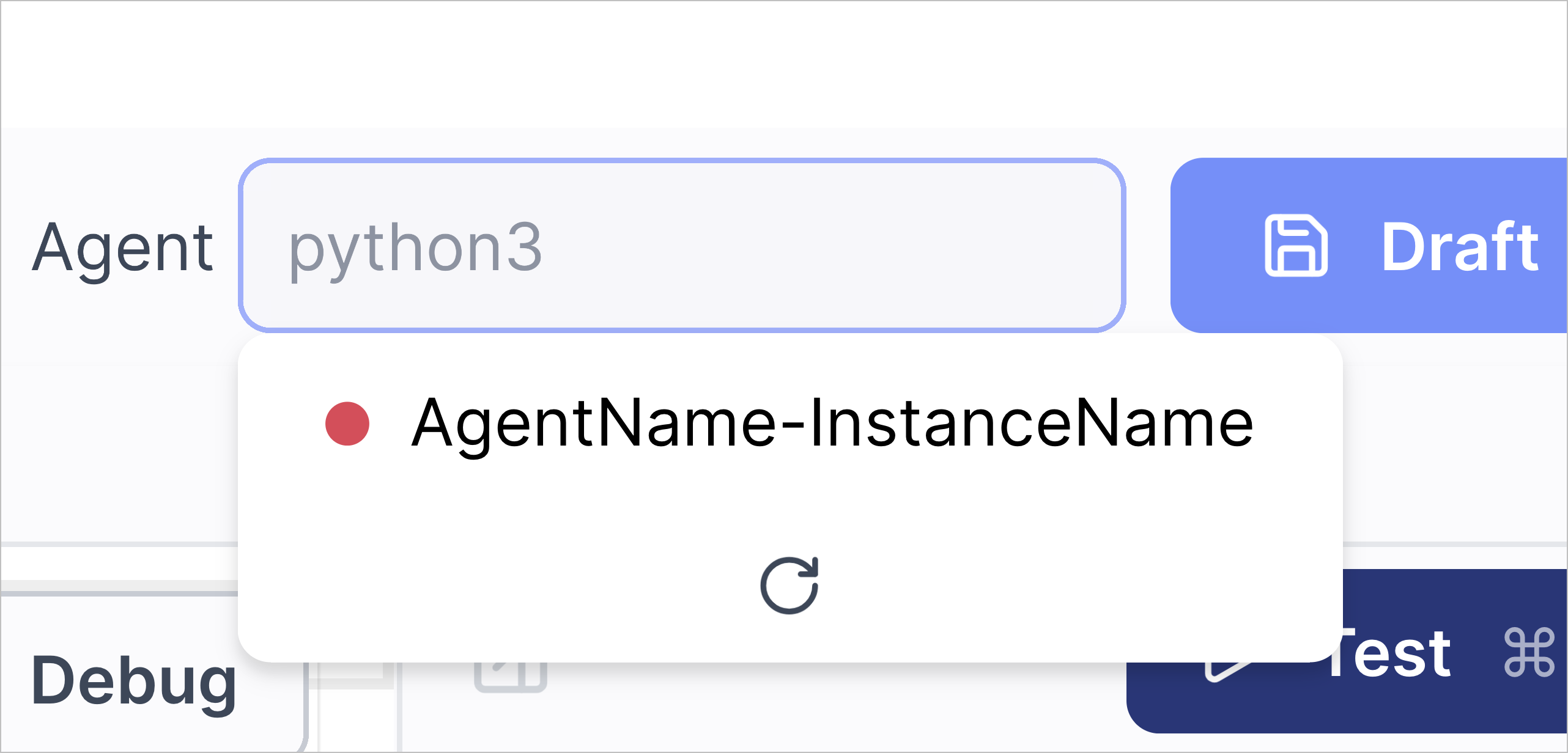
The AgentName-InstanceName automation agent in a list of available agents.

To support this new format:

  • You can now only enter up to 20 characters for the automation agent name.

  • If your instance name is longer than 29 characters, it is automatically shortened to 29 characters by taking the first 20 characters and last 9 characters.

Advanced Playbook Variable Reliability Enhancement

To more reliably create advanced playbooks, only service instance parameters of the string data type now appear as variables in advanced playbooks.

Pre-built Set Default assignee and queue Playbook Enhancement

To ensure the pre-built Set Default assignee and queue playbook is compatible with various Threat Center queue configurations, it now assigns new cases with a risk score above 90 to the Unassigned queue.

Cloud Collectors

Feature

Description

Mimecast Incydr Cloud Collector

The Mimecast Incydr cloud collector is now available as part of Cloud Collectors to facilitate ingestion of events from the File events data source.

Early Access Collectors

S2W Threat Intelligence Cloud Collector

The S2W Threat Intelligence Cloud Collector is now available as part of Cloud Collectors Early Access program, to facilitate ingestion of threat intelligence data, such as threat detections, brand or digital abuse, and blockchain data.

The early access program offers you an opportunity to gain access to the latest cloud collectors before their official release. To participate, see Sign Up for the Early Access Program.

Context Management

Feature

Description

Option to Add Rows of Data to Filtered Tables is Removed

Filtered context tables can contain data from multiple parent tables. When the data in the parent tables are updated, the filtered table is automatically updated and any data added directly to the filtered table, either manually or via CSV, is overwritten. For this reason, the option to add rows of data directly to a filtered context table has been removed. Instead, add the desired rows of data to one of the parent context tables.

For more information, see View and Interact with a Custom or Filtered Context Table in the Context Management Guide.

Correlation Rules

Feature

Description

Correlation Rule Stopped Status Tooltip Enhancement

To better understand why a correlation rule is stopped, when you hover over the Stopped status, you can now view an enhanced tooltip that explains that a correlation rule may be stopped because of incorrect query syntax or a reference to an empty context table.

The tooltip now states: Please check the rule's query for any context tables which no longer exist or such thing as custom or metadata fields that are no longer relevant.
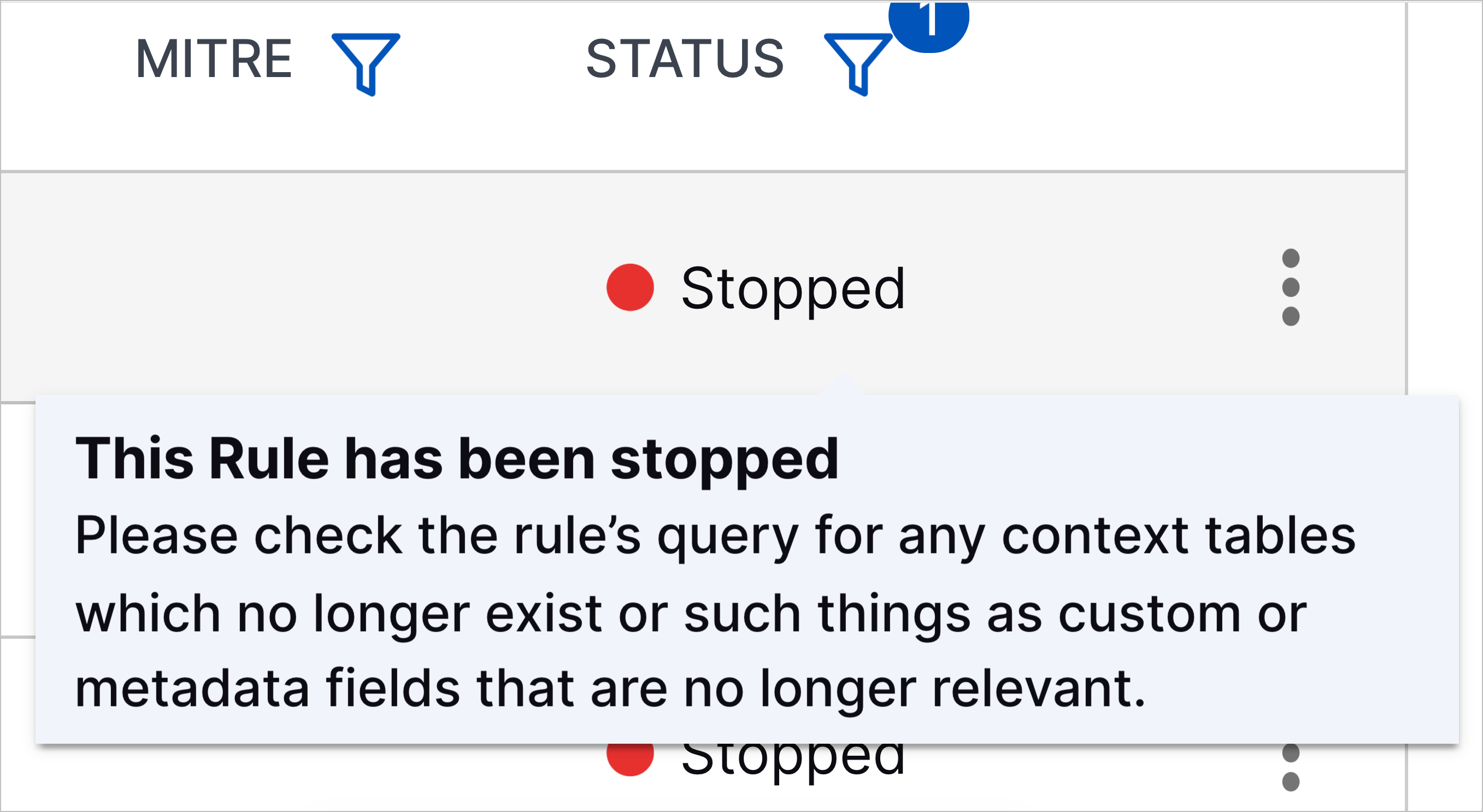
The tooltip for the Stopped correlation rule status.

New Correlation Rule Templates

You can now better detect unauthorized cloud account access, email-based attacks, and remote code execution with new correlation rule templates:

  • AWS root account logged in without MFA – AWS root account logged in without MFA

  • Large amount of failed delivery status notifications for this Gmail account – 100 or more failed delivery status notifications have been observed for this Gmail account in 12 hours

  • Remote HTA file executed using 'mshta.exe' – The Microsoft HTML Applications ('mshta.exe') utility has been used to remotely execute an HTML application script file ('.hta').

  • Remote MSI file executed using 'msiexec.exe' – The Microsoft Installer ('msiexec.exe') utility has been used to remotely execute an installation script file ('.msi').

Log Stream

Feature

Description

Enhanced Host to IP Enrichment

New-Scale Host to IP enrichment has been enhanced two new opportunities for managing the host to IP enrichment mapping process. Previously available only as early access functionality, these opportunities are now available to all user as described below:

  • Customize the Default Condition – If you want to modify the default condition used to map hostnames and IP addresses, you can access a platform enrichment rule called HostToIP. You can view and edit this rule directly on the Log Stream Enrichment tab.

  • Exclude Hosts from Enrichment – If you want to exclude domain controllers or other specific host servers from the host to IP enrichment process, you can use an exclusion context table called Host To IP Excluded Hosts. This context table is a Pre-Built New-Scale Analytics table available in the Context Management application. It can be populated manually or via an automated process that loads domain controllers based on your Active Directory.

For more information about this type of enrichment, see Host to IP Enrichment in the Log Stream Guide.

Increased Visibility for Enriched Fields

The Log Stream Enrichment tab has been enhanced to surface the fields that have been enriched by each enrichment rule. A new Enriched Fields column has been added to the table of enrichment rules to show which field is being enriched by each rule. If multiple fields are being enriched, the fields are displayed in a comma-separated list. This new column makes it possible to see the enriched fields without the need to drill into the rule definition details. You can also filter the new column to change the table so it displays only those rules that enrich specific fields.

For more information about this type of enrichment, see Navigating the Enrichments Tab in the Log Stream Guide.

Reserved Fields Restricted from Enrichment Mapping

Guardrails have been added to the enrichment rule definition process to ensure that certain reserved fields are restricted from use for enrichment mapping. You also cannot import enrichment rules that include reserved fields. For a list of these restricted fields, see Reserved Fields.

No Disabling of Slow Performing Parsers

In Advanced Analytics, when a slow performing parser was detected, the assumption was that a problem with the parser definition might be causing the slow performance and the parser was automatically disabled. However, in Log Stream, a slow performing parser is less likely caused by a parser definition issue than by a possible service issue. In such cases, automatically disabling the parser is unnecessary and can cause disruptions in data parsing. For these reasons, the practice of automatically disabling slow performing parsers has been discontinued. However, you can still choose to manually disable such parsers.

For information about disabling a parser, see Enable or Disable Parsers in the Log Stream Guide.

Custom Default Parser Disablement Complete

As of February, 2026, the process of discontinuing the Custom Default parser category has been completed. This category has been removed in favor of a simpler, more consistent approach to handling default parsers that have been customized. For more information, see Parser Types in the Log Stream Guide.

Clarification of Automatic Content Package Updates

A warning has been added to clarify the benefits and risks that should be considered before activating Auto-install updates on the Parser Updates tab in Log Stream. The bottom line is that content package updates must be installed on a regular cadence, whether you opt to auto-install them or manually install them. For more information, see Parser Updates in the Log Stream Guide.

New-Scale Platform

Feature

Description

Success Center

To quickly access information about your account team, announcements, links to training and more, you now have a customized Success Center directly in the New-Scale Security Operations Platform.

To access your Success Center, click on the new ribbon icon in the upper right-hand corner.
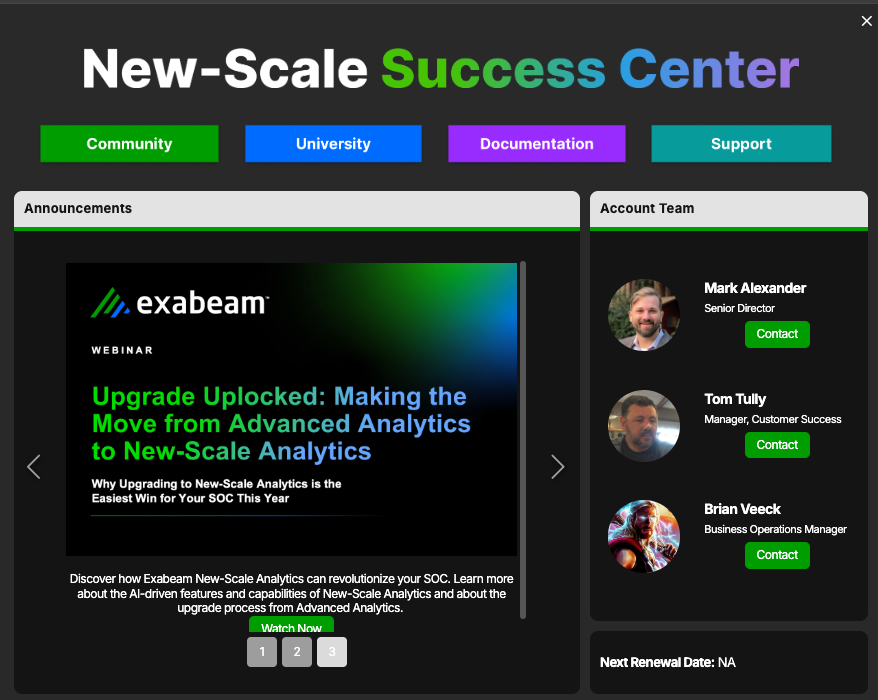
success-center.png

Outcomes Navigator

Feature

Description

Agentic AI Security Use Case Support

You can now use Outcomes Navigator to assess how well your environment protects against agentic AI threats.

Agentic AI Security is a new use case under the Compromised Insiders use case category. Like other use cases in Outcomes Navigator, you can assess the current state of your configuration, see where there are gaps, and view recommendations to improve your protection against agentic AI threats.
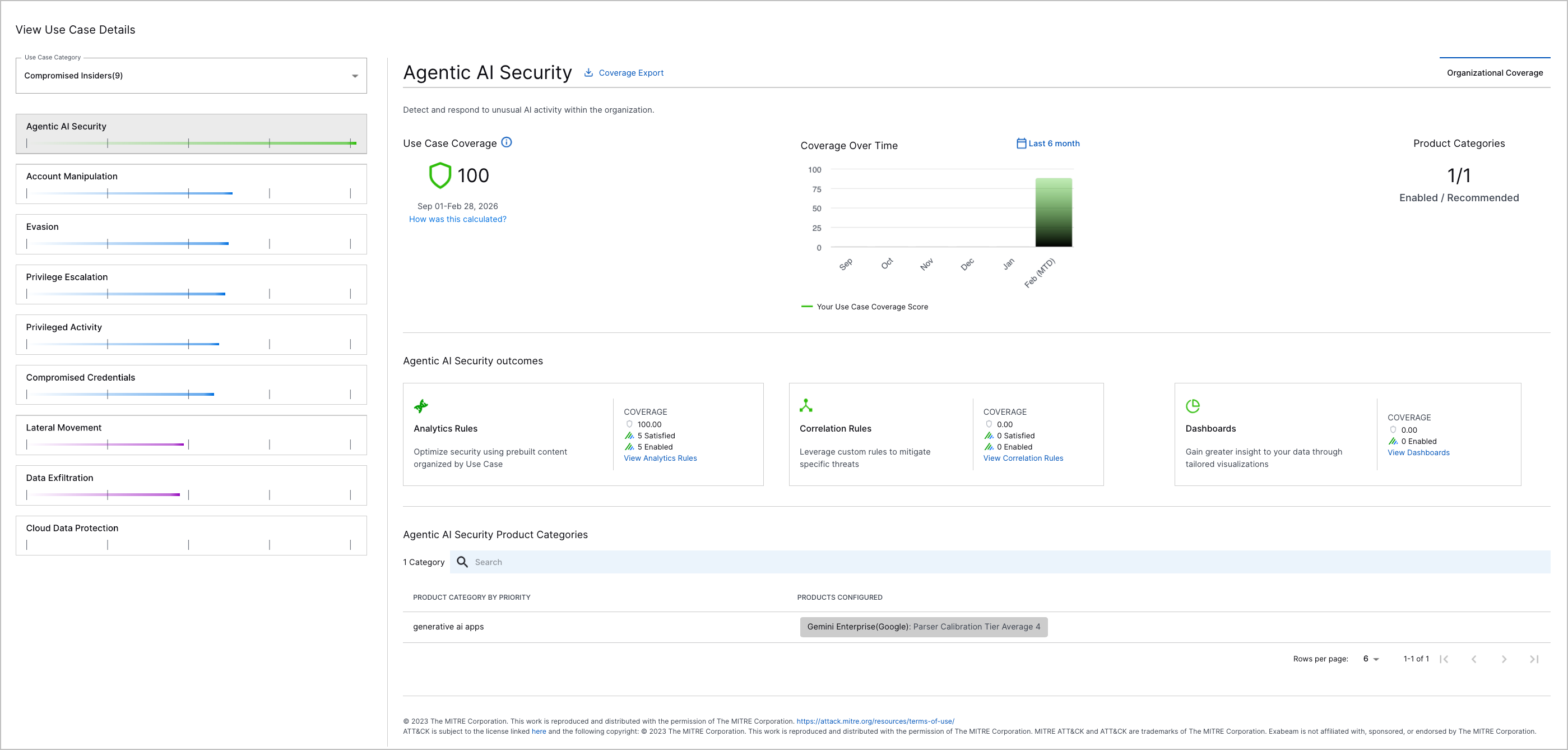
The Agentic AI Security use case in Outcomes Navigator.

Search

Feature

Description

Enhancement to the Timeline View

The Timeline view of search results has been enhanced to provide a more complete investigational experience. Previously, when a search query returned a detection, but the associated source event did not meet the query criteria, the detection was displayed alone with an Out of Scope message in the Events column. Now, if a source event exists, the Timeline view automatically adds it to the Events column where it is displayed next to the detection, despite not matching the query. This ensures that immediate context is available for triggered detection, without the need to run multiple searches.

For more information, see Timeline View of Search Results in the Search Guide.

Access to View Rule Definitions

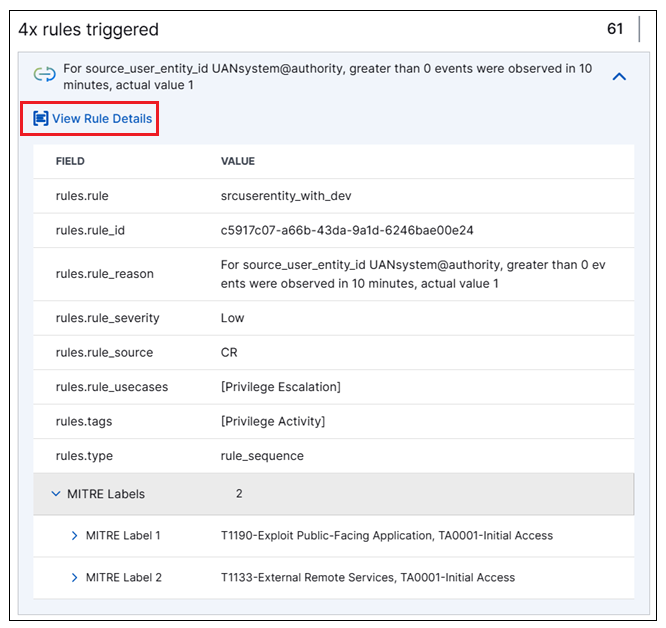
A new capability to view rule definitions without leaving the Search application is now available. When you open a Detection tab in the Details panel to view information about a specific detection, the rules that triggered the detection are listed. You can expand the rules to view all of the supporting fields. If the rule you expand is a primary rule (not a context rule), a new View Rule Details link is now available.

detection-rules-expanded-annotated-022026.png

Click the new link to open a Rule Details panel that provides immediate, in-context access to rule information, including the configured rule definition. This panel makes the rule definition and other rule information accessible for examination without navigating away from your search results.

For more information, see Detection Details in the Search Guide.

Site Collectors 2.17

Feature

Description

Editable Windows Event Log Collector Name

You can now edit the name for the Windows Event Log Collector from the user interface which was was previously auto-generated and could not be changed.

Threat Detection Management

Feature

Description

Training Period for Select Analytics Rules

To prevent profiledFeature, numericCountProfiledFeature, numericDistinctCountProfiledFeature, and numericSumProfiledFeature analytics rules from over-triggering on first-time observations and to ensure they establish a good baseline, you can now configure them to train on live data for a specified period before they begin triggering.

To configure a training period, add the minimumTrainingPeriodInDays field to the analytics rule JSON configuration or use the builder to configure the Minimum Training required field:

The Minimum Training required field in the analytics rule builder.

Disabling the analytics rule resets its training. When re-enabled, the analytics rule must complete its training period before it can begin triggering again. Editing an enabled analytics rule doesn't reset its training.

When an analytics rule is training, its status is set to Training and it can't trigger. After the rule is finished training, its status is automatically changed to Enabled.

Expanded CIM Fields for Analytics Rule Builder Applicable Events

To more precisely define which events an analytics rule evaluates using the analytics rule builder, you can now select from all CIM 2.0 fields when defining applicable events.
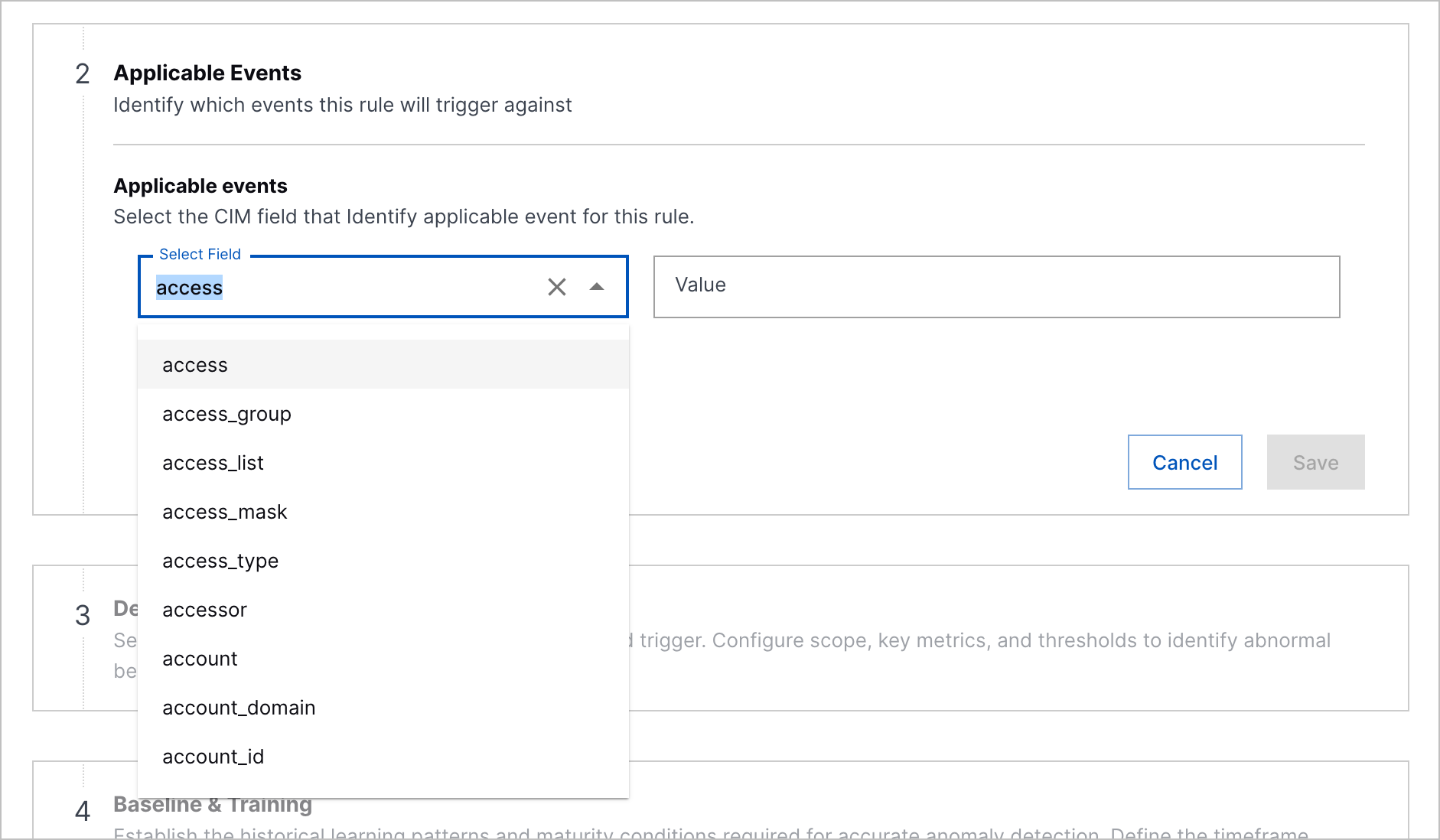
The expanded menu of all available CIM fields under Applicable Events in the analytics rule builder.

Expanded minOrderofMagnitude Range

You can now set higher trigger thresholds for numericCountProfiledFeature, numericDistinctCountProfiledFeature, and numericSumProfiledFeature analytics rules using the minOrderofMagnitude field.

A valid value for the minOrderOfMagnitude field is now any number from 1 to 32.

featureValue Validation for numericSumProfiledFeature Analytics Rules

To improve the reliability of numericSumProfiledFeature analytics rules, you can now only use event fields that return numeric values for the featureValue analytics rule field.

Correlation Rule Stopped Status Tooltip Enhancement

To better understand why a correlation rule is stopped, when you hover over the Stopped status, you can now view an enhanced tooltip that explains that a correlation rule may be stopped because of incorrect query syntax or a reference to an empty context table.

The tooltip now states: Please check the rule's query for any context tables which no longer exist or such thing as custom or metadata fields that are no longer relevant.

The tooltip for the Stopped correlation rule status.

New Correlation Rule Templates

You can now better detect unauthorized cloud account access, email-based attacks, and remote code execution with new correlation rule templates:

  • AWS root account logged in without MFA – AWS root account logged in without MFA

  • Large amount of failed delivery status notifications for this Gmail account – 100 or more failed delivery status notifications have been observed for this Gmail account in 12 hours

  • Remote HTA file executed using 'mshta.exe' – The Microsoft HTML Applications ('mshta.exe') utility has been used to remotely execute an HTML application script file ('.hta').

  • Remote MSI file executed using 'msiexec.exe' – The Microsoft Installer ('msiexec.exe') utility has been used to remotely execute an installation script file ('.msi').

New and Updated Pre-Built Analytics Rules

You can now better detect credential dumping, privilege escalation, persistence, data exfiltration, lateral movement, RDP session hijacking, Kerberos-based attacks, malicious code execution, and AI misuse with new and updated analytics rules.

New pre-built analytics rules include:

  • Prof-Network-FromExtIP-O-DP – This is the first time a successful connection from an external IP to this port has been observed for the organization.

  • Cntx-PC-Critical-Dump – Process is a known credential dumping tool: True\False

  • Cntx-GA-SuspCountry – The source country is suspicious: True\False

  • Prof-Network-ToExtIP-O-DP – This is the first time a successful connection to an external IP to this port has been observed for the organization.

  • Prof-CPM-AzureRoleAssign-O-U – This is the first time this user assigned Azure roles. Roles can be manipulated for privilege escalation and persistence, and should not be managed by every user.

  • Prof-CA-IE-O-U – This is the first time this user has exported a compute instance. Instance export could be used by an attacker to collect sensitive data that resides inside the organization's virtual machines.

  • Prof-CA-IC-Plt-U – This is the first time this user has created a virtual instance on this platform.

  • Prof-Network-ToExtIP-SE-DP – This is the first time a successful connection to an external IP to this port has been observed for this endpoint.

  • Cntx-Network-DPClass – Destination port class

  • Prof-FPM-CloudACL-AzureContainer-O-U – This is the first time this user has modified the ACL of a container in Azure. Container ACLs manage user access permissions and determine the access user have to the blobs inside, so modifications must be treated carefully.

  • Fact-FPM-PublicCloud – A cloud storage object was modified to become public. By manipulating file permissions to make the object public, attackers can expose the data of important or sensitive files, making them available to read, download or even modify by everyone.

  • NumCP-Web-MethodDelC-SIP – An abnormal number of HTTP requests to an internal resource with the method DELETE by this IP have been observed. Probably detects resources deletion.

  • Prof-FPM-CloudACL-O-U – This is the first time this user has modified the ACL of a cloud storage object.

  • Prof-Network-ToExtIP-SZ-DP – This is the first time a successful connection to an external IP to this port has been observed for this zone.

  • NumSP-Network-BytesFromExtIP-SZ-Bytes – An abnormal amount of bytes have been sent in communication from an external IP to this network zone.

  • NumSP-Network-BytesToExtIP-Failed-SE-Bytes – An abnormal amount of bytes have failed to be sent in communication to an external IP from this endpoint.

  • NumSP-Network-BytesToExtIP-SZ-Bytes – An abnormal amount of bytes have been sent in communication to an external IP from this network zone.

  • Prof-CA-IKM-AWSAdminRetrv-O-U – This is the first time this user has retrieved the administrator password of an instance in AWS. Instance administrator passwords can be extracted from the instance resource even if the user does not have permissions to connect to the instance itself. These passwords can be used by attackers to identify with an administrator user on the instance and gain complete control of the machine.

  • Fact-PC-TsconSysPerm – The 'tscon.exe' process has been executed by the system account. This could potentially mean an adversary is attempting to hijack an RDP session.

  • Prof-CA-FromSnapshot-O-U – This is the first time this user has created a compute resource from an existing snapshot.

  • NumSP-Network-BytesToExtIP-SEDP-Bytes – An abnormal amount of bytes have been sent using SSH, Telnet, SMTP, DNS, FTP, HTTP or HTTPS protocols in communication to an external IP from this endpoint to this port.

  • Prof-EA-Kerberos-O-ET – This is the first time a Kerberos authentication has been observed with this encrpytion type for the organization. These events may include both failed and successful authentication.

  • Prof-Network-Port-SE-DP – This is the first time an internal connection to this port from this endpoint has been observed for the organization.

  • Prof-FPM-CloudACL-B-U – This is the first time this user has modified the ACL of a cloud storage object in this bucket.

  • Prof-CA-IKM-AWSKeyPair-O-U – This is the first time this user has modified an instance's SSH key pair in AWS.

  • Prof-Network-FromExtIP-O-DZ – This is the first time a successful connection from an external IP to an endpoint in this network zone has been observed for the organization.

  • NumDCP-Network-DPC-SEDE-DP – An abnormal number of unique destination ports have been accessed from this source endpoint to this destination endpoint in internal communication.

  • Prof-Network-FromExtIP-DE-DP – This is the first time a successful connection from an external IP to this port has been observed for this endpoint.

  • Prof-FWrite-Cloud-ExecObject-O-U – This is the first time this user created an executable storage object in a cloud bucket. An abnormal upload could indicate this user is trying to implant a malicious file in the organization, and these files are extremely critical to note when abnormal, since they are usually used for code execution.

  • Prof-Network-ToExtIP-O-SE – This is the first time a successful connection to an external IP from this endpoint has been observed for the organization.

  • Prof-Network-Port-DZ-DP – This is the first time an internal connection to this port to this zone has been observed for the organization.

  • Prof-Network-Port-DE-DP – This is the first time an internal connection to this port to this endpoint has been observed for the organization.

  • Prof-PC-E-NetUserAdd-O-U – This is the first time a user account has been created by this user using 'net.exe'.

  • NumDCP-Network-DEC-SE-DE – An abnormal number of unique endpoints have been accessed from this source endpoint in internal communication.

  • Prof-CA-RI-O-U – This is the first time this user imported an instance, volume, snapshot or image. An unknown compute resource that was imported maliciously could indicate that the user's available compute data cloud has compromised. An instance or a volume created from a malicious source could possibly contain a shellcode or a malware implanted in advance by an attacker.

  • NumDCP-EA-TgsEC-UD-Sn – An abnormal number of Ticket Granting Services (TGS) were observed for users in this department. In Kerberos authentication, a Ticket Granting Ticket (TGT) is a user authentication token issued by the Key Distribution Center (KDC) to be used to request from the Ticket Granting Service (TGS) access tokens for specific resources/systems joined to the domain. This event is notable since it may indicate use of stolen credentials.

  • Prof-Network-FromExtIP-DZ-DP – This is the first time a successful connection from an external IP to this port has been observed for this zone.

  • Prof-Network-ToExtIP-O-SZ – This is the first time a successful connection to an external IP from an endpoint in this network zone has been observed for the organization.

  • NumSP-Network-BytesToExtIP-SE-Bytes – An abnormal amount of bytes have been sent in communication to an external IP from this endpoint.

  • Prof-Network-FromExtIP-O-DE – This is the first time a successful connection from an external IP to this endpoint has been observed for the organization.

  • NumCP-WebF-EC-SIP – An abnormal number of error responses to an HTTP requests to an internal resources from this IP have been observed.

  • NumCP-WebF-EC-WebDomain – An abnormal number of error responses to an HTTP requests to an internal resources have been observed for this domain.

  • NumCP-Web-MethodDelC-WebDom – An abnormal number of HTTP requests to an internal resource with the method DELETE have been observed for this domain. Probably detects resources deletion.

  • Prof-Network-E-SEPN-DE – This is the first time this process has accessed this destination endpoint from this source endpoint.

  • Cntx-PC-Critical-Parent-Dump – Parent process is a known credential dumping tool: True\False

  • Prof-CA-AzureSAS-O-U – This is the first time this user has generated a shared access signature (SAS) to a compute resource in Azure. By generating SAS, attackers can make a resource public and download its content.

  • Prof-SEPwrshell-Web-O-U – This is the first time this user has executed a PowerShell script that performs a web request.

Pre-built analytics rules for which title, description, applicable_events, query, countPer, trainOnCondition, minOrderOfMagnitude, detectionReason, and severity were updated include:

  • NumCP-WebF-EC-U-Id – An abnormal number of failed HTTP events have been observed for this user.

Pre-built analytics rules for which title, description, featureValue, scopeValue, query, trainOnCondition, detectionReason were updated include:

  • NumDCP-Network-DIPC-SE-DIP – An abnormal number of unique destination IPs have been accessed from this source endpoint.

Pre-built analytics rules for which title, description, applicable_events, detectionReason, and mitre were updated include:

  • Prof-CA-IC-O-U – This is the first time this user has created an image. An abnormal image upload could mean the image was created with a malicious intent. A malicious image could be used to trick users to create a VM that will contains a shellcode or a malware implanted in advance by an attacker.

Pre-built analytics rules for which query, useCase, and mitre were updated include:

  • NumCP-AI-U-Guardrail-Block – An abnormal amount of AI guardrail violations have been observed for a user.

Pre-built analytics rules for which title and detectionReason were updated include:

  • Prof-Network-ERDP-DE-SE – This is the first time a successful RDP connection has been observed from this source endpoint to this destination endpoint.

Pre-built analytics rules for which query and scoreUnless were updated include:

  • NumDCP-Login-DZC-U-DZ – An abnormal number of unique destination network zones have been observed in login events for this user. These events may include both failed and successful logins.

Pre-built analytics rules for which query and trainOnCondition were updated include:

  • NumDC-Git-RepoC-U-Object – An abnormal number of unique repository endpoints where secrets are generally stored, which may indicate unauthorized enumeration or insider reconnaissance activity. Repository name is parsed into the object field which is being counted here.

Pre-built analytics rules for which query and severity were updated include:

  • NumDCP-SA-ANC-SE-AN – An abnormal number of unique alerts have triggered from this endpoint.

  • NumDCP-SA-ANC-UD-AN – An abnormal number of unique alerts have triggered for users in this department.

  • NumDCP-SA-ANC-U-AN – An abnormal number of unique alerts have triggered for this user.

Pre-built analytics rules for which useCase and mitre were updated include:

  • Prof-AI-O-Guardrail-Bloc – This is the first time a user in the organization has triggered an AI guardrail violation.

  • Prof-AI-UD-Guardrail-Block – This is the first time a user in this department has triggered an AI guardrail violation.

  • Fact-AI-Guardrail-Block – An AI guardrail violation has been observed.

  • Prof-AI-U-Guardrail-Block – This is the first time this user has triggered an AI guardrail violation.

Pre-built analytics rules for which query was updated include:

  • NumSP-EMR-Bytes-DU-Bytes – An abnormal amount of bytes have been received in incoming emails for this user.

  • NumCP-RegD-EC-U – An abnormal number of registry deletion events have been observed for this user.

  • NumCP-PwdChkout-EC-UD-SC – An abnormal number of password retrievals have been observed for users in this department.

  • NumSP-VPNOut-Bytes-U-Bytes – An abnormal amount of bytes have been uploaded in VPN session for this user.

  • NumCP-MPermMod-EC-U – An abnormal number of mailbox permission modifications have been observed for this user.

  • NumCP-EMS-EC-U-Id – An abnormal number of outgoing emails have been observed for this user.

  • NumCP-PCpwrshell-EC-UD – An abnormal number of PowerShell process executions have been observed for users in this department.

  • NumDCP-PLA-LocC-U-LocCity – An abnormal number of unique cities have been observed in physical access events for this user.

  • NumCP-PwdChkout-EC-O-SC – An abnormal number of password retrievals have been observed for the organization.

  • NumDCP-FWrite-AuditRule-U-DE – An abnormal number of unique endpoints where this user modified the audit.rules file in Unix system.

  • NumCP-ELF-EC-U-DE – An abnormal number of failed endpoint logins to this endpoint have been observed for this user.

  • NumCP-RegD-EC-DE – An abnormal number of registry deletion events have been observed on this device.

  • NumCP-SEPwrshell-CmdInvC-O-InvC – An abnormal number of PowerShell command invocations have been observed for the organization.

  • NumDCP-PCCEnum-TC-U-CEnum – An abnormal number of unique credential enumeration tools have been executed for this user.

  • NumSP-FRead-FS-UP-Bytes – An abnormal amount of file bytes have been read in this platform for this user.

  • NumCP-ELF-EC-U-RDP – An abnormal number of failed RDP (remote desktop protocol) logins to this endpoint have been observed for this user.

  • NumCP-FDnld-EC-O – An abnormal amount of file download events have been observed for the organization.

  • NumCP-PC-InsmodCmdC-U – An abnormal number of 'insmod' (Install Module) process executions have been observed for this user.

  • NumDCP-ELF-SEC-DE-SE – An abnormal number of unique endpoints have been observed failing to log into this endpoint.

  • NumDCP-SADLP-ProtoC-U-Proto – An abnormal number of unique protocols have been observed in DLP alerts for this user.

  • NumCP-DB-DBOpC-U – An abnormal number of database operation events were observed for this user - this can include both unique and non-unique operations. A database operation consists of any action in a database query (i.e. SELECT, DROP, UPDATE, etc...). These events may include both failed and successful operations.

  • NumCP-FDel-EC-U – An abnormal number of file deletion events have been observed for this user.

  • NumCP-DL-EC-SE – An abnormal number of kernel module or drivers have been loaded on this endpoint.

  • NumCP-PC-ModprobeCmdC-U – An abnormal number of 'modprobe' (Module Probe, a kernel module managment tool) process executions have been observed for this user.

  • NumCP-DSOW-EC-O – An abnormal number of directory service write events have been observed for the organization. Directory services typically manage various types of objects to organize and administer resources within a network environment.

  • NumCP-Auth-MfaEC-U – An abnormal number of Multi-Factor Authentication (MFA) authentication events for this user have been observed. These events may include both failed and successful authentications to an MFA service.

  • NumDCP-FRead-FS-U-DE – An abnormal number of unique destination endpoints have been observed in file read events for this user.

  • NumSP-DBQ-RS-U-RS – An abnormal database query response size has been observed for this user. These events may include both failed and successful queries.

  • NumCP-ELF-EC-U-SE – An abnormal number of failed endpoint logins from this endpoint have been observed for this user.

  • NumDCP-WebF-WebDomC-U-WebDom – An abnormal number of unique domains have been observed in failed HTTP events for this user.

  • NumCP-PwdChkout-EC-U-SC – An abnormal number of password retrievals have been observed for this user.

  • NumDCP-PCHEnum-TC-U-HEnum – An abnormal number of unique host enumeration tools have been executed for this user.

  • NumCP-EMR-EC-DU – An abnormal number of incoming emails have been observed for this user.

  • NumCP-PC-KextloadCmdC-U – An abnormal number of 'kextload' (Kernel Extension Load) process executions have been observed for this user.

  • NumCP-DSOW-EC-U – An abnormal number of directory service events have been observed for this user. Directory services typically manage various types of objects to organize and administer resources within a network environment.

  • NumSP-FUSB-Bytes-U-Bytes – An abnormal amount of file bytes have been written to peripheral storage devices for this user.

  • NumCP-Git-EC-U – An abnormal amount of GitHub API access events have been observed for this user.

  • NumCP-PC-ChownCount-U – An abnormal number of 'chown' (Change Owner) process executions have been observed for this user.

  • NumCP-PC-ModprobeCmdC-DE – An abnormal number of 'modprobe' (Module Probe, a kernel module managment tool) process executions have been observed on this endpoint.

  • NumSP-DNSReq-Bytes-O-Bytes – An abnormal amount of bytes were sent in DNS queries from endpoints in the organization.

  • NumSP-Web-Bytes-UD-BytesStorageOut – An abnormal amount of bytes have been uploaded to file sharing websites for users in this department.

  • NumDCP-GA-OpC-UPlt-FOp – An abnormal number of unique failed operations have been observed in this platform for this user.

  • NumCP-DSOW-EC-UD – An abnormal number of directory service write events have been observed for users in this department. Directory services typically manage various types of objects to organize and administer resources within a network environment.

  • NumCP-PC-ChmodCount-U – An abnormal number of 'chmod' (Change Mode) process executions have been observed for this user.

  • NumCP-PCpwrshell-EC-O – An abnormal number of PowerShell process executions have been observed for the organization.

  • NumCP-FDnld-EC-U – An abnormal amount of file download events have been observed for this user.

  • NumSP-Web-Bytes-U-BytesInPost – An abnormal amount of bytes have been uploaded to the web with POST requests for this user.

  • NumSP-SADLP-Bytes-U-Bytes – An abnormal amount of outgoing bytes have been recorded in DLP alerts for this user.

  • NumCP-RuleDel-EC-U – An abnormal number of security rules deletion events have been observed for this user.

  • NumDCP-FWrite-EC-U-FP – An abnormal number of unique files have been written for this user.

  • NumCP-RegD-Services-EC-DE – An abnormal number of unique service configurations have been deleted from the registry on this device.

  • NumCP-FUpld-EC-U – An abnormal amount of file upload events have been observed for this user.

  • NumCP-VPNlnF-EC-U – An abnormal number of vpn login failures have been observed for this user.

  • NumDCP-EL-DEC-SE-DE – An abnormal number of unique destination endpoints have been observed in successful endpoint login events from this endpoint. These events may include interactive Window logins and other (interactive or not) OS logins.

  • NumDCP-FRead-EC-SA-FP – An abnormal number of unique files have been read in this storage account for this user.

  • NumSP-Web-Bytes-U-BytesStorageOut – An abnormal amount of bytes have been uploaded to file sharing websites for this user.

  • NumCP-PrivUse-EC-U-APC – An abnormal number of administrative privilege access events have been observed for this user.

  • NumCP-FDel-LogFileCount-U – An abnormal number of log file deletion events have been observed for this user.

  • NumCP-PC-SudoCount-U – An abnormal number of 'sudo' (Superuser Do) process executions have been observed for this user.

  • NumSP-Web-Bytes-O-BytesStorageOut – An abnormal amount of bytes have been uploaded to file sharing websites for the organization.

  • NumCP-DNSResp-NXC-SE-NX – An abnormal number of DNS queries to NX domains from this endpoint have been observed.

  • NumDCP-Auth-TgsEC-U-Sn – An abnormal number of Ticket Granting Services (TGS) were observed for this user. In Kerberos authentication, a Ticket Granting Ticket (TGT) is a user authentication token issued by the Key Distribution Center (KDC) to be used to request from the Ticket Granting Service (TGS) access tokens for specific resources/systems joined to the domain. This event is notable since it may indicate use of stolen credentials.

  • NumDCP-Login-DZC-UD-DZ – An abnormal number of unique destination network zones have been observed in login events for users in this department. These events may include both failed and successful logins.

  • NumSP-DNSReq-Bytes-SZ-Bytes – An abnormal amount of bytes were sent in DNS queries from this network zone.

  • NumSP-FRead-FS-B-Bytes – An abnormal amount of file bytes have been read in this bucket for this user.

  • NumCP-AppLF-EC-U – An abnormal number of application login failures have been observed for this user.

  • NumDCP-EL-DEC-O-DE – An abnormal number of unique destination endpoints have been observed in endpoint login events for the organization. These events may include interactive Window logins and other (interactive or not) OS logins, both failed as successful.

  • NumSP-EMS-Bytes-U-Bytes – An abnormal amount of bytes have been sent in outgoing emails for this user.

  • NumDCP-RegR-RPC-Cert-U-RP – An abnormal number of unique certificates and private keys related registry values have been read by this user.

  • NumCP-FUpld-EC-O – An abnormal amount of file upload events have been observed for the organization.

  • NumCP-ELF-EC-U-DZ – An abnormal number of failed logins to endpoints in this network zone have been observed for this user.

  • NumCP-PCpwrshell-EC-U – An abnormal number of PowerShell process executions have been observed for this user.

  • NumCP-PC-CritCmdC-O – An abnormal number of critical command executions have been observed for the organization.

  • NumDCP-FDel-U-DE – An abnormal number of unique remote destination endpoints have been observed in file deletion events on this endpoint for this user.

  • NumDCP-FUSB-FPC-U-FP – An abnormal number of unique files has been written to peripheral storage devices for this user.

  • NumCP-RegD-Services-EC-U – An abnormal number of unique service configurations have been deleted from the registry for this user.

  • NumSP-DNSReq-Bytes-SE-Bytes – An abnormal amount of bytes were sent in DNS queries from this endpoint.

  • NumCP-EScrn-EC-U – An abnormal number of screenshot events have been observed for this user.

  • NumCP-DNSResp-NXC-O-NX – An abnormal number of DNS queries to NX domains have been observed for the organization.

  • NumCP-UPwdMod-O – An abnormal amount of password reset events were observed for this user.

  • NumDCP-FRead-EC-B-FP – An abnormal number of unique files have been read in this bucket for this user.

  • NumCP-DL-EC-UPlt – An abnormal number of kernel module or drivers have been loaded for this user.

  • NumDCP-RegW-RPC-ServicesStop-DE-RP

  • NumDC-RA-U-RAC – An abnormal number of unique services have been stopped by modifying the registry on this endpoint.

  • NumSP-Web-Bytes-U-BytesStorageIn – An abnormal amount of bytes have been downloaded from file sharing websites for this user.

  • NumDCP-PLA-LocC-U-LocDoor – An abnormal number of unique doors have been observed in physical access events for this user.

  • NumCP-PC-DirSearchCount-U – An abnormal number of unix file search process executions have been observed for this user.

  • NumCP-PC-InsmodCmdC-DE – An abnormal number of 'insmod' (Install Module) process executions have been observed on this endpoint.

  • NumDCP-RegW-RPC-ServicesStop-U-RP – An abnormal number of unique services have been stopped by modifying the registry for this user.

  • NumSP-FRead-FS-SA-Bytes – An abnormal amount of file bytes have been read in this storage account for this user.

  • NumDCP-FRead-EC-UP-FP – An abnormal number of unique files have been read in this platform for this user.

  • NumDCP-EL-DEC-U-DE – An abnormal number of unique destination endpoints have been observed in endpoint login events for this user. These events may include interactive Window logins and other (interactive or not) OS logins, both failed as successful.

  • NumCP-AppAuthF-EC-U – An abnormal number of application authentication failures have been observed for this user.

  • NumDCP-PwdChkout-SVC-U-SV – An abnormal number of unique safes have been observed in passwords retrieval events for this user.

  • NumDCP-CA-DAC-U-Disks – An abnormal number of volumes were attached to instances by this user. These events may include both failed and successful attachments.

  • NumDC-ShA-ShareC-U-DS – An abnormal number of unique network shares have been accessed for this user.

  • NumCP-FUpld-EC-UD – An abnormal amount of file upload events have been observed for users in this department.

  • NumCP-SEPwrshell-WebReq-O-WebReq – An abnormal number of PowerShell web requests have been observed for the organization.

  • NumCP-FDnld-EC-UD – An abnormal amount of file download events have been observed for users in this department.

Pre-built analytics rules for which scoreUnless was updated include:

  • Prof-UCreate-Z-O-SZ – This is the first time a user account has been created in this network zone.

  • Prof-Login-E-U-DZ – This is the first time this user successfully logged into this network zone.

  • Prof-ELF-E-U-DE – This is the first time this user has failed to log into this endpoint. The user might have logged in successfully before, but this is the first time a failed login event was observed on the endpoint.

  • Prof-VPNIn-U-O-U – This is the first time this user attempted to log into a VPN. These events may include both failed and successful logins.

  • Prof-PwdChkout-E-U-SE – This is the first time this user retrieved a password from this endpoint.

  • Prof-DS-E-U-SZ – This is the first time this user performed an activity on a directory service object from this network zone.

  • Prof-EL-E-U-DE – This is the first time this user attempted to log into this endpoint. These events may include both failed and successful logins.

  • Prof-DSF-AT-U-AT – This is the first time this directory service activity type failed for this user. Directory services typically manage various types of objects to organize and administer resources within a network environment.

  • Prof-UCreate-E-U-SE – This is the first time this user has created a user account from this endpoint.

  • Prof-VPNIn-E-U-DE – This is the first time this user attempted to log into a VPN with this server. These events may include both failed and successful logins.

  • Prof-UCreate-U-O-U – This is the first time this user has created a user account.

  • Prof-UCreate-E-U-DE – This is the first time this user has created a user account on this endpoint.

  • Prof-SA-E-U-SE – This is the first time a security alert triggered from this endpoint for this user.

  • Prof-VPNIn-SC-U-SC – This is the first time this user attempted to log into a VPN from this country. These events may include both failed and successful logins.

  • Prof-PC-PN-Pdir – This is the first time a process execution has been observed from this directory for this process.

  • Prof-EMS-Country-U-DCountry – This is the first time this user has sent an email to this country, as determined by geolocation lookup.

  • Prof-UCreate-U-O-UD – This is the first time a user in this department has created a user account.

  • Prof-SA-E-SZ-SE – This is the first time a security alert triggered from this endpoint in this network zone.

  • Prof-UDel-U-O-U – This is the first time this user has deleted a user account.

  • Prof-SA-AN-SZ-AN – This is the first time this security alert triggered in this network zone.

  • Prof-USB-E-U-SE – This is the first time a peripheral device activity has been observed from this endpoint for this user.

  • Prof-UCreate-E-O-SE – This is the first time a user account was created from this endpoint.

  • Prof-SA-AN-UD-AN – This is the first time this security alert triggered for users in this department.

  • Prof-UPwdMod-U-O-U – This is the first time this user has modified the password of another user account.

  • Prof-VPNIn-E-U-SE – This is the first time this user attempted to log into a VPN from this endpoint. These events may include both failed and successful logins.

  • Prof-VPNIn-Rlm-U-Rlm – This is the first time this user attempted to log into a VPN with this realm. These events may include both failed and successful logins.

  • Prof-DS-A-UDSOT-A – This is the first time this activity has been observed on this directory service object class for this user. Directory services typically manage various types of objects to organize and administer resources within a network environment.

  • Prof-DB-DBOp-UDBN-DBOp – This is the first time a database operation has been observed for this user. A database operation consists of any action in a database query (i.e. SELECT, DROP, UPDATE, etc...).

  • Prof-UCreate-U-DE-U-SystemAcct – This is the first time this system account has created a user account on this endpoint.

  • Prof-WinSC-E-U-DE – This is the first time a service creation has been observed on this endpoint for this user.

  • Prof-DS-E-U-SE – This is the first time this user performed an activity on a directory service object from this endpoint.

  • Prof-SA-AN-SE-AN – This is the first time this security alert triggered from this endpoint.

  • Prof-USB-DevId-SE-DevId – This is the first time this peripheral device ID has been observed from this endpoint.

  • Prof-GMA-U-O-U – This is the first time a user has been added to a group by this user.

  • Prof-PrivUse-E-U-SE – This is the first time a Windows privileged has been used and invoked from this endpoint for this user.

  • Prof-USB-DevId-U-DevId – This is the first time this peripheral device ID has been observed for this user.

  • Prof-GMA-U-O-UD – This is the first time a user has been added to a group by a user in this department.

  • Prof-SA-PN-U-PN – This is the first time an alert triggered on this process for this user.

  • Prof-GMA-U-DE-U – This is the first time this system account has added a user to a group on this endpoint.

Pre-built analytics rules for which detectionReason was updated include:

  • Cntx-Web-WDCrit-IP – Web domain is an IP address: True\False

  • Cntx-Web-WDCrit-FS – Web domain is a file sharing domain: True\False

Pre-built analytics rules for which actOnCondition was updated include:

  • Fact-WebMtgM-RmPwd – A meeting has been modified to remove the meeting password.

  • Fact-PCsvchost-DCOMLaunch – Remote DCOM activation under DcomLaunch service.

Removed obsolete pre-built analytics include:

  • NumSP-NetworkF-BytesOut-SE-Bytes – An abnormal amount of bytes have failed to be sent in outbound communication from this endpoint.

  • NumCP-WebReqF-EC-U-Id – An abnormal number of failed HTTP requests have been observed for this user.

  • Cntx-NetworkF-ATF – Network activity failed: True\False

  • NumSP-Network-BytesOut-SZ-Bytes – An abnormal amount of bytes have been sent in outbound communication from this network zone.

  • NumSP-Network-BytesOut-SEDP-Bytes – An abnormal amount of bytes have been sent using SSH, Telnet, SMTP, DNS, FTP, HTTP or HTTPS protocols in outbound communication from this endpoint to this port.

  • NumSP-Network-BytesOut-SE-Bytes – An abnormal amount of bytes have been sent in outbound communication from this endpoint.

  • Prof-CA-DC-FromSnapshot-O-U – This is the first time this user has successfully created a volume from a snapshot.

  • Prof-Network-SEPN-DE – This is the first time this process has accessed this destination endpoint from this source endpoint.

  • NumSP-Network-BytesIn-SZ-Bytes – An abnormal amount of bytes have been sent in inbound communication from this network zone.