Responses are generated using AI and may contain mistakes.

New-Scale Security Operations PlatformNew-Scale Security Operations Platform Release Notes

August 2026

The New-Scale Security Operations Platform includes the following addressed features and new features for August 2026.

Attack Surface Insights

Feature

Description

Security Criticality Distribution Chart

To streamline the Overview tab, you can now view the number of user and device entities assigned each security criticality under a single Security Criticality Distribution chart.
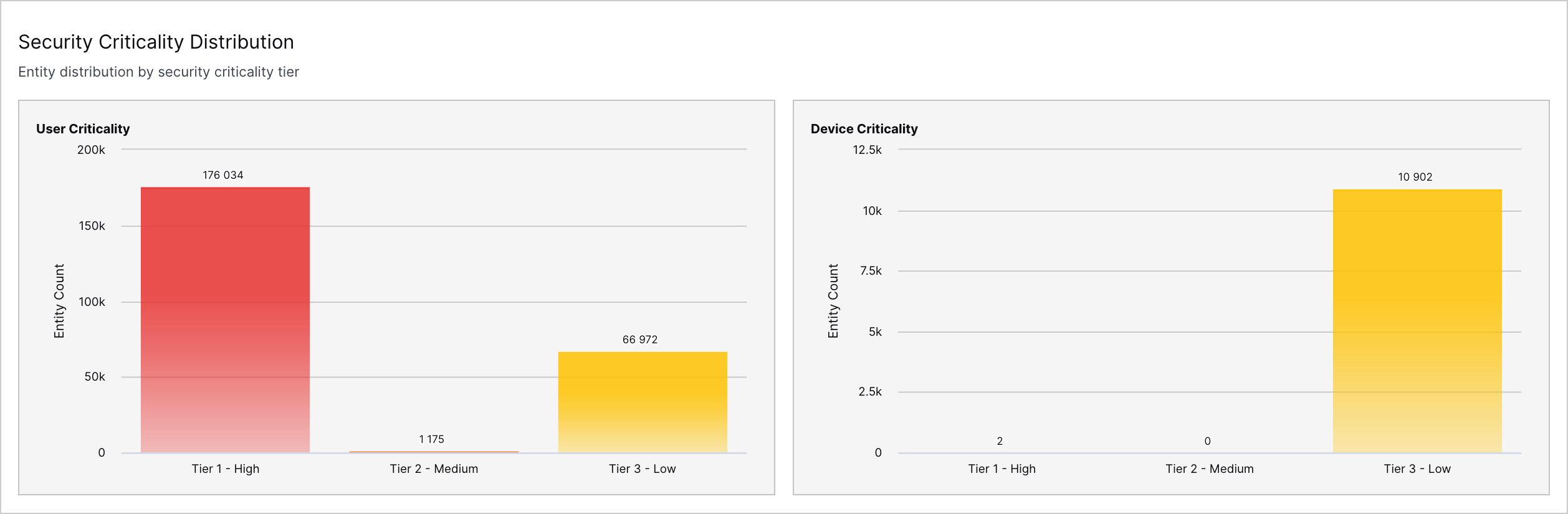
The Security Criticality Distribution chart in the Overview tab.

Scheduled Updates for Overview Charts

To improve performance, all charts in the Overview tab, except Entities by Tags, are now scheduled to refresh once every 24 hours.

You can now see the date and time the charts were last updated at the top of the Overview tab.
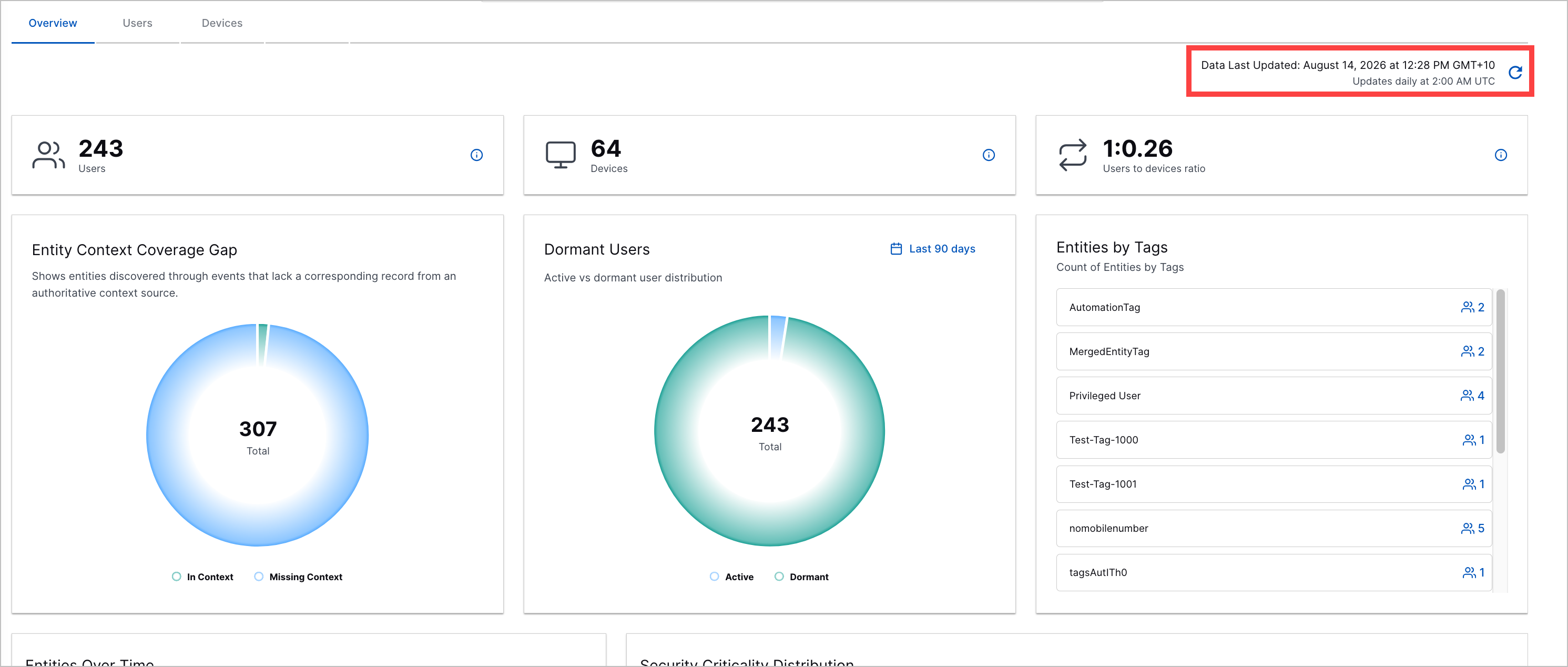
The Overview tab with the Date Last Updated timestamp highlighted in a red rectangle.

To immediately refresh all charts, you can click A blue arrow forming a circular shape pointing clockwise. to manually refresh them.

Linking Exclusions Using User Entity Do-Not-Link Pre-Built Context Table

You can now prevent user identities from linking and create standalone entities using a new pre-built context table, the User Entity Do-Not-Link context table.

By default, the User Entity Do-Not-Link context table has one column, User Entity Do Not Link Id. The value of each row should follow a specific format: SourceContextField:::SourceValue:::TargetContextField::::TargetValue. Entities containing the source field and source value will never link with entities containing the target field and target value.

The User Entity Do-Not-Link pre-built context table.

You can use the Java flavor of regular expressions in the source value and target value, with some limitations. To indicate an expression should be treated as regex, you use the following syntax: #{expression}#.

Standalone entities not linked to any other entities are still enriched with relevant context data.

Regular Expressions in the User Entity Links Pre-Built Context Table

To link user identities using pattern matching, you can now use regular expressions in the pre-built User Entity Links context table.

You can use the Java flavor of regex only in the source value. To indicate an expression should be treated as regex, you use the following syntax: #{expression}#.

If you use a capture group in the source value, you can substitute the capture group in the target value using the syntax $(#), where # represents the group number.

To test a regular expression used in the context table, you can enter the expression as a query in Attack Surface Insights search.

Increased Entity Attribute Character Limit

To ensure entity attributes fully capture incoming event and context data, the character limit for string type attributes has been increased to 512.

String-type entity attribute values above 512 characters are truncated.

Cloud Collectors

Feature

Description

AWS Eventbridge Cloud Collector

The AWS Eventbridge Cloud Collector is now available as part of Cloud Collectors to facilitate ingestion of events that are routed via Amazon EventBridge rules for the selected AWS sources on the configured target SQS queue.

AWS Shield Cloud Collector

The AWS Shield Cloud Collector is now available as part of Cloud Collectors to facilitate ingestion of AWS DDoS attack flow logs and event data.

Egnyte Cloud Collector

The Egnyte Cloud Collector is now available as part of Cloud Collectors to facilitate ingestion of Egnyte audit logs that track data activity, user behavior, and system administration.

Symantec Email Security Collector

The Symantec Email Security Collector is now available as part of Cloud Collectors to facilitate ingestion of Symantec Email Security Cloud logs.

Symantec Cloud Secure Web Gateway Cloud Collector

The Symantec Cloud Secure Web Gateway Cloud Collector is now available as part of Cloud Collectors to facilitate ingestion of Symantec Secure Web Gateway (SWG) logs.

Collector Metadata Enhancement

Cloud Collectors now include a metadata field m_collector_id as part of each event fetched by collectors. This unique value can be utilized across a variety of use cases, including OpenAPI requests and targeted searches. Fetched logs can be searched instantly using this identifier.

Google Workspace Context Cloud Collector

The Google Workspace Context Cloud Collector is now available as part of Cloud Collectors to facilitate ingestion of user context data.

REST API Context Cloud Collector

The REST API Context Collector is now available as part of Cloud Collectors to facilitate ingestion of context data from REST API endpoints from a broad range of vendors and products.

Armis Cloud Collector

The Armis Cloud Collector is now available as part of Cloud Collectors to facilitate ingestion of alerts logs from Armis.

Armis Context Cloud Collector

The Armis Context Cloud Collector is now available as part of Cloud Collectors to facilitate ingestion of context data from Armis.

AWS Inspector Cloud Collector

The AWS Inspector Cloud Collector is now available as part of Cloud Collectors to facilitate ingestion of data from Amazon Inspector.

AWS Redshift Cloud Collector

The AWS Redshift Cloud Collector is now available as part of Cloud Collectors to facilitate ingestion of Redshift cluster management events from Amazon Redshift.

Cybereason Cloud Collector

The Cybereason Cloud Collector is now available as part of Cloud Collectors to facilitate ingestion of Cybereason logs.

Google Security Operations Cloud Collector

The Google Security Operations Cloud Collector is now available as part of Cloud Collectors to facilitate ingestion of all supported default and custom logs from your Google SecOps account.

Palo Alto SaaS Security Cloud Collector

The Palo Alto Networks SaaS Security Cloud Collector is now available as part of Cloud Collectors to facilitate ingestion of SaaS Security log events.

Symantec CloudSOC Cloud Collector

The Symantec CloudSOC Cloud Collector is now available as part of Cloud Collectors to facilitate ingestion of Symantec CloudSoc logs that include Investigate Service App logs, Detect App (Incidents) logs and Investigate App logs.

Early Access Cloud Collector

Claud Enterprise Cloud Collector

The Claud Enterprise Cloud Collector is now available as part of Cloud Collectors early access program to facilitate ingestion of logs from Claude Compliance API.

The early access program offers you an opportunity to gain access to the latest cloud collectors before their official release. To participate, see Sign Up for the Early Access Program.

Context Management

Feature

Description

REST API Context Tables

tile-stix-taxii.png

Context Management now supports custom context tables based on REST API cloud collectors. These context tables can contain user, device, or other data type attributes.

In the Cloud Collector service, the available REST API collectors have been expanded to include both log and context sources. The REST API Context collector simplifies integration with custom REST API context sources, independent of any pre-built, vendor-specific cloud collector or external development.

On the Context Management side, the new REST API context tables process data ingested by the corresponding REST API Context Cloud Collector. These context tables do not map, by default, to a set of specific context attributes. Instead, you have full flexibility to customize the attribute mapping for any of the source attributes returned by the API response in the collector.

For more information about REST API data collection, see the following references:

Support for Array-based Filtering

A new Array Contains operator has been added to Context Management filtered tables functionality. When creating or editing a custom filtered context table, this new operator supports condition filtering based on data in array attributes. The Array Contains operator can be used only on array attributes. It returns records from the parent tables only when the array attribute contains a specific filter value.
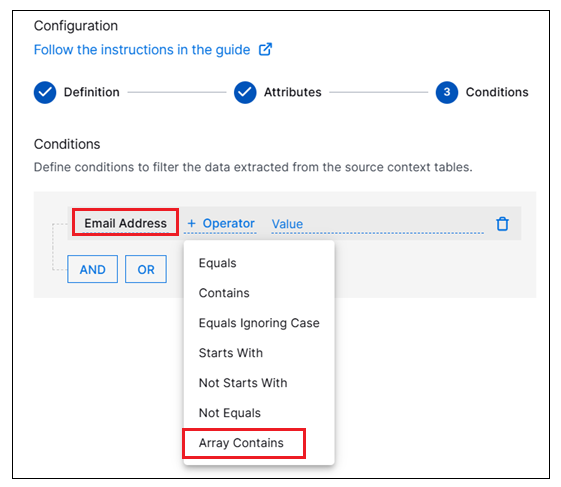
array-contains.png

For more information about configuring filter conditions, see Working with Filtered Context Tables.

Dashboards

Feature

Description

Support for Role-Based Control of Dashboard Access

Role-based access control (RBAC) has been introduced in the Dashboards service. These controls allow you to restrict permissions, at the individual dashboard level, based on user roles. Available permissions include:

  • Can View – Users with roles assigned to this permission can view but not modify the dashboard. All options for editing the dashboard are hidden. Users whose role is not included in this permission cannot see or access the dashboard.

  • Can View and Edit – Users with roles assigned to this permission can view and modify the dashboard but cannot delete it. All editing options are available to users whose role is included in this permission.

  • Can View, Edit and Delete – Users with roles assigned to this permission can view, edit, or delete the dashboard. All editing options are availabel to users whose role is included in this permission, and they can also delete the dashboard. Users with the Administrator role have this full access to all dashboards. Dashboard creators also have this full access for any dashboards they create.

For more information see User Management in the Dashboards Guide.

Log Stream

Feature

Description

Support for Read Only Access to Log Stream

A new read-only permission level has been added that grants access to Log Stream without the ability to make modifications. User roles assigned the new read-only level of permissions can log in and view information on every tab of the Log Stream application. These users can view the status and details about parsers, parser updates, enrichment rules, and event filters. But on each tab, options that would permit editing or creating anything new are unavailable.
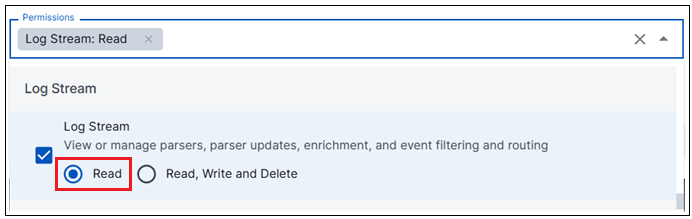
read-only-permission.png

For more information Log Stream access levels, see Access Log Stream in the Log Stream Guide.

New Public APIs for Log Stream

You can now programmatically manage parsers, event builders and event enrichers via a new set of public API endpoints for Log Stream. These new public APIs expose endpoints that allow you to create, update, generate lists, and delete. All of the available Log Stream API endpoints start with the following base URL: /log-stream/v1/...

For an overview of the available endpoints, see Log Stream APIs in the Log Stream Guide.

For specific information about the request and response parameters, visit the Exabeam API Reference Guide and use the left navigation panel to find the Log Stream endpoints.

New-Scale Platform

Feature

Description

Exabeam MCP Server Email Notifications

Security analysts and AI agents performing triage sessions need to push structured findings and summaries to stakeholders via email without leaving their workflow. You can now send emails of triage activity to be delivered to directly to configured recipients.

Example: "Get a list of the latest cases and send an email to [email protected]"

For more information about the Exabeam MCP Server, refer to Connect to Exabeam MCP Server in the New-Scale Security Operations Platform Administration Guide.

Site Collectors 2.22

Feature

Description

Streamlined Deployment and Hardened Protection

Security hardening has been enhanced and streamlined for seamless deployment.

Additionally, a vast number of vulnerabilities have been successfully resolved to strengthen the overall security.

Early Access Features

Direct Access Agent Management API Expansion

Direct Access Agent Management API now provides extended API capabilities to ensure seamless, unrestricted integration with the New-Scale Security Operations Platform. Public API support is introduced to empower teams to effortlessly automate security workflows and integrate existing tools.

Support for MS SQL Server Kerberos Authentication

Site Collectors now support MS SQSL Sever Database Kerberos authentication. Previously, users were limited to basic login and password authentication for MS SQL Server databases, creating a need for policy exceptions. To eliminate this, MS SQL Server Kerberos authentication is now fully supported for MS SQL collector. With this enhancement, Windows Active Directory can be utilized to seamlessly manage both standard users and service accounts for all database connections.

Refer to the following table for collector versions for Site Collectors 2.22.

Collector / Component

Product Version

Direct Access Agent (DAA) Collector

1.6

Threat Center

Feature

Description

Attack Surface Insights Entity Tag Enhancement

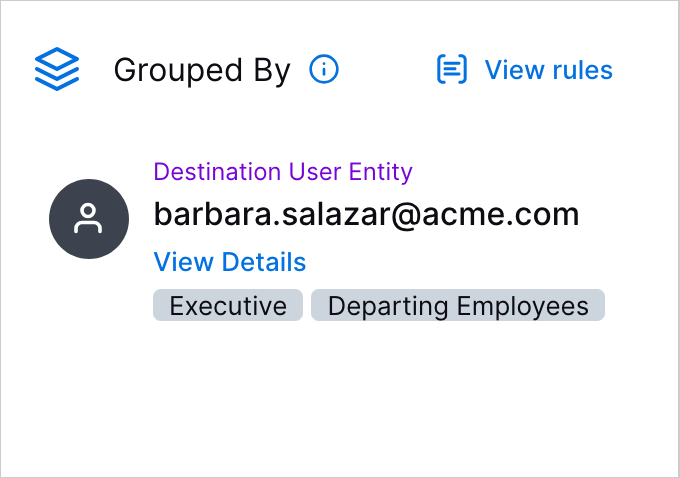
To clearly distinguish Attack Surface Insights entity tags from case and alert tags, you can now view entity tags alongside the entity with which they are associated.

The Grouped By section of the Overview tab, showing a destination user entity tagged with the Executie and Departing Employees tags.

The tags shown are the ones that are associated with the entity when the alert was created. If you add or remove a tag from the entity, the changes aren't reflected in the case or alert.

Entity tags are no longer presented alongside case or alert tags in the Threat Center application.

Watchlist Performance Enhancement

To improve watchlist response time and reliability, you can now create watchlists using the entity tags associated with the entity when an alert was created.

An entity appears in all corresponding watchlists even if its tags change between alerts. For example, if an entity has tag1 in Alert 1 and tag2 in Alert 2, it appears in both the watchlist created based on tag1 and the watchlist created based on tag2.

Threat Detection Management

Feature

Description

New Analytics Rule Time Functions

In analytics rules configurations, you can now retrieve the date and time an event occurred using three new functions:

  • timeofday() – Evaluates the time of day of the event time as hours after midnight, including fractions.

  • timeofweek() – Evaluates the day of the week of the event time as a number between 0 and 6, including fractions.

  • timeofmonth() – Evaluates the day of the month of the event time as a number between 0 and 30, including fractions.

Updated Pre-Built Analytics Rules

You can now better detect persistent unauthorized access, evasion, malicious execution on endpoints, and data exfiltration with updated pre-built analytics rules.

To prevent over-triggering on first-time observations and to establish a good baseline, minimumTrainingPeriodInDays was updated to 14 for the following pre-built analytics rules:

  • Prof-PLA-Loc-U-LocDoor – This is the first time this user has physically accessed this door.

  • Prof-GMA-GN-O-GN – This is the first time a user has been added to this group.

  • Prof-USB-E-O-SE – This is the first time a peripheral device activity has been observed from this endpoint.

  • Prof-FPM-CloudACL-B-U – This is the first time this user has modified the ACL of a cloud storage object in this bucket.

  • Prof-DllLoad-Ext-SE-FileExt – This is the first time a DLL image file with this extension was loaded on this endpoint.

  • Prof-PwdChkout-SV-U-SV – This is the first time this user retrieved a password from this safe.

  • Prof-VPNIn-E-UD-SE – This is the first time a user in this department attempted to log into a VPN from this endpoint. These events may include both failed and successful logins.

  • Prof-Fwrite-U-O-U-Plist – This is the first time a plist file was created by this user.

  • Prof-EL-EDC-U-SZ – This is the first time an endpoint login event to a domain controller has been observed originating from this network zone for this user. These events may include both failed and successful logins.

  • Prof-WinSC-E-O-DE – This is the first time a service creation has been observed on this endpoint.

  • Prof-PC-CmdArgs-InstallUtil-O-DLLParam – This is the first time the 'installutil.exe' process has been executed with this DLL file as a parameter.

  • Prof-DB-U-DBN-U – This is the first time a database event in this database has been observed for this user. A database event consists of any event or operation performed on a database. These events may include both failed and successful operations.

  • Prof-PCwmic-IR-O-U-usr – This is the first time a user account has been renamed using 'wmic.exe' for this user.

  • Prof-CPM-AzureRoleAssign-O-U – This is the first time this user assigned Azure roles. Roles can be manipulated for privilege escalation and persistence, and should not be managed by every user.

  • Prof-BPM-U-PBPolicy-O-U – This is the first time this user has successful edited the IAM policy of a bucket in AWS. IAM bucket policies determine the access users and other identities have to the files and objects inside the storage bucket.

  • Prof-EL-NTLM-O-SE – This is the first time a successful NTLM login has been observed from this endpoint.

  • Prof-CPM-DestUT-U-DestUT – This is the first time a member with this user type was successfully granted IAM permissions in a GCP policy. IAM policies determine the roles and permissions granted to users on a resource.

  • Prof-EMS-FileExt-U-FileExt – This is the first time this user has sent an email attachment with this extension.

  • Prof-GMA-OU-GN-UOU – This is the first time a user in this OU has been added to this group.

  • Prof-RegA-PP-O-PP – This is the first time this process has performed a registry activity.

  • Prof-CPM-Resource-O-R – This is the first time an IAM policy of a resource in this directory has been successfully modified in GCP. IAM policies determine the roles and permissions granted to users on a resource.

  • Prof-SA-Elbl-DZ-Dlbl – This is the first time a security alert triggered on a server for this destination network zone.

  • Prof-PCnet-U-O-U-netuser – This is the first time a user account has been enabled or disabled using 'net.exe' for this user.

  • Prof-EMR-FileExt-O-FileExt – This is the first time a user in the organization has received an email attachment with this extension.

  • Prof-SA-AS-SE-AS – This is the first time a security alert with this subject triggered from this endpoint.

  • Prof-RegW-Services-O-U – This is the first time this user has modified or created a service by writing a registry key\value under the key 'HKLM\SYSTEM\CurrentControlSet\Services'.

  • NumSP-Web-AIA-U-AILLMBytesOut – An abnormal volume of outbound data to AI/LLM web applications has been observed for this user.

  • Prof-GA-OS-U-OS – This is the first time this operating system has been observed for this user.

  • Prof-SA-U-O-UD – This is the first time a security alert triggered for users in this department.

  • Prof-GMA-U-O-UD – This is the first time a user has been added to a group by a user in this department.

  • Prof-FUpld-E-O-SE – This is the first time a file has been uploaded from this endpoint.

  • Prof-PC-U-O-USudo – This is the first time a process execution of a 'sudo' (Superuser Do) command has been observed for this user.

  • Prof-EMR-ED-O-ED – This is the first time a user from the organization has received an email from this email domain.

  • Prof-DS-E-O-SZ – This is the first time a user in the organization performed an activity on a directory service object from this network zone.

  • Prof-DS-E-U-SZ – This is the first time this user performed an activity on a directory service object from this network zone.

  • Prof-UCreate-DC-U-DC – This is the first time this domain controller has processed a user creation request for this user.

  • Prof-AuditPolicyMod-E-O-SE – This is the first time an audit policy modification has been observed from this endpoint. These events may include both failed and successful modifications.

  • Prof-MPermMod-U-O-U – This is the first time this user has modified permissions in a mailbox.

  • Prof-BC-U-O-U – This is the first time this user has successfully created a cloud storage bucket.

  • Prof-RA-U-O-U – This is the first time this user assumed a role.

  • Prof-USB-U-O-U – This is the first time a peripheral device activity has been observed for this user.

  • Prof-FPM-PublicCloud-P-U – This is the first time this user modified a cloud storage object to become public. By manipulating file permissions to make the object public, attackers can expose the data of important or sensitive files, making them available to read, download or even modify by everyone.

  • Prof-CA-IRC-O-U – This is the first time this user executed a remote command on an instance. These events may include both failed and successful executions.

  • Prof-RegR-SAM-O-U – This is the first time this user has read a registry value under the SAM registry key.

  • Prof-PC-E-O-SE-Modprobe – This is the first time a process execution of a 'modprobe' (Module Probe, a kernel module management tool) command has been observed on this endpoint.

  • Prof-PCnet-U-O-U-netuserdel – This is the first time a user account has been deleted using 'net.exe' for this user.

  • Prof-SA-DP-O-DP – This is the first time a network alert on this port has been triggered in the organization.

  • Prof-Fwrite-AuditRule-O-U – This is the first time an audit rule file has been modified by this user.

  • Prof-USB-DevId-UD-DevId – This is the first time this peripheral device ID has been observed for users in this department.

  • Prof-SA-AN-SZ-AN – This is the first time this security alert triggered in this network zone.

  • Prof-PLA-Loc-U-LocBldg – This is the first time this user has physically accessed this building.

  • Prof-RegW-CORPROFILER-O-U – This is the first time this user has modified or created a registry value for an environment variable associated with the COR_PROFILER.

  • Prof-RegD-Services-O-U – This is the first time this user has deleted a service by deleting a registry key\value under the key 'HKLM\SYSTEM\CurrentControlSet\Services'.

  • Prof-UCreate-Dom-U-DDom – This is the first time this user has created a user account on this domain.

  • Prof-RA-R-UDPlt-RN – This is the first time this role was assigned by users in this department on this platform.

  • Prof-EMS-FileExt-UD-FileExt – This is the first time a user in this department has sent an email attachment with this extension.

  • Prof-Fwrite-E-O-DE-Xdg – This is the first time a XDG autostart file was created on this endpoint.

  • Prof-LogCl-U-O-U – This is the first time an audit log has been cleared by this user.

  • Prof-DS-E-O-SE – This is the first time a user in the organization performed an activity on a directory service object from this endpoint.

  • Prof-CA-IC-Publisher-O-Publisher – This is the first time this image publisher has been observed in a successful virtual machine image creation for the organization.

  • Prof-SA-AN-SE-AN – This is the first time this security alert triggered from this endpoint.

  • Prof-RA-R-UPlt-RN – This is the first time this user has assigned this role on this platform.

  • Prof-Login-EmD-Plt-EmD – This is the first time this email domain has been used to successfully log into this platform.

  • Prof-FDel-U-O-U-LogFile – This is the first time a log file has been deleted by this user.

  • Prof-PrivUse-U-O-UD – This is the first time a Windows privileged has been used and invoked for users in this department.

  • Prof-FPM-CloudACL-AzureContainer-O-U – This is the first time this user has modified the ACL of a container in Azure. Container ACLs manage user access permissions and determine the access user have to the blobs inside, so modifications must be treated carefully.

  • Prof-PCnet-U-O-U-user – This is the first time local user accounts have been enumerated using 'net.exe' for this user.

  • Prof-CA-IKM-KeyCreateGCP-O-U – This is the first time this user added or modified an SSH key of an instance in GCP. These events may include both failed and successful modifications.

  • Prof-SA-PN-U-PN – This is the first time an alert triggered on this process for this user.

  • Prof-STC-PP-TN-PP – This is the first time a scheduled task has been created and configured to execute this process for this task name.

  • Prof-Login-Plt-U-Plt – This is the first time this user has attempted to log into this platform. These events do not include endpoint events and may include both failed and successful logins.

  • Prof-SEPwrshell-wmi-O-U – This is the first time this user executed a PowerShell script with WMI commands.

  • Prof-CPM-Resource-U-R – This is the first time an IAM policy of a resource in this directory has been successfully modified by this user in GCP. IAM policies determine the roles and permissions granted to users on a resource.

  • Prof-FDnld-E-O-SE – This is the first time a file has been downloaded to this endpoint.

  • Prof-DSF-AT-U-AT – This is the first time this directory service activity type failed for this user. Directory services typically manage various types of objects to organize and administer resources within a network environment.

  • Prof-PwdChkout-U-O-UD – This is the first time a user in this department retrieved a password.

  • Prof-AI-AC-O-AT – This is the first time a user in the organization has created an AI agent.

  • Prof-STC-O-UD – This is the first time a scheduled task has been created for users in this department.

  • Prof-PwdChkout-E-U-SE – This is the first time this user retrieved a password from this endpoint.

  • Prof-DS-Attr-U-Attr – This is the first time this privileged user accessed this directory service attribute.

  • Prof-PC-CmdArgs-Regsvr32-O-SCTParam – This is the first time the 'regsvr32.exe' process has been executed with this SCT file as a parameter.

  • Prof-STC-E-O-DE – This is the first time a scheduled task has been created on this endpoint.

  • Prof-FDnld-E-U-SE – This is the first time a file has been downloaded to this endpoint for this user.

  • Prof-AL-E-O-SE – This is the first time a user in the organization attempted to log into an application from this endpoint. These events may include both failed and successful logins.

  • Prof-PC-U-O-U-Kextload – This is the first time a process execution of a 'kextload' (Kernel Extension Load) command has been observed for this user.

  • Prof-GMA-U-O-U – This is the first time a user has been added to a group by this user.

  • Prof-VPNIn-U-O-U – This is the first time this user attempted to log into a VPN. These events may include both failed and successful logins.

  • Prof-DL-E-O-SE – This is the first time a kernel module\driver was loaded on this endpoint.

  • Prof-STC-O-PN – This is the first time a scheduled task has been created and configured to execute this process for the organization.

  • Prof-PCnet-U-O-U-groups – This is the first time local groups have been enumerated using 'net.exe' for this user.

  • Prof-GA-CSVC-U-SVC – This is the first time this cloud service was observed in events in this platform for this user.

  • Prof-SA-PN-O-PN – This is the first time a security alert triggered on this process for the organization.

  • Prof-DBQ-RS-U-RS – An abnormal successful database query response size has been observed in this database for this user.

  • Prof-Login-E-UD-DZ – This is the first time a user in this department successfully logged into this network zone.

  • Prof-RegW-AppPaths-O-U – This is the first time this user has modified a registry key\value under the App Paths key '[HKLM/HKCU]\Software\Microsoft\Windows\CurrentVersion\App Paths'.

  • Prof-RegW-SilentExitMon-O-U – This is the first time this user has modified or created the silent exit configuration of a process by writing a registry key\value under the key 'HKEY_LOCAL_MACHINE\SOFTWARE\Microsoft\Windows NT\CurrentVersion\SilentProcessExit'.

  • Prof-VPNIn-U-O-UC – This is the first time a user in this country attempted to log into a VPN. These events may include both failed and successful logins.

  • Prof-RegR-Certs-U-RP – This is the first time this user has read this certificate\private key related registry value.

  • Prof-GA-RGN-U-RGN – This is the first time this cloud region has been observed for this user.

  • Prof-CPM-UAttachAWS-O-U – This is the first time this user attached a policy to an identity (user, group and role) in AWS. Policies in AWS are the documents that dictate what permissions are granted to identities and resources. These events may include both failed and successful attachments.

  • Prof-GA-Country-O-DCountry – This is the first time an activity has been observed to this country, determined by geolocation lookup.

  • Prof-DS-DSOC-UD-DSOC – This is the first time a user in this department performed an activity on a directory service object with this object class.

  • Prof-LogCl-E-O-DE – This is the first time an audit log has been cleared on this endpoint.

  • Prof-DBQ-RS-SZ-RS – An abnormal successful database query response size has been observed for this source network zone.

  • Prof-UKeyCreate-U-O-U – This is the first time this user has generated an access key for a user account.

  • Prof-PrivUse-E-SE-SZ – This is the first time a Windows privileged has been used and invoked from this endpoint and from this network zone.

  • Prof-UCreate-U-Plt-U – This is the first time this user has created a user account on this platform.

  • Prof-PCroute-NetDisc-U-PN – This is the first time a process execution of 'route.exe' has been observed for this user.

  • Prof-CA-IKM-AWSKeyPair-O-U – This is the first time this user has modified an instance's SSH key pair in AWS.

  • Prof-DllLoad-Ext-PN-FileExt – This is the first time a DLL image file with this extension was loaded for this process.

  • Prof-RCM-U-O-UPlt – This is the first time this user modified or created a role on this platform.

  • Prof-SA-E-O-SZ – This is the first time a security alert triggered in this network zone.

  • Prof-GMA-E-O-DE – This is the first time a user has been added to a group on this endpoint.

  • Prof-USB-DevId-U-DevId – This is the first time this peripheral device ID has been observed for this user.

  • Prof-Login-E-U-DZ – This is the first time this user successfully logged into this network zone.

  • Prof-GA-Country-O-SCountry – This is the first time an activity has been observed from this country, determined by geolocation lookup.

  • Prof-FPM-PublicCloud-B-U – This is the first time a cloud storage object was modified to become public in this bucket. By manipulating file permissions to make the object public, attackers can expose the data of important or sensitive files, making them available to read, download or even modify by everyone.

  • Prof-MFA-MFADevice-U-MFADevice – This is the first time this user authenticates with MFA authentication using this device. These events may include both failed and successful logins.

  • Prof-EMS-Country-UD-DCountry – This is the first time a user in this department has sent an email to this country, as determined by geolocation lookup.

  • Prof-WinSC-E-O-DZ – This is the first time a service creation has been observed in this network zone.

  • Prof-Login-E-SE-DZ – This is the first time a user on this endpoint successfully logged into this network zone.

  • Prof-PC-U-O-U-Insmod – This is the first time a process execution of a 'insmod' (Install Module) command has been observed for this user.

  • Prof-UDel-U-O-U – This is the first time this user has deleted a user account.

  • Prof-RPM-U-O-UPlt – This is the first time this user modified the permissions of a role on this platform.

  • Prof-FA-SCFA-O-UD – This is the first time source code file activity (by file extension) has been observed for users in this department. File activity could include read, delete, write or any other type of file related operations.

  • Prof-DB-U-DBN-UD – This is the first time a database event in this database has been observed for a user in this department. A database event consists of any event or operation performed on a database. These events may include both failed and successful operations.

  • Prof-MFA-FailureReason-U-FailureReason – This is the first time this user failed to authenticate with MFA authentication with this failure reason.

  • Prof-AI-U-Guardrail-Block – This is the first time this user has triggered an AI guardrail violation.

  • Prof-VPNIn-E-U-DE – This is the first time this user attempted to log into a VPN with this server. These events may include both failed and successful logins.

  • Prof-FWrite-AuthorizedKeys-O-UD – This is the first time an 'authorized_keys' file has been modified by users in this department.

  • Prof-EL-EDC-O-SZ – This is the first time an endpoint login event to a domain controller has been observed originating from this network zone for the organization. These events may include both failed and successful logins.

  • Prof-DB-E-UDBN-SE – This is the first time a successful database event in this database has been observed for this user from this endpoint.

  • Prof-RA-R-U-RA – This is the first time this user assumed this role.

  • Prof-DS-A-UDSOT-A – This is the first time this activity has been observed on this directory service object class for this user. Directory services typically manage various types of objects to organize and administer resources within a network environment.

  • Prof-PwdChkout-U-O-U – This is the first time this user retrieved a password.

  • Prof-STC-O-U – This is the first time a scheduled task has been created for this user.

  • Prof-STC-TN-O-TN – This is the first time a scheduled task with this name has been created.

  • Prof-GA-Mime-O-Mime – This is the first time this MIME type has been observed for the organization. These events do not include network or endpoint platforms.

  • Prof-SEPwrshell-U-O-U – This is the first time this user executed a PowerShell script.

  • Prof-DB-DBOp-UDBN-DBOp – This is the first time a database operation has been observed for this user. A database operation consists of any action in a database query (i.e. SELECT, DROP, UPDATE, etc...).

  • Prof-EW-DCShadow-SE-O-SE – This is the first time the GC (global catalog) and DRS (directory replication service) service principal names have been added to this matured endpoint. These SPNs are required for the active directory replication process, and can be added to a rogue domain controller to execute a DCShadow attack.

  • Prof-PCpwrshell-En-O-PP – This is the first time a process execution of PowerShell with an encrypted command has been observed for this parent process.

  • Prof-STC-TN-UD-TN – This is the first time a scheduled task with this name has been created for users in this department.

  • Prof-PrivUse-U-O-U – This is the first time a Windows privileged has been used and invoked from this directory for this process.

  • Prof-WinSC-E-UD-DE – This is the first time a service creation has been observed on this endpoint for users in this department.

  • Prof-CA-AzureSAS-O-U – This is the first time this user has generated a shared access signature (SAS) to a compute resource in Azure. By generating SAS, attackers can make a resource public and download its content.

  • Prof-PC-CmdArgs-Msbuild-O-XMLParam – This is the first time the 'msbuild.exe' process has been used to build a project with this xml file.

  • Prof-PC-CmdArgs-InstallUtil-O-EXEParam – This is the first time the 'installutil.exe' process has been executed with this EXE file as a parameter.

  • Prof-PCca-U-O-U – This is the first time root certificate has been installed on a Linux machine using 'update-ca-certificates' or 'update-ca-trust' for this user.

  • Prof-SA-AN-O-AN – This is the first time this security alert triggered in the organization.

  • Prof-CA-FromSnapshot-O-U – This is the first time this user has created a compute resource from an existing snapshot.

  • Prof-STC-U-PN – This is the first time a scheduled task has been created and configured to execute this process for this user.

  • Prof-CA-IE-O-U – This is the first time this user has exported a compute instance. Instance export could be used by an attacker to collect sensitive data that resides inside the organization's virtual machines.

  • Prof-RegW-UAC-O-U – This is the first time this user has modified or created a registry key\value under the UAC configuration key 'HKLM\SOFTWARE\Microsoft\Windows\CurrentVersion\Policies\System'.

  • Prof-AL-E-U-SE – This is the first time this user attempted to log into an application from this endpoint. These events may include both failed and successful logins.

  • Prof-PC-O-Pdir – This is the first time a process execution has been observed from this directory.

  • Prof-Web-TI-U-WebDom-Malicious – This is the first time an HTTP communication attempt to this malicious web domain has been observed for this user. These events may include both failed and successful traffic.

  • Prof-WinSC-PP-SN-PP – This is the first time this service was created with this command process path.

  • Prof-ShA-SE-SN – This is the first time this network share has been accessed from this endpoint.

  • Prof-SA-DP-LE-DP – This is the first time a network alert on this port has been triggered for this destination endpoint.

  • Prof-PC-E-NetUserAdd-O-DE – This is the first time a user account has been created using 'net.exe' on this endpoint.

  • Prof-FWrite-Cloud-ExecObject-O-U – This is the first time this user created an executable storage object in a cloud bucket. An abnormal upload could indicate this user is trying to implant a malicious file in the organization, and these files are extremely critical to note when abnormal, since they are usually used for code execution.

  • Prof-SA-E-SZ-SE – This is the first time a security alert triggered from this endpoint in this network zone.

  • Prof-AI-AC-O-UD – This is the first time a user in this department has created an AI agent.

  • Prof-SA-AN-SE-RN – This is the first time this correlation rule triggered from this endpoint.

  • Prof-ULck-U-O-U – This is the first time this user has locked a user account.

  • Prof-SA-PN-UD-PN – This is the first time an alert triggered on this process for users in this department.

  • Prof-FPM-CloudACL-O-U – This is the first time this user has modified the ACL of a cloud storage object.

  • Prof-EMS-FileExt-O-FileExt – This is the first time a user in the organization has sent an email attachment with this extension.

  • Prof-CA-IC-O-U – This is the first time this user has created an image. An abnormal image upload could mean the image was created with a malicious intent. A malicious image could be used to trick users to create a VM that will contains a shellcode or a malware implanted in advance by an attacker.

  • Prof-CA-RI-O-U – This is the first time this user imported an instance, volume, snapshot or image. An unknown compute resource that was imported maliciously could indicate that the user's available compute data cloud has compromised. An instance or a volume created from a malicious source could possibly contain a shellcode or a malware implanted in advance by an attacker.

  • Prof-SEPwrshell-CmdInv-U-CmdInv – This is the first time this user executed a PowerShell script with this command.

  • Prof-Login-E-DZ-SZ – This is the first time a successful login has been observed from this source network zone to this destination network zone.

  • Prof-PC-Sysvol-O-UD – This is the first time a SYSVOL domain group policy has been accessed by a process for users in this department.

  • Prof-UCreate-E-O-DE – This is the first time a user account was created on this endpoint.

  • Prof-Fwrite-U-O-U-KernelExtExt – This is the first time a kernel extension file was created on MacOS system by this user.

  • Prof-RegW-IFEO-O-U – This is the first time this user has modified or created the Image File Execution Options of a process by writing to the registry value 'Debugger' under the key 'HKLM\SOFTWARE{\Wow6432Node}\Microsoft\Windows NT\CurrentVersion\Image File Execution Options\<executable>'.

  • Prof-EL-E-U-SC – This is the first time this user has successfully logged into an endpoint from this country, determined by geolocation lookup.

  • Prof-RegW-Services-O-UD – This is the first time users in this department have modified or created a service by writing a registry key\value under the key 'HKLM\SYSTEM\CurrentControlSet\Services'.

  • Prof-PCMsbuild-E-O-DE – This is the first time the 'msbuild.exe' process has been used to build and execute a project on this endpoint.

  • Prof-PC-FPermMod-Cacl-O-U – This is the first time a file or folder permissions have been modified using 'icacls.exe' or 'cacls.exe' for this user.

  • Prof-RegD-Services-O-UD – This is the first time users in this department have deleted a service by deleting a registry key\value under the key 'HKLM\SYSTEM\CurrentControlSet\Services'.

  • Prof-USB-DevId-O-DevId – This is the first time this peripheral device ID has been observed for the organization.

  • Prof-EMS-Country-U-DCountry – This is the first time this user has sent an email to this country, as determined by geolocation lookup.

  • Prof-Web-BinURL-O-U – This is the first time an executable file was downloaded during an HTTP session for this user. These events may include both failed and successful traffic.

  • Prof-PCnetsh-U-O-U – This is the first time firewall policies have been enumerated using 'netsh.exe' for this user.

  • Prof-MFA-AuthMethod-U-AuthMethod – This is the first time this user authenticates with MFA authentication using this authentication method. These events may include both failed and successful logins.

  • Prof-DS-DSOC-O-DSOC – This is the first time a user in the organization performed an activity on a directory service object with this object class.

  • Prof-VPNIn-Rlm-U-Rlm – This is the first time this user attempted to log into a VPN with this realm. These events may include both failed and successful logins.

  • Prof-VPNIn-SC-U-SC – This is the first time this user attempted to log into a VPN from this country. These events may include both failed and successful logins.

  • Prof-UCreate-U-O-UD – This is the first time a user in this department has created a user account.

  • Prof-DS-AT-U-AT – This is the first time this directory service activity has been observed for this user. Directory services typically manage various types of objects to organize and administer resources within a network environment.

  • Prof-CA-IC-Plt-U – This is the first time this user has created a virtual instance on this platform.

  • Prof-PC-CmdArgs-Msbuild-O-CsprojParam – This is the first time the 'msbuild.exe' process has been used to build this C# project.

  • Prof-VPNIn-E-O-SE – This is the first time a user attempted to log into a VPN from this endpoint. These events may include both failed and successful logins.

  • Prof-BPM-U-PBACL-O-U – This is the first time this user has successful edited the ACL policy of a bucket in AWS.

  • Prof-DS-AT-DSOC-AT – This is the first time this activity has been observed for this directory service object class. Directory services typically manage various types of objects to organize and administer resources within a network environment.

  • Prof-CPM-UCreate-O-U – This is the first time this user created or modified an IAM policy on this cloud platform. IAM policies determine the roles and permissions granted to users on a resource. These events may include both failed and successful creations\modifications.

  • Prof-VPNIn-E-UD-DE – This is the first time a user in this department attempted to log into a VPN with this server. These events may include both failed and successful logins.

  • Prof-PC-E-O-SE-Insmod – This is the first time a process execution of a 'insmod' (Install Module) command has been observed on this endpoint.

  • Prof-GA-RGN-O-RGN – This is the first time this cloud region has been observed for the organization.

  • Prof-PCnet-U-O-U-netlocalgroupadmin – This is the first time a user account has been added to the administrators group using 'net.exe' for this user.

  • Prof-FA-FDir-DE-NTDSDir – This is the first time a NTDS access has been observed in this folder on this endpoint. NTDS activities could include database attach or detach.

  • Prof-PCnet-U-O-U-netlocalgroup – This is the first time a user account has been added to a group using 'net.exe' for this user.

  • Prof-ShA-U-SN – This is the first time this network share has been accessed by this user.

  • Prof-RegW-FileAssoc-O-U – This is the first time this user has modified a command of a file assocation handler by modifing its registry configuration.

  • Prof-EMS-AC-U-A – An abnormal number of email attachments have been observed in an outgoing email for this user.

  • Prof-AuditPolicyMod-U-O-U – This is the first time this user has performed an audit policy modification. These events may include both failed and successful modifications.

  • Prof-PCipconfig-NetDisc-U-PN – This is the first time a process execution of 'ipconfig.exe' has been observed for this user.

  • Prof-FA-SCFA-O-U – This is the first time source code file activity (by file extension) has been observed for this user. File activity could include read, delete, write or any other type of file related operations.

  • Prof-SEPwrshell-SN-U-SN – This is the first time this user executed a PowerShell script with this name.

  • Prof-DS-E-UD-SE – This is the first time a user in this department performed an activity on a directory service object from this endpoint.

  • Prof-Fwrite-SystemdService-O-U – This is the first time a systemd service file has been modified by this user.

  • Prof-WinSC-U-DE-DU – This is the first time a service permitted to run under this user's credentials was created on this endpoint.

  • Prof-GA-CSVC-UD-SVC – This is the first time this cloud service was observed in events in this platform for users in this department.

  • Prof-EA-Kerberos-O-ET – This is the first time a Kerberos authentication has been observed with this encryption type for the organization. These events may include both failed and successful authentication.

  • Prof-Auth-U-Okta-AnonVPN – This is the first time an Okta user has used an anonymous VPN to authenticate.

  • Prof-SA-AN-UD-RN – This is the first time this correlation rule triggered for users in this department.

  • Prof-WinSC-E-DE-DZ – This is the first time a service creation has been observed on this endpoint for this destination network zone.

  • Prof-ShA-SZ-SN – This is the first time this network share has been successfully accessed from this network zone.

  • Prof-DB-DBOp-UDDBN-DBOp – This is the first time a database operation has been observed for a user in this department (i.e. "HR", "Finance", etc...). A database operation consists of any action in a database query (i.e. SELECT, DROP, UPDATE, etc...)

  • Prof-ELNAC-Loc-U-Loc – This is the first time this user has been observed logging into an endpoint using a network access control platform from this network location.

  • Prof-PCvssadmin-SCC-O-SE – This is the first time a shadow copy was created using 'vssadmin.exe' from this endpoint.

  • Prof-Login-E-U-SZ – This is the first time a successful login has been observed from this network zone for the this user.

  • Prof-USwtch-U-U-DU – This is the first time this user has performed an account switch to this account.

  • Prof-RegW-U-DetailsLen – An abnormal registry details length has been observed for this user.

  • Prof-DSF-AT-UD-AT – This is the first time this directory service activity type failed for users in this department. Directory services typically manage various types of objects to organize and administer resources within a network environment.

  • Prof-SA-DP-DZ-DP – This is the first time a network alert on this port has been triggered for this destination network zone.

  • Prof-UCreate-E-U-DE – This is the first time this user has created a user account on this endpoint.

  • Prof-SA-E-O-SE – This is the first time a security alert triggered from this endpoint.

  • Prof-DllLoad-Ext-O-FileExt – This is the first time a DLL image file with this extension was loaded for the organization.

  • Prof-SEPwrshell-Web-O-U – This is the first time this user has executed a PowerShell script that performs a web request.

  • Prof-EL-HT-U-HT – This is the first time this user has attempted to log into an endpoint of this type (server, workstation...). These events may include both failed and successful logins.

  • Prof-CA-SC-O-U – This is the first time this user has successfully created a snapshot of a compute instance.

  • Prof-Web-WebDom-O-Tld – This is the first time a successful HTTP communication to this top level domain has been observed for the organization.

  • Prof-VPNOut-SDM-U-SD – An abnormal VPN session length has been observed for this user.

  • Prof-CA-IKM-AWSAdminRetrv-O-U – This is the first time this user has retrieved the administrator password of an instance in AWS. Instance administrator passwords can be extracted from the instance resource even if the user does not have permissions to connect to the instance itself. These passwords can be used by attackers to identify with an administrator user on the instance and gain complete control of the machine.

  • Prof-AI-AC-O-U – This is the first time this user has created an AI agent.

  • Prof-RegR-LSA-O-UD – This is the first time users in this department read have read a LSA secret from the registry.

  • Prof-UCreate-Z-O-SZ – This is the first time a user account has been created in this network zone.

  • Prof-CPM-DestD-U-DestD – This is the first time a user from this domain was successfully granted IAM permissions in a GCP policy. IAM policies determine the roles and permissions granted to users on a resource.

  • Prof-AI-UD-Guardrail-Block – This is the first time a user in this department has triggered an AI guardrail violation.

  • Prof-SA-AN-UD-AN – This is the first time this security alert triggered for users in this department.

  • Prof-DS-AT-SE-AT – This is the first time this directory service activity has been observed from this endpoint. Directory services typically manage various types of objects to organize and administer resources within a network environment.

  • Prof-EMS-Country-O-DCountry – This is the first time a user in the organization has sent an email to this country, as determined by geolocation lookup.

  • Prof-FWrite-AuthorizedKeys-O-U – This is the first time an 'authorized_keys' file has been modified by this user.

  • Prof-DS-DSOC-U-DSOC – This is the first time this user performed an activity on a directory service object with this object class.

  • Prof-DB-E-UDBN-SZ – This is the first time a successful database event in this database has been observed for this user from this network zone.

  • Prof-EL-E-U-DE – This is the first time this user attempted to log into this endpoint. These events may include both failed and successful logins.

  • Prof-PC-E-NetUserAdd-O-DZ – This is the first time a user account has been created using 'net.exe' on this network zone.

  • Prof-RegW-EnvVarPath-O-U – This is the first time this user has modified the PATH environment variable by writing to the registry value 'HKEY_LOCAL_MACHINE\SYSTEM\CurrentControlSet\Control\Session Manager\Environment\Path'.

  • Prof-AI-O-Guardrail-Block – This is the first time a user in the organization has triggered an AI guardrail violation.

  • Prof-GMA-E-O-SZ – This is the first time a user has been added to a group from this network zone.

  • Prof-UCreate-U-O-U – This is the first time this user has created a user account.

  • Prof-PCwmic-IR-O-U-grp – This is the first time a group has been renamed using 'wmic.exe' for this user.

  • Prof-FWrite-UMWorkerProcess-PN-FN – This is the first time this file was created by the 'umworkerprocess.exe' process.

  • Prof-PC-U-O-U-Modprobe – This is the first time a process execution of a 'modprobe' (Module Probe, a kernel module management tool) command has been observed for this user.

  • Prof-DS-E-UD-SZ – This is the first time a user in this department performed an activity on a directory service object from this network zone.

  • Prof-Web-WebDom-O-U-WebDomIP – This is the first time an HTTP communication attempt directly to an IP address has been observed for this user. These events may include both failed and successful traffic.

  • Prof-RegR-SAM-O-UD – This is the first time users in this department have read a registry value under the SAM registry key.

  • Prof-DB-DBOp-SZDBN-DBOp – This is the first time a database operation has been observed from this network zone. A database operation consists of any action in a database query (i.e. SELECT, DROP, UPDATE, etc...).

  • Prof-RegR-LSA-O-U – This is the first time this user has read a LSA secret from the registry.

  • Prof-CPM-URevertAWS-O-U – This is the first time this user has successfully changed the default policy version of a policy in AWS. Policies in AWS are the documents that dictate what permissions are granted to identities and resources.

  • Prof-USB-E-UD-SE – This is the first time a peripheral device activity has been observed from this endpoint for users in this department.

  • Prof-Login-E-O-SZ – This is the first time a successful login has been observed from this network zone for the organization.

  • Prof-DL-U-O-Uplt – This is the first time a kernel module\driver was loaded for this user.

  • Prof-RA-R-Plt-RN – This is the first time this role was assigned on this platform.

  • Prof-Login-E-DE-SZ – This is the first time a successful login has been observed from this network zone to this endpoint.

  • Prof-SA-AN-U-RN – This is the first time this correlation rule triggered for this user.

  • Prof-UCreate-U-Plt-UD – This is the first time users in this department have created a user account on this platform.

  • Prof-FDel-UnixLogFiles-O-U – This is the first time a log file deletion has been observed for this user in Unix systems.

  • Prof-RegW-SafeBoot-O-U – This is the first time this user has modifed the safe mode boot configuration by writing to a registry value/key under the registry key HKLM\SYSTEM\CurrentControlSet\Control\SafeBoot\Minimal.

  • Prof-EL-E-UD-DE – This is the first time a user from this department attempted to log into this endpoint. These events may include both failed and successful logins.

  • Prof-VPNIn-Rlm-UD-Rlm – This is the first time a user in this department attempted to log into a VPN with this realm. These events may include both failed and successful logins.

  • Prof-DB-E-UDBN-SIP – This is the first time a successful database event in this database has been observed for this user from this IP address.

  • Prof-SA-AN-O-RN – This is the first time this correlation rule triggered in the organization.

  • Prof-ELNAC-E-U-SMac – This is the first a network access control login event has been observed coming from this MAC address for this user. These events may include both failed and successful logins.

  • Prof-GMA-U-DE-U – This is the first time this system account has added a user to a group on this endpoint.

  • Prof-PLA-Loc-U-LocCity – This is the first time this user has physically accessed a building in this city.

  • Prof-PCpwrshell-En-O-U – This is the first time a process execution of a PowerShell process with an encrypted command has been observed for this user.

  • Prof-SA-E-UD-SE – This is the first time a security alert triggered from this endpoint for users in this department.

  • Prof-ELF-E-U-DE – This is the first time this user has failed to log into this endpoint. The user might have logged in successfully before, but this is the first time a failed login event was observed on the endpoint.

  • Prof-USB-DevId-SE-DevId – This is the first time this peripheral device ID has been observed from this endpoint.

  • Prof-UCreate-U-DE-U-SystemAcct – This is the first time this system account has created a user account on this endpoint.

  • Prof-CA-DA-O-U – This is the first time this user has successfully attached a volume to an instance.

  • Prof-BPM-Public-O-U – This is the first time this user has attempte to modify the IAM policy or the ACL of an AWS bucket to make it public to all users. These events may include both failed and successful modifications.

  • Prof-PC-PN-Pdir – This is the first time a process execution has been observed from this directory for this process.

  • Prof-VPNIn-U-O-UD – This is the first time a user in this department attempted to log into a VPN. These events may include both failed and successful logins.

  • Prof-DL-O-Sig – This is the first time a kernel module or driver has been loaded with this signature for the organization.

  • Prof-AL-MFA-U-MFA – This is the first time this user has logged into an application without using multi factor authentication (MFA).

  • Prof-FUpld-E-U-SE – This is the first time this user has uploaded a file from this endpoint.

  • Prof-RPM-PR-R-Public – This is the first time this role's permissions were modified to make it public.

  • Prof-PCIOC-IOCPenT-U-PenT – This is the first time a process execution of a known pentesting tool has been observed for this user.

To filter the events an analytics rule assesses and improve efficiency, applicable_events was updated for the following pre-built analytics rules:

  • Prof-USB-E-O-SE – This is the first time a peripheral device activity has been observed from this endpoint.

  • Prof-USB-U-O-U – This is the first time a peripheral device activity has been observed for this user.

  • Prof-USB-DevId-U-DevId – This is the first time this peripheral device ID has been observed for this user.

  • Prof-USB-DevId-UD-DevId – This is the first time this peripheral device ID has been observed for users in this department.

  • Prof-SA-AN-SE-RN – This is the first time this correlation rule triggered from this endpoint.

  • Prof-USB-DevId-O-DevId – This is the first time this peripheral device ID has been observed for the organization.

  • Prof-USB-E-U-SE – This is the first time a peripheral device activity has been observed from this endpoint for this user.

  • Prof-FA-FDir-DE-NTDSDir – This is the first time a NTDS access has been observed in this folder on this endpoint. NTDS activities could include database attach or detach.

  • Prof-USB-E-UD-SE – This is the first time a peripheral device activity has been observed from this endpoint for users in this department.

  • Prof-SA-AN-U-RN – This is the first time this correlation rule triggered for this user.

  • Prof-SA-AN-O-RN – This is the first time this correlation rule triggered in the organization.

  • Prof-USB-DevId-SE-DevId – This is the first time this peripheral device ID has been observed from this endpoint.

To normalize letter cases and improve reliability, actOnCondition was updated for the following pre-built analytics rule:

  • Fact-EMRC-FwR-ExtDom – An inbox rule has been configured to forward emails to an email address that's in a different domain than the rule's creator.

To fix an issue with querying for analytics rules in Search, query and trainOnConditionwere updated for the following pre-built analytics rules:

  • NumCP-Web-AIA-U-AILLMSessionCount – An abnormal number of AI/LLM web sessions has been observed for this user.

  • NumSP-Web-AIA-U-AILLMBytesOut – An abnormal volume of outbound data to AI/LLM web applications has been observed for this user.

To more accurately reflect the threats the analytics rule is intended to detect, useCase and mitre were updated for the following pre-built analytics rule:

  • Prof-FS-T-U-IT – This is the first time an item shared of this type (file, folder, etc) has been observed for this user.

To ensure analytics rules reference valid use cases, useCase was updated for the following pre-built analytics rules:

  • Fact-PCsharphound-BloodHound – The 'sharphound.exe' (a network domain enumeration tool) process has been executed.

  • Fact-PC-TFE-Write – The Tasks folder in system32 and syswow64 are globally writable paths that can be abused using shell built-ins such as 'copy', 'echo', 'type', 'file createnew' to stage or execute payloads. This sigma rule is authored by Sreeman. The content of this repository is released under the [Detection Rule License (DRL) 1.1](https://github.com/SigmaHQ/Detection-Rule-License). Reference: https://github.com/SigmaHQ/sigma/blob/799acec38b9e0696cc1d5767a9416033f620aca0/rules/windows/process_creation/proc_creation_win_susp_task_folder_evasion.yml

To ensure field values are in the correct format and are within valid ranges, minOrderOfMagnitude, windowPeriod, and windowDuration were updated for the following pre-built analytics rules:

  • NumCP-AI-MC-U – An abnormal amount of AI agent modifications have been observed for a user.

  • NumCP-Git-EC-U – An abnormal amount of GitHub API access events have been observed for this user.

  • NumCP-AI-QC-WID – An abnormal number of successful AI requests has been observed for this workspace. AI requests may consist of one or more prompts.

  • NumCP-AI-QC-U – An abnormal number of successful AI requests have been performed by this user. AI requests consist of one or more prompts.

  • NumCP-AI-U-Guardrail-Block – An abnormal amount of AI guardrail violations have been observed for a user.

  • NumCP-AI-QC-UO – An abnormal number of successful AI requests for the organization have been performed by this user. AI requests may consist of one or more prompts.

To ensure double slashes in URLs aren't normalized to single slashes, trainOnCondition was updated for the following pre-built analytics rules:

  • Prof-PC-AIT-SE-CURL-Framework – This is the first time an AI development framework has been installed using CURL on this endpoint.

  • Prof-PC-AIT-U-CURL-Framework – This is the first time an AI development framework has been installed using CURL by this user.

  • Prof-PC-AIT-UD-CURL-Framework – This is the first time an AI development framework has been installed using CURL by users in this department.

  • Prof-PC-AIT-UD-CURL-Agent – This is the first time an AI agent has been installed using CURL by users in this department.

  • Prof-PC-AIT-SE-CURL-Agent – This is the first time an AI agent has been installed using CURL on this endpoint.

  • Prof-PC-AIT-U-CURL-Agent – This is the first time an AI agent has been installed using CURL by this user.

  • Prof-PC-O-COD – This is the first time a process execution of an Office application has opened a remote document from this web domain.

To ensure double slashes in URLs aren't normalized to single slashes, actOnCondition was updated for the following pre-built analytics rule:

  • Fact-PCDotNet-CommandLine – This .NET supporting process was created with an URL in the commandline.

  • Fact-PC-OpenClawInstall – OpenClaw has been installed using the command line tool 'curl'. There is nothing inherently malicious about OpenClaw, however, by default it uses insecure practices and may expose significant security flaws.

To ensure the analytics rule triggers on all LSASS memory-reading activities, actOnCondition was updated for the following pre-built analytics rule:

  • Fact-FRead-Lssas – A process has directly read from the memory space of 'lsass.exe'.

To minimize false positives and precisely match exact parent process names, actOnCondition was updated for the following pre-built analytics rule:

  • Fact-PCcsc-AP – The CSC (C# Compiler) process has been spawned by a command line executable or a Microsoft Office process. This sigma rule is authored by Florian Roth (Nextron Systems), Nasreddine Bencherchali (Nextron Systems) and is licensed under Detection Rule License (DRL), https://github.com/SigmaHQ/sigma/blob/master/LICENSE.Detection.Rules.md. Reference: https://github.com/SigmaHQ/sigma/blob/master/rules/windows/process_creation/proc_creation_win_csc_susp_parent.yml

To ensure the analytics rule detects when a NTDS process is executed with its full extension or name, trainOnCondition and actOnCondition were updated for the following pre-built analytics rule:

  • Prof-FA-FDir-DE-NTDSDir – This is the first time a NTDS access has been observed in this folder on this endpoint. NTDS activities could include database attach or detach.

To improve analytics rule effiency and remove a redundant condition already accounted for in other analytics rule fields, trainOnCondition was updated for the following pre-built analytics rules:

  • Prof-PwdChkout-U-O-UD – This is the first time a user in this department retrieved a password.

  • Prof-PwdChkout-U-O-U – This is the first time this user retrieved a password.

  • Prof-SA-AN-SE-RN – This is the first time this correlation rule triggered from this endpoint.

  • Prof-SA-AN-UD-RN – This is the first time this correlation rule triggered for users in this department.

  • Prof-SA-AN-U-RN – This is the first time this correlation rule triggered for this user.

  • Prof-SA-AN-O-RN – This is the first time this correlation rule triggered in the organization.

To improve analytics rule effiency and remove a redundant condition already accounted for in other analytics rule fields, actOnCondition was updated for the following pre-built analytics rule:

  • Fact-LogCl-LogClear-AT – An audit log has been cleared.

To remove a trailing space, trainOnCondition was updated for the following pre-built analytics rule:

  • Prof-EL-E-U-SC – This is the first time this user has successfully logged into an endpoint from this country, determined by geolocation lookup.

Resolved Issues

Correlation Rules

Issue ID

Description

ENG-102035

If you changed the name of a correlation rule, then navigated to associated rule trigger events in Search by clicking CRMitreMoreInfoIcon.png, the search results were empty or incomplete. This issue occurred because the Search query used the correlation rule name. Historical events contained the previous correlation rule name, so the query failed to find them.

To ensure the Search query returns rule trigger events for a specific correlation rule, even if its name changes, the link to Search now queries using the correlation rule ID.

Log Stream

Issue ID

Description

ENG-92107

In some environments, rule trigger events from Advanced Analytics raw logs were difficult to find in New-Scale Search. This issue is caused because the format for rule trigger events in Advanced Analytics is different from the expected format in New-Scale. Finding rule trigger events becomes more complicated and requires different query syntax to find rule triggers in raw logs from both Advanced Analytics and New-Scale.

To resolve this issue and simplify the search process, the format for rule trigger events in Advanced Analytics has been standardized to match the expected New-Scale format. Now Log Stream can parse rule trigger events for consistent handling in Advanced Analytics, New-Scale Analytics, and Correlation Rules engines.

Site Collector 2.22: Security Vulnerabilities Remediations

The Site Collectors 2.22 (August 2026) release includes remediated security vulnerabilities. For more information about Exabeam’s commitment to remediating vulnerabilities for Site Collector, see the Vulnerability Remediation Policy.

There are no open known CVEs in any container image (Nifi). Toolkit has been deprecated and is no longer in use hence no security vulnerabilities update is available for that.

The following table lists the CVEs remediated for the Nifi container and their severity.

Critical

High

Medium

Total: 41

Total: 312

Total: 261

CVE-2026-10536 CVE-2026-11564 CVE-2026-11856 CVE-2026-25702 CVE-2026-39821 CVE-2026-52914 CVE-2026-52924 CVE-2026-52931 CVE-2026-52955 CVE-2026-52958 CVE-2026-52982 CVE-2026-52986 CVE-2026-52989 CVE-2026-52993 CVE-2026-52999 CVE-2026-53002 CVE-2026-53006 CVE-2026-53010 CVE-2026-53043 CVE-2026-53045 CVE-2026-53046 CVE-2026-53049 CVE-2026-53055 CVE-2026-53086 CVE-2026-53088 CVE-2026-53131 CVE-2026-53151 CVE-2026-53175 CVE-2026-53176 CVE-2026-53186 CVE-2026-53215 CVE-2026-53216 CVE-2026-53221 CVE-2026-53224 CVE-2026-53225 CVE-2026-53228 CVE-2026-53246 CVE-2026-53247 CVE-2026-53260 CVE-2026-53309 CVE-2026-5450

CVE-2013-7445 CVE-2018-12930 CVE-2018-12931 CVE-2019-14899 CVE-2019-15794 CVE-2019-19378 CVE-2019-19814 CVE-2019-20426 CVE-2020-26560 CVE-2021-26934 CVE-2021-3864 CVE-2022-0400 CVE-2022-1247 CVE-2022-25265 CVE-2022-25836 CVE-2022-2961 CVE-2022-3238 CVE-2022-45885 CVE-2022-50090 CVE-2022-50240 CVE-2022-50551 CVE-2023-0030 CVE-2023-26242 CVE-2023-33053 CVE-2023-3397 CVE-2023-3640 CVE-2025-1272 CVE-2025-54518 CVE-2026-11352 CVE-2026-11586 CVE-2026-12064 CVE-2026-27145 CVE-2026-31786 CVE-2026-31787 CVE-2026-33814 CVE-2026-40355 CVE-2026-40356 CVE-2026-4046 CVE-2026-41992 CVE-2026-42504 CVE-2026-43490 CVE-2026-43495 CVE-2026-43497 CVE-2026-43498 CVE-2026-43502 CVE-2026-4437 CVE-2026-45837 CVE-2026-45839 CVE-2026-45843 CVE-2026-46055 CVE-2026-46105 CVE-2026-46107 CVE-2026-46110 CVE-2026-46111 CVE-2026-46112 CVE-2026-46113 CVE-2026-46114 CVE-2026-46116 CVE-2026-46117 CVE-2026-46120 CVE-2026-46121 CVE-2026-46122 CVE-2026-46123 CVE-2026-46124 CVE-2026-46125 CVE-2026-46129 CVE-2026-46130 CVE-2026-46133 CVE-2026-46136 CVE-2026-46138 CVE-2026-46140 CVE-2026-46145 CVE-2026-46149 CVE-2026-46150 CVE-2026-46152 CVE-2026-46154 CVE-2026-46157 CVE-2026-46162 CVE-2026-46163 CVE-2026-46164 CVE-2026-46166 CVE-2026-46173 CVE-2026-46174 CVE-2026-46175 CVE-2026-46176 CVE-2026-46177 CVE-2026-46178 CVE-2026-46180 CVE-2026-46181 CVE-2026-46183 CVE-2026-46189 CVE-2026-46190 CVE-2026-46191 CVE-2026-46197 CVE-2026-46198 CVE-2026-46199 CVE-2026-46201 CVE-2026-46203 CVE-2026-46204 CVE-2026-46205 CVE-2026-46206 CVE-2026-46208 CVE-2026-46209 CVE-2026-46210 CVE-2026-46212 CVE-2026-46213 CVE-2026-46215 CVE-2026-46218 CVE-2026-46219 CVE-2026-46227 CVE-2026-46230 CVE-2026-46232 CVE-2026-46234 CVE-2026-46238 CVE-2026-46240 CVE-2026-46241 CVE-2026-46242 CVE-2026-46273 CVE-2026-46274 CVE-2026-46275 CVE-2026-46293 CVE-2026-46294 CVE-2026-46299 CVE-2026-46301 CVE-2026-46303 CVE-2026-46304 CVE-2026-46306 CVE-2026-46307 CVE-2026-46308 CVE-2026-46309 CVE-2026-46311 CVE-2026-46317 CVE-2026-46319 CVE-2026-46320 CVE-2026-46321 CVE-2026-46322 CVE-2026-46324 CVE-2026-46331 CVE-2026-52908 CVE-2026-52909 CVE-2026-52910 CVE-2026-52911 CVE-2026-52912 CVE-2026-52915 CVE-2026-52917 CVE-2026-52918 CVE-2026-52919 CVE-2026-52920 CVE-2026-52922 CVE-2026-52923 CVE-2026-52927 CVE-2026-52929 CVE-2026-52932 CVE-2026-52934 CVE-2026-52935 CVE-2026-52942 CVE-2026-52943 CVE-2026-52947 CVE-2026-52950 CVE-2026-52951 CVE-2026-52952 CVE-2026-52953 CVE-2026-52954 CVE-2026-52956 CVE-2026-52957 CVE-2026-52959 CVE-2026-52960 CVE-2026-52967 CVE-2026-52969 CVE-2026-52971 CVE-2026-52973 CVE-2026-52974 CVE-2026-52975 CVE-2026-52976 CVE-2026-52981 CVE-2026-52983 CVE-2026-52987 CVE-2026-52988 CVE-2026-52991 CVE-2026-52998 CVE-2026-53000 CVE-2026-53003 CVE-2026-53005 CVE-2026-53009 CVE-2026-53011 CVE-2026-53016 CVE-2026-53020 CVE-2026-53024 CVE-2026-53025 CVE-2026-53026 CVE-2026-53031 CVE-2026-53033 CVE-2026-53036 CVE-2026-53040 CVE-2026-53041 CVE-2026-53044 CVE-2026-53050 CVE-2026-53053 CVE-2026-53054 CVE-2026-53057 CVE-2026-53062 CVE-2026-53068 CVE-2026-53069 CVE-2026-53070 CVE-2026-53071 CVE-2026-53072 CVE-2026-53075 CVE-2026-53076 CVE-2026-53077 CVE-2026-53078 CVE-2026-53081 CVE-2026-53085 CVE-2026-53087 CVE-2026-53090 CVE-2026-53091 CVE-2026-53092 CVE-2026-53094 CVE-2026-53096 CVE-2026-53110 CVE-2026-53129 CVE-2026-53130 CVE-2026-53132 CVE-2026-53133 CVE-2026-53136 CVE-2026-53137 CVE-2026-53138 CVE-2026-53143 CVE-2026-53145 CVE-2026-53146 CVE-2026-53147 CVE-2026-53148 CVE-2026-53149 CVE-2026-53153 CVE-2026-53156 CVE-2026-53157 CVE-2026-53160 CVE-2026-53161 CVE-2026-53162 CVE-2026-53165 CVE-2026-53170 CVE-2026-53171 CVE-2026-53172 CVE-2026-53173 CVE-2026-53174 CVE-2026-53178 CVE-2026-53179 CVE-2026-53180 CVE-2026-53182 CVE-2026-53183 CVE-2026-53184 CVE-2026-53185 CVE-2026-53187 CVE-2026-53188 CVE-2026-53189 CVE-2026-53191 CVE-2026-53192 CVE-2026-53193 CVE-2026-53194 CVE-2026-53195 CVE-2026-53198 CVE-2026-53199 CVE-2026-53200 CVE-2026-53201 CVE-2026-53202 CVE-2026-53203 CVE-2026-53205 CVE-2026-53209 CVE-2026-53212 CVE-2026-53217 CVE-2026-53223 CVE-2026-53229 CVE-2026-53230 CVE-2026-53232 CVE-2026-53233 CVE-2026-53234 CVE-2026-53235 CVE-2026-53239 CVE-2026-53240 CVE-2026-53242 CVE-2026-53244 CVE-2026-53248 CVE-2026-53250 CVE-2026-53253 CVE-2026-53254 CVE-2026-53255 CVE-2026-53256 CVE-2026-53259 CVE-2026-53262 CVE-2026-53264 CVE-2026-53265 CVE-2026-53266 CVE-2026-53267 CVE-2026-53268 CVE-2026-53270 CVE-2026-53272 CVE-2026-53273 CVE-2026-53275 CVE-2026-53276 CVE-2026-53277 CVE-2026-53281 CVE-2026-53284 CVE-2026-53286 CVE-2026-53290 CVE-2026-53294 CVE-2026-53296 CVE-2026-53300 CVE-2026-53303 CVE-2026-53322 CVE-2026-5435 CVE-2026-58050 CVE-2026-5928 CVE-2026-8932

CVE-2012-4542 CVE-2015-7837 CVE-2015-8553 CVE-2016-8660 CVE-2017-0537 CVE-2017-13165 CVE-2017-13693 CVE-2017-13694 CVE-2018-1121 CVE-2018-12928 CVE-2018-12929 CVE-2018-17977 CVE-2019-15213 CVE-2019-20794 CVE-2020-11935 CVE-2020-14304 CVE-2020-26140 CVE-2020-26142 CVE-2020-26143 CVE-2020-26146 CVE-2021-3714 CVE-2022-0480 CVE-2022-41848 CVE-2022-44034 CVE-2022-4543 CVE-2022-48846 CVE-2022-48929 CVE-2022-49940 CVE-2022-50230 CVE-2022-50232 CVE-2022-50332 CVE-2022-50380 CVE-2023-0160 CVE-2023-1193 CVE-2023-20585 CVE-2023-31082 CVE-2023-4010 CVE-2023-52879 CVE-2023-53642 CVE-2023-6238 CVE-2023-6240 CVE-2024-0564 CVE-2024-24864 CVE-2024-25740 CVE-2024-35895 CVE-2024-35995 CVE-2024-53240 CVE-2024-53241 CVE-2025-12801 CVE-2025-21988 CVE-2025-22077 CVE-2025-47911 CVE-2025-58190 CVE-2025-8869 CVE-2026-11850 CVE-2026-25680 CVE-2026-25681 CVE-2026-27136 CVE-2026-41991 CVE-2026-42502 CVE-2026-42506 CVE-2026-42507 CVE-2026-43492 CVE-2026-43496 CVE-2026-4438 CVE-2026-45834 CVE-2026-45835 CVE-2026-45836 CVE-2026-45838 CVE-2026-45840 CVE-2026-45841 CVE-2026-45842 CVE-2026-45844 CVE-2026-45845 CVE-2026-45846 CVE-2026-46104 CVE-2026-46106 CVE-2026-46108 CVE-2026-46109 CVE-2026-46118 CVE-2026-46126 CVE-2026-46127 CVE-2026-46128 CVE-2026-46131 CVE-2026-46132 CVE-2026-46134 CVE-2026-46139 CVE-2026-46141 CVE-2026-46142 CVE-2026-46143 CVE-2026-46144 CVE-2026-46146 CVE-2026-46147 CVE-2026-46148 CVE-2026-46151 CVE-2026-46153 CVE-2026-46156 CVE-2026-46158 CVE-2026-46159 CVE-2026-46160 CVE-2026-46161 CVE-2026-46165 CVE-2026-46167 CVE-2026-46168 CVE-2026-46169 CVE-2026-46170 CVE-2026-46171 CVE-2026-46172 CVE-2026-46179 CVE-2026-46182 CVE-2026-46184 CVE-2026-46186 CVE-2026-46187 CVE-2026-46188 CVE-2026-46192 CVE-2026-46193 CVE-2026-46194 CVE-2026-46196 CVE-2026-46200 CVE-2026-46202 CVE-2026-46207 CVE-2026-46211 CVE-2026-46214 CVE-2026-46216 CVE-2026-46220 CVE-2026-46221 CVE-2026-46222 CVE-2026-46223 CVE-2026-46224 CVE-2026-46225 CVE-2026-46226 CVE-2026-46228 CVE-2026-46229 CVE-2026-46231 CVE-2026-46233 CVE-2026-46235 CVE-2026-46236 CVE-2026-46239 CVE-2026-46290 CVE-2026-46291 CVE-2026-46295 CVE-2026-46296 CVE-2026-46297 CVE-2026-46298 CVE-2026-46302 CVE-2026-46305 CVE-2026-46310 CVE-2026-46312 CVE-2026-46313 CVE-2026-46314 CVE-2026-46315 CVE-2026-46318 CVE-2026-52913 CVE-2026-52916 CVE-2026-52921 CVE-2026-52925 CVE-2026-52926 CVE-2026-52928 CVE-2026-52930 CVE-2026-52938 CVE-2026-52939 CVE-2026-52940 CVE-2026-52941 CVE-2026-52944 CVE-2026-53059 CVE-2026-53128 CVE-2026-53134 CVE-2026-53135 CVE-2026-53139 CVE-2026-53140 CVE-2026-53141 CVE-2026-53142 CVE-2026-53144 CVE-2026-53150 CVE-2026-53152 CVE-2026-53154 CVE-2026-53155 CVE-2026-53158 CVE-2026-53159 CVE-2026-53163 CVE-2026-53164 CVE-2026-53166 CVE-2026-53167 CVE-2026-53168 CVE-2026-53169 CVE-2026-53177 CVE-2026-53181 CVE-2026-53190 CVE-2026-53196 CVE-2026-53197 CVE-2026-53204 CVE-2026-53206 CVE-2026-53207 CVE-2026-53208 CVE-2026-53210 CVE-2026-53211 CVE-2026-53213 CVE-2026-53214 CVE-2026-53218 CVE-2026-53219 CVE-2026-53220 CVE-2026-53222 CVE-2026-53226 CVE-2026-53227 CVE-2026-53231 CVE-2026-53236 CVE-2026-53237 CVE-2026-53238 CVE-2026-53241 CVE-2026-53243 CVE-2026-53245 CVE-2026-53249 CVE-2026-53251 CVE-2026-53252 CVE-2026-53257 CVE-2026-53258 CVE-2026-53263 CVE-2026-53269 CVE-2026-53271 CVE-2026-53274 CVE-2026-53278 CVE-2026-53279 CVE-2026-53280 CVE-2026-53282 CVE-2026-53283 CVE-2026-53285 CVE-2026-53287 CVE-2026-53288 CVE-2026-53289 CVE-2026-53291 CVE-2026-53292 CVE-2026-53293 CVE-2026-53295 CVE-2026-53297 CVE-2026-53298 CVE-2026-53299 CVE-2026-53301 CVE-2026-53302 CVE-2026-53304 CVE-2026-53305 CVE-2026-53306 CVE-2026-53307 CVE-2026-53308 CVE-2026-53310 CVE-2026-53311 CVE-2026-53312 CVE-2026-53313 CVE-2026-53314 CVE-2026-53315 CVE-2026-53316 CVE-2026-53317 CVE-2026-53318 CVE-2026-53319 CVE-2026-53320 CVE-2026-53321 CVE-2026-53323 CVE-2026-53324 CVE-2026-53325 CVE-2026-54411 CVE-2026-58051 CVE-2026-6238