Responses are generated using AI and may contain mistakes.

New-Scale Security Operations PlatformNew-Scale Security Operations Platform Release Notes

May 2026

The New-Scale Security Operations Platform includes the following addressed features and new features for May 2026.

Attack Surface Insights

Feature

Description

Entity Overview

You can now get a high-level understanding of all entities in your environment in the Overview tab.
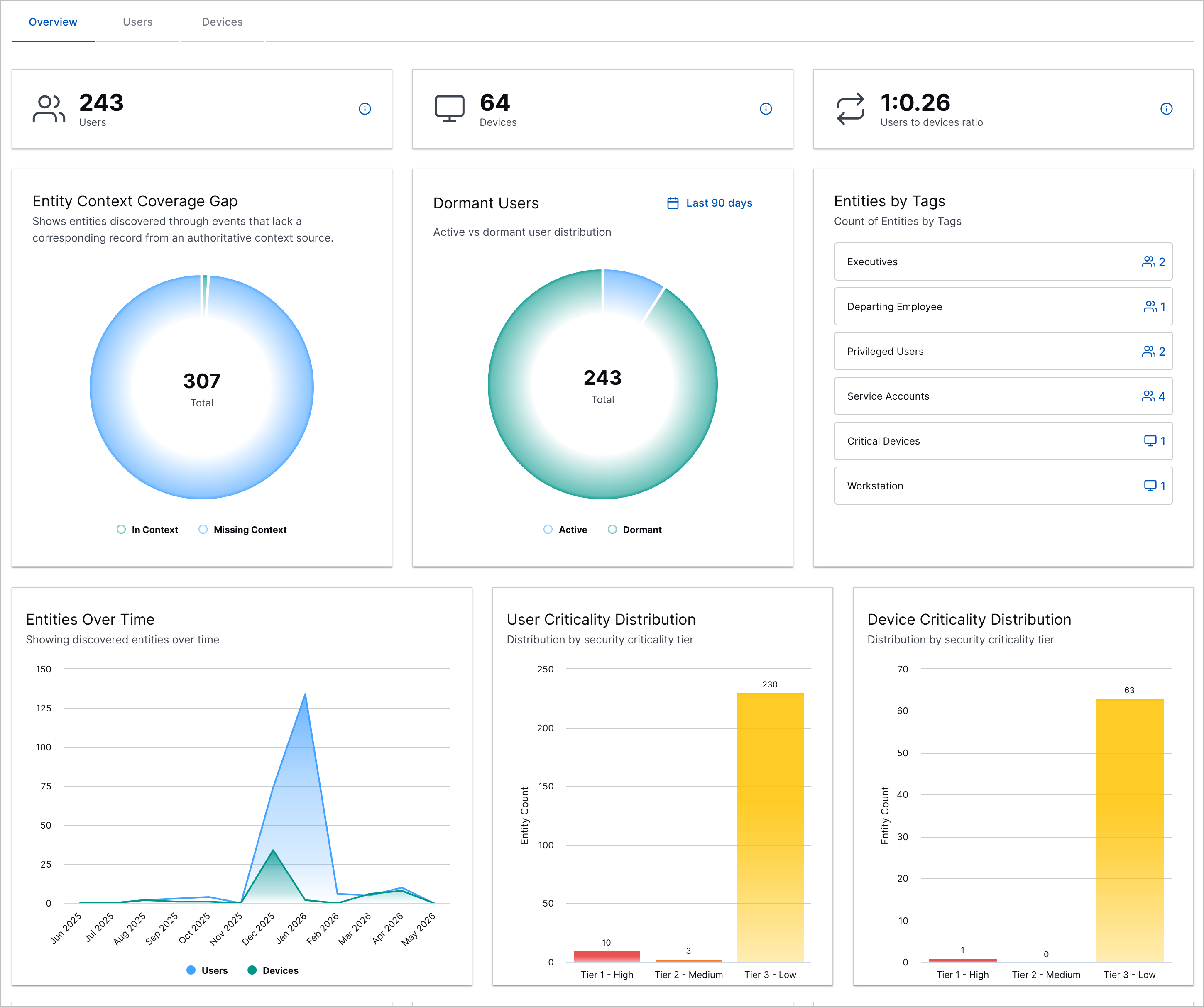
The Overview tab in Attack Surface Insights.

You can use the figures and charts to understand:

  • The total number of user entities in your environment

  • The total number of device entities in your environment

  • The ratio of user entities to device entities

  • The number of entities with and without links to context

  • The distribution of dormant and active users

  • The number of entities assigned each tag

  • Trends in the total number of user and device entities in your environment in the past 12 months

  • The number of user entities assigned each security criticality

  • The number of device entities assigned each security criticality

Continuous Linking

Existing entities can now be linked to new context data even after the entity has been created.

Note

Attack Surface Insights continues to query context only when two conditions are met:

  • An event containing an identifying attribute value is created

  • Attack Surface Insights hasn't looked up the attribute value in your context tables in the last 24 hours.

Caution

You may see analytics rules for first-time user behaviors re-trigger on user entities that have already been observed or duplicate detections created for the same user entity.

This is an expected, one-time effect of enabling continuous linking on your environment as Attack Surface Insights realigns the relationships between entities.

When previously separate user identities are linked using continuous linking, the newly created entity is assigned a new internal identifier, so the analytics engine treats it as a new user entity. The entity with the new internal identifier re-triggers analytics rules detecting first-time user behaviors. The resulting detections are related to updated entity relationships rather than new activity.

We recommend that you continue your standard investigation workflows and keep this one-time effect in mind when reviewing alerts.

Attack Surface Insights-Related Enrichment Enhancements

Attack Surface Insights now creates entities more accurately and consistently with new and updated Log Stream pre-built enrichment rules.

To ensure user entities are accurately created, new pre-built enrichment rules now correctly parse and enrich events with validated structured data:

  • User to Email Address – Enriches email_address from user

  • Destination User to Destination Email Address – Enriches dest_email_address from dest_user

  • User to User SID or User ID – Enriches user_sid and user_id from user.

  • Destination User to Destination User SID or Destination User ID – Enriches dest_email_address from dest_user

  • Microsoft User UPN to Email Address Enricher – Enriches email_address from user_upn

For more precise control over entity creation and to streamline rule logic, the following pre-built enrichment rules have been updated to use Discard_EM_USER and Discard_EM_HOST m_tags values and consolidate logic from other enrichment rules:

  • Discard EM HOST – Adds the m_tags field with the Discard_EM_HOST value to an event if an IP address is present in the src_host or dest_host event fields

  • Discard EM USER – Adds the m_tags field with the Discard_EM_USER value to events associated with ephemeral user accounts or Exabeam accounts

To ensure user entities are consistently and accurately created, the logic of several pre-built enrichment rules has been integrated directly into Attack Surface Insights or consolidated into other pre-built enrichment rules. These pre-built enrichment rules are now obsolete and have been removed:

  • UID to User Lookup

  • EmployeeNumber to User Lookup

  • Email to User Enricher-1

  • Destination Email to Destination User Enricher-1

  • Email to User Enricher-2

  • Destination Email to Destination User Enricher-2

  • User SID to User Lookup

  • Microsoft User UPN to User/Email Enricher

  • CrowdStrike Asset ID to User Lookup

  • Discard EM External

  • Discard EM Ephemeral

  • Discard Exabeam Users

Cloud Collectors

Feature

Description

PingOne Identity Cloud Collector

The PingOne Identity Cloud Collector is now available as part of Cloud Collectors to facilitate ingestion of audit log events that include user-related activities, poll subscription, and system configuration changes.

S2W Threat Intelligence Cloud Collector

The S2W Threat Intelligence Cloud Collector is now available as part of Cloud Collectors to facilitate ingestion of threat intelligence data, such as threat detections, brand or digital abuse, and blockchain data.

Workday Cloud Collector

The Workday Cloud Collector is now available as part of Cloud Collectors to facilitate ingestion of user activity logs from the Workday API to identify which specific users are making requests and the nature of the interactions being performed. The cloud collector also tracks the total volume of these requests with relevant event metadata, including details such as IP addresses and device types.

Support for the CLP API by the ChatGPT Enterprise Cloud Collector

The ChatGPT Enterprise Cloud Collector now supports Audit Logs data source to collect the data related to actions performed on the ChatGPT CLP.

Support for REST API OAuth2.0 JWT Grant Authentication

The REST API Cloud Collector now supports the OAuth2.0 JWT Grant authentication that lets collectors securely obtain access tokens without user interaction using signed tokens and key pairs. This enhances security, protects data integrity, and is optimized for machine-to-machine communication.

Support for DST-Based Time Adjustment

A cloud collector now determines whether Daylight Saving Time (DST) is active based on the current date and automatically adjusts the time by adding or subtracting one hour, ensuring more accurate time reporting.

Early Access Collectors

Google Workspace Context Cloud Collector

The Google Workspace Context Cloud Collector is now available as part of Cloud Collectors early access program to facilitate ingestion of user context data.

The early access program offers you an opportunity to gain access to the latest cloud collectors before their official release. To participate, see Sign Up for the Early Access Program.

Context Management

Feature

Description

Google Workspace Context Tables

tile-google.png

Context Management now supports a preconfigured onboarding experience for Google Workspace context tables. These tables process data that is ingested by a corresponding Google Workspace Context cloud collector. By default these context tables process a predetermined set of user attributes from the source collector and then map these attributes to a set of standardized Exabeam target attributes.

For more information, see Google Workspace Context Tables in the Context Management Guide.

Correlation Rules

Feature

Description

Suspicious Improbable Travel Template Enhancement

You can now more accurately detect when a user logs in from geographically distant locations within a short time frame.

The Suspicious Improbable Travel correlation rule template now requires the location_city event field to trigger, which ensures that the correlation rule detects logins from physical locations and not VPN sessions.

Dashboards

Feature

Description

New Schedule Reports Permission

A new Manage All Schedule Reports permission has been added for the Dashboards application. By default, the new permission is assigned to Administrator level roles. It allows administrators to view, edit, and delete scheduled reports that have been created by any users. With this new capability, administrators can now perform audit, cleanup, and maintenance tasks on scheduled reports created by any users in their environments.

For more information about working with scheduled reports, see Configure and Manage Scheduled Reports in the Dashboards Guide.

For information about this new user permission, see Threat Detection Permissions in theNew-Scale Security Operations Platform Guide.

Redesigned Visualization Authoring

A new Create a Custom Visualization page had been designed to streamline and simplify the process of authoring new visualizations. On the new page, you can switch between two panels for different authoring experiences:

  • Basic – On the Basic panel, you can manually select data fields, metrics, filters, and chart types. This authoring method provides granular control to tailor the data to your exact specifications. Even if you start creating a visualization using the Exabeam Nova auto-create method, you can switch to the Basic panel to make modifications. For more information about this visualization authoring method, see Create a Visualization Using the Basic Method in the Dashboards Guide.

  • Exabeam Nova – On this panel you can use the Exabeam Nova method and its set of AI-driven capabilities to quickly auto-create a visualization from a natural language prompt. To help you write a valid prompt, the panel provides a list of Example Prompts of different types. It also provides a list of Recent Prompts in case you want to reuse a previous prompt. If you want to further tailor the visualization results, you can switch to the Basic panel and make more granular modifications. For more information about this visualization authoring method, see Auto-Create a Visualization from a Natural Language Prompt in the Dashboards Guide.

The new Create a Custom Visualization page also features a number of design improvements that enhance the authoring process, including:

  • A more intuitive division between authoring tools on the left and preview panes on the right

  • No need to specify a data category at the start of the process, so your choice of data fields and metrics is not limited by an initial category selection

  • Data and Filters panels that require fewer clicks to make selections and offer a less complicated interface

  • Indicators in the Chart Type selection panel that make clear which chart types are valid for the data fields and metrics you've selected

  • Options to view the data table preview and the chart preview panes alone or together on the right side of the page

Log Stream

Feature

Description

Reorder Custom Enrichers to Run After Default Enrichers

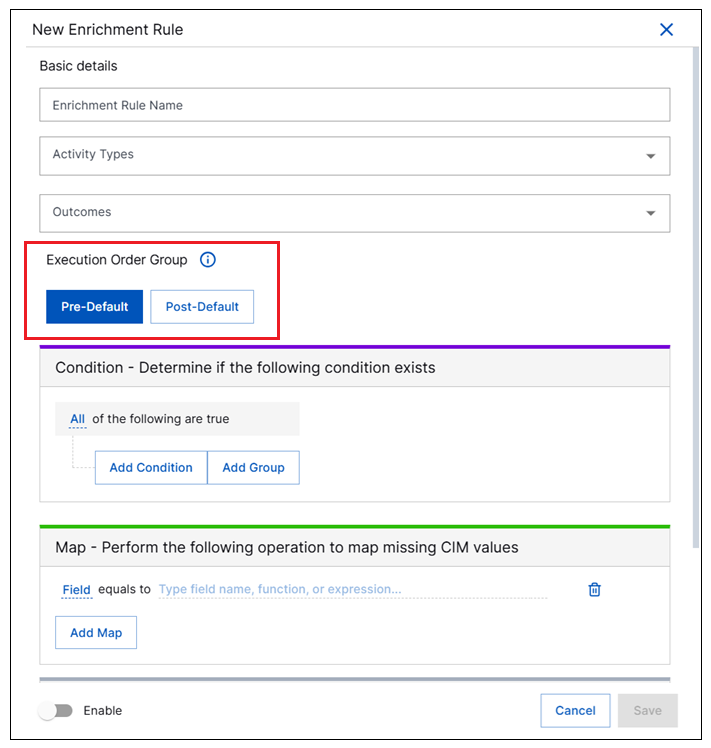
In Log Stream, you can now configure custom enrichment rules to be applied to incoming data after the default set of enrichment rules have been applied. Previously, custom enrichers were always applied before the default enrichers. This new ordering functionality is available when you create or update individual custom enrichers via a new set of Pre-Default and Post-Default options.

before-after-enrichers.png

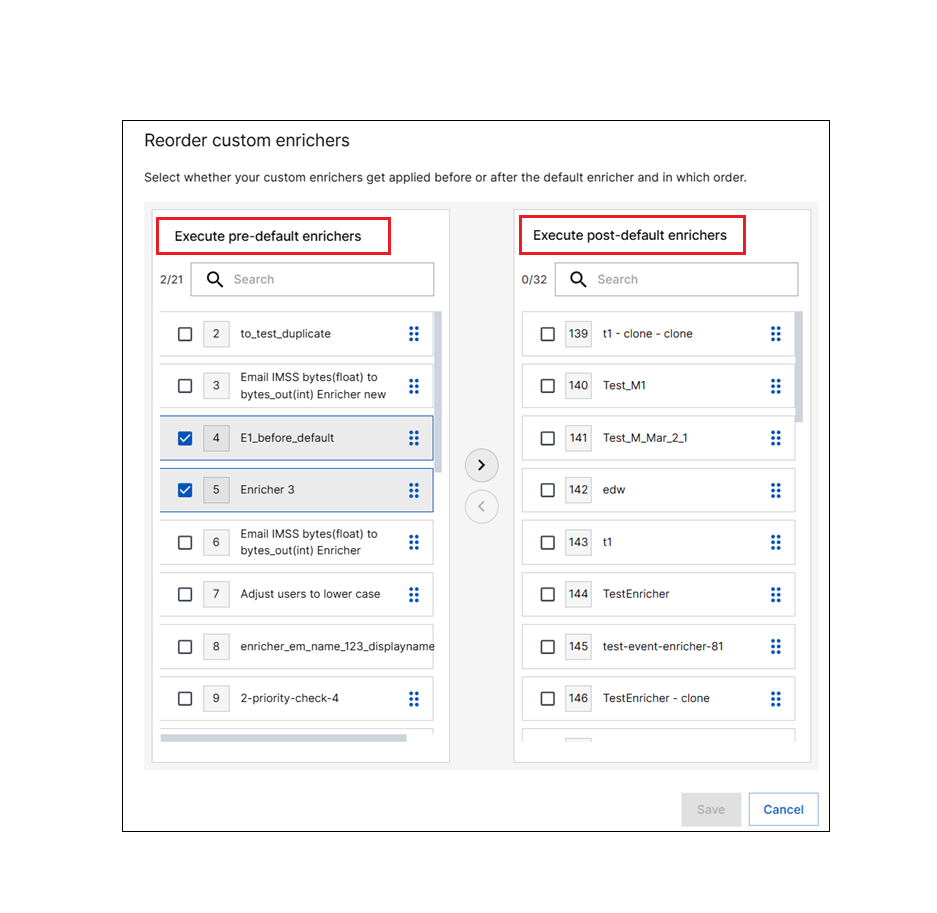
You can also make enricher ordering decisions via the Reorder option that lets you configure the priority order of all the existing custom enrichers in bulk. The new Reorder custom enrichers dialog box features separate columns for Pre-Default and Post-Default enrichers that are executed before or after the default enrichers. You can move custom enrichment rules between the columns and drag them into a specific priority order within each column.

reorder-enrichers.png

For more information about this type of enrichment ordering, see Reorder Enrichers or Define an Enrichment Rule in the Log Stream Guide.

New-Scale Platform

Feature

Description

Exabeam MCP Server Enhancements

The Exabeam MCP Server now supports additional functionality, including the ability to:

  • Create cases

  • Update cases

  • Create case notes

  • Update alerts

For more information, and to learn how to connect to the server, see Connect to Exabeam MCP Server in the New-Scale Security Operations Platform Administration Guide.

Global Search

A global search bar is now available as a Generally Available feature platform-wide to help locate entities such as users and devices in a single, integrated search.
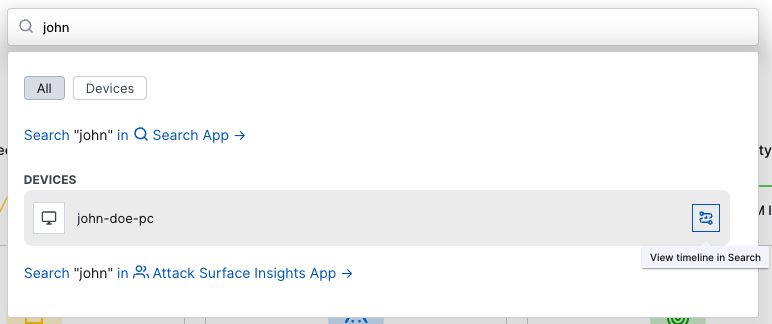
global-search.png

When further analysis is needed, you can quickly navigate from the search into specific apps for further advanced searching and investigation.

For more information, see Navigation Center in the New-Scale Security Operations Platform Administration Guide.

Outcomes Navigator

These features were released on March 30, 2026.

Feature

Description

Compliance Control Coverage Details

You can now understand how well your environment is configured to protect against a specific compliance control.

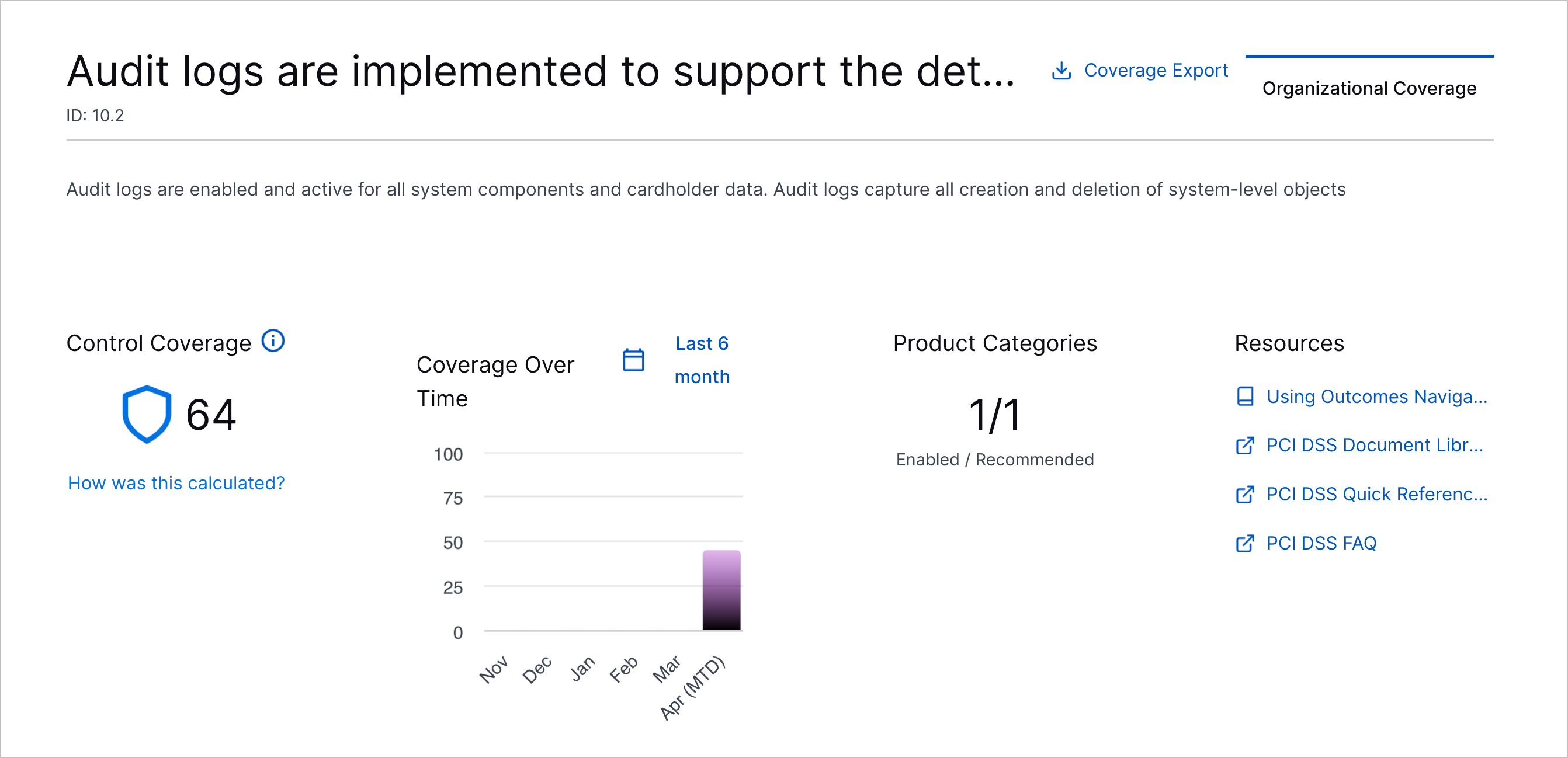
After you get a high-level view of your overall coverage for a compliance framework, you can drill down to a specific control in Control Details. You can:

  • Understand your compliance control coverage and find resources about the compliance framework

    The Organizational Coverage tab showing the coverage summary for a compliance control.
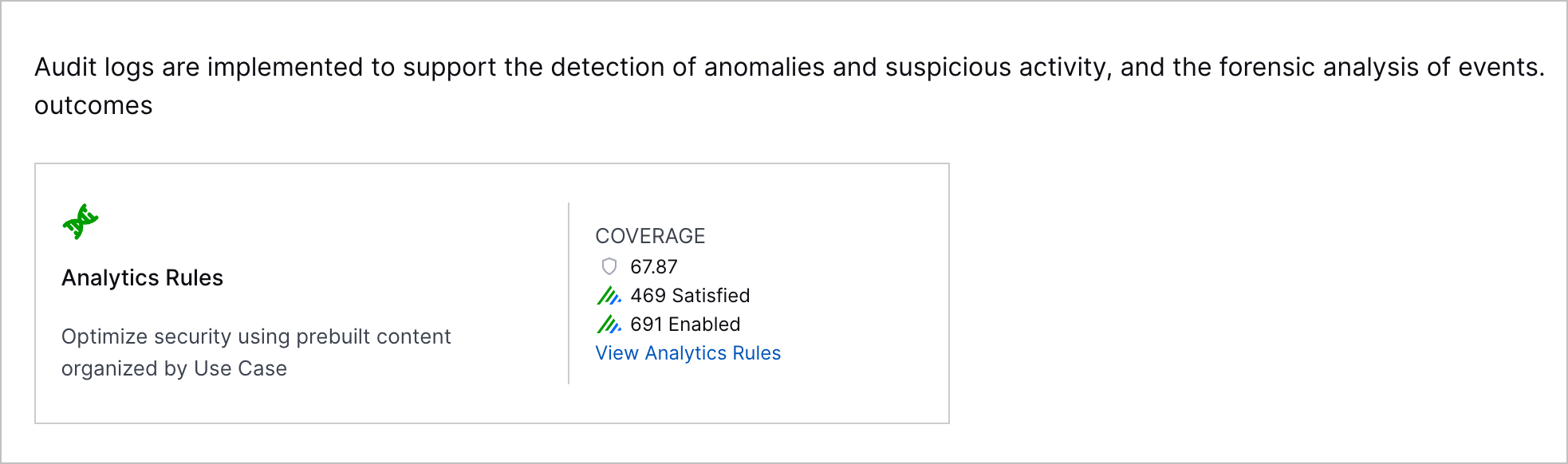
  • Learn what Exabeam applications and features your current configuration enables

    The Organizational Coverage tab showing the relevant analytics rules enabled by the configured product categories.
  • View the product categories you configured that provide data for related Exabeam applications and features

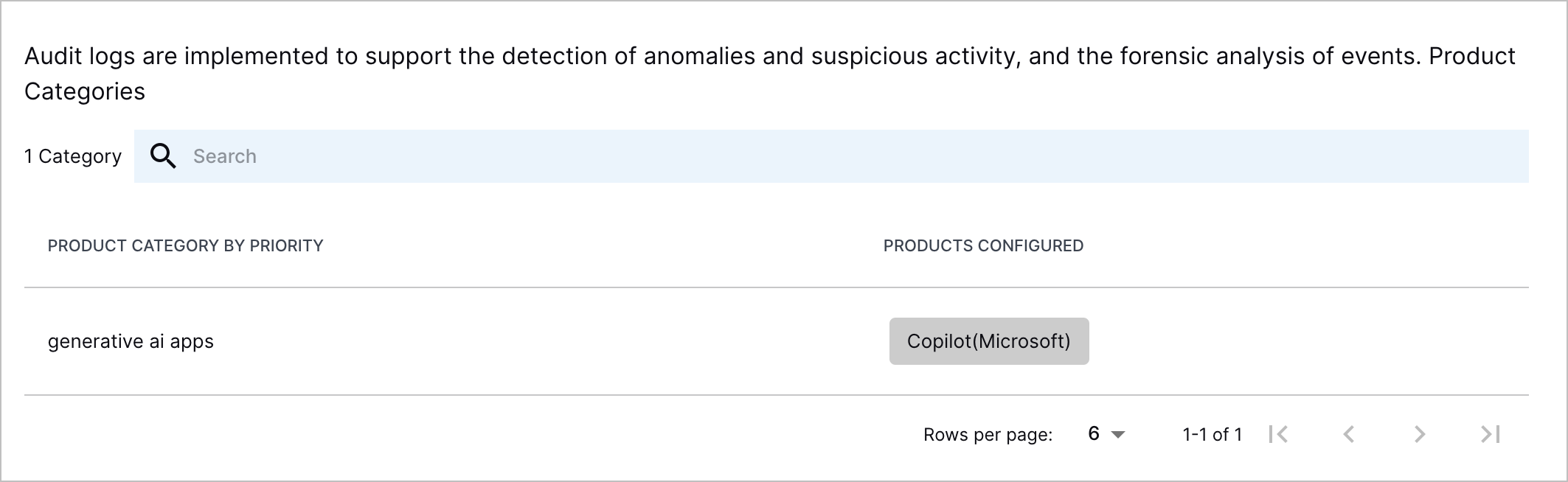
    The Organizational Coverage tab showing the configured product categories and product relevant to the compliance control.

Additional Compliance Framework Support

You can now track your coverage for three additional compliance frameworks:
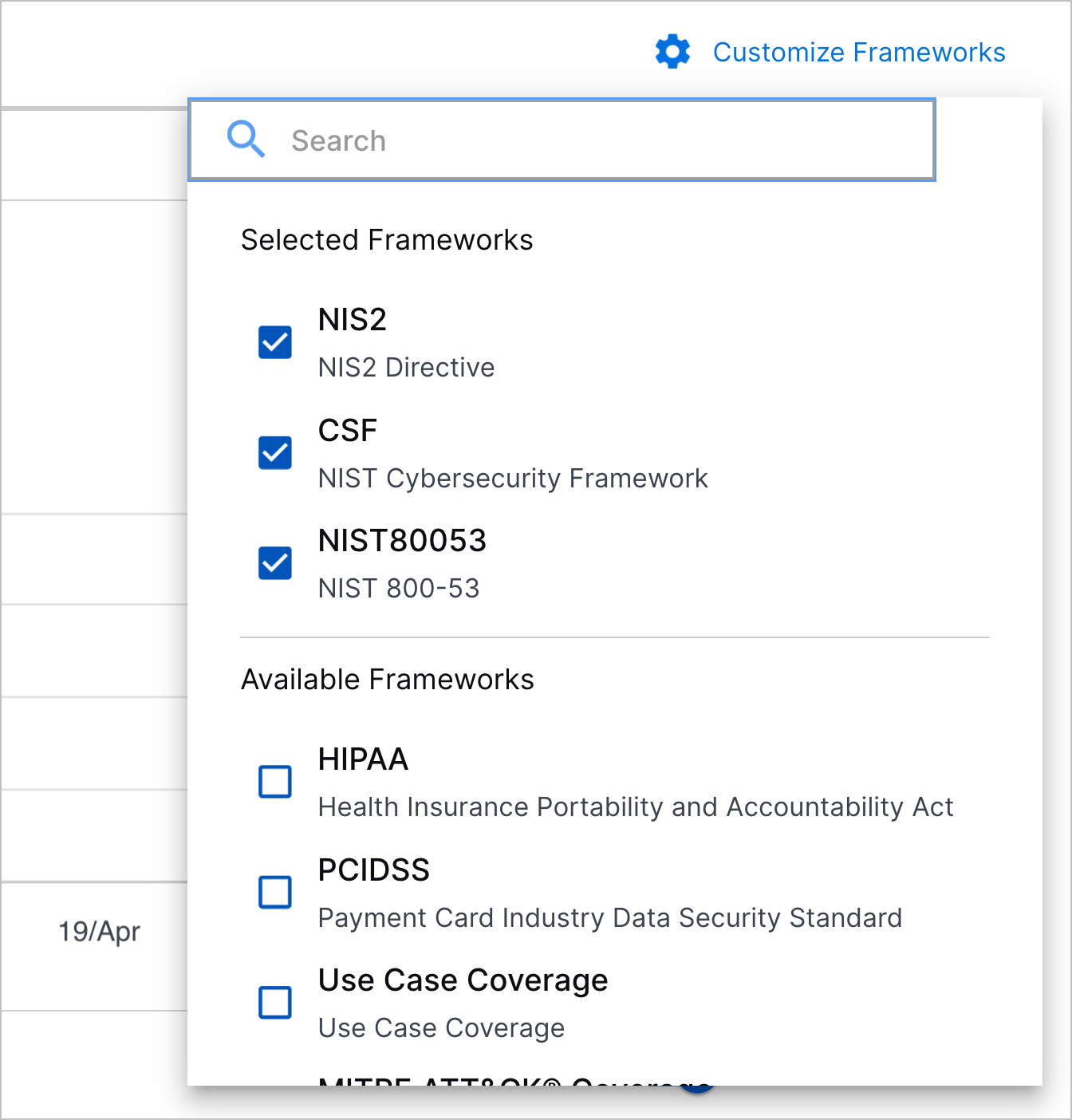
  • NIST 800-53

  • NIIST CSF

  • NIIS2

The Customize Frameworks menu opened with the NIS2, CSF, and NIST80053 compliance frameworks selected.

Search

Feature

Description

New Filter Capability in the Search Results Field Summary

Finding a specific field in the search result Summary list has been simplified. A new search field has been added to the Summary list in each of the search result views. Now, instead of expanding subject categories one-by-one to hunt for a specific field, you can start typing a field name in the new search field. The Summary list automatically filters to show only the fields in each subject category that match your filter criteria.
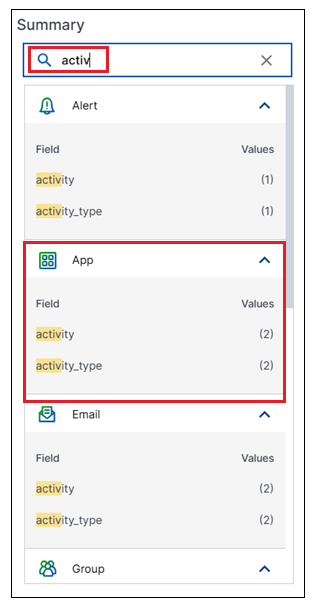
results-field-summary-search.png

For more information, see Field Summary in the Search Guide.

Site Collectors 2.19

Feature

Description

Ingestion of DNS Multiline Debug Logs: Multiline Processing Support

The Windows File Collector now can ingest Windows DNS Debug Logs with multiline processing support.  In addition to DNS-specific multi-line entries, the collector also supports other multi-line use cases where a single logical record spans multiple lines of text.

Support for the SASL_SSL authentication method for the Kafka Collector

The Kafka collector now supports the SASL_SSL authentication method. SASL_SSL offers the higher level of security by combining SSL encryption with SASL-based authentication such as username and password. The SASL_SSL authentication method securely encrypts all network traffic and is the preferred standard for Kafka cloud deployments.

Threat Center

Feature

Description

Saved Search Visibility

To collaborate more effectively with other team members, you can now share saved searches with other users who share your environment.

When you create a new saved search, you can now toggle whether the saved search is private or public.
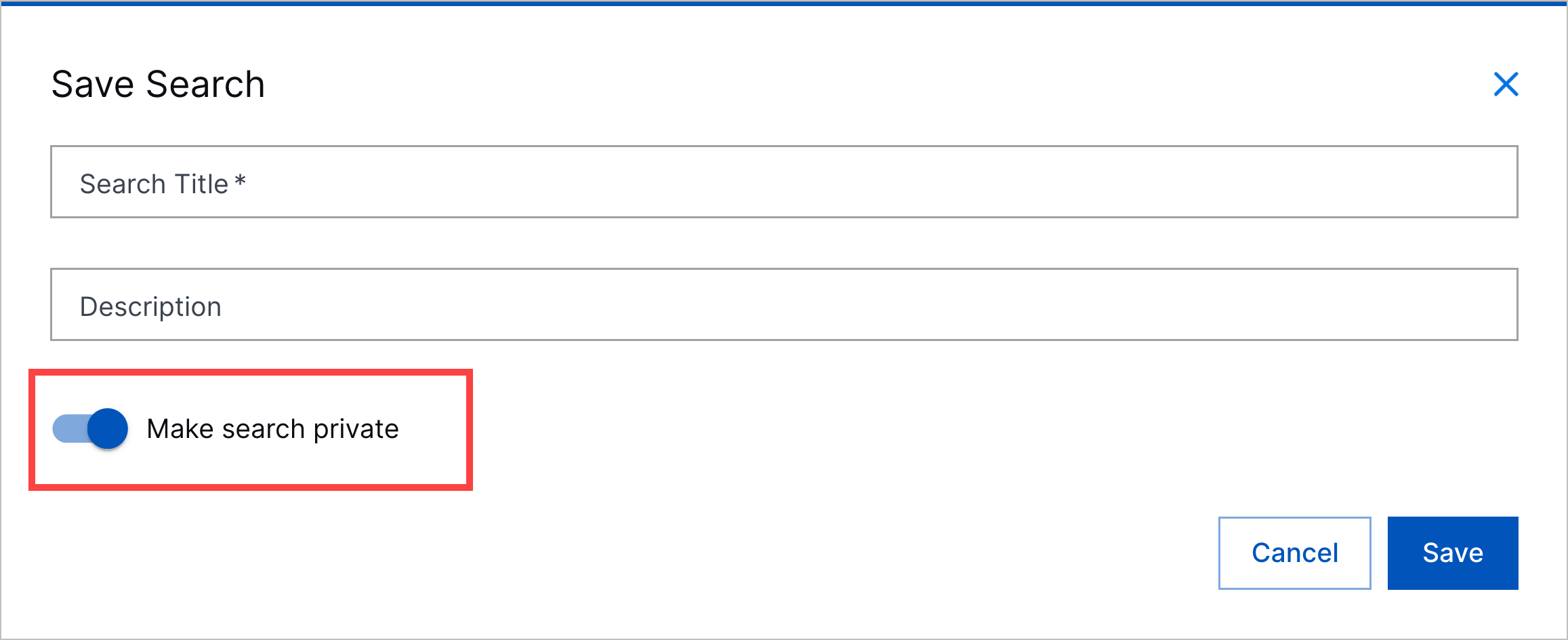
The Save Search window with the Make search private toggle highlighted in a red rectangle.

A private saved search is visible only to you and is marked Private A blue lock. in the list of saved searches.

A public saved search can be run, edited, and deleted by any user in your environment and is marked as Public A human figure outlined in blue partially obscuring another human figure outlined in blue. in the list of saved searches.

Saved and Recent Searches Navigation Enhancement

To easily access your saved and recent searches, you can now click on Searches:

Searches underneath the search bar highlighted in a red rectangle.

Find your saved searches under Saved Searches. Find your recent searches under Recent Searches.

Saved and Recent Search Findability Enhancements

To easily find saved and recent searches of interest, you can now sort and search for saved and recent searches.

You can sort saved searches by title, creator, and the date and time they were last modified. You can search saved searches by title, query, and creator.

You can sort recent searches by the date and time they were last run. You can search recent searches by query.

Threat Detection Management

Feature

Description

GetContextAttribute() Function

You can now more precisely query context tables in analytics rules with the GetContextAttribute() function.

For a context table, GetContextAttribute() function returns the value of an attribute column for a given value in a row of the key column.

New and Updated Pre-Built Analytics Rules

You can now better detect abnormal AI agent activity, abnormal cloud application usage, password spray events, unapproved access tools, email recipient anomalies, and abnormal endpoint activity with new and updated pre-built analytics rules.

You can now better detect abnormal AI agent activity in your environment with the following new pre-built analytics rules:

  • Fact-UI-UOO – A user outside the organization was invited to this platform

  • NumCP-AI-CDC-UPLT –Abnormal number of AI conversations successfully deleted by this user on this platform

  • NumCP-AI-CSC-UPLT – Abnormal number of AI conversations successfully shared by this user on this platform

You can now better detect abnormal cloud application activity with the following new pre-built analytics rules:

  • NumDCP-FC-EC-U-FP – An abnormal number of unique files have been copied in this platform for this user.

  • Prof-FS-T-U-IT – This is the first time an item shared of this type (file, folder, etc) has been observed for this user.

  • Prof-GCreate-U-O-U – This is the first time for this user to create a group for the organization.

  • Prof-GCreate-U-O-UD – This is the first time for users in this department to create a group for the organization.

You can now better detect password spray events without a defined source host with the following new pre-built analytics rules:

  • NumDCP-EL-UC-DE-U – An abnormal number of unique user names have been observed in logins to this endpoint. These events may include both failed and successful logins.

  • NumDCP-EL-UC-DE-UUnknown – An abnormal number of unique uknown user names have been observed in failed logins to this endopoint.

To more accurately and precisely detect abnormal endpoint activity, three obsolete pre-built analytics rules were replaced by the following new pre-built analytics rules:

  • Cntx-PC-ECrit-Server-SE – Source endpoint is a server: True\False

  • Cntx-PC-ECrit-Server-DE – Destination endpoint is a server: True\False

  • Cntx-PC-ECrit-CS-SE – Source endpoint is critical or a Domain Controller: True\False

  • Cntx-PC-ECrit-CS-DE – Destination endpoint is critical or a Domain Controller: True\False

  • Cntx-SA-ECrit-SE – Source endpoint is critical: True\False

  • Cntx-SA-ECrit-DE – Destination endpoint is critical: True\False

To ensure browser-related pre-built analytics rules trigger on events containing the user_agent_client event field, featureValue and trainOnCondition were updated for the following pre-built analytics rules:

  • Prof-GA-Brwsr-O-Brwsr – This is the first time this web browser has been observed for the organization.

  • Prof-GA-Brwsr-UD-Brwsr – This is the first time this web browser has been observed for users in this department.

To track abnormal first-time email activity for recipients instead of senders, scopeValue was updated for the following pre-built analytics rules:

  • Prof-EMR-ED-UD-ED – This is the first time a user in this department has received an email from this email domain.

  • Prof-EMR-FileExt-UD-FileExt – This is the first time a user in this department has received an email attachment with this extension.

  • Prof-EMR-ED-U-ED – This is the first time this user has received an email from this email domain.

To detect first-time or anomalous use of unapproved access tools, trainOnCondition was updated to reference the new pre-built Unapproved Access Tools context table for the following pre-built analytics rules:

  • Prof-PC-PPN-PN-PPN – This is the first time this parent process has been observed for this matured child process.

  • Prof-PC-PPN-PPN-PN – This is the first time this child process has been observed for this matured parent process.

  • Prof-PC-PN-DE-PN – This is the first time this process has been executed on this endpoint. This feature only models processes from - Windows and Unix commands, pentest tools, system enumeration, account enumeration and network sniffers.

  • Prof-PC-PN-Plt-PN – This is the first time this process has been executed in this platform. This feature only models processes from - Windows and Unix commands, pentest tools, system enumeration, account enumeration and network sniffers.

  • Prof-PC-PN-PltSZ-PN – This is the first time this process has been executed in this platform from this network zone. This feature only models processes from - Windows and Unix commands, pentest tools, system enumeration, account enumeration and network sniffers.

  • Prof-PC-PN-PltU-PN – This is the first time this process has been executed in this platform for this user. This feature only models processes from - Windows and Unix commands, pentest tools, system enumeration, account enumeration and network sniffers.

  • Prof-PC-PN-PltUD-PN – This is the first time this process has been executed in this platform for users in this department. This feature only models processes from - Windows and Unix commands, pentest tools, system enumeration, account enumeration and network sniffers.

To prevent over-triggering on events with missing entity fields, trainOnCondition was updated for the following pre-built analytics rules:

  • Prof-GA-PrivU-PltOp-PrivU – This is the first time this successful operation has been performed on this platform by a non-privileged user. Operations can include function types, APIs, application activities and more.

  • NumCP-AI-MC-U – An abnormal amount of AI agent modifications have been observed for a user.

  • Prof-EL-AP-U-AP – This is the first time this user has attempted to perform a remote Windows login or access using this authentication package. These events may include both failed and successful logins.

  • NumDCP-EL-DEC-SE-DE – An abnormal number of unique destination endpoints have been observed in successful endpoint login events from this endpoint. These events may include interactive Window logins and other (interactive or not) OS logins.

  • NumSP-EMS-Bytes-U-Bytes – An abnormal amount of bytes have been sent in outgoing emails for this user.

  • Prof-EL-E-U-SE – This is the first time this user attempted to login from this endpoint. These events may include both failed and successful logins.

  • Prof-UCreate-E-O-SE – This is the first time a user account was created from this endpoint.

  • Prof-UCreate-E-U-SE – This is the first time this user has created a user account from this endpoint.

  • Prof-UPwdMod-U-O-U – This is the first time this user has modified the password of another user account.

  • Prof-USwtch-U-O-U – This is the first time this user has switched accounts.

To prevent over-triggering on events with missing entity fields, actOnCondition was updated for the following pre-built analytics rule:

  • Fact-PCwsreset-UAC – The WSReset (Windows Store Reset) process has spawned a child process that it shouldn't normally spawn. This sigma rule is authored by E.M. Anhaus (originally from Atomic Blue Detections, Tony Lambert), oscd.community, Florian Roth and is licensed under Detection Rule License (DRL), https://github.com/SigmaHQ/sigma/blob/master/LICENSE.Detection.Rules.md. Reference: https://github.com/SigmaHQ/sigma/blob/master/rules/windows/process_creation/proc_creation_win_uac_bypass_wsreset.yml

To correctly detect the use of curl commands to install OpenClaw, actOnCondition was updated for the following pre-built analytics rule:

  • Fact-PC-OpenClawInstall – OpenClaw has been installed using the command line tool 'curl'. There is nothing inherently malicious about OpenClaw, however, by default it uses insecure practices and may expose significant security flaws.

To correctly detect RDP connections using ephemeral source ports, trainOnCondition was updated for the following pre-built analytics rule:

  • Prof-Network-ERDP-DE-SE – This is the first time a successful RDP connection has been observed from this source endpoint to this destination endpoint.

To remove a reference to an invalid variable, detectionReason was updated for the following pre-built analytics rule:

  • Cntx-FA-FCrit-SrcExecutable – Source file is an executable: True\False

To more clearly communicate how the pre-built analytics rule works, title, description, and detectionReason were updated for the following pre-built analytics rules:

  • Cntx-Network-DPClass – Target port class. If the initiator cannot be determined from the event, it is inferred based on port values: the IP\endpoint communicating with the lower port is considered the initiator.

  • NumDCP-Network-DIPC-O-DIP-SE-Fail – An abnormal number of unique target IPs have been observed in failed internal communications for the organization per initiated endpoint. If the initiator cannot be determined from the event, it is inferred based on port values: the IP\endpoint communicating with the lower port is considered the initiator.

  • NumDCP-Network-DIPC-O-DIP-SIP-Fail – An abnormal number of unique target IPs have been observed in failed internal communications for the organization per initiated IP. If the initiator cannot be determined from the event, it is inferred based on port values: the IP\endpoint communicating with the lower port is considered the initiator.

  • NumDCP-Network-DIPC-O-DIP-U-Fail – An abnormal number of unique target IPs have been observed in failed internal communications for the organization per user. If the initiator cannot be determined from the event, it is inferred based on port values: the IP\endpoint communicating with the lower port is considered the initiator.

  • NumDCP-Network-DIPC-SE-DIP-Fail – An abnormal number of unique target IPs have been observed in failed internal communications that initiated by this endpoint. If the initiator cannot be determined from the event, it is inferred based on port values: the IP\endpoint communicating with the lower port is considered the initiator.

  • NumDCP-Network-DIPC-U-DIP-Fail – An abnormal number of unique target IPs have been observed in failed internal communications by this user. If the initiator cannot be determined from the event, it is inferred based on port values: the IP\endpoint communicating with the lower port is considered the initiator.

  • NumDCP-Network-DPC-SEDE-DP – An abnormal number of unique target ports have been observed in internal communication that initiated by this endpoint to this destination endpoint. If the initiator cannot be determined from the event, it is inferred based on port values: the IP\endpoint communicating with the lower port is considered the initiator. These events may include both failed and successful communications.

  • NumSP-Network-BytesFromExtIP-SZ-Bytes – An abnormal amount of bytes have been sent in externally initiated communication to this network zone. If the initiator cannot be determined from the event, it is inferred based on port values: the IP\endpoint communicating with the lower port is considered the initiator. These events may include both failed and successful communications.

  • NumSP-Network-BytesToExtIP-Failed-SE-Bytes – An abnormal amount of bytes have failed to be sent in communication that initiated from this endpoint to an external IP. If the initiator cannot be determined from the event, it is inferred based on port values: the IP\endpoint communicating with the lower port is considered the initiator.

  • NumSP-Network-BytesToExtIP-SE-Bytes – An abnormal amount of bytes have been sent in communication that initiated from this endpoint to an external IP. If the initiator cannot be determined from the event, it is inferred based on port values: the IP\endpoint communicating with the lower port is considered the initiator. These events may include both failed and successful communications.

  • NumSP-Network-BytesToExtIP-SZ-Bytes – An abnormal amount of bytes have been sent in communication that initiated in this network zone to an external IP. If the initiator cannot be determined from the event, it is inferred based on port values: the IP\endpoint communicating with the lower port is considered the initiator. These events may include both failed and successful communications.

  • Prof-Network-FromExtIP-DE-DP – This is the first time a successful connection to this port has been initiated by an external IP for this target endpoint. If the initiator cannot be determined from the event, it is inferred based on port values: the IP\endpoint communicating with the lower port is considered the initiator.

  • Prof-Network-FromExtIP-DZ-DP – This is the first time a successful connection to this port has been initiated by an external IP for this target zone. If the initiator cannot be determined from the event, it is inferred based on port values: the IP\endpoint communicating with the lower port is considered the initiator.

  • Prof-Network-FromExtIP-O-DE – This is the first time a successful connection to this endpoint has been initiated by an external IP for the organization. If the initiator cannot be determined from the event, it is inferred based on port values: the IP\endpoint communicating with the lower port is considered the initiator.

  • Prof-Network-FromExtIP-O-DP – This is the first time a successful connection to this port has been initiated by an external IP for the organization. If the initiator cannot be determined from the event, it is inferred based on port values: the IP\endpoint communicating with the lower port is considered the initiator.

  • Prof-Network-FromExtIP-O-DZ – This is the first time a successful connection to an endpoint in this network zone has been initiated by an external IP for the organization. If the initiator cannot be determined from the event, it is inferred based on port values: the IP\endpoint communicating with the lower port is considered the initiator.

To prevent false positives for new users and defer rarity scoring to organization-level pre-built analytics rules, maturityThreshold and scoreUnless were updated for the following pre-built analytics rule:

  • Prof-GCreate-U-P-U – This is the first time this user has created a group on this platform.

  • Prof-GCreate-U-P-UD – This is the first time users in this department have created a group on this platform.

To correct a typo, detectionReason was updated in the following pre-built analytics rule:

  • Prof-CA-IPM-AddMember-O-U – This is the first time a user has successfully modified the attributes of a compute image in AWS and shared it with a user/group.

To prevent over-triggering on first-time observations and to establish a good baseline, minimumTrainingPeriodInDays was added to the following pre-built analytics rules:

  • Prof-RC-Perm-Plt-Perm – This is the first time a role has been created with these permissions on this platform.

  • Prof-USwtch-U-O-U – This is the first time this user has switched accounts.

  • Prof-EMR-ED-UD-ED – This is the first time a user in this department has received an email from this email domain.

  • Prof-UCreate-E-O-SE – This is the first time a user account was created from this endpoint.

  • Prof-GCreate-U-P-U – This is the first time this user has created a group on this platform.

  • Prof-GA-PrivU-PltOp-PrivU – This is the first time this successful operation has been performed on this platform by a non-privileged user. Operations can include function types, APIs, application activities and more.

  • Prof-GA-Brwsr-O-Brwsr – This is the first time this web browser has been observed for the organization.

  • Prof-UPwdMod-U-O-U – This is the first time this user has modified the password of another user account.

  • Prof-UCreate-E-U-SE – This is the first time this user has created a user account from this endpoint.

  • Prof-PC-PN-PltSZ-PN – This is the first time this process has been executed in this platform from this network zone. This feature only models processes from - Windows and Unix commands, pentest tools, system enumeration, account enumeration and network sniffers.

  • Prof-EMR-ED-U-ED – This is the first time this user has received an email from this email domain.

  • Prof-PC-PN-PltU-PN – This is the first time this process has been executed in this platform for this user. This feature only models processes from - Windows and Unix commands, pentest tools, system enumeration, account enumeration and network sniffers.

  • Prof-PC-PN-PltUD-PN – This is the first time this process has been executed in this platform for users in this department. This feature only models processes from - Windows and Unix commands, pentest tools, system enumeration, account enumeration and network sniffers.

  • Prof-Network-FromExtIP-DZ-DP – This is the first time a successful connection to this port has been initiated by an external IP for this target zone. If the initiator cannot be determined from the event, it is inferred based on port values: the IP\endpoint communicating with the lower port is considered the initiator.

  • Prof-GCreate-U-P-UD – This is the first time users in this department have created a group on this platform.

  • Prof-EMR-FileExt-UD-FileExt – This is the first time a user in this department has received an email attachment with this extension.

  • Prof-CA-IPM-AddMember-O-U – This is the first time a user has successfully modified the attributes of a compute image in AWS and shared it with a user/group.

  • Prof-PC-PPN-PPN-PN – This is the first time this child process has been observed for this matured parent process.

  • Prof-Network-FromExtIP-O-DP – This is the first time a successful connection to this port has been initiated by an external IP for the organization. If the initiator cannot be determined from the event, it is inferred based on port values: the IP\endpoint communicating with the lower port is considered the initiator.

  • Prof-Network-ERDP-DE-SE – This is the first time a successful RDP connection has been observed from this source endpoint to this destination endpoint.

  • Prof-Network-FromExtIP-O-DE – This is the first time a successful connection to this endpoint has been initiated by an external IP for the organization. If the initiator cannot be determined from the event, it is inferred based on port values: the IP\endpoint communicating with the lower port is considered the initiator.

  • Prof-Network-FromExtIP-DE-DP – This is the first time a successful connection to this port has been initiated by an external IP for this target endpoint. If the initiator cannot be determined from the event, it is inferred based on port values: the IP\endpoint communicating with the lower port is considered the initiator.

  • Prof-PC-PN-Plt-PN – This is the first time this process has been executed in this platform. This feature only models processes from - Windows and Unix commands, pentest tools, system enumeration, account enumeration and network sniffers.

  • Prof-PC-PN-DE-PN – This is the first time this process has been executed on this endpoint. This feature only models processes from - Windows and Unix commands, pentest tools, system enumeration, account enumeration and network sniffers.

  • Prof-EL-AP-U-AP – This is the first time this user has attempted to perform a remote Windows login or access using this authentication package. These events may include both failed and successful logins.

  • Prof-EL-E-U-SE – This is the first time this user attempted to login from this endpoint. These events may include both failed and successful logins.

  • Prof-Network-FromExtIP-O-DZ – This is the first time a successful connection to an endpoint in this network zone has been initiated by an external IP for the organization. If the initiator cannot be determined from the event, it is inferred based on port values: the IP\endpoint communicating with the lower port is considered the initiator.

  • Prof-GA-Brwsr-UD-Brwsr – This is the first time this web browser has been observed for users in this department.

  • Prof-PC-PPN-PN-PPN – This is the first time this parent process has been observed for this matured child process.

To ensure detectionReason is clear and readable even when an event field doesn't exist, dynamic variables have been removed from detectionReason for all pre-built contextFeature analytics rules.

To map pre-built analytics rules to compliance controls so you can assess your control coverage in Outcomes Navigator, compliance was updated for 789 pre-built analytics rules.

To more accurately and precisely detect abnormal endpoint activity, the following obsolete pre-built analytics rules were replaced by six new pre-built analytics rules and subsequently removed:

  • Cntx-SA-ECrit – Endpoint is critical: True\False

  • Cntx-PC-ECrit-CS – Endpoint is critical or a Domain Controller: True\False

  • Cntx-PC-ECrit-Server – Endpoint is a server: True\False

Because the following pre-built analytics rules, which were intended to detect abnormal activity, were triggering more frequently than intended, they have been removed for further evaluation:

  • NumDCP-Network-DEC-SE-DE – An abnormal number of unique destination endpoints have been accessed in internally initiated communication from this endpoint. If the initiator cannot be determined from the event, it is inferred based on port values: the IP\endpoint communicating with the lower port is considered the initiator. These events may include both failed and successful communications.

  • NumDCP-Network-DIPC-DP-DIP – An abnormal number of unique target IPs have been observed in internal communications to this port. If the initiator cannot be determined from the event, it is inferred based on port values: the IP\endpoint communicating with the lower port is considered the initiator. These events may include both failed and successful communications.

  • NumDCP-Network-DIPC-DP-DIP-SE – An abnormal number of unique target IPs have been observed in internal communications to this port per initiated endpoint. If the initiator cannot be determined from the event, it is inferred based on port values: the IP\endpoint communicating with the lower port is considered the initiator. These events may include both failed and successful communications.

  • NumDCP-Network-DIPC-DP-DIP-SIP – An abnormal number of unique target IPs have been observed in internal communications to this port per initiated IP. If the initiator cannot be determined from the event, it is inferred based on port values: the IP\endpoint communicating with the lower port is considered the initiator. These events may include both failed and successful communications.

  • NumDCP-Network-DIPC-O-DIP-SE – An abnormal number of unique target IPs have been observed in failed internal communications for the organization per initiated endpoint. If the initiator cannot be determined from the event, it is inferred based on port values: the IP\endpoint communicating with the lower port is considered the initiator.

  • NumDCP-Network-DIPC-O-DIP-SIP – An abnormal number of unique target IPs have been observed in internal connection attempts for the organization per initiated IP. If the initiator cannot be determined from the event, it is inferred based on port values: the IP\endpoint communicating with the lower port is considered the initiator. These events may include both failed and successful communications.

  • NumDCP-Network-DIPC-O-DIP-U – An abnormal number of unique target IPs have been observed in internal connection attempts for the organization per user. If the initiator cannot be determined from the event, it is inferred based on port values: the IP\endpoint communicating with the lower port is considered the initiator. These events may include both failed and successful communications.

  • NumDCP-Network-DIPC-SE-DIP – An abnormal number of unique target IPs have been accessed in internal communication that initiated by this endpoint. If the initiator cannot be determined from the event, it is inferred based on port values: the IP\endpoint communicating with the lower port is considered the initiator. These events may include both failed and successful communications.

  • NumDCP-Network-DIPC-U-DIP – An abnormal number of unique target IPs have been observed in internal connection attempts by this user. If the initiator cannot be determined from the event, it is inferred based on port values: the IP\endpoint communicating with the lower port is considered the initiator. These events may include both failed and successful communications.

  • Prof-Network-ToExtIP-O-DP – This is the first time a successful connection to an external IP and this port has been observed for the organization. If the initiator cannot be determined from the event, it is inferred based on port values: the IP\endpoint communicating with the lower port is considered the initiator.

  • Prof-Network-ToExtIP-O-SE – This is the first time a successful connection to an external IP has been initiated by this endpoint. If the initiator cannot be determined from the event, it is inferred based on port values: the IP\endpoint communicating with the lower port is considered the initiator.

  • Prof-Network-ToExtIP-O-SZ – This is the first time a successful connection to an external IP has been initiated by an endpoint in this network zone. If the initiator cannot be determined from the event, it is inferred based on port values: the IP\endpoint communicating with the lower port is considered the initiator.

Resolved Issues

Hotfixes in Site Collector 2.19 Release

The following table provides details about the hotfixes and enhancements implemented after the May 2026 release.

Release Number

Description

2.19.1

  • Updated the install/upgrade precheck to validate Docker-related disk space across the following fallback paths in order:

    /var/lib/docker → /var/lib → /var

  • Resolved a data loss issue for the Windows File Collector Multiline (DNS Debug) Logs where the final log entry was missing when only a head regex was configured.

Threat Detection Management Resolved Issues

Issue ID

Description

ENG-87685

numericCountProfiledFeature, numericDistinctCountProfiledFeature, and numericSumProfiledFeature analytics rules were not evaluated in conjunction with context rules in a feature vector, which resulted in inaccurate rarity scores for analytics rule detections.

Now, context rules are evaluated in conjunction with all analytics rule types.