
- 2026 Release Notes
- September 2026
- August 2026
- July 2026
- Attack Surface Insights
- Automation Management
- Cloud Collectors
- Dashboards
- Log Sources
- Log Stream
- New-Scale Platform
- Outcomes Navigator
- Search
- Site Collectors 2.21
- Threat Center
- Threat Detection Management
- Resolved Issues
- Site Collector 2.21: Resolved Issues
- Site Collector 2.21: Security Vulnerabilities Remediations
- June 2026
- Attack Surface Insights
- Automation Management
- Cloud Collectors
- Context Management
- Correlation Rules
- Dashboards
- Log Stream
- New-Scale Platform
- Outcomes Navigator
- Search
- Service Health and Consumption
- Site Collectors 2.20
- Threat Center
- Threat Detection Management
- Resolved Issues
- Site Collector 2.20: Security Vulnerabilities Remediations
- May 2026
- April 2026
- March 2026
- February 2026
- January 2026
- 2025 Release Notes
- December 2025
- November 2025
- October 2025
- September 2025
- August 2025
- July 2025
- June 2025
- May 2025
- April 2025
- March 2025
- February 2025
- January 2025
- Known Issues
July 2026
The New-Scale Security Operations Platform includes the following addressed features and new features for July 2026.
Attack Surface Insights
Feature | Description |
|---|---|
Email Address and Primary Login (Email Format) Linking | To reduce duplicate and orphan entities if the user identity data in your environment is inconsistent or incomplete, Attack Surface Insights now links the email_address event field with the Primary Login (Email Format) Active Directory field. If an incoming event is identified by the email_address field and there is no matching email_address in context, Attack Surface Insights now looks for the field value under the Primary Login (Email Format) field. If there is a matching field value, the entity is linked to that context record. |
Automation Management
Feature | Description | |
|---|---|---|
New Actions for threatcenter Pre-Built Service | You can now return all case and alert details with two new actions for the pre-built threatcenter service. You can use the the Get Case Details action to return:
You can use the Get Alert Details action to return:
| |
Default Action Timeout | This feature was released on August 5, 2026. To ensure playbook run predictably and to prevent processes from hanging, all actions, both pre-built and custom, now automatically time out after two minutes by default. | |
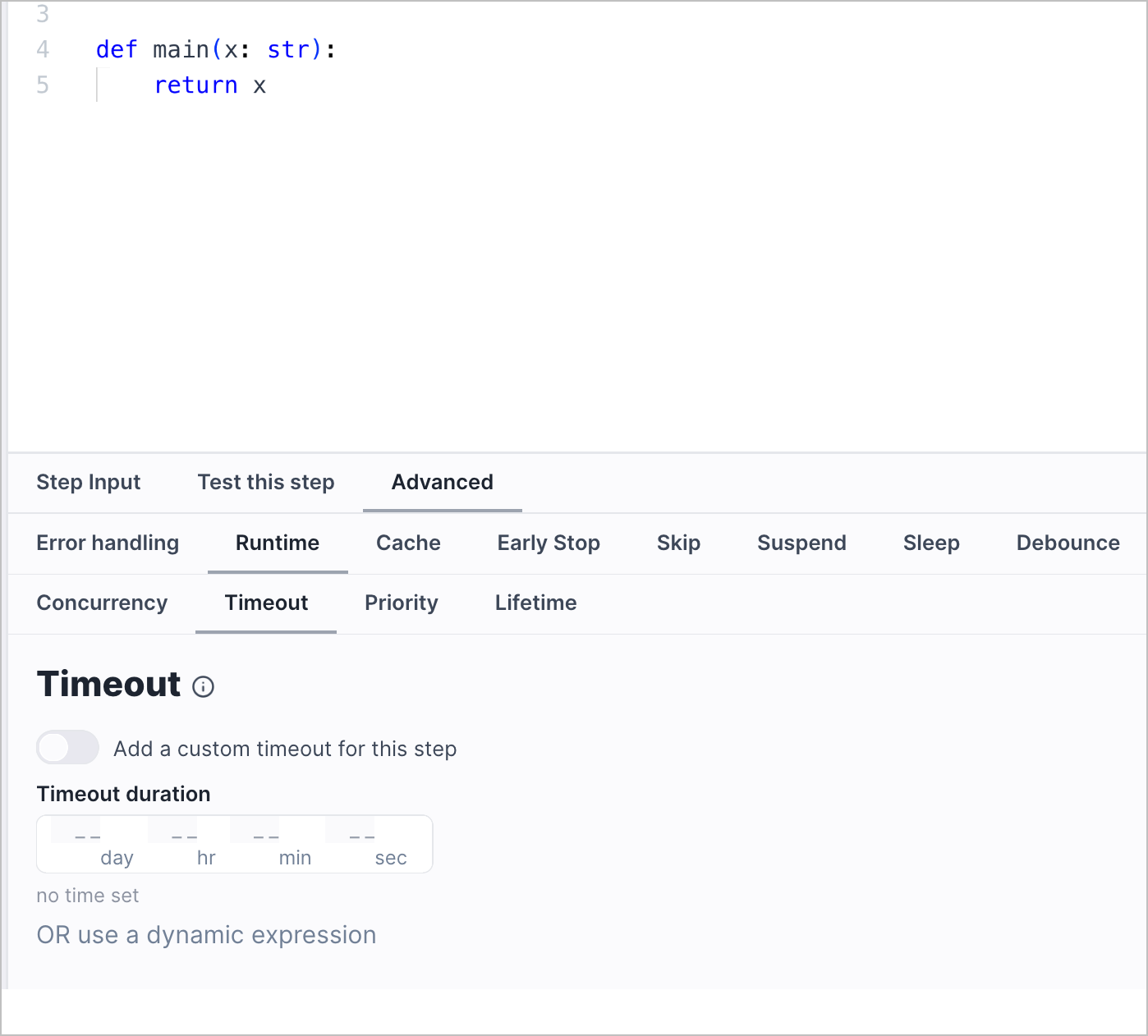
Configurable Action Timeouts | This feature was released on August 5, 2026. To accommodate integrations and actions that require more processing time, you can now configure actions to time out after a period you specify. When you create or edit an advanced playbook, you can now configure the timeout limit for an action in advanced settings.
| |
Autosave | This feature was released on August 5, 2026. To ensure you don't lose progress while drafting playbooks and actions, you can now automatically save your progress at regular intervals using autosave. You can enable or disable autosave. To manually save your progress, you can continue to press command + S or Ctrl + S. 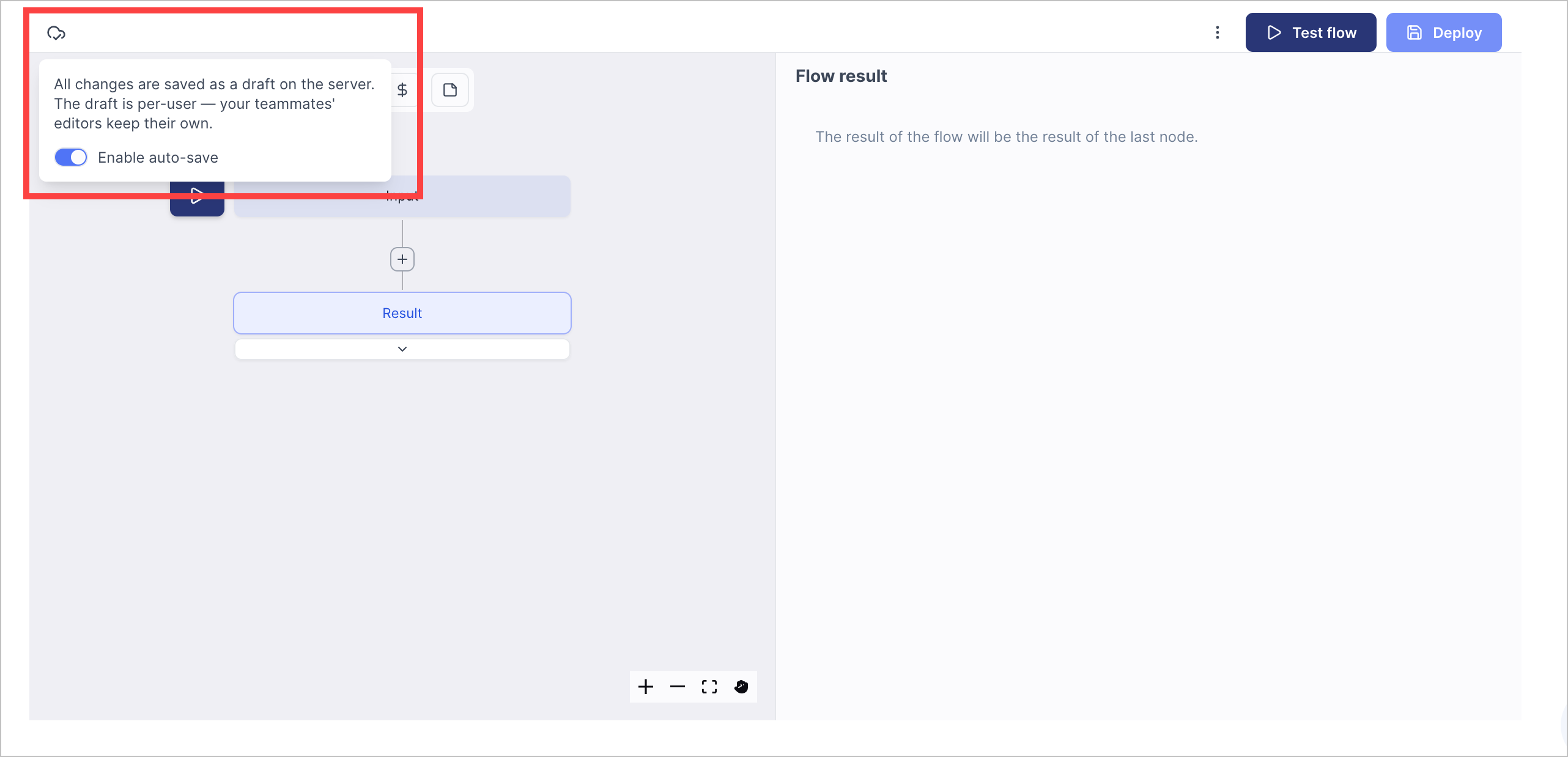 |
Cloud Collectors
Feature | Description |
|---|---|
Google Workspace Context Cloud Collector | The Google Workspace Context Cloud Collector is now available as part of Cloud Collectors to facilitate ingestion of user context data. |
Early Access Collectors | |
Armis Cloud Collector | The Armis Cloud Collector is now available as part of Cloud Collectors early access program to facilitate ingestion of alerts logs from Armis. The early access program offers you an opportunity to gain access to the latest cloud collectors before their official release. To participate, see Sign Up for the Early Access Program. |
Armis Context Cloud Collector | The Armis Context Cloud Collector is now available as part of Cloud Collectors early access program to facilitate ingestion of context data from Armis. The early access program offers you an opportunity to gain access to the latest cloud collectors before their official release. To participate, see Sign Up for the Early Access Program. |
AWS Inspector Cloud Collector | The AWS Inspector Cloud Collector is now available as part of Cloud Collectors early access program to facilitate ingestion of data from Amazon Inspector. The early access program offers you an opportunity to gain access to the latest cloud collectors before their official release. To participate, see Sign Up for the Early Access Program. |
AWS Redshift Cloud Collector | The AWS Redshift Cloud Collector is now available as part of Cloud Collectors early access program to facilitate ingestion of Redshift cluster management events from Amazon Redshift. The early access program offers you an opportunity to gain access to the latest cloud collectors before their official release. To participate, see Sign Up for the Early Access Program. |
Cybereason Cloud Collector | The Cybereason Cloud Collector is now available as part of Cloud Collectors early access program to facilitate ingestion of Cybereason logs. The early access program offers you an opportunity to gain access to the latest cloud collectors before their official release. To participate, see Sign Up for the Early Access Program. |
Google Security Operations Cloud Collector | The Google Security Operations Cloud Collector is now available as part of Cloud Collectors early access program to facilitate ingestion of all supported default and custom logs from your Google SecOps account. The early access program offers you an opportunity to gain access to the latest cloud collectors before their official release. To participate, see Sign Up for the Early Access Program. |
Palo Alto SaaS Security Cloud Collector | The Palo Alto Networks SaaS Security Cloud Collector is now available as part of Cloud Collectors early access program to facilitate ingestion of SaaS Security log events. The early access program offers you an opportunity to gain access to the latest cloud collectors before their official release. To participate, see Sign Up for the Early Access Program. |
Symantec CloudSOC Cloud Collector | The Symantec CloudSOC Cloud Collector is now available as part of Cloud Collectors early access program to facilitate ingestion of Symantec CloudSoc logs that include Investigate Service App logs, Detect App (Incidents) logs and Investigate App logs. The early access program offers you an opportunity to gain access to the latest cloud collectors before their official release. To participate, see Sign Up for the Early Access Program. |
Dashboards
Feature | Description |
|---|---|
Improved PDF Download for Open Dashboards | The dashboard download feature has been improved to include the full content of any table-style visualization. Previously, when an open dashboard was downloaded directly from the Dashboards application, table data was limited to the columns and rows visible without scrolling. The improved feature includes all column and row content, regardless of the current visibility on the screen. For more information, see View and Interact with an Open Dashboard in the Dashboards Guide. |
NSA Detections Overview Dashboard | A new pre-built dashboard is available that visualizes the overall count and breakdowns of alert events in your New-Scale environment. This dashboard can be used to monitor alerts in different stages and over specific time ranges. It includes visualizations that represent alerts by use case, by MITRE techniques and tactics, and by rule IDs. For more information about the new dashboard, see NSA Detections Overview Dashboard in the Dashboards Guide. |
Support for Scheduled Reports Every 2 Weeks | A new option has been added to the Recurrence field when scheduling a report. The system now supports scheduling a report to be sent on an Every 2 Weeks cadence. For more information, see Create a Scheduled Report in the Dashboards Guide. |
Log Sources
The following features were introduced in Log Sources during July 2026.
Feature | Description |
|---|---|
User-initiated Deletion of Log Source Policies | Log Sources features now offer enhancements to the user-initiated deletion of log source policies. You can delete one or more policies. For bulk deletion, the available actions are displayed dynamically based on the status of the log source policy - Enabled or Disabled. The Delete action is displayed only when all selected policies are disabled. |
Recommendations for Overlapping Policy Conditions | To resolve the errors caused due to overlapping conditions that result in to routing errors, quiet log sources, and policy conflicts, recommendations are added to the Log Sources documentation. In case a raw log event is assigned to an incorrect log source policy due to overlapping conditions, the conflict can be resolved using recommendation and specific policy precedence rules. |
Support for Custom Silent Monitoring Threshold | Under Silent Monitoring Threshold, you can now enter a custom value in the Warn After Silent for field or select a duration from 30 minutes to 72 hours to define the condition for detecting a silent log source. You can enter the custom value while creating a new log source policy or while editing an existing log source policy. |
Log Stream
Feature | Description | ||||||||||
|---|---|---|---|---|---|---|---|---|---|---|---|
Native Field Extraction Expressions for Enrichment Rules | A new set of expressions is available when defining conditions for custom enrichment rules. These new expressions streamline the multi-step process of extracting sub-string values from complex fields like These new expressions eliminate the need to define multiple manual Regex patterns and provide the following benefits:
The new native field extraction expressions include the following:
For information and examples of each expression, see Native Field Extraction Expressions in the Log Stream Guide ImportantThese new expressions can be used only to define conditions when building a custom enrichment rule. They cannot be used to support custom parser creation. |
New-Scale Platform
Feature | Description | ||
|---|---|---|---|
Capture Failed Login Attempts in Audit Log | Failed login attempts are now captured in the Audit Log. Previously, only successful logins were recorded. With this update, authentication failures are logged as query-able events, giving visibility into unauthorized access attempts, account enumeration, and potential credential attacks. Failed login events share the same schema as success events and can be queried using the same filters. | ||
MCP User-Delegated Authentication | You can now connect an AI client (such as Claude, ChatGPT, or Microsoft Copilot) to Exabeam via the Model Context Protocol (MCP) with user-level authentication using your Exabeam credentials. Previously, MCP connections only used application-level API keys shared across users. All actions taken through the AI client are performed under your identity, respect your existing role-based permissions, and are attributed to you in the Exabeam Audit Log. With user-delegated authentication, each analyst's AI client session is individually authorized. For more information see Connect to Exabeam MCP Server in the New-Scale Security Operations Platform Administration Guide. | ||
Notice of Audit Activity Type Deprecations | Exabeam is in the process of streamlining and and simplifying the
The parser affected by this update is The change can affect downstream applications if, for example, you rely on audit log activity types in filters for saved searches or for custom dashboards or visualizations. To provide enough time to make any necessary downstream updates, the deprecations will be implemented at the end of September. The following are the audit log
|
Outcomes Navigator
Feature | Description |
|---|---|
OWASP Top 10 for Agentic Applications Framework | This feature was released on July 28, 2026. You can now track your coverage of the OWASP Top 10 for Agentic Applications framework. 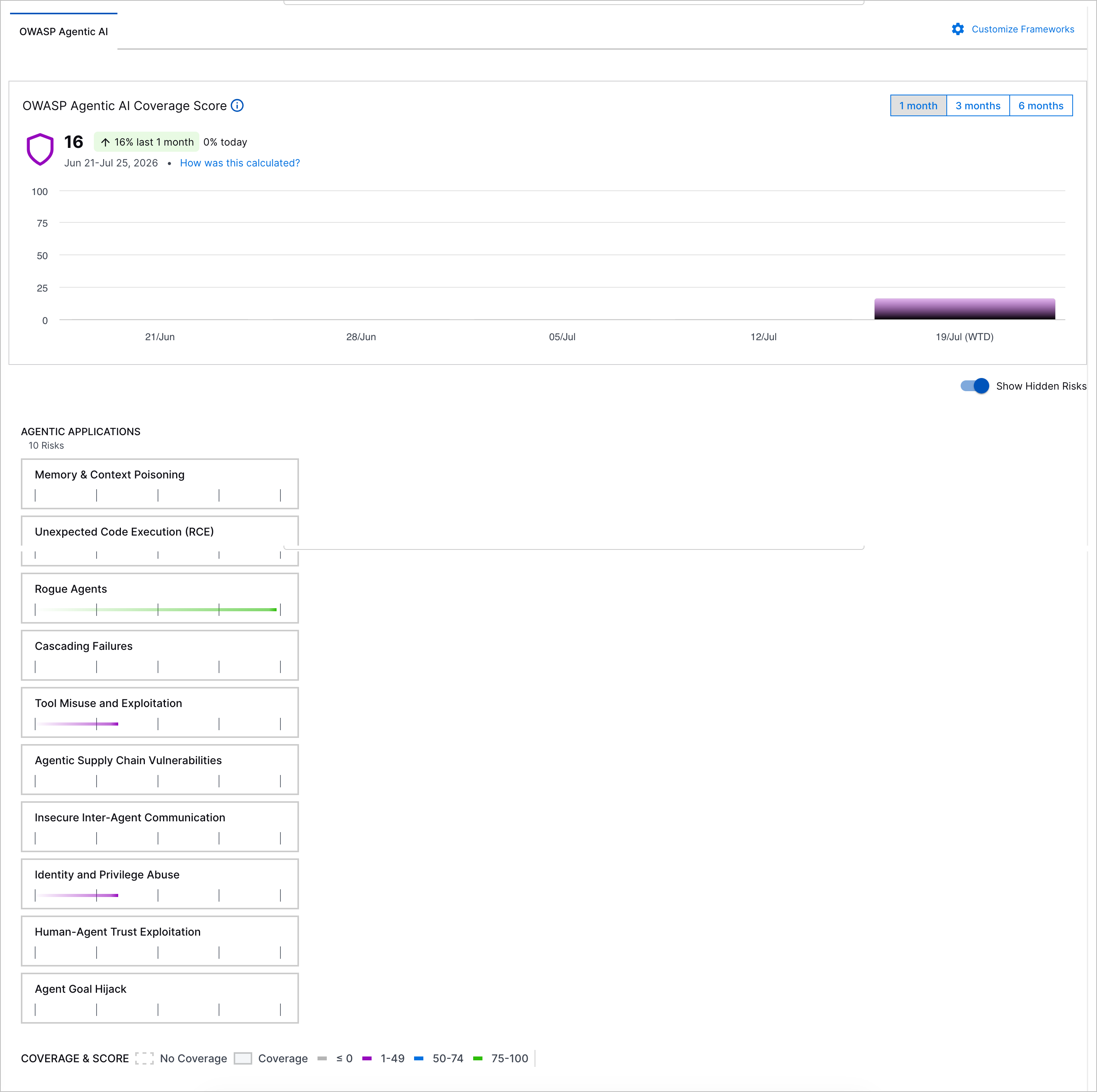 You can:
|
Search
Feature | Description |
|---|---|
Expanded Date Range for Queries in the Timeline View | The supported date range for viewing search results in the Timeline view has been expandedfrom 7 days to 31 days. For more information, see Timeline View of Search Results in the Search Guide. |
Server-Side Filter for Showing Only Detections | Early Access Opportunity An early access opportunity is available to change the behavior of the Show only rows with detections toggle in the Timeline view or results. When enabled, the detections only filter runs as a server-side filter and re-queries the entire dataset, rather than the initial set of 5,000 records, to return detection results from the full dataset. If you would like to take advantage of this early access opportunity, email the following group: [email protected] |
Natural Language Query Improvements | Natural language functionality benefits from exposure to use and Exabeam continues to work on extending the supported use cases. AI training has now been expanded to generate reliably accurate results for the following types of real-world use cases:
For information, see Natural Language Search n the Search Guide. |
Site Collectors 2.21
Feature | Description |
|---|---|
Unsupported Ports | The following ports are no longer supported for Site Collectors: 8880, 9093, 9877, 9878, and 9879. Ensure that unsupported ports, such as 8880 and 9093 are removed or closed, and that the remaining ports are configured to match your specific environment. |
Deprecation of Log Sources Monitoring Feature from Site Collectors | The Log Source Monitoring feature will be deprecated effective September 1, 2026. After this date, the functionality will no longer be available. It is recommended to use the Log Sources tile on the New-Scale Security Operations Platform home page to monitor log sources and get notified of any issues. |
Upgradation of MiNiFi Binary | Upgraded the base MiNiFi binary from version 0.99.1 to version 0.99.2. All agent collectors are updated to the latest Site Collectors version 2.21. |
Refer to the following table for collector versions for Site Collectors 2.21.2.
Collector / Component | Product Version |
|---|---|
Windows Event Log Collector (WELC) | 2.21.0 |
Windows File Collector | 2.21.0 |
Windows Archive Collector | 2.21.0 |
Linux File Collector | 2.21.3 |
Linux Archive Collector | 2.21.4 |
Direct Access Agent (DAA) Collector | 1.5.0 |
Threat Center
Feature | Description |
|---|---|
Exabeam Nova Analyst Assistant Safeguards | To get more reliable and predictable answers and to prevent misuse, Exabeam Nova Analyst Assistant safeguards now ensure your conversations are focused on alert triage and case investigations. When you enter general purpose or unrelated prompts, Exabeam Nova Analyst Assistant now asks you to refocus on security operations. |
Detection Grouping Display Enhancement | To more easily understand how detections are grouped at a glance, cases or alerts whose detections are grouped by multiple fields now display as <first detection grouping field value> + <count>. The count indicates the number of additional fields by which detections are grouped. You can hover over the count to reveal the additional fields by which detections are grouped.  |
Dynamic Exabeam Nova Generated Titles | To more quickly understand cases and alerts and to prioritize investigations more effectively, Exabeam Nova now automatically updates case and alert titles whenever there is new evidence in the case or alert. |
Exabeam Nova Investigation Summary Enhancement | To understand key findings more quickly, you can now view a more concise and accurate Exabeam Nova Investigation Summary. To create more concise and accurate case and alert summaries, Exabeam Nova Investigation Summary consolidates duplicate detections and considers additional metadata from the original event. |
Threat Detection Management
Feature | Description |
|---|---|
New Early Access Pre-Built Analytics Rules | New pre-built analytics rules are now released as part of an early access program before becoming generally available. Analytics rules in early access have [Early Access] in their names. You can now better detect abnormal cloud application activity with the following early access pre-built analytics rules:
You can now better detect use of unapproved access tools with the following early access pre-built analytics rules:
To better account for ephemeral ports and to replace an obsolete pre-built analytics rule, the following early access pre-built analytics rule was created:
|
Updated and Removed Pre-Built Analytics Rules | You can now better detect DLP-related events, first time user and system anomalies, and network communications with updated and removed pre-built analytics rules. To ensure rule logic captures real-world DLP-related log values, which typically start with DLP rather than matching the string exactly,
To prevent over-triggering on first-time observations and to establish a good baseline,
To prevent over-triggering on first-time observations and to establish a good baseline,
To prevent over-triggering on first-time observations and to establish a good baseline,
To prevent over-triggering on first-time observations,
To account for URLs that have been normalized to use a single slash,
To account for URLs that have been normalized to use a single slash,
To remove a superfluous space at the beginning of the expression,
To correct a typo,
To remove a redundant condition already accounted for in
To simplify rule logic and remove empty string checks,
To optimize performance by filtering out non-relevant data earlier in the evaluation process,
To map pre-built analytics rules to the Stealth tactic and remove the mapping to the obsolete Defense Evasion tactic,
To map pre-built analytics rules to the Defense Impairment tactic and remove the mapping to the obsolete Defense Evasion tactic,
To remove the mapping to the obsolete Defense Evasion tactic,
To remove the mapping to the Evasion Exabeam use case,
To map pre-built analytics rules to the OWASP Top 10 for Agentic Applications framework so you can assess your coverage in Outcomes Navigator,
To better account for ephemeral ports,
To better account for ephemeral ports,
To better account for ephemeral ports,
To better account for ephemeral ports,
To better account for ephemeral ports, the following obsolete pre-built analytics rules were removed:
To better account for ephemeral ports, the following obsolete pre-built analytics rule was removed and replaced by a new early access pre-built analytics rule:
|
Generally Available Pre-Built Analytics Rules | After an early access period, a selection of pre-built analytics rules are now generally available. You can now better detect abnormal cloud application activity with the following generally available pre-built analytics rules:
You can now detect when AI agents have been downloaded or installed with the following generally available pre-built analytics rules:
You can now accurately detect abnormal AI agent activity with the following generally available pre-built analytics rules:
You can now detect suspicious OpenClaw agent activity with the following generally available pre-built analytics rules:
You can now detect abnormal tool calls with the following generally available pre-built analytics rules:
You can now detect third-party AI alerts with the following generally available pre-built analytics rules:
You can now better detect model context protocol (MCP) permission abuse and high-confidence API control-plane activity with the following generally available pre-built analytics rule:
|
Resolved Issues
Attack Surface Insights Resolved Issues
ID | Description |
|---|---|
ENG-101146 | Attack Surface Insights tags were no longer available to use in other applications, including Threat Center, Dashboards, and Automation Management:
Now, Attack Surface Insights tags are available and usable across all applications. |
Site Collector 2.21: Resolved Issues
Release Number | Description |
|---|---|
ENG-91612 | Resolved the LOG.log rotation and disk exhaustion issue. Upgrading the Linux File Collector causes unrotated log files to continuously expand the content_repository and flowfile_repository directories, leading to disk exhaustion. The underlying MiNiFi binaries are upgraded from version 0.99.1 to 0.99.2. The version 0.99.2 correctly rotates log files and prevents excessive disk usage. |
Site Collector 2.21: Security Vulnerabilities Remediations
The Site Collectors 2.21 (July 2026) release includes remediated security vulnerabilities. For more information about Exabeam’s commitment to remediating vulnerabilities for Site Collector, see the Vulnerability Remediation Policy.
There are no open known CVEs in any container image (Nifi). Toolkit has been deprecated and is no longer in use hence no security vulnerabilities update is available for that.
The following table lists the CVEs remediated for the Nifi container and their severity.
Critical | High | Medium |
|---|---|---|
Total: 24 | Total: 90 | Total: 64 |
CVE-2026-31589 CVE-2026-31607 CVE-2026-31608 CVE-2026-31609 CVE-2026-31705 CVE-2026-31718 CVE-2026-42496 CVE-2026-43071 CVE-2026-43493 CVE-2026-43501 CVE-2026-45988 CVE-2026-46039 CVE-2026-46043 CVE-2026-46115 CVE-2026-46119 CVE-2026-46135 CVE-2026-46137 CVE-2026-46155 CVE-2026-46185 CVE-2026-46195 CVE-2026-46244 CVE-2026-6100 CVE-2026-7210 CVE-2026-8376 | CVE-2025-66418 CVE-2025-69534 CVE-2026-31532 CVE-2026-31576 CVE-2026-31578 CVE-2026-31580 CVE-2026-31581 CVE-2026-31582 CVE-2026-31583 CVE-2026-31584 CVE-2026-31586 CVE-2026-31587 CVE-2026-31588 CVE-2026-31597 CVE-2026-31598 CVE-2026-31600 CVE-2026-31602 CVE-2026-31611 CVE-2026-31612 CVE-2026-31613 CVE-2026-31614 CVE-2026-31622 CVE-2026-31626 CVE-2026-31627 CVE-2026-31629 CVE-2026-31686 CVE-2026-31694 CVE-2026-31696 CVE-2026-31697 CVE-2026-31698 CVE-2026-31699 CVE-2026-31700 CVE-2026-31702 CVE-2026-31703 CVE-2026-31706 CVE-2026-31707 CVE-2026-31708 CVE-2026-31709 CVE-2026-31711 CVE-2026-31712 CVE-2026-31715 CVE-2026-31716 CVE-2026-31717 CVE-2026-31719 CVE-2026-3298 CVE-2026-33811 CVE-2026-3644 CVE-2026-39820 CVE-2026-39836 CVE-2026-4224 CVE-2026-42499 CVE-2026-42501 CVE-2026-42504 CVE-2026-43350 CVE-2026-43499 CVE-2026-44249 CVE-2026-45991 CVE-2026-45999 CVE-2026-46006 CVE-2026-46010 CVE-2026-46011 CVE-2026-46015 CVE-2026-46024 CVE-2026-46027 CVE-2026-46029 CVE-2026-46031 CVE-2026-46036 CVE-2026-46037 CVE-2026-46052 CVE-2026-46053 CVE-2026-46054 CVE-2026-46056 CVE-2026-46058 CVE-2026-46062 CVE-2026-46065 CVE-2026-46070 CVE-2026-46076 CVE-2026-46078 CVE-2026-46081 CVE-2026-46085 CVE-2026-46090 CVE-2026-46093 CVE-2026-46099 CVE-2026-46100 CVE-2026-46102 CVE-2026-46243 CVE-2026-46273 CVE-2026-4786 CVE-2026-6732 CVE-2026-9669 | CVE-2025-45582 CVE-2026-1502 CVE-2026-1757 CVE-2026-2297 CVE-2026-27145 CVE-2026-31574 CVE-2026-31575 CVE-2026-31577 CVE-2026-31579 CVE-2026-31585 CVE-2026-31590 CVE-2026-31591 CVE-2026-31592 CVE-2026-31593 CVE-2026-31594 CVE-2026-31595 CVE-2026-31596 CVE-2026-31599 CVE-2026-31601 CVE-2026-31603 CVE-2026-31604 CVE-2026-31605 CVE-2026-31606 CVE-2026-31610 CVE-2026-31615 CVE-2026-31616 CVE-2026-31617 CVE-2026-31618 CVE-2026-31619 CVE-2026-31620 CVE-2026-31621 CVE-2026-31623 CVE-2026-31624 CVE-2026-31625 CVE-2026-31628 CVE-2026-31701 CVE-2026-31704 CVE-2026-31710 CVE-2026-31713 CVE-2026-31714 CVE-2026-3276 CVE-2026-3446 CVE-2026-39817 CVE-2026-39819 CVE-2026-39823 CVE-2026-39825 CVE-2026-39826 CVE-2026-40355 CVE-2026-40356 CVE-2026-42507 CVE-2026-43058 CVE-2026-43072 CVE-2026-43073 CVE-2026-43348 CVE-2026-43349 CVE-2026-45409 CVE-2026-50219 CVE-2026-5588 CVE-2026-5704 CVE-2026-5713 CVE-2026-6019 CVE-2026-7774 CVE-2026-8328 CVE-2026-8643 |