Responses are generated using AI and may contain mistakes.

New-Scale Security Operations PlatformNew-Scale Security Operations Platform Release Notes

October 2026

The New-Scale Security Operations Platform includes the following addressed features and new features for October 2026.

Automation Management

Feature

Description

Activity and Run History Audit Enhancement

To satisfy compliance requirements and support security audits, activity and run histories for playbooks and actions are now stored in an updated database model and based on a persisted audit trail.

You can now securely track and audit all automated workflows using the:

Manual Runs in Advanced Playbook Run History

To more comprehensively track playbook activity, you can now see when a playbook was manually run in the advanced playbook run history.

Threat Center Case and Alert Automation History Enhancement

To focus on the most recent and relevant automation activity, you can now see only 30 days of activity in the Threat Center case and alert automation history.

To see more than 30 days of automation activity, view the advanced playbook run history.

Cloud Collectors

Feature

Description

Deprecation of version 1 (v1) of the Microsoft Graph Security API

Microsoft is deprecating version 1 (v1) of the Microsoft Graph Security API soon. To prevent any interruption to your security monitoring, you must migrate your Microsoft Security Alerts collector with API version V1 (v1) to API version 2 (v2) immediately to retrieve Microsoft security alerts and incidents through the Microsoft Graph Security API v2.

Early Access Cloud Collector

Support for New Data Sources by Claude Enterprise Cloud Collector

In addition to the logs from Claude Compliance API that include user activity data containing user role changes, workspace creations, and administrative updates, and chats containing user prompts, the Claude Enterprise Cloud Collector now collects data from the endpoints that support Cowork (local and cloud sessions) and Claude Code (local sessions) data sources.

With the new data sources, the Claude Enterprise Cloud Collector can now collect user data that includes files, text, computer commands, account, and basic usage.

Log Stream

Feature

Description

Improved Parser and Enrichment Rule Workflows

Managing your parsers and enrichments has become faster and easier in the Log Stream application. The following enhanced capabilities are now available:

  • Editing live custom parsers – It's no longer necessary to disable and take a live parser out of service to make changes to it. You can edit parsers that are in Enabled status while they continue to parse incoming logs. This new behavior reduces impact on your data parsing workflow and minimizes the risk of missing logs. When you start editing a parser, a draft version is stored and persists until you either deploy or discard it. For more information, see Edit a Custom Parser in the Log Stream Guide.

  • Automated searching for parser and enricher data – When a parser or enrichment rule is in Enabled status, a new Open in Search option becomes available. It's a fast and simple way to view data relevant to a specific parser or enricher. Clicking the option opens the Search application and automatically populates a query based on the selected parser name or enriched field definition. For more information, see Open a Search Query Based on a Parser or Interacting with Enrichment Rules in the Log Stream Guide

  • Sorting columns in parser and enricher lists – You can now control which columns are visible in both parser and enrichemnt lists and the order in which they are displayed. A new Columns option in the toolbar above each list opens a sorting dialog box where you can make your display selections.

    Note

    Column order and show/hide selections do not persist beyond the current Log Stream session. You will need to reconfigure these selections when you log into Log Stream again.

    For more information, see Parser List or Navigate the Enrichments Tab in the Log Stream Guide.

Enhanced Enrichment Rule Visibility

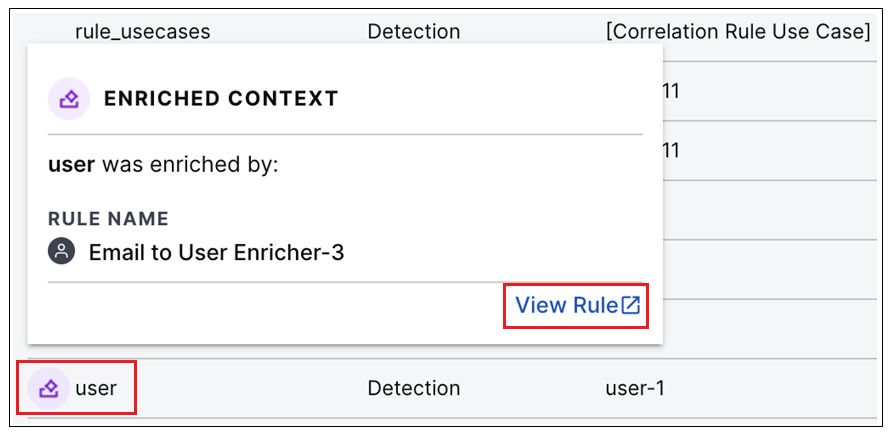
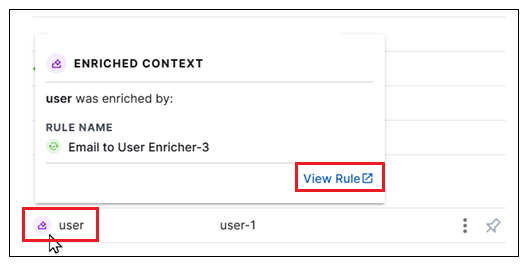
When viewing event details in the Live Tail tab of Log Stream, a new enrichment icon (icon-context-enricher.png) indicates fields for which more than one enrichment rule is configured. When multiple enrichment rules are applicable to the same field, a correspondin tooltip displays the name of the most recently (last) rule applied to the that field in a given event. The new tooltip also provides a View Rule link that launches the Log Stream Enrichments tab with the details panel open for the relevant enrichment rule so you can investigate its configuration.

enriched-context-dbox.png

For more information, see Analyze and Troubleshoot in the Live Tail section of the Log Stream Guide.

This enrichment rule visibility is also available in the Search application when viewing event information in the Details panel. For more information, see Event Details or Detection Details in the Search Guide.

New Default Enrichment Rules

New default enrichment rules have been added to populate a new network_direction field. These new rules provide network traffic information for any event that includes both source and destination IP addresses. They include common traffic directions (such as local, inbound, outbound, internal) to reduce the amount of manual configuration needed to filter and analyze event traffic.

The following enrichment rules are available:

  • all-src_network_type-2

  • all-dest_network_type-2

  • all-network-direction-local

  • all-network-direction-inbound

  • all-network-direction-outbound

  • all-network-direction-internal

  • all-network-direction-external

  • all-network-direction-unknown

For more information about the new content package, visit the 2026.10.1 Content Package Release Notes on the Exabeam Community.

New-Scale Platform

Feature

Description

Exabeam MCP Server Enhancements

The Exabeam MCP Server now supports retrieving cases related to a given case, including relationship type, shared entities, and an AI-generated relationship summary. Use to discover case clusters before bulk operations such as bulk-close.

For more information, and to learn how to connect to the server, see Connect to Exabeam MCP Server in the New-Scale Security Operations Platform Administration Guide.

Outcomes Navigator

Feature

Description

MITRE Coverage Overview Enhancement

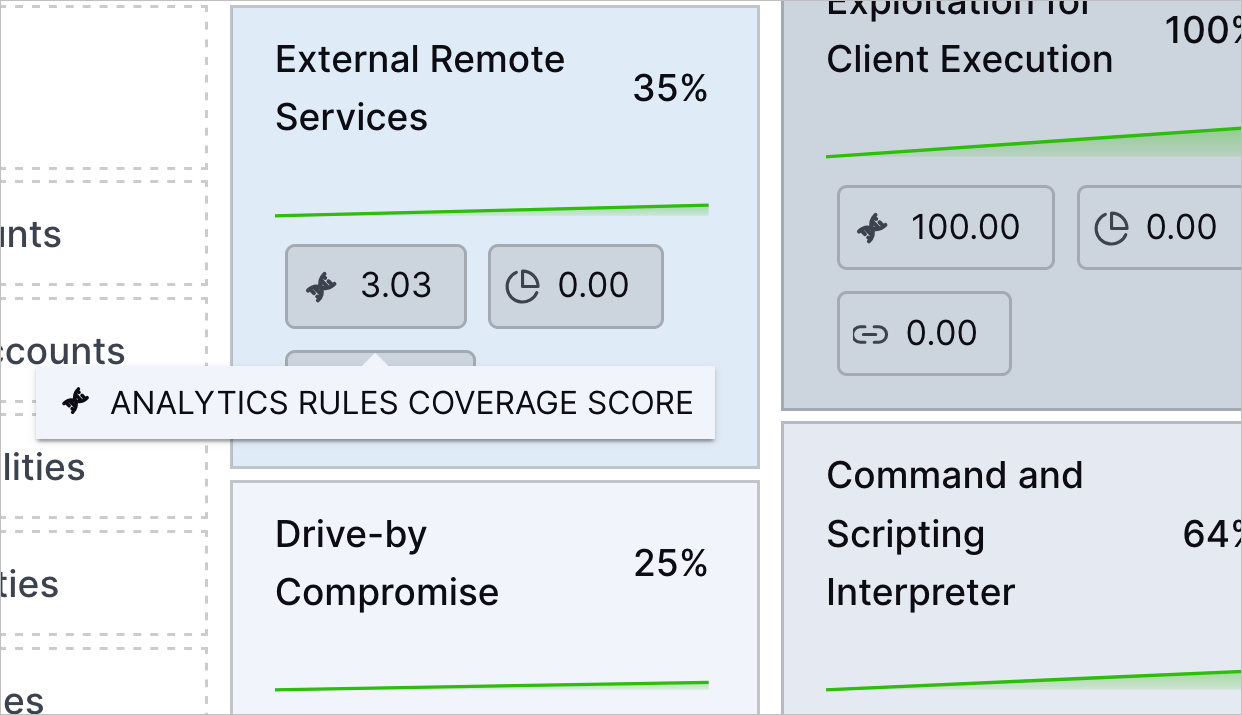
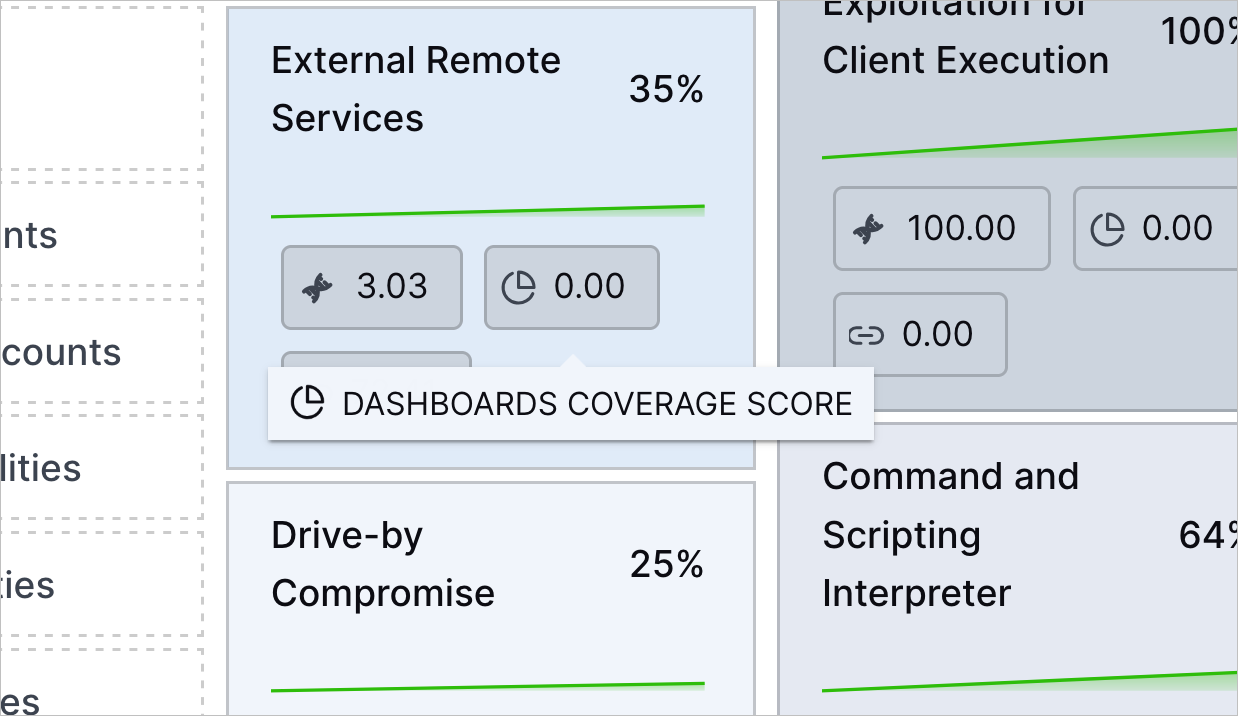
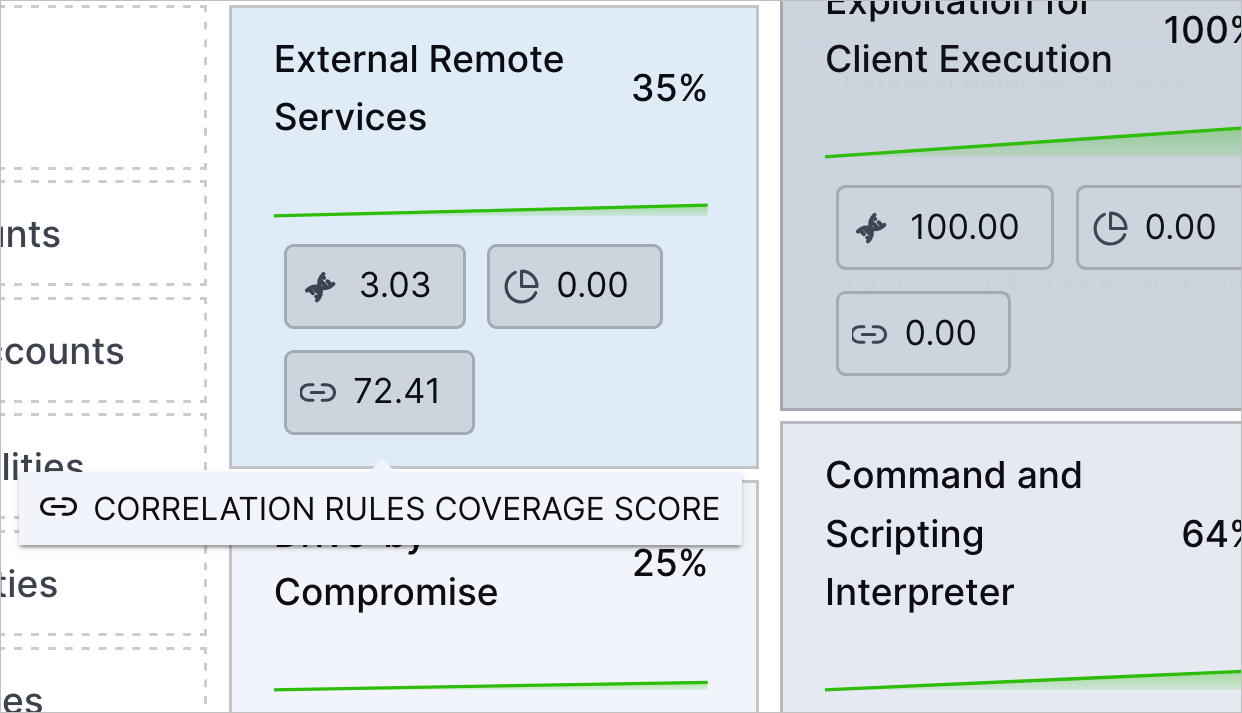
To learn more about MITRE ATT&CK techniques at a glance, you can now see the a preview of the Exabeam features and applications coverage scores directly on a ATT&CK technique.

On a technique in the MITRE ATT&CK Coverage overview, you can see the coverage scores for:

  • Analytics rules

    The tooltip for the analytics rules coverage score for the External Remote Services technique in the MITRE ATT&CK Coverage tab.
  • Correlation rules

    The tooltip for the dashboards coverage score for the External Remote Services technique in the MITRE ATT&CK Coverage tab.
  • Dashboards

    The tooltip for the correlation rules coverage score for the External Remote Services technique in the MITRE ATT&CK Coverage tab.

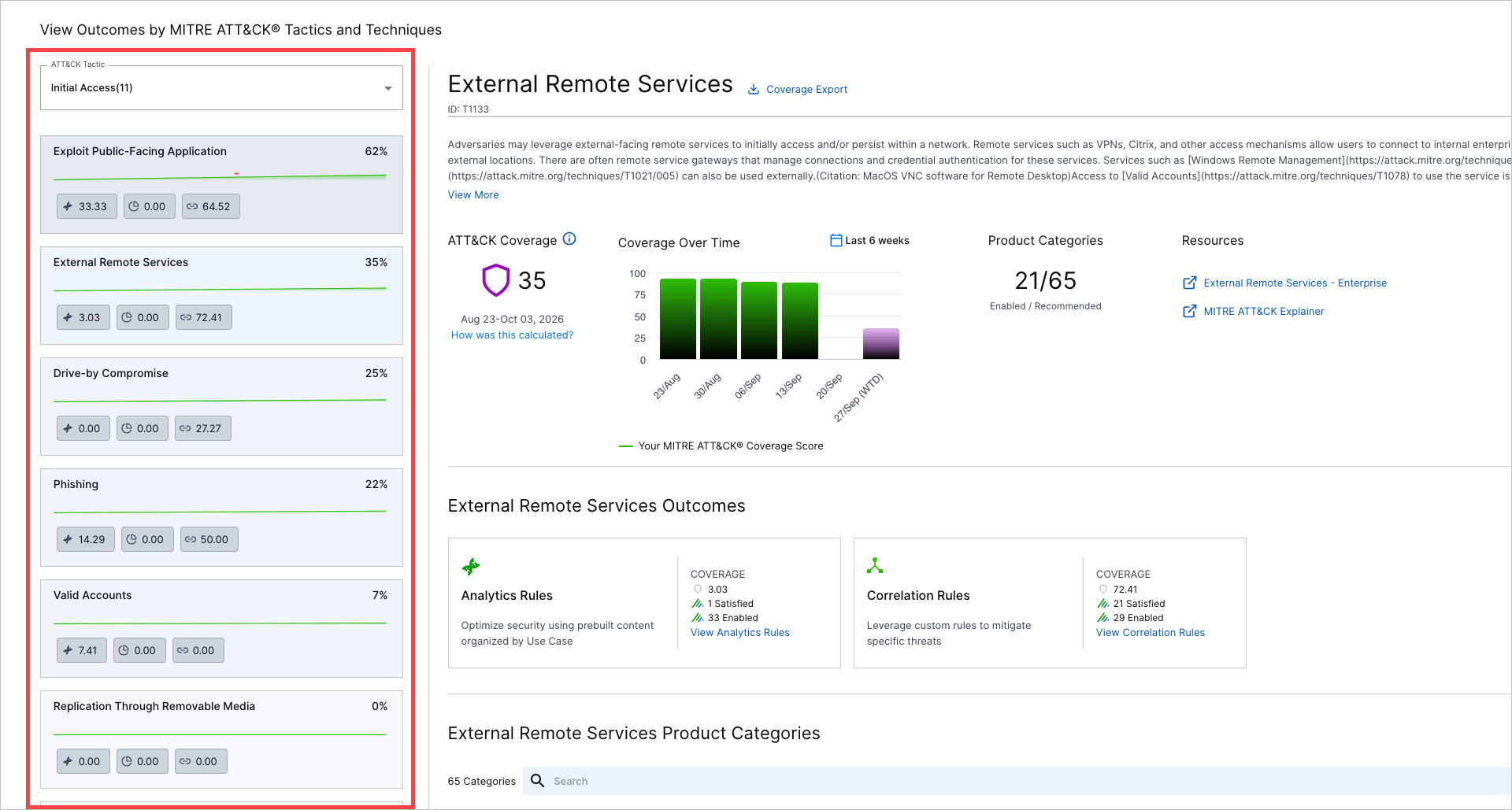
When selecting ATT&CK techniques to view further details, you can see the same coverage score information for analytics rules, correlation rules, and Dashboards:

The View Outcomes by MITRE ATT&CK Tactics and Techniques page for the Account Manipulation ATT&CK technique, with the option to navigate to other techniques highlighted.

MITRE Coverage Overview Filters

To focus on specific ATT&CK techniques of interest, you can now filter them in the MITRE ATT&CK® Coverage overview.

You can filter by:

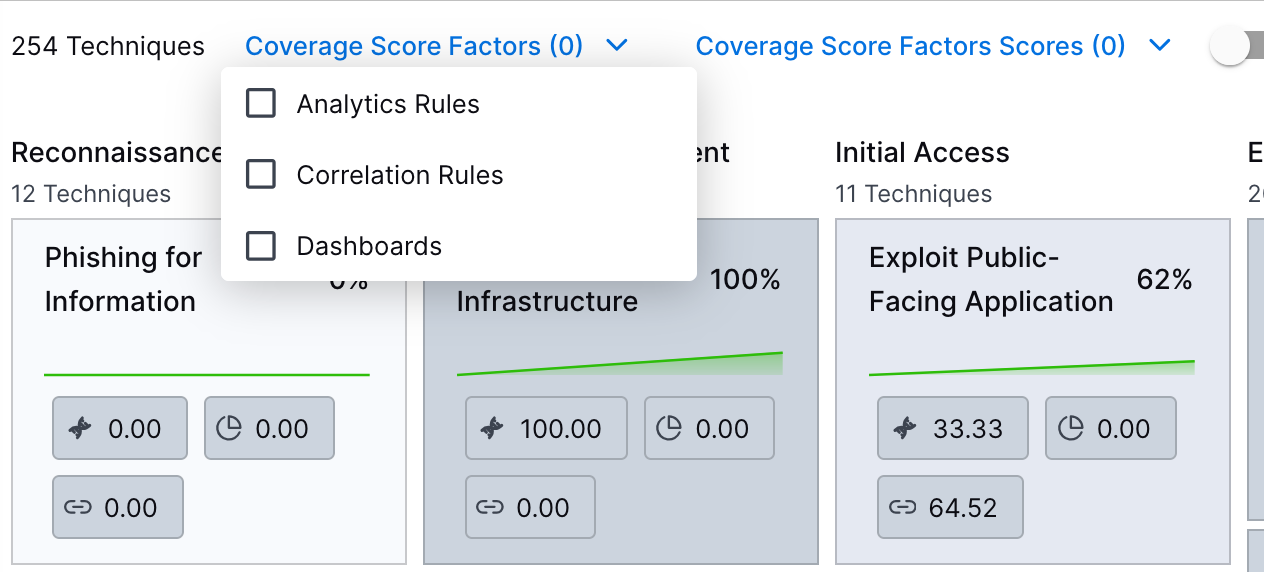
  • Coverage Score Factors – The Exabeam features and applications that cover the ATT&CK technique.

    The Coverage Score Factors filter in the MITRE ATT&CK Coverage tab.
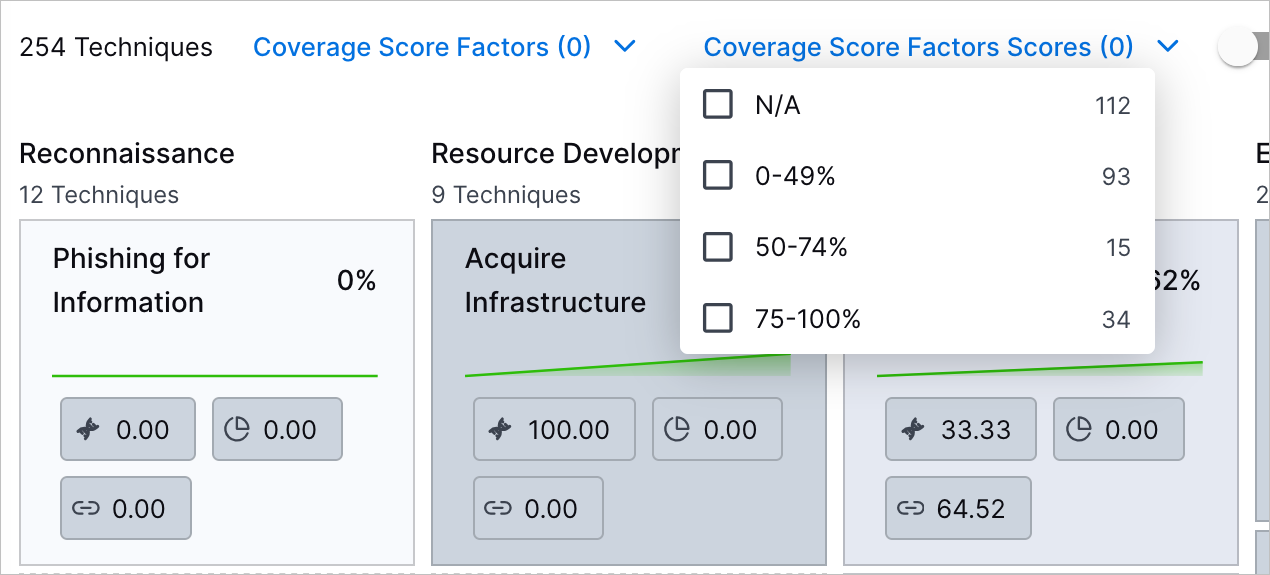
  • Coverage Score Factors Scores – The coverage scores for the Exabeam features and applications.

    The Coverage Score Factors Scores filter in the MITRE ATT&CK Coverage tab.

Search

Feature

Description

Enhanced Enrichment Rule Visibility in Search Results

When viewing event and detection details, a new enrichment icon (icon-context-enricher.png) indicates fields for which more than one enrichment rule is configured. A corresponding tooltip indicates which specific enrichment rule was most recently applied to that field in a given event. The new tooltip also provides a View Rule link that launches the Log Stream Enrichments tab with the details panel open for the relevant enrichment rule so you can investigate its configuration.

enriched-context-field.png

For more information about the Details panel, see Event Details or Detection Details in the Search Guide.

Site Collectors 3.0.0

Feature

Description

Universal Collector Framework

The new Universal Collector Framework introduces a standardized system to install and manage all Exabeam collectors on Windows and Linux. You can easily upgrade existing collectors directly through the user interface without a complete reinstallation. The framework comprises two components—An automatic background service that quietly handles remote management tasks and an administrator command-line tool (collcli) which is a single executable to locally install, upgrade, and repair collectors.

This framework operates via an automatic background service alongside a local command tool (collcli) to smoothly handle system updates and repairs. For added safety, the system automatically backs up settings and rolls back failed updates to ensure uninterrupted collector operation.

This framework is designed to simplify and streamline agent collector deployment, monitoring, and maintenance throughout the collectors' lifecycle.

Log Collection from MS SQL Server using Windows/Kerberos Authentication

The MS SQL Collector is enhanced and made available to facilitate log collection via MS SQL server using Windows/Kerberos authentication.

Refer to the following table for collector versions for Site Collectors 3.0.0

Collector / Component

Product Version

Collectors

3.0.0

Service Health and Consumption

Feature

Description

Renaming and Enhancement of CISO Digest dashboard in Service Health and Consumption

The CISO Digest dashboard that provides security leaders direct access to essential executive insights is further enhanced and renamed to Executive Digest.

By navigating to Service Health and Consumption Dashboard > Executive Digest on the New-Scale Security Operations Platform, you can view your overall security posture via coverage scores, key metrics, and complete case analyses.

Threat Center

Feature

Description

Case Editing and Manual Creation Enhancement

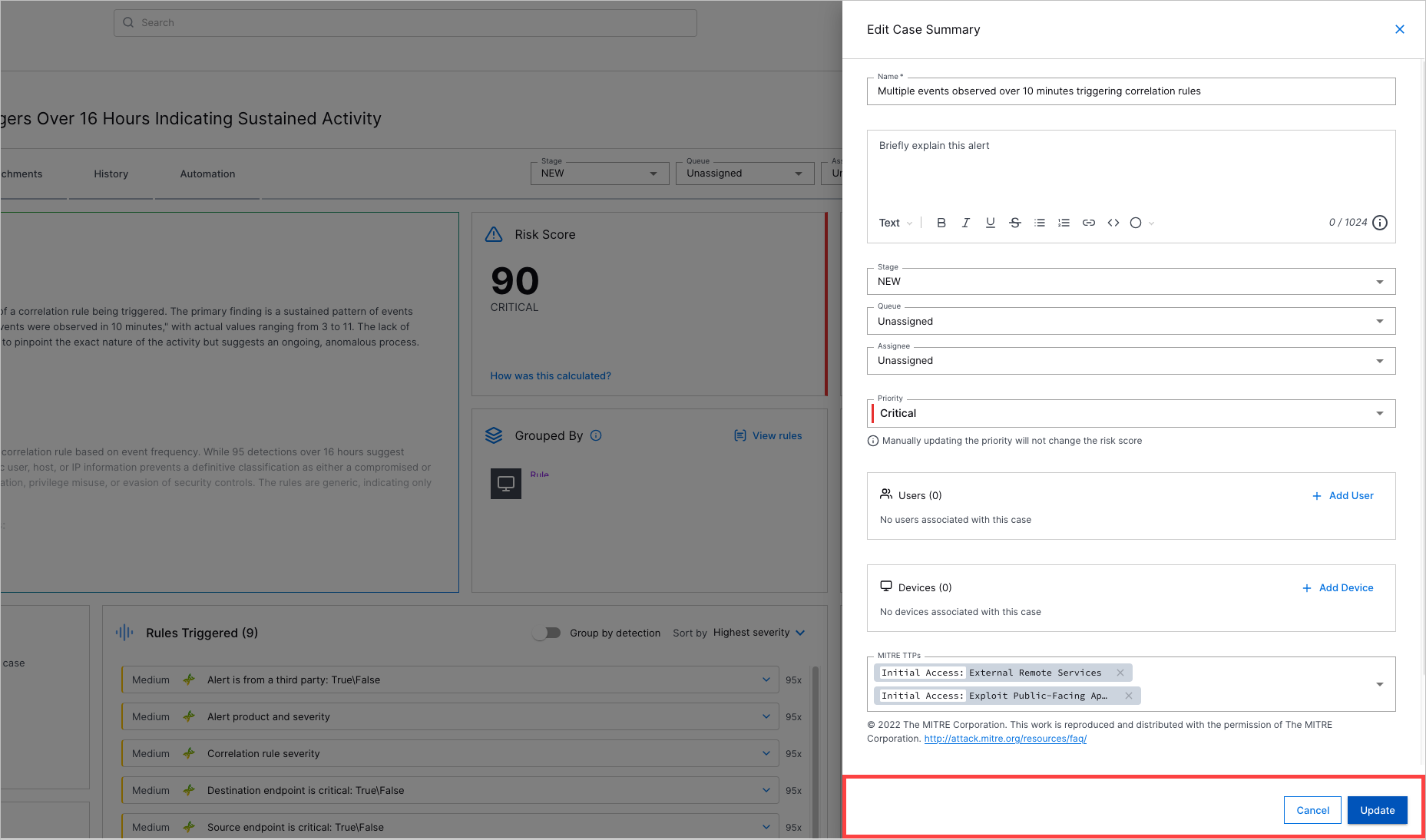
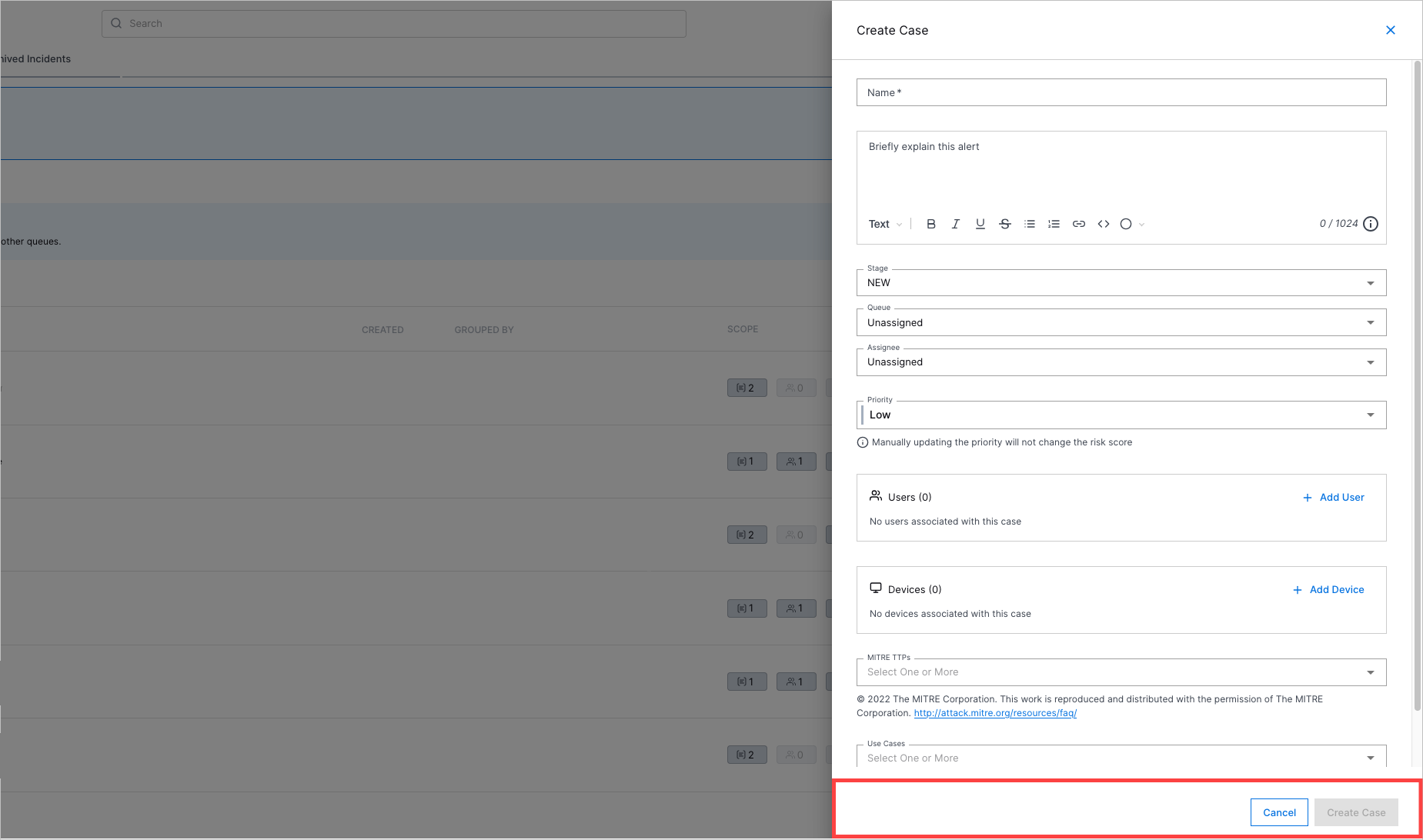
To make saving your changes easier and more visible, you can now always see:

  • The Update and Cancel buttons when updating case attributes

    The Edit Case Summary drawer with the Cancel and Update buttons highlighted in a red rectangle.
  • The Create Case and Cancel buttons when manually creating a case

    The Create Case drawer with teh Cancel and Create Case buttons highlighted in a red rectangle.

Device Entity Search

You can now search for cases and alerts by the device entities with which they're associated.

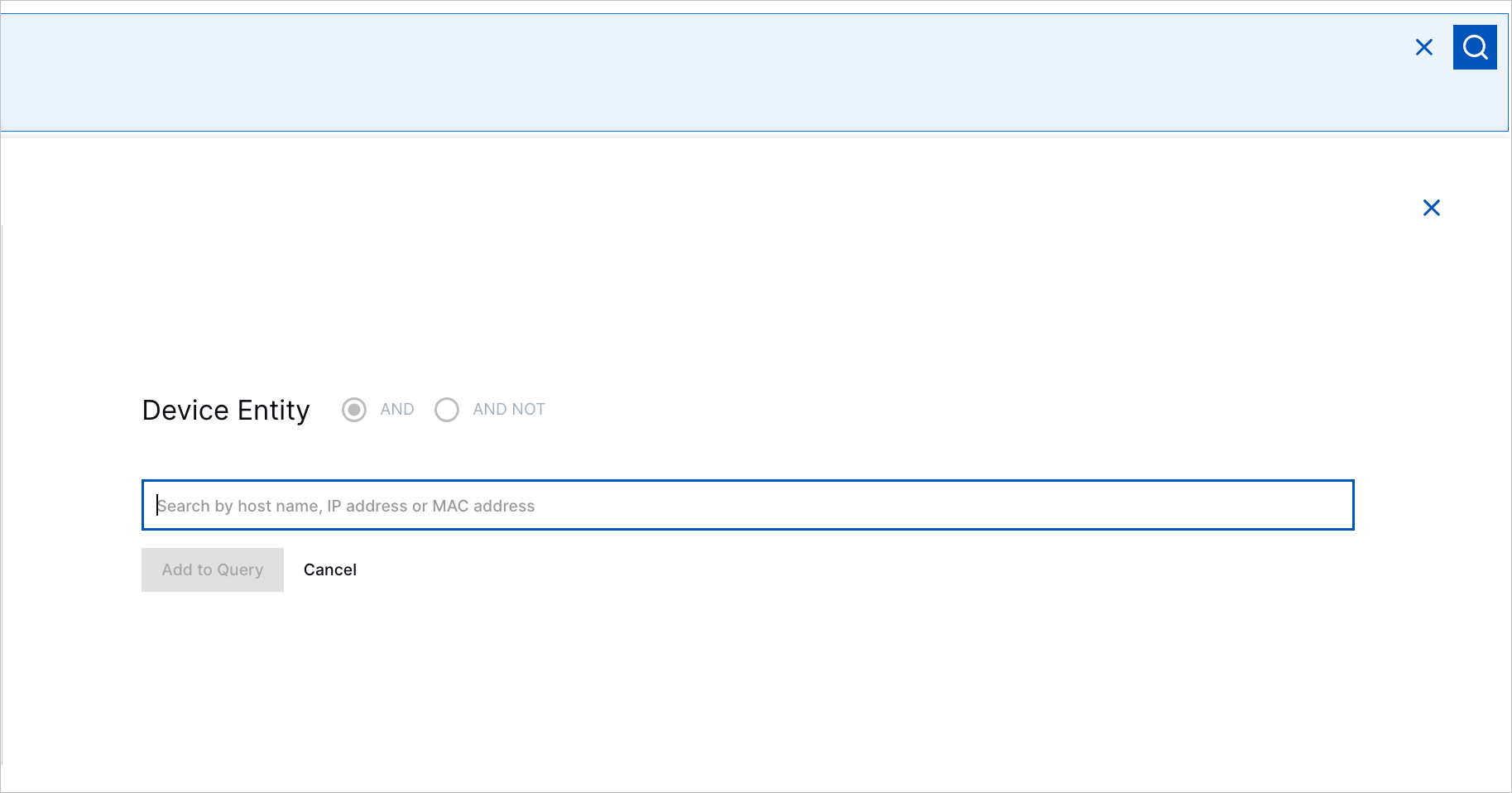
When you build a search, you can now select Device Entity, then enter a query for a host name, IP address, or MAC address.
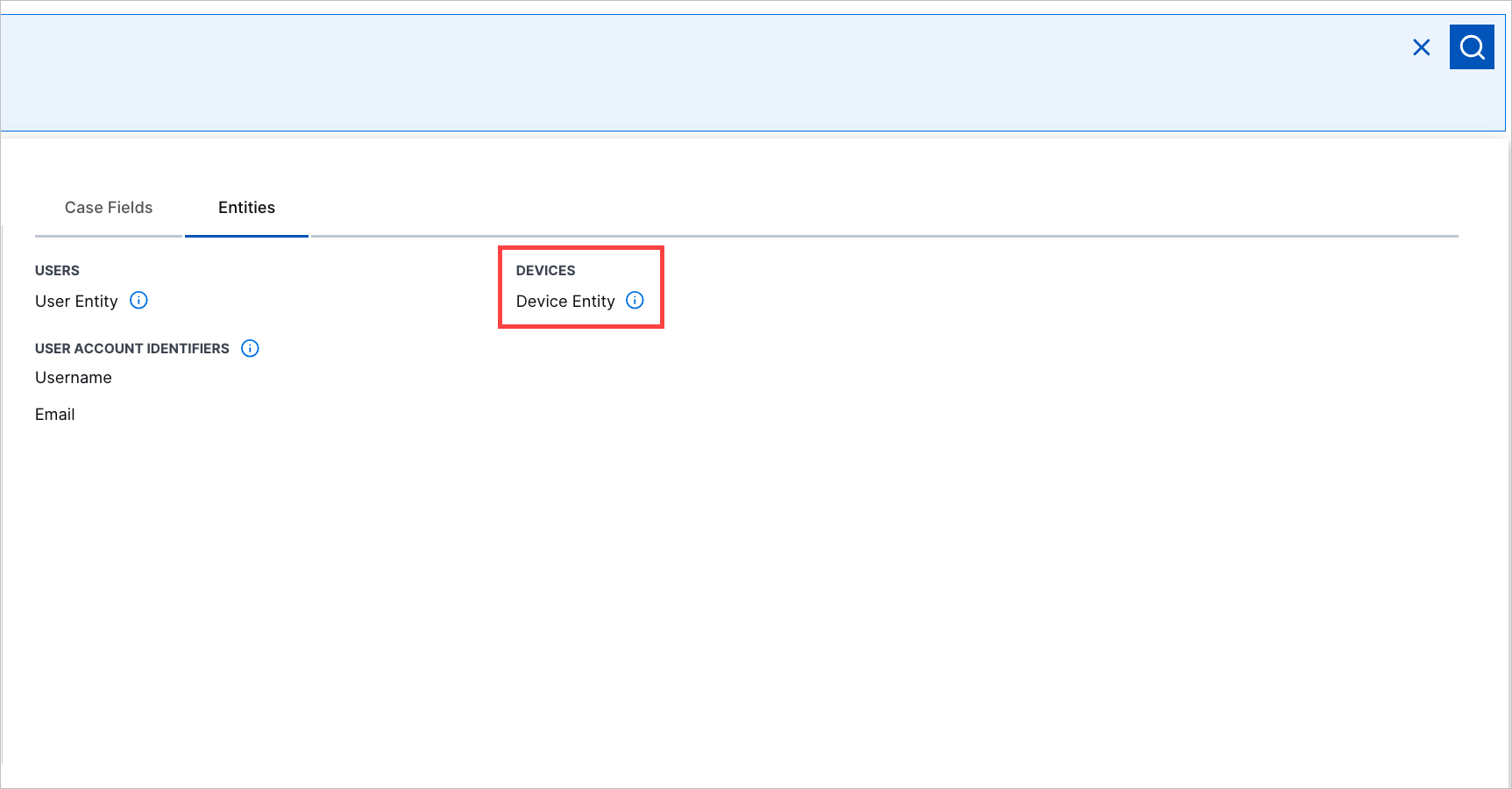
The Device Entity Search under the Entities tab in Threat Center basic search highlighted in a red rectangle.
Entering a query for Device Entity in Threat Center basic search.

You can also search for cases and alerts associated with a device entity by entering a search in Exabeam Query Language or natural language.

Case and Alert Automation History Enhancement

To focus on the most recent and relevant automation activity, you can now see only 30 days of activity in the Threat Center case and alert automation history.

To see more than 30 days of automation activity, view the advanced playbook run history in Automation Management.

Threat Detection Management

Feature

Description

New Early Access Pre-Built Analytics Rules

New pre-built analytics rules are released as part of an early access program before becoming generally available. Analytics rules in early access have [Early Access] in their names.

You can now better detect defense evasion techniques where attackers abuse trusted administrative utilities to execute malicious scripts with the following early access pre-built analytics rules:

  • Fact-PC-ProxyExecution-ScriptProxy – Detects rarely used Windows administrative scripts that may be abused to proxy execution through trusted system components and evade security controls.

  • Fact-PC-ProxyExecution-RemoteResource – Detects WMIC or MSXSL loading content from a remote HTTP or HTTPS resource, which may indicate execution of attacker-controlled scripts or abuse of trusted utilities for defense evasion.

Updated Pre-Built Analytics Rules

You can now better detect unusual AI interactions, data exfiltration, and compromised credentials with updated pre-built analytics rules.

To improve wording and clarity, detectionReason was updated for the following pre-built analytics rules:

  • NumDCP-AL-UC-Plt-U-SIP – An abnormal number of unique user names have been observed in application logins to this platform per source IP. These events may include both failed and successful communications.

  • NumSP-EMS-Bytes-U-Bytes – An abnormal amount of bytes have been sent in outgoing emails for this user.

  • NumDCP-Login-DZC-U-DZ – An abnormal number of unique destination network zones have been observed in login events for this user. These events may include both failed and successful logins.

  • NumCP-ELF-EC-U-DE – An abnormal number of failed endpoint logins to this endpoint have been observed for this user.

  • NumCP-AI-QC-U – An abnormal number of successful AI requests have been performed by this user. AI requests consist of one or more prompts.

  • NumCP-FDel-EC-U – An abnormal number of file deletion events have been observed for this user.

  • NumSP-Network-BytesFromExtIP-DZ-Bytes – An abnormal amount of bytes have been sent in externally initiated communication to this network zone. If the initiator cannot be determined from the event, it is inferred based on port values: the IP\endpoint communicating with the lower port is considered the initiator. These events may include both failed and successful communications.

  • NumDCP-PCCEnum-TC-U-CEnum – An abnormal number of unique credential enumeration tools have been executed for this user.

  • NumCP-SEPwrshell-WebReq-O-WebReq – An abnormal number of PowerShell web requests have been observed for the organization.

  • NumDCP-FWrite-AuditRule-U-DE – An abnormal number of unique endpoints where this user modified the audit.rules file in Unix system.

  • NumDCP-VPNln-UC-O-U-SE – An abnormal number of unique user names have been observed in VPN login for the organization per source endpoint. These events may include both failed and successful communications.

  • NumDCP-EL-UC-DE-UUnknown – An abnormal number of unique unknown user names have been observed in failed logins to this endpoint.

  • NumSP-Web-Bytes-UD-BytesStorageOut – An abnormal amount of bytes have been uploaded to file sharing websites for users in this department.

  • NumSP-DNSReq-Bytes-O-Bytes – An abnormal amount of bytes were sent in DNS queries from endpoints in the organization.

  • NumDCP-SA-ANC-UD-AN – An abnormal number of unique alerts have triggered for users in this department.

  • NumCP-PC-InsmodCmdC-DE – An abnormal number of 'insmod' (Install Module) process executions have been observed on this endpoint.

  • NumDCP-FRead-FS-U-DE – An abnormal number of unique destination endpoints have been observed in file read events for this user.

  • NumCP-PC-ChownCount-U – An abnormal number of 'chown' (Change Owner) process executions have been observed for this user.

  • NumDCP-SADLP-ProtoC-U-Proto – An abnormal number of unique protocols have been observed in DLP alerts for this user.

  • NumCP-ELF-EC-U-RDP – An abnormal number of failed RDP (remote desktop protocol) logins to this endpoint have been observed for this user.

  • NumCP-AppAuthF-EC-U – An abnormal number of application authentication failures have been observed for this user.

  • NumSP-DNSReq-Bytes-SE-Bytes – An abnormal amount of bytes were sent in DNS queries from this endpoint.

  • NumCP-FDnld-EC-O – An abnormal amount of file download events have been observed for the organization.

  • NumCP-DSOW-EC-UD – An abnormal number of directory service write events have been observed for users in this department. Directory services typically manage various types of objects to organize and administer resources within a network environment.

  • NumCP-WebF-EC-SIP – An abnormal number of HTTP 4xx/5xx error responses to internal resources has been observed from this IP.

  • NumCP-RegD-EC-U – An abnormal number of registry deletion events have been observed for this user.

  • NumCP-WebF-EC-WebDomain – An abnormal number of HTTP 4xx/5xx error responses to internal resources has been observed for this web domain.

  • NumCP-DNSResp-NXC-SE-NX – An abnormal number of DNS queries to NX domains from this endpoint have been observed.

  • NumCP-PC-ModprobeCmdC-DE – An abnormal number of 'modprobe' (Module Probe, a kernel module management tool) process executions have been observed on this endpoint.

  • NumDCP-FUSB-FPC-U-FP – An abnormal number of unique files has been written to peripheral storage devices for this user.

  • NumDCP-VPNln-UC-SE-U – An abnormal number of unique user names have been observed in VPN login from this endpoint. These events may include both failed and successful communications.

  • NumSP-Web-Bytes-U-BytesStorageOut – An abnormal amount of bytes have been uploaded to file sharing websites for this user.

  • NumCP-DNSResp-NXC-O-NX – An abnormal number of DNS queries to NX domains have been observed for the organization.

  • NumCP-FDnld-EC-UD – An abnormal amount of file download events have been observed for users in this department.

  • NumCP-DB-DBOpC-U – An abnormal number of database operation events were observed for this user - this can include both unique and non-unique operations. A database operation consists of any action in a database query (i.e. SELECT, DROP, UPDATE, etc...). These events may include both failed and successful operations.

  • NumDCP-PLA-LocC-U-LocCity – An abnormal number of unique cities have been observed in physical access events for this user.

  • NumCP-PC-KextloadCmdC-U – An abnormal number of 'kextload' (Kernel Extension Load) process executions have been observed for this user.

  • NumCP-AI-QC-UO – An abnormal number of successful AI requests for the organization have been performed by this user. AI requests may consist of one or more prompts.

  • NumCP-RegD-EC-DE – An abnormal number of registry deletion events have been observed on this device.

  • NumSP-FRead-FS-UP-Bytes – An abnormal amount of file bytes have been read in this platform for this user.

  • NumCP-VPNlnF-EC-U-30Days – An abnormal number of vpn login failures have been observed for this user in 30 days.

  • NumSP-FRead-FS-B-Bytes – An abnormal amount of file bytes have been read in this bucket for this user.

  • NumDCP-EL-DEC-SE-DE – An abnormal number of unique destination endpoints have been observed in successful endpoint login events from this endpoint. These events may include interactive Window logins and other (interactive or not) OS logins.

  • NumCP-ELF-EC-U-DZ – An abnormal number of failed logins to endpoints in this network zone have been observed for this user.

  • NumDCP-EL-DEC-O-DE – An abnormal number of unique destination endpoints have been observed in endpoint login events for the organization. These events may include interactive Window logins and other (interactive or not) OS logins, both failed as successful.

  • NumSP-Network-BytesToExtIP-Failed-SE-Bytes – An abnormal amount of bytes have failed to be sent in communication that initiated from this endpoint to an external IP. If the initiator cannot be determined from the event, it is inferred based on port values: the IP\endpoint communicating with the lower port is considered the initiator.

  • NumSP-SADLP-Bytes-U-Bytes – An abnormal amount of outgoing bytes have been recorded in DLP alerts for this user.

  • NumCP-PCpwrshell-EC-U – An abnormal number of PowerShell process executions have been observed for this user.

  • NumDCP-PLA-LocC-U-LocDoor – An abnormal number of unique doors have been observed in physical access events for this user.

  • NumCP-Web-AIA-U-AILLMSessionCount – An abnormal number of AI/LLM web sessions has been observed for this user.

  • NumCP-PC-CritCmdC-O – An abnormal number of critical command executions have been observed for the organization.

  • NumCP-Git-EC-U – An abnormal amount of GitHub API access events have been observed for this user.

  • NumCP-DSOW-EC-U – An abnormal number of directory service events have been observed for this user. Directory services typically manage various types of objects to organize and administer resources within a network environment.

  • NumCP-SA-TP-AC-DLP-UO – An abnormal number of of DLP violations via AI for the organization have been performed by this user.

  • NumDCP-RegW-RPC-ServicesStop-U-RP – An abnormal number of unique services have been stopped by modifying the registry for this user.

  • NumDCP-EL-UC-DE-U-SE – An abnormal number of unique user names have been observed in endpoint logins to this endpoint per source endpoint. These events may include both failed and successful communications.

  • NumDCP-PCHEnum-TC-U-HEnum – An abnormal number of unique host enumeration tools have been executed for this user.

  • NumCP-PwdChkout-EC-O-SC – An abnormal number of password retrievals have been observed for the organization.

  • NumCP-PC-DirSearchCount-U – An abnormal number of unix file search process executions have been observed for this user.

  • NumCP-FUpld-EC-UD – An abnormal amount of file upload events have been observed for users in this department.

  • NumCP-AI-TC-U – An abnormal amount of tool calls have been observed for this user.

  • NumDCP-AL-UC-PltSE-U – An abnormal number of unique user names have been observed in application logins to this platform from this endpoint. These events may include both failed and successful communications.

  • NumDCP-ELF-SEC-DE-SE – An abnormal number of unique endpoints have been observed failing to log into this endpoint.

  • NumCP-RegD-Services-EC-DE – An abnormal number of unique service configurations have been deleted from the registry on this device.

  • NumSP-FRead-FS-SA-Bytes – An abnormal amount of file bytes have been read in this storage account for this user.

  • NumCP-SEPwrshell-CmdInvC-O-InvC – An abnormal number of PowerShell command invocations have been observed for the organization.

  • NumDCP-EA-TgsEC-UD-Sn – An abnormal number of Ticket Granting Services (TGS) were observed for users in this department. In Kerberos authentication, a Ticket Granting Ticket (TGT) is a user authentication token issued by the Key Distribution Center (KDC) to be used to request from the Ticket Granting Service (TGS) access tokens for specific resources/systems joined to the domain. This event is notable since it may indicate use of stolen credentials.

  • NumCP-AI-CDC-UPLT – An abnormal number of AI conversations have been successfully deleted by this user on this platform.

  • NumCP-AppLF-EC-U – An abnormal number of application login failures have been observed for this user.

  • NumCP-Web-MethodDelC-SIP – An abnormal number of HTTP requests to an internal resource with the method DELETE by this IP have been observed. Probably detects resources deletion.

  • NumDCP-VPNln-UC-O-U-SIP – An abnormal number of unique user names have been observed in VPN login for the organization per source IP. These events may include both failed and successful communications.

  • NumCP-VPNlnF-EC-O-U-30Days – An abnormal number of failed VPN logins have been observed for the organization by this user in 30 days.

  • NumCP-AI-CSC-UPLT – An abnormal number of AI conversations have been successfully shared by this user on this platform.

  • NumSP-Network-BytesToExtIP-SE-Bytes – An abnormal amount of bytes have been sent in communication that initiated from this endpoint to an external IP. If the initiator cannot be determined from the event, it is inferred based on port values: the IP\endpoint communicating with the lower port is considered the initiator. These events may include both failed and successful communications.

  • NumDC-RA-U-RAC – An abnormal number of role-assume requests have been observed for this user. These events can include both successful and failed assumed roles.

  • NumCP-AI-U-Guardrail-Block – An abnormal amount of AI guardrail violations have been observed for a user.

  • NumSP-DBQ-RS-U-RS – An abnormal database query response size has been observed for this user. These events may include both failed and successful queries.

  • NumCP-PC-ChmodCount-U – An abnormal number of 'chmod' (Change Mode) process executions have been observed for this user.

  • NumDCP-CA-DAC-U-Disks – An abnormal number of volumes were attached to instances by this user. These events may include both failed and successful attachments.

  • NumSP-Web-Bytes-U-BytesInPost – An abnormal amount of bytes have been uploaded to the web with POST requests for this user.

  • NumCP-PC-InsmodCmdC-U – An abnormal number of 'insmod' (Install Module) process executions have been observed for this user.

  • NumSP-AI-TS-U-Tokens – An abnormal sum of tokens in successful AI requests and responses has been observed for this user. If the number of tokens is not available, tokens are estimated at one token per four letters.

  • NumDCP-FRead-EC-UP-FP – An abnormal number of unique files have been read in this platform for this user.

  • NumDCP-GA-OpC-UPlt-FOp – An abnormal number of unique failed operations have been observed in this platform for this user.

  • NumCP-PwdChkout-EC-UD-SC – An abnormal number of password retrievals have been observed for users in this department.

  • NumCP-PCpwrshell-EC-UD – An abnormal number of PowerShell process executions have been observed for users in this department.

  • NumCP-MFADisable-UC – An abnormal number of MFA disable events have been observed for this user.

  • NumSP-Web-Bytes-U-BytesStorageIn – An abnormal amount of bytes have been downloaded from file sharing websites for this user.

  • NumSP-Web-Bytes-O-BytesStorageOut – An abnormal amount of bytes have been uploaded to file sharing websites for the organization.

  • NumCP-AI-MC-U – An abnormal amount of AI agent modifications have been observed for a user.

  • NumSP-FUSB-Bytes-U-Bytes – An abnormal amount of file bytes have been written to peripheral storage devices for this user.

  • NumCP-SA-TP-AC-U – An abnormal number of AI third-party alerts have been observed for this user.

  • NumSP-Web-Bytes-AIA-U-DownloadBytesIn – An abnormal inbound byte volume was observed for this user from download-related domains categorized as AI, ML, Generative AI, LLM, or equivalent by a web security vendor.

  • NumDCP-EL-UC-DE-U – An abnormal number of unique user names have been observed in logins to this endpoint. These events may include both failed and successful logins.

  • NumCP-DSOW-EC-O – An abnormal number of directory service write events have been observed for the organization. Directory services typically manage various types of objects to organize and administer resources within a network environment.

  • NumSP-MItemRead-NMS-U-NA – An abnormal number of emails have been read by this user.

  • NumCP-PrivUse-EC-U-APC – An abnormal number of administrative privilege access events have been observed for this user.

  • NumDCP-RegR-RPC-Cert-U-RP – An abnormal number of unique certificates and private keys related registry values have been read by this user.

  • NumCP-RegD-Services-EC-U – An abnormal number of unique service configurations have been deleted from the registry for this user.

  • NumCP-SA-TP-AC-DLP-U – An abnormal number of DLP violations via AI have been observed for this user.

  • NumDCP-AL-UC-Plt-U-SE – An abnormal number of unique user names have been observed in application logins to this platform per source endpoint. These events may include both failed and successful communications.

  • NumDCP-Login-DZC-UD-DZ – An abnormal number of unique destination network zones have been observed in login events for users in this department. These events may include both failed and successful logins.

  • NumDCP-Auth-TgsEC-U-Sn – An abnormal number of Ticket Granting Services (TGS) were observed for this user. In Kerberos authentication, a Ticket Granting Ticket (TGT) is a user authentication token issued by the Key Distribution Center (KDC) to be used to request from the Ticket Granting Service (TGS) access tokens for specific resources/systems joined to the domain. This event is notable since it may indicate use of stolen credentials.

  • NumDCP-FWrite-EC-U-FP – An abnormal number of unique files have been written for this user.

  • NumCP-DL-EC-SE – An abnormal number of kernel module or drivers have been loaded on this endpoint.

  • NumDCP-EL-DEC-U-DE – An abnormal number of unique destination endpoints have been observed in endpoint login events for this user. These events may include interactive Window logins and other (interactive or not) OS logins, both failed as successful.

  • NumDCP-RegW-RPC-ServicesStop-DE-RP – An abnormal number of unique services have been stopped by modifying the registry on this endpoint.

  • NumDCP-EL-UC-DESE-U – An abnormal number of unique user names have been observed in endpoint logins for destination endpoint and source endpoint. These events may include both failed and successful communications.

  • NumCP-FUpld-EC-U – An abnormal amount of file upload events have been observed for this user.

  • NumCP-FDnld-EC-U – An abnormal amount of file download events have been observed for this user.

  • NumCP-Auth-MfaEC-U – An abnormal number of Multi-Factor Authentication (MFA) authentication events for this user have been observed. These events may include both failed and successful authentications to an MFA service.

  • NumCP-EScrn-EC-U – An abnormal number of screenshot events have been observed for this user.

  • NumCP-AI-TC-O-U – An abnormal amount of tool calls have been observed for the organization by this user.

  • NumCP-VPNlnF-EC-O-U-1Day – An abnormal number of failed VPN logins have been observed for the organization by this user in a day.

  • NumCP-FDel-UnixLogFilesC-U – An abnormal number of log files have been deleted by this user in Unix systems.

  • NumDC-Git-RepoC-U-Object – An abnormal number of unique repository endpoints where secrets are generally stored, which may indicate unauthorized enumeration or insider reconnaissance activity. Repository name is parsed into the object field which is being counted here.

  • NumCP-DL-EC-UPlt – An abnormal number of kernel module or drivers have been loaded for this user.

  • NumCP-VPNlnF-EC-U – An abnormal number of vpn login failures have been observed for this user.

  • NumDCP-FS-EC-U-FP – An abnormal number of files have been shared by this user.

  • NumDCP-SA-ANC-SE-AN – An abnormal number of unique alerts have triggered from this endpoint.

  • NumSP-VPNOut-Bytes-U-Bytes – An abnormal amount of bytes have been uploaded in VPN session for this user.

  • NumSP-EMR-Bytes-DU-Bytes – An abnormal amount of bytes have been received in incoming emails for this user.

  • NumCP-SA-TP-AC-UO – An abnormal number of of AI third-party alerts for the organization have been performed by this user.

  • NumDCP-FRead-EC-B-FP – An abnormal number of unique files have been read in this bucket for this user.

  • NumDCP-PwdChkout-SVC-U-SV – An abnormal number of unique safes have been observed in passwords retrieval events for this user.

  • NumDCP-Network-DPC-SEDE-DP – An abnormal number of unique target ports have been observed in internal communication that initiated by this endpoint to this destination endpoint. If the initiator cannot be determined from the event, it is inferred based on port values: the IP\endpoint communicating with the lower port is considered the initiator. These events may include both failed and successful communications.

  • NumSP-Network-BytesToExtIP-SZ-Bytes – An abnormal amount of bytes have been sent in communication that initiated in this network zone to an external IP. If the initiator cannot be determined from the event, it is inferred based on port values: the IP\endpoint communicating with the lower port is considered the initiator. These events may include both failed and successful communications.

  • NumCP-RuleDel-EC-U – An abnormal number of security rules deletion events have been observed for this user.

  • NumCP-PwdChkout-EC-U-SC – An abnormal number of password retrievals have been observed for this user.

  • NumSP-DNSReq-Bytes-SZ-Bytes – An abnormal amount of bytes were sent in DNS queries from this network zone.

  • NumCP-MPermMod-EC-U – An abnormal number of mailbox permission modifications have been observed for this user.

  • NumCP-WebF-EC-U-Id – An abnormal number of HTTP 4xx/5xx error responses has been observed for this user.

  • NumCP-PCpwrshell-EC-O – An abnormal number of PowerShell process executions have been observed for the organization.

  • NumDCP-EL-UC-O-U-SE – An abnormal number of unique user names have been observed in endpoint logins for the organization per source endpoint. These events may include both failed and successful communications.

  • NumDCP-FDel-U-DE – An abnormal number of unique remote destination endpoints have been observed in file deletion events on this endpoint for this user.

  • NumCP-AI-QC-WID – An abnormal number of successful AI requests has been observed for this workspace. AI requests may consist of one or more prompts.

  • NumCP-EMS-EC-U-Id – An abnormal number of outgoing emails have been observed for this user.

  • NumSP-Web-AIA-U-AILLMBytesOut – An abnormal volume of outbound data to AI/LLM web applications has been observed for this user.

  • NumDCP-SA-ANC-U-AN – An abnormal number of unique alerts have triggered for this user.

  • NumCP-ELF-EC-U-SE – An abnormal number of failed endpoint logins from this endpoint have been observed for this user.

  • NumDCP-FRead-EC-SA-FP – An abnormal number of unique files have been read in this storage account for this user.

  • NumDCP-FC-EC-U-FP – An abnormal number of unique files have been copied in this platform for this user.

  • NumSP-AI-TS-UO-Tokens – An abnormal sum of tokens in successful AI requests and responses has been observed for the organization and has been attributed to this user. If the number of tokens is not available, tokens are estimated at one token per four letters.

  • NumDCP-WebF-WebDomC-U-WebDom – An abnormal number of unique domains have been observed in failed HTTP events for this user.

  • NumCP-UPwdMod-O – An abnormal amount of password reset events were observed for this user.

  • NumCP-FUpld-EC-O – An abnormal amount of file upload events have been observed for the organization.

  • NumCP-PC-KextloadCmdC-DE – An abnormal number of 'kextload' (Kernel Extension Load) process executions have been observed for this endpoint.

  • NumCP-Web-MethodDelC-WebDom – An abnormal number of HTTP requests to an internal resource with the method DELETE have been observed for this domain. Probably detects resources deletion.

  • NumCP-PC-ModprobeCmdC-U – An abnormal number of 'modprobe' (Module Probe, a kernel module management tool) process executions have been observed for this user.

  • NumCP-EMR-EC-DU – An abnormal number of incoming emails have been observed for this user.

  • NumCP-PC-SudoCount-U – An abnormal number of 'sudo' (Superuser Do) process executions have been observed for this user.

To prevent pre-built analytics rules from creating Threat Center cases while upcoming detection logic updates are pending, severity was updated to Low for the following pre-built analytics rules:

  • Prof-RegW-COM-O-CLSID – This is the first time the registry path to a COM class with this CLSID has been modified.

  • Prof-DllLoad-Dll-O-FN – This is the first time this DLL image file was loaded in the organization.

  • Prof-PC-PPN-PN-PPN – This is the first time this parent process has been observed for this matured child process.

  • Prof-DllLoad-Dir-O-FD – This is the first time a DLL image file was loaded from this folder for the organization.

  • Prof-DllLoad-Ext-O-FileExt – This is the first time a DLL image file with this extension was loaded for the organization.

  • Prof-PC-PPN-PPN-PN – This is the first time this child process has been observed for this matured parent process.

To ensure associated rule trigger events are correctly retrieved, query was updated to ensure numeric values are evaluated as integers and to apply null guards for the following pre-built analytics rules:

  • NumSP-Network-BytesFromExtIP-DZ-Bytes – An abnormal amount of bytes have been sent in externally initiated communication to this network zone. If the initiator cannot be determined from the event, it is inferred based on port values: the IP\endpoint communicating with the lower port is considered the initiator. These events may include both failed and successful communications.

  • NumCP-WebF-EC-SIP – An abnormal number of HTTP 4xx/5xx error responses to internal resources has been observed from this IP.

  • NumCP-WebF-EC-WebDomain – An abnormal number of HTTP 4xx/5xx error responses to internal resources has been observed for this web domain.

  • NumSP-Network-BytesToExtIP-Failed-SE-Bytes – An abnormal amount of bytes have failed to be sent in communication that initiated from this endpoint to an external IP. If the initiator cannot be determined from the event, it is inferred based on port values: the IP\endpoint communicating with the lower port is considered the initiator.

  • NumSP-Network-BytesToExtIP-SE-Bytes – An abnormal amount of bytes have been sent in communication that initiated from this endpoint to an external IP. If the initiator cannot be determined from the event, it is inferred based on port values: the IP\endpoint communicating with the lower port is considered the initiator. These events may include both failed and successful communications.

  • NumSP-DBQ-RS-U-RS – An abnormal database query response size has been observed for this user. These events may include both failed and successful queries.

  • NumSP-Web-Bytes-AIA-U-DownloadBytesIn – An abnormal inbound byte volume was observed for this user from download-related domains categorized as AI, ML, Generative AI, LLM, or equivalent by a web security vendor.

  • NumDCP-Network-DPC-SEDE-DP – An abnormal number of unique target ports have been observed in internal communication that initiated by this endpoint to this destination endpoint. If the initiator cannot be determined from the event, it is inferred based on port values: the IP\endpoint communicating with the lower port is considered the initiator. These events may include both failed and successful communications.

  • NumSP-Network-BytesToExtIP-SZ-Bytes – An abnormal amount of bytes have been sent in communication that initiated in this network zone to an external IP. If the initiator cannot be determined from the event, it is inferred based on port values: the IP\endpoint communicating with the lower port is considered the initiator. These events may include both failed and successful communications.

  • NumCP-WebF-EC-U-Id – An abnormal number of HTTP 4xx/5xx error responses has been observed for this user.

To ensure associated rule trigger events are correctly retrieved, query was updated so boolean, integer, and number values are formatted without quotation marks for the following pre-built analytics rules:

  • NumSP-Web-Bytes-UD-BytesStorageOut – An abnormal amount of bytes have been uploaded to file sharing websites for users in this department.

  • NumDCP-FUSB-FPC-U-FP – An abnormal number of unique files has been written to peripheral storage devices for this user.

  • NumSP-Web-Bytes-U-BytesStorageIn – An abnormal amount of bytes have been downloaded from file sharing websites for this user.

  • NumSP-Web-Bytes-O-BytesStorageOut – An abnormal amount of bytes have been uploaded to file sharing websites for the organization.

  • NumSP-FUSB-Bytes-U-Bytes – An abnormal amount of file bytes have been written to peripheral storage devices for this user.

To improve PowerShell detection, title, description, query, and trainOnCondition were updated for the following pre-built analytics rule:

  • NumCP-SEPwrshell-WebReq-O-WebReq – An abnormal number of PowerShell web requests have been observed for the organization.

To improve PowerShell detection, title, description, detectionReason, and actOnCondition were updated for the following pre-built analytics rule:

  • Fact-SEPwrshell-EnumNetworkAdapter – A PowerShell script that enumerate network adapters using wmi object has been executed.

To improve PowerShell detection, title, description, detectionReason, trainOnCondition, and mitre were updated for the following pre-built analytics rule:

  • Prof-SEPwrshell-wmi-O-U – This is the first time this user executed a PowerShell script with WMI commands.

To improve PowerShell detection, description, query, and trainOnCondition were updated for the following pre-built analytics rule:

  • NumCP-SEPwrshell-CmdInvC-O-InvC – An abnormal number of PowerShell command invocations have been observed for the organization.

To ensure events can reasonably satisfy the rule conditions, applicable_events was updated for the following pre-built analytics rule:

  • Prof-ELNAC-Loc-U-Loc – This is the first time this user has been observed logging into an endpoint using a network access control platform from this network location.

To prevent false positive triggers, actOnCondition was updated for the following pre-built analytics rule:

  • Fact-U-PrivMM – A non-privileged user has been observed accessing an attribute of a privileged directory service user account.

Resolved Issues

There are no new resolved issues to report in this release.