New docs portal launching December 21st! All Exabeam, LogRhythm, and API documentation is moving to docs.exabeam.com. Links will redirect, but we recommend updating your bookmarks after Dec. 21st.

Responses are generated using AI and may contain mistakes.

New-Scale Security Operations PlatformNew-Scale Security Operations Platform Release Notes

November 2026

The New-Scale Security Operations Platform includes the following addressed features and new features for November 2026.

Note

The November monthly release deployment occurs across regions over a 48 hour period starting on November 17th at 8 A.M. IST (2:30 UTC).

Attack Surface Insights

Feature

Description

Individual Entities for System Accounts

To accurately identify system or service accounts, Attack Surface Insights now treats them as distinct entities.

If both of the following conditions are true:

  • An identifying entity attribute value or context data contains a hyphen

  • The prefix before @ or - delimiters is system

The entity is not linked to context, resulting in a distinct, individual entity.

Example

In an event, Attack Surface Insights identifies the username attribute value System - Cisco.

In context, it finds the local_username attribute value System - Windows.

Because both values contain a hyphen and the prefix is System, Attack Surface Insights does not link the entity to the context record. The entity remains a standalone entity.

Example

In an event, Attack Surface Insights identifies the username attribute value System - Cisco.

In context, it finds the local_username attribute value [email protected].

Because both values contain a hyphen and the prefix is System, Attack Surface Insights does not link the entity to the context record. The entity remains a standalone entity.

Unified Entity Details

To consistently review the details of an entity, you can now view the same entity details in Attack Surface Insights that is in other areas of the platform, like Search.

With a streamlined entity details experience, you can now:

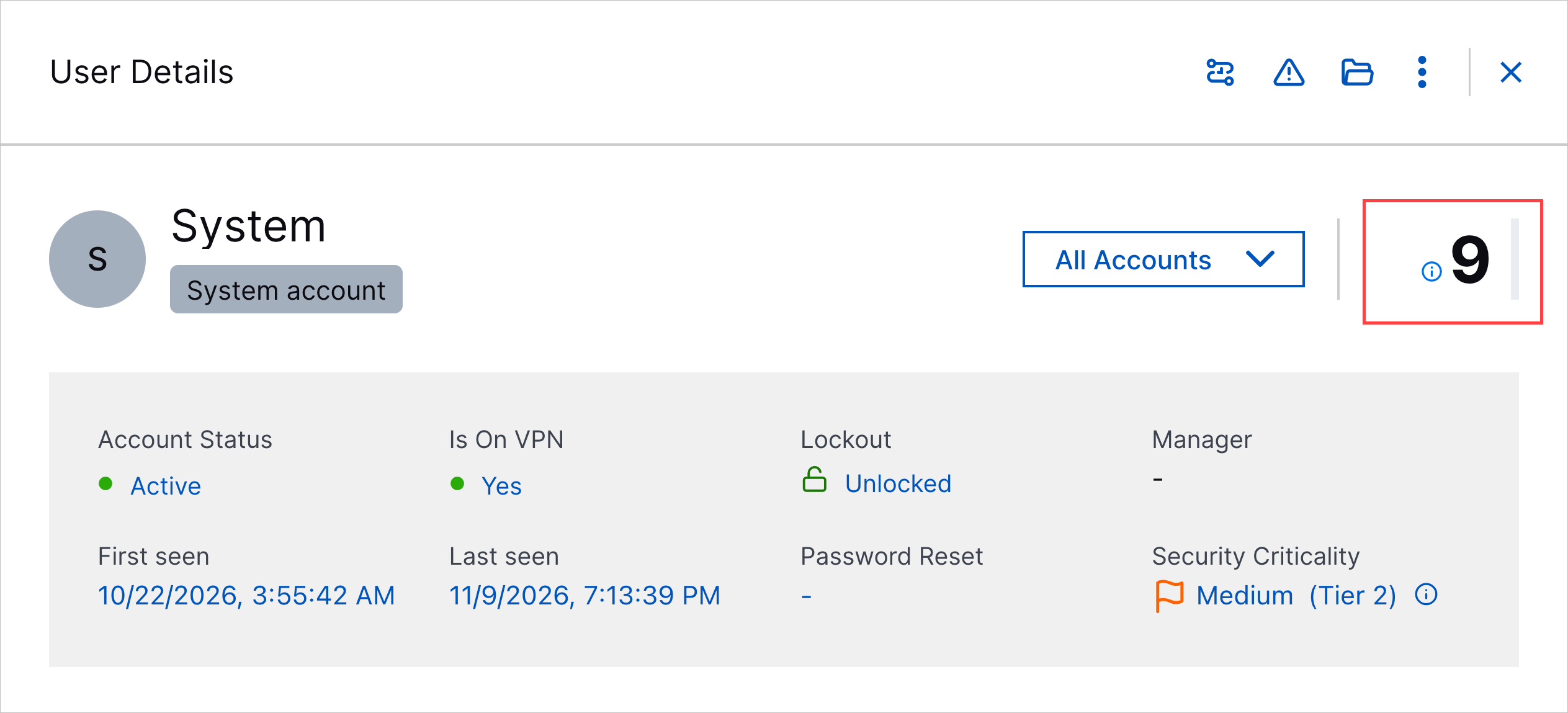
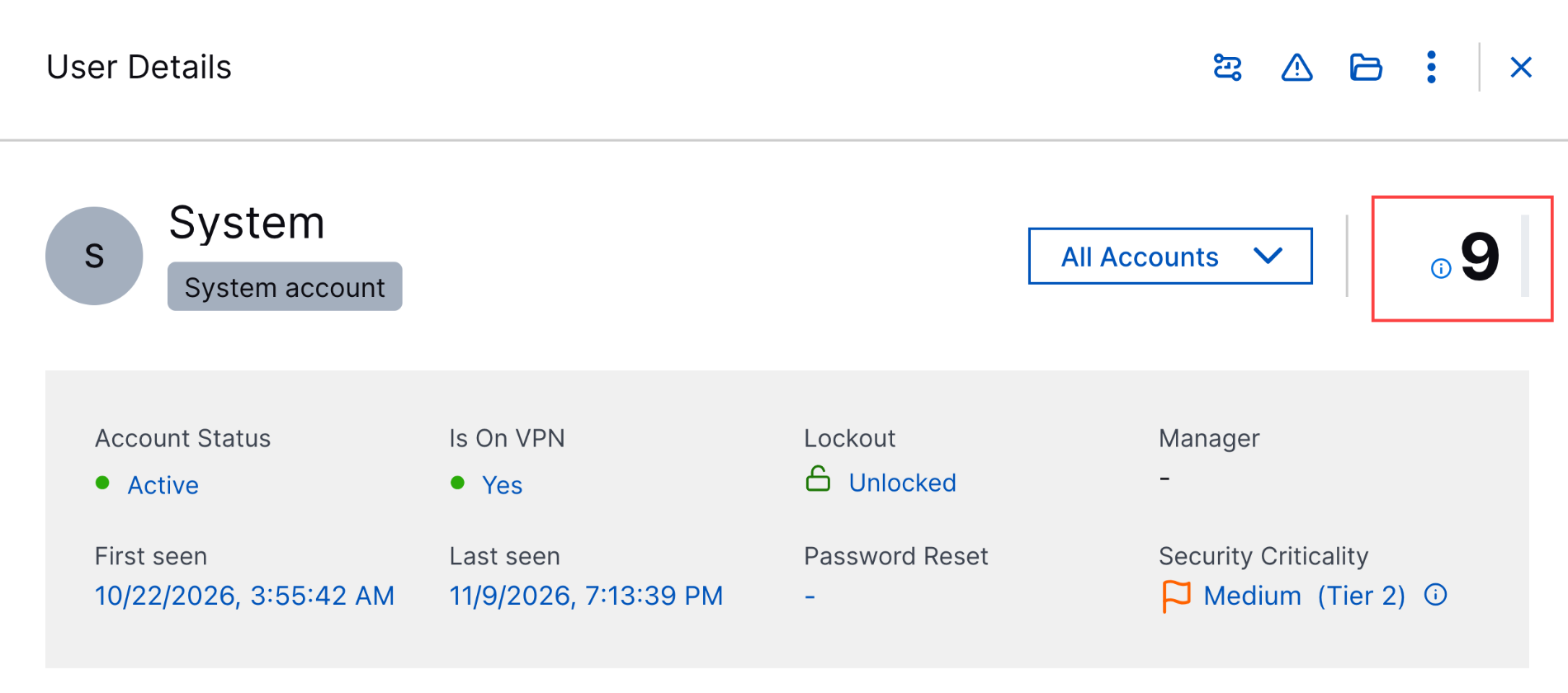
  • View the risk score of the most recently created Threat Center case or alert associated with the entity

    The latest case or alert risk score in the entity details highlighted in a red rectangle.
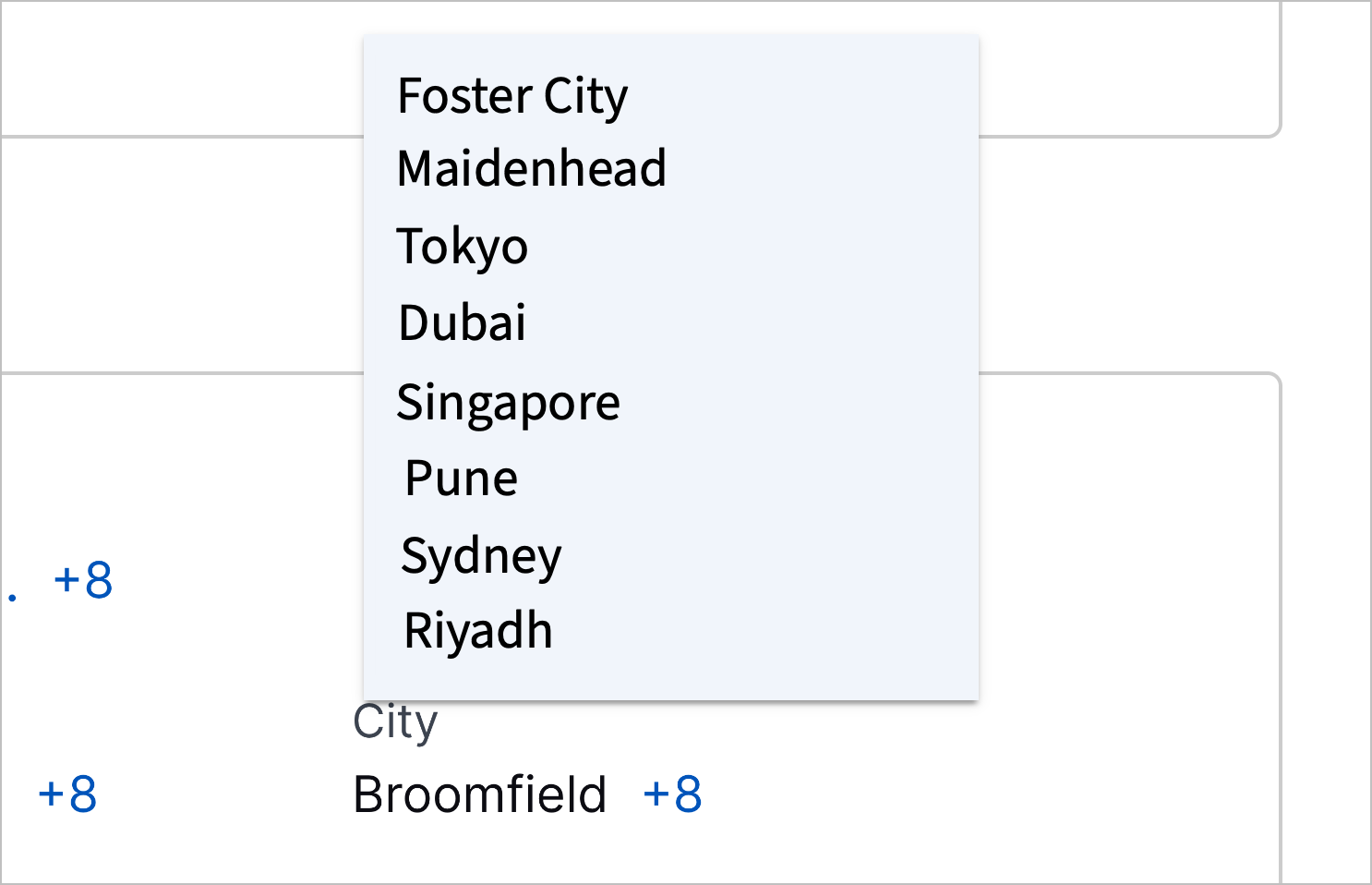
  • Hover over +<#> to view all values of an entity attribute that has multiple values

    An entity attribute with multiple values.
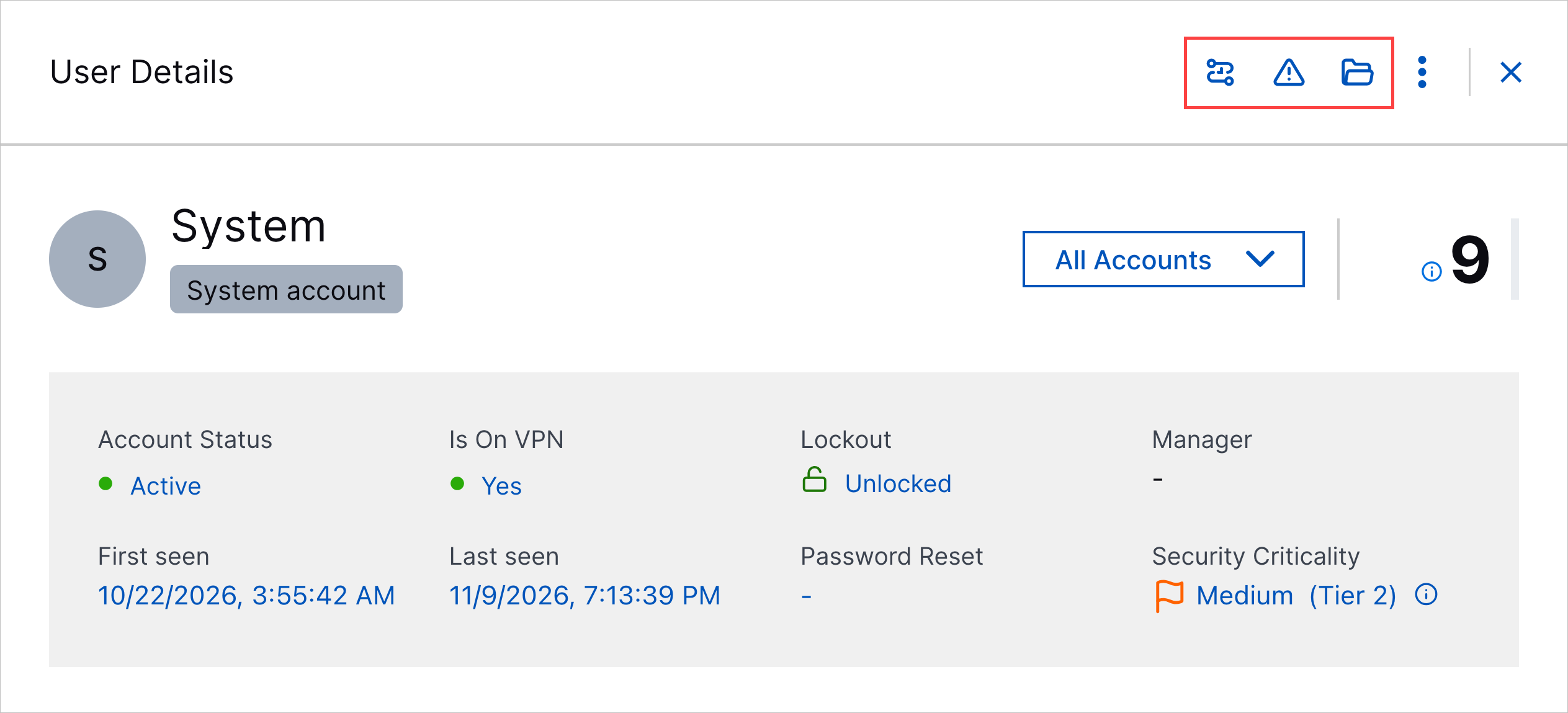
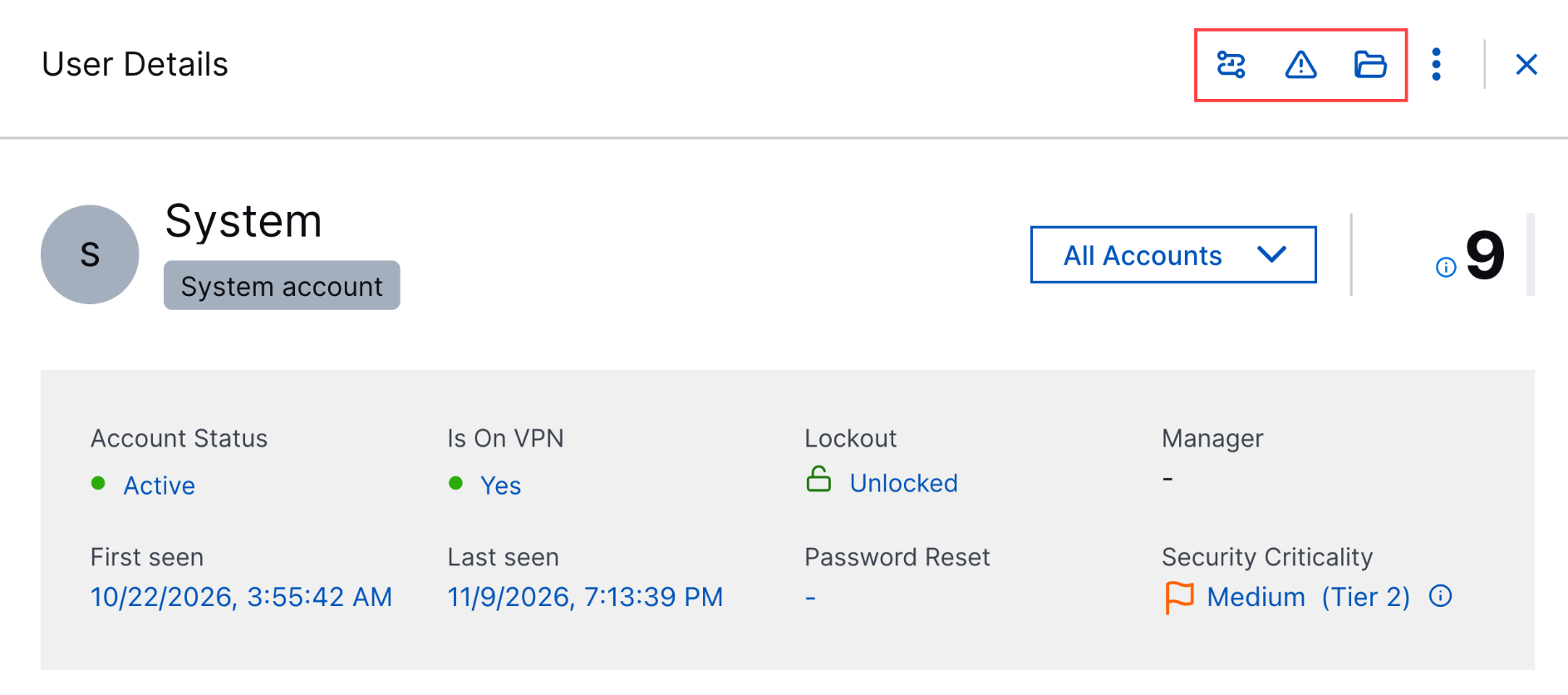
  • Further investigate an entity by quickly navigating to the Search timeline, associated Threat Center cases, or associated Threat Center alerts

    The buttons to navigate to the Search timeline, associated Threat Center cases, and Threat Center alerts in the entity details highlighted in a red rectangle.
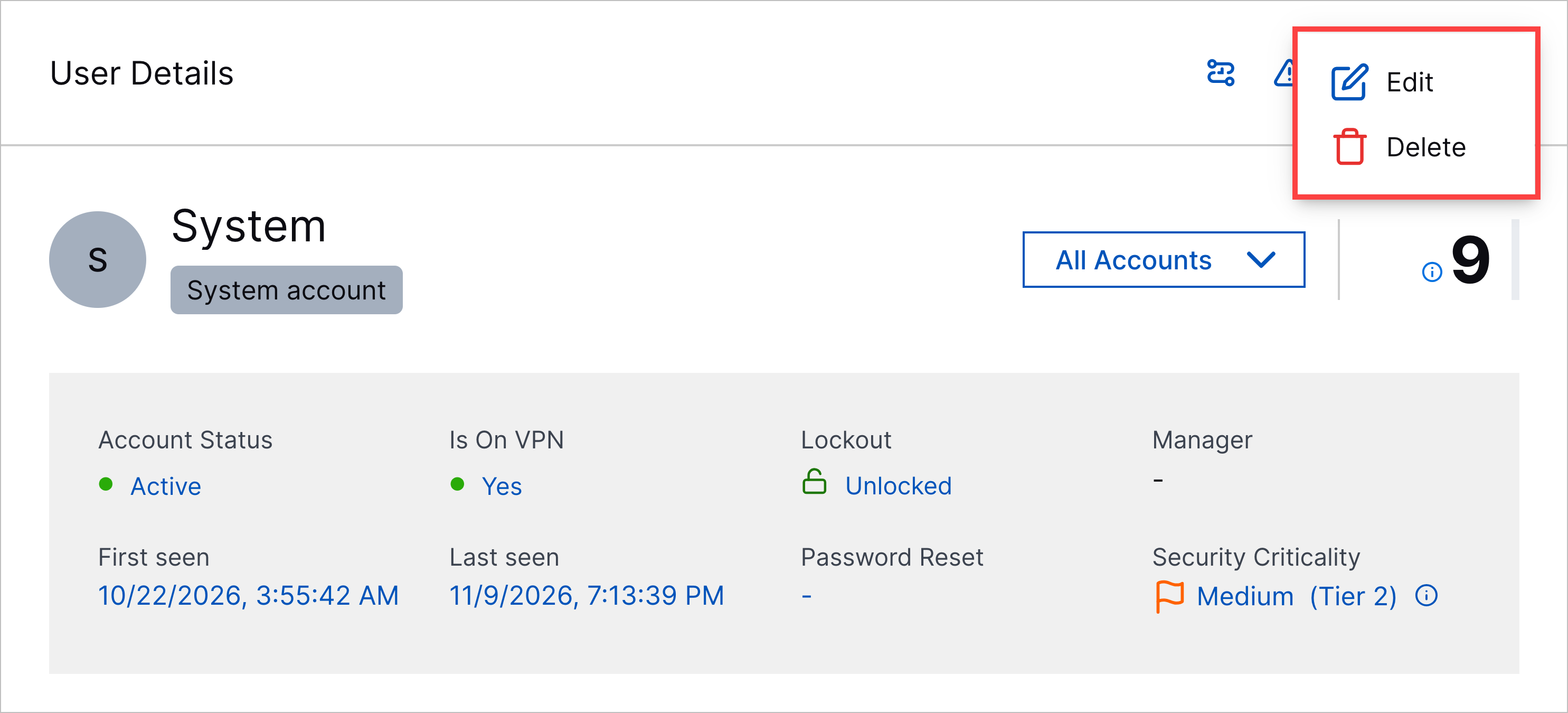
  • Click the More menu search-query-moremenu.png to edit or delete an entity

    The More menu in user entity details expanded, with the menu highlighted in a red rectangle.

Automation Management

Feature

Description

Advanced Playbook Inputs Enhancement

To simplify how you create and edit advanced playbooks, you can now view pre-configured playbook inputs and their data types for reference only in the advanced playbook editor.
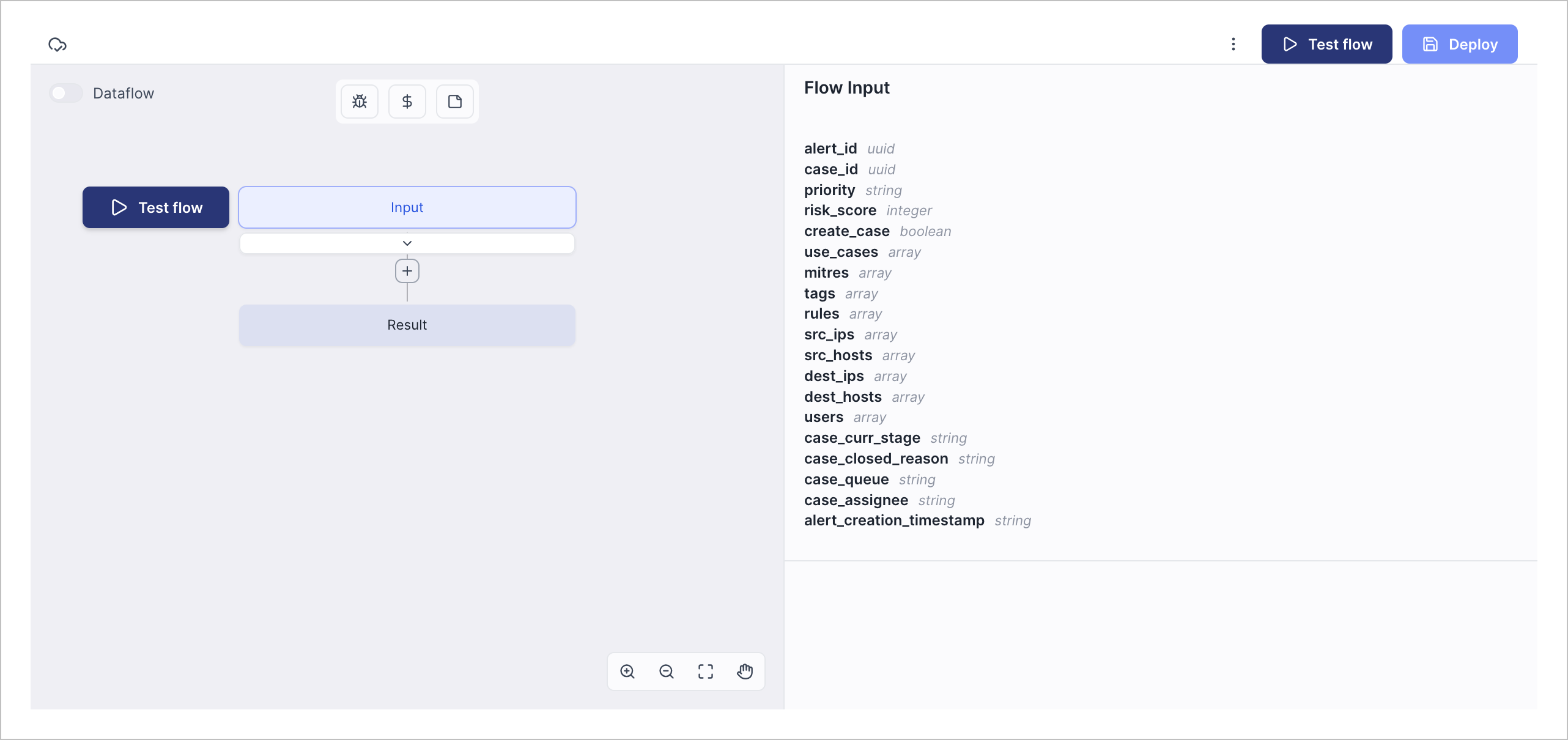
An advanced playbook with the Input node selected.

You can no longer add or edit playbook inputs. When testing an advanced playbook, you can still enter playbook input values.

Cloud Collectors

Feature

Description

Claude Enterprise Cloud Collector

The Claude Enterprise Cloud Collector is now available as part of Cloud Collectors to facilitate ingestion of logs from from Claude Compliance API that include user activity data containing user role changes, workspace creations, and administrative updates, and chats containing user prompts. Additionally, the collector collects data from the endpoints that support Cowork (local and cloud sessions) and Claude Code (local sessions) data sources.

Support for Offset/Limit Pagination Parameters

The REST API Cloud Collector in addition to the exiting pagination options, now offers new pagination style that enables you to use offset and limit paging parameters to control paging of a response collection.

Early Access Cloud Collector

Bindplane Cloud Collector

The Bindplane Cloud Collector is now available as part of Cloud Collectors early access program to facilitate ingestion of logs from Bindplane stream.

The early access program offers you an opportunity to gain access to the latest cloud collectors before their official release. To participate, see Sign Up for the Early Access Program.

Context Management

Feature

Description

Support for STIX/TAXII Data Expiration

Context Management now supports aging logic for threat intelligence data that uses the STIX/TAXII protocols. In Context Management, this type of data is included in Anomali, Recorded Future, and STIX/TAXII context tables. Data collected from the corresponding cloud collector expires and is removed from the context table based on the Maximum Age in Days configured in the cloud collector. In this way, stale threat intelligence data is not maintained long enough to become inaccurate and begin causing false positives.

For more information about STIX/TAXII data collection, see the following references:

Correlation Rules

Feature

Description

Rule Creation Button Enhancement with Read Permission

To clarify that you can't create correlation rules if you have Correlation Rules read permissions, the + New Rule button is now disabled if you have read permissions only.

When you hover over the button, a tooltip states: You need Correlation Rules Write access to create new correlation rules. Contact your administrator.
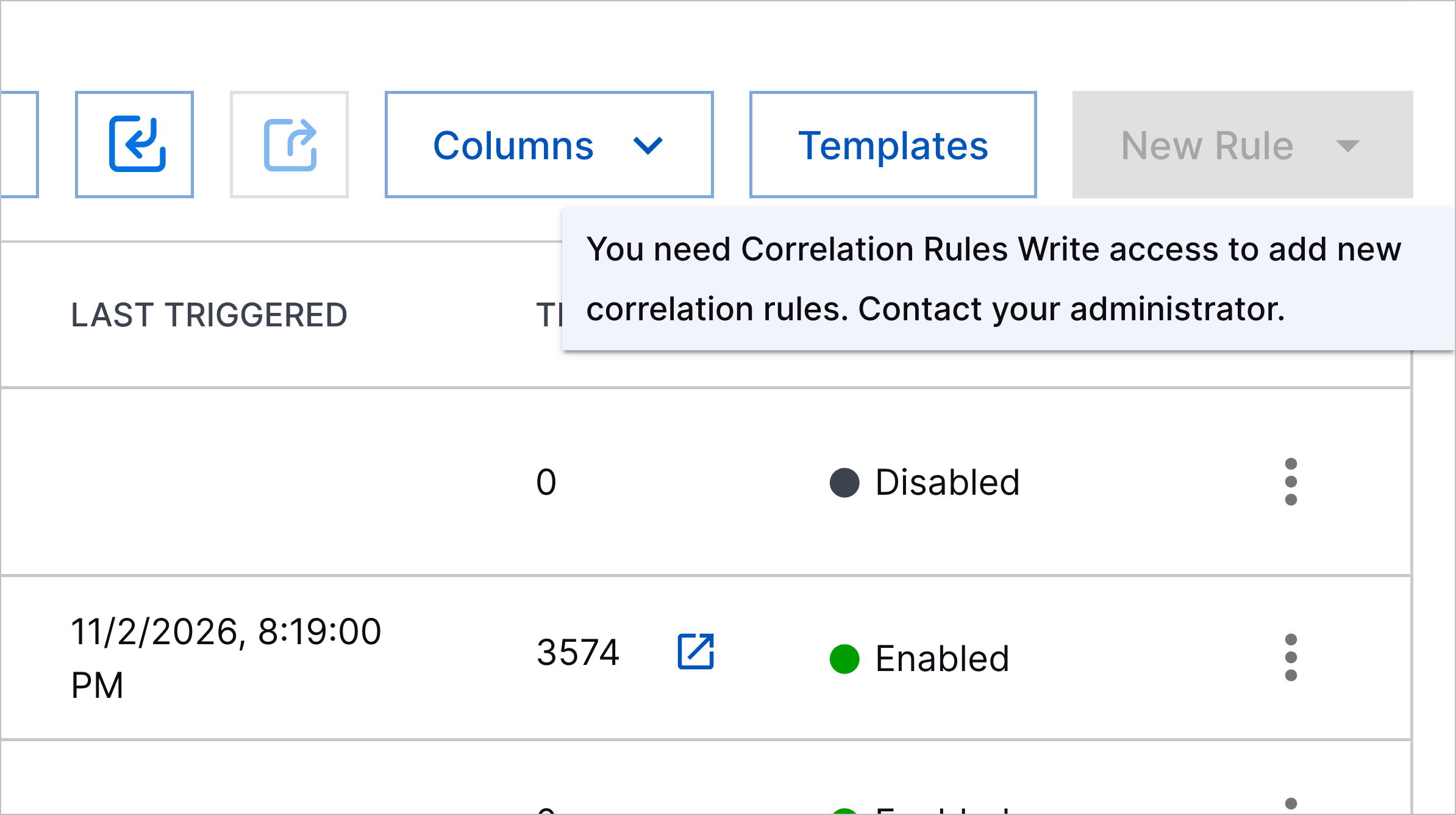
The New Rule button is greyed out and the tooltip states: You need Correlation Rules Write access to add new correlation rules. Contact your administrator.

Page Selection Enhancement

To more easily navigate between pages and set the number of rows per page, you can now always see the page settings at the bottom of the correlation rules list.
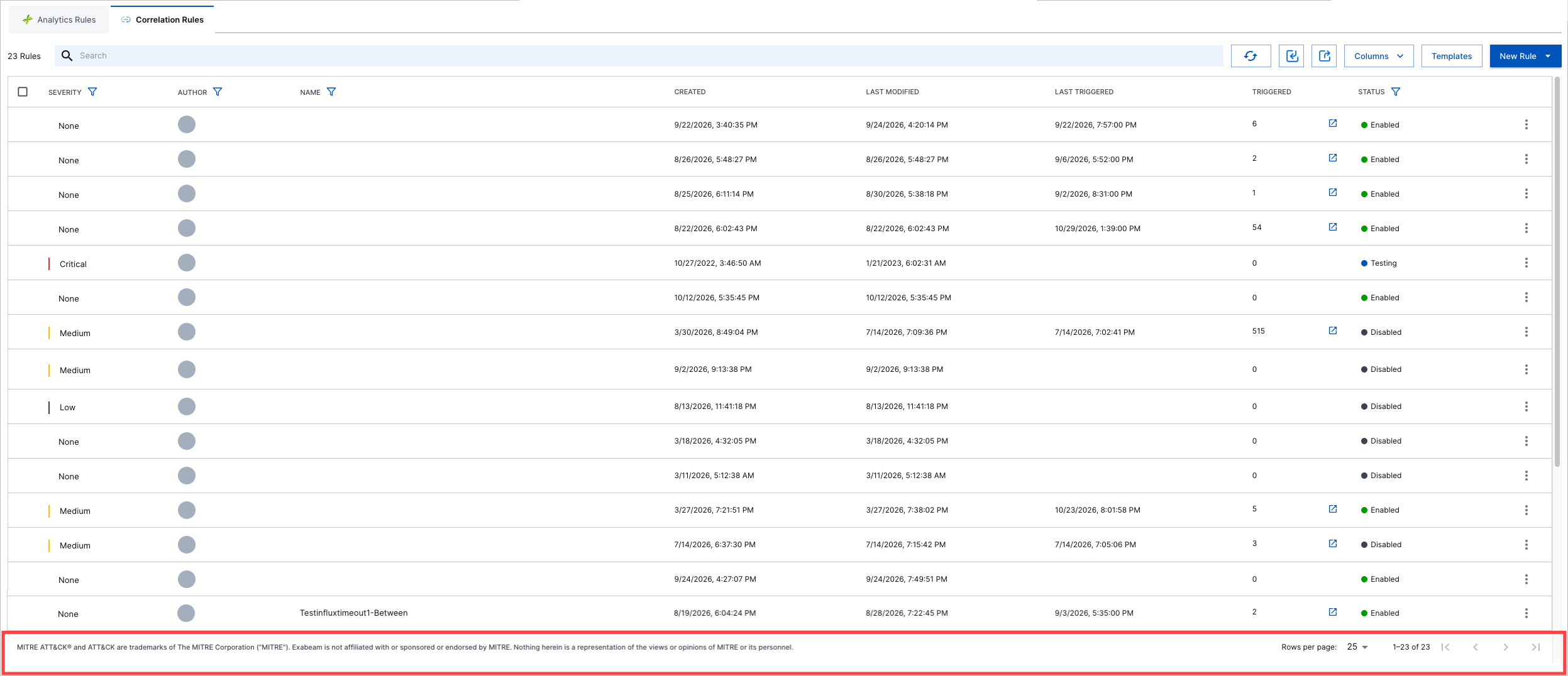
The correlation rules list page settings highlighted in a red rectangle.

Column Customization

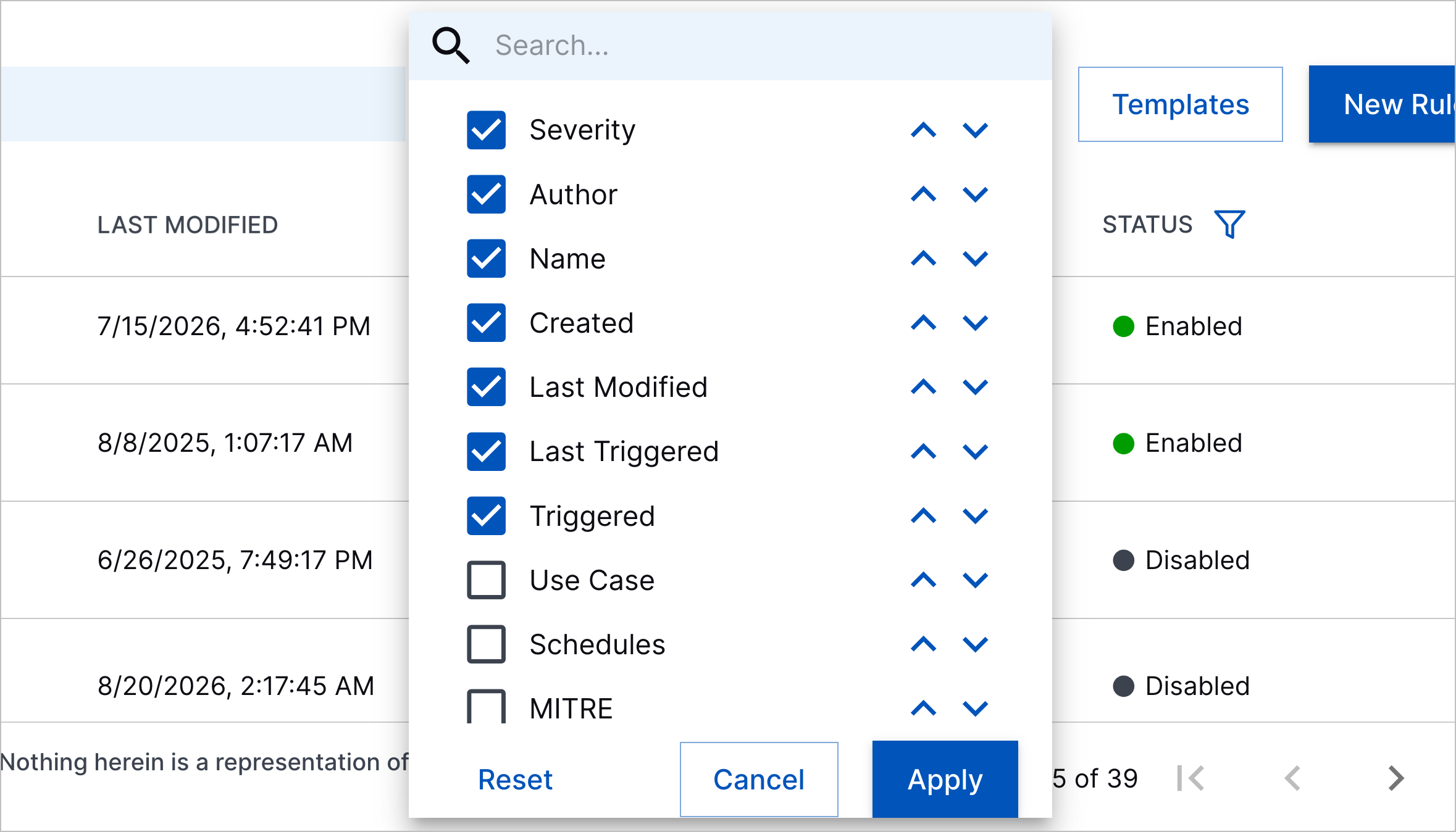
To focus on the most important information, you can now customize the columns in the correlation rules list.

When you click on the new Columns button, you can now select the columns to display and arrange them in a specified order.
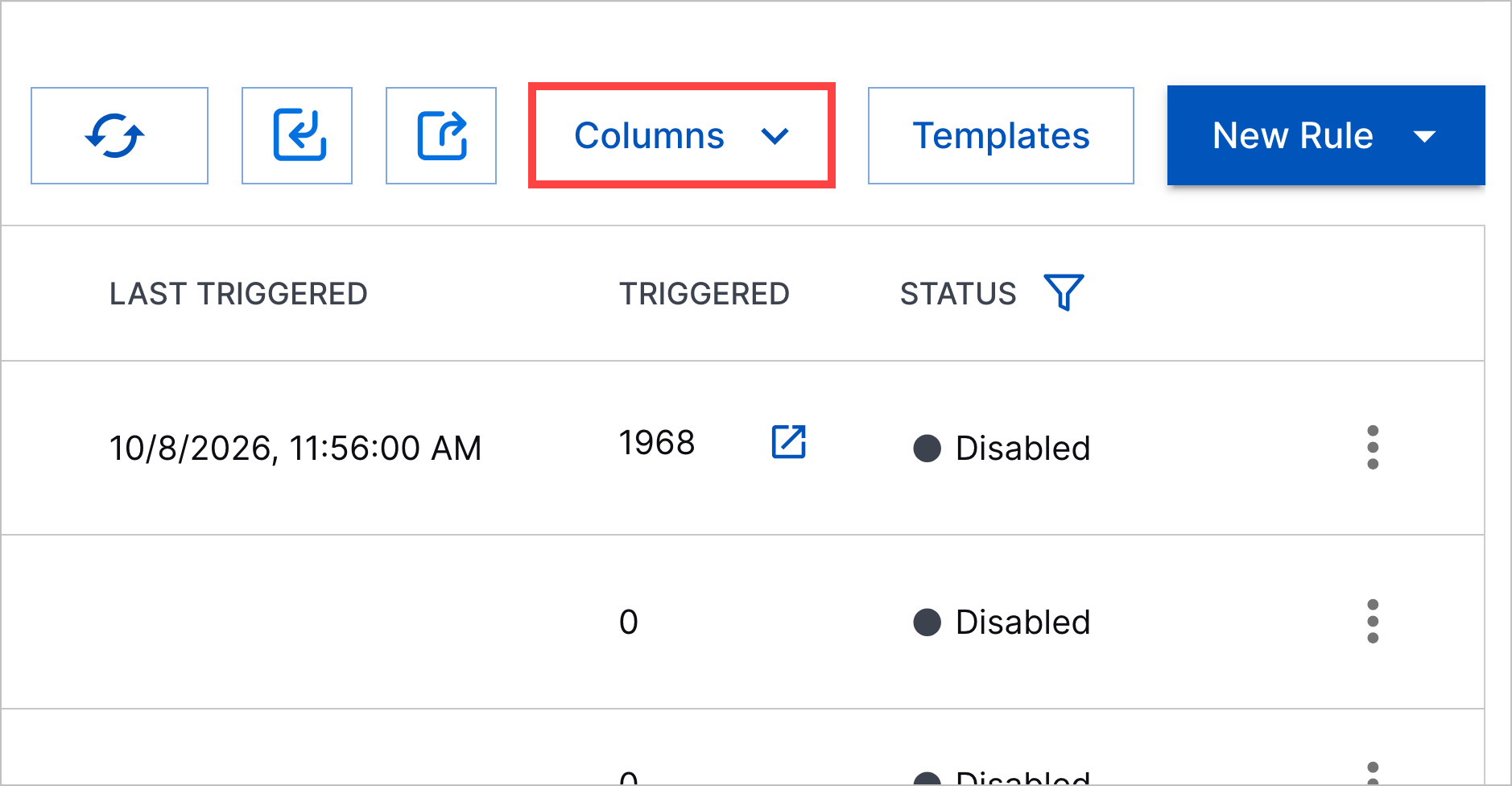
The Columns button for the correlation rules list highlighted in a red rectangle.
The opened Columns menu for correlation rules.

Correlation Rule Template Details Enhancement

To better understand a correlation rule template before using it, you can now more easily preview and access its details. With this enhancement, the experience of previewing correlation rule template details is now similar to that of previewing correlation rules and analytics rule details.

You can now:
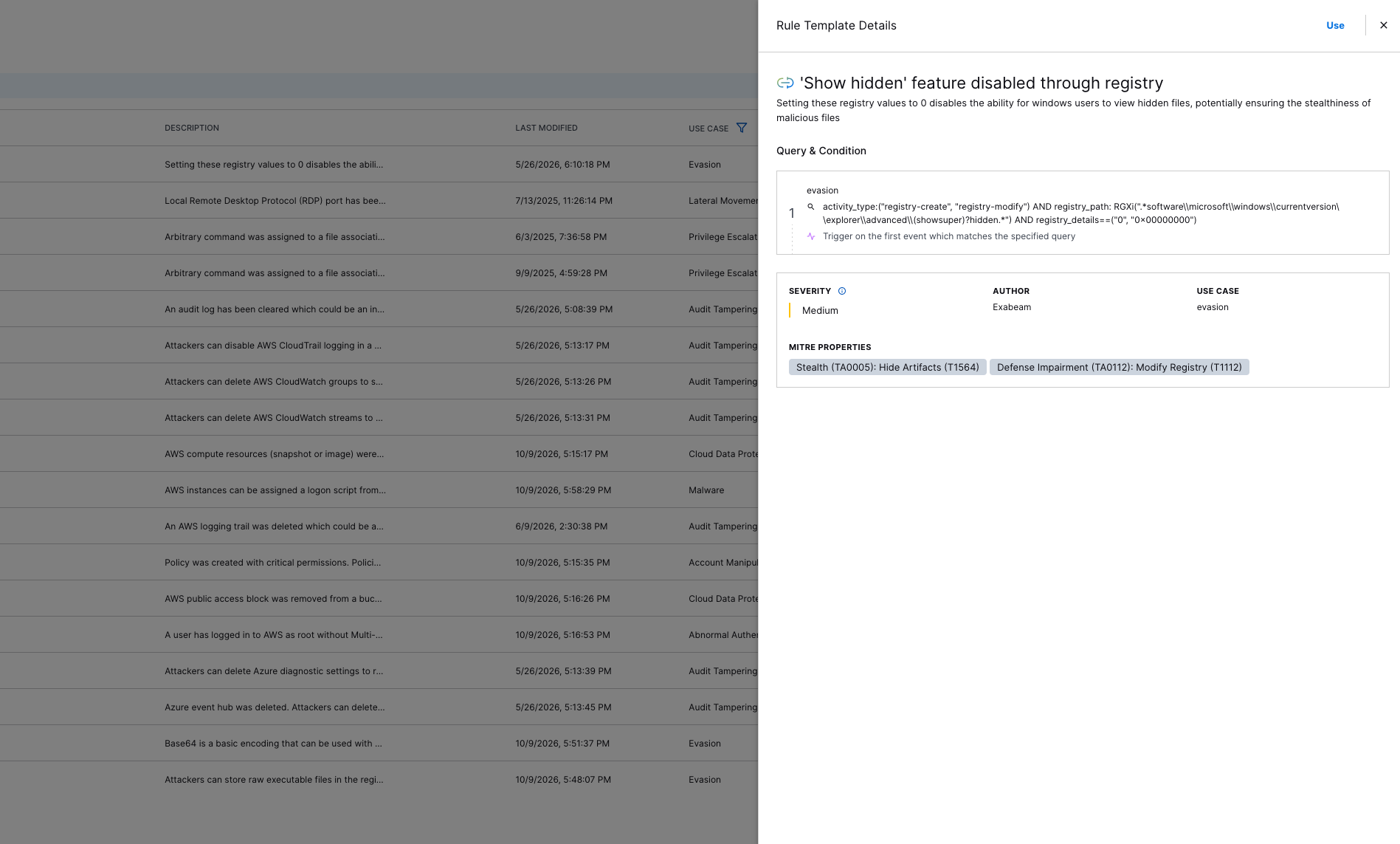
  • Select the correlation rule template in the list to open the correlation rule template details

  • Understand the sequences and conditions more easily with clear, easy-to-read formatting

  • View more details about the correlation rule template, including the description, severity, associated Exabeam use case, and associated MITRE ATT&CK® tactic and technique

The details for the 'Show hidden' feature disabled through registry correlation rule template.

Updated Correlation Rule Templates

To fix copyediting errors, 37 correlation rule templates were updated.

The name was updated for the following correlation rule templates:

  • AWS compute resource (snapshot/image) made public

  • WSReset UAC bypass by modifying shell configuration in the registry using the registry command tool

  • Recycle bin autostart persistence through the registry

  • Bitsadmin persistence task executed

  • Recycle bin autostart persistence through the registry using the registry command tool

  • PowerShell targeted remote endpoint

  • AWS role brute force: Large amount of role assumption events for this user

The description was updated for the following correlation rule templates:

  • Base64 executable file stored in the registry

  • AWS public access block was removed

  • DLL executed using 'odbcconf.exe'

  • Microsoft Defender firewall disabled using 'netsh.exe'

  • Startup folder location changed through the registry using the registry command tool

  • RC script file modified using a command

  • Microsoft Defender firewall disabled using PowerShell

  • Startup folder location changed through the registry

  • RC script file modified

  • AWS powerful policy creation

  • Windows event viewer audit policy reverted to default state using the audit policy CLI

  • Shadow copies deleted using PowerShell

  • Disable history collection in Unix

  • AWS root login without MFA

  • Create symbolic link for a shadow copy using mklink.exe

  • Base64 encoded data with PowerShell in the command line

  • Native Windows network sniffing using 'netsh.exe'

  • Large number of user switch events observed on this endpoint for this user

  • AWS instance logon script creation

Both the name and description were updated for the following correlation rule templates:

  • PowerShell remote activation

  • Bitsadmin persistence setup with setnotifycmdline

  • BITS job creation

  • Disable Windows recovery mode with bcdedit

  • Bitsadmin remote download with PowerShell

  • Disable Windows crash dumps through the registry using the registry command tool

  • PowerShell kerberos ticket request

  • WMI PowerShell invocation on remote endpoint

  • PowerShell keylogging using SetWindowsHookEx API

  • Bitsadmin remote download with PowerShell via the command line

  • Disable Windows crash dumps through the registry

Dashboards

Feature

Description

Preserving Dashboard Permissions during Duplication and Export/Import

When a dashboard is duplicated, its user permissions are preserved in the copied dashboard. You can modify the permissions by configuring the Restrict Dashboard Access by Role field in the Edit Dashboard Details workflow. Similarly, when a dashboard is exported, its user permissions are included with it. These permissions are preserved if you import the dashboard back into a Dashboards application.Edit Dashboard Details

For more information, see Duplicate a Dashboard or Export and Import Dashboards in the Dashboards Guide.

Support Audit Logs for Dashboard Permission Changes

The Dashboard modified (dashboard-modify) audit log now reflects changes to dashboard role permissions. When the Restrict Dashboard Access by Role field is used to modify who can access a specific dashboard, in either the Create Dashboard or Edit Dashboard Details workflows, an audit log is generated. When viewing augit logs in the Search application, the role permission change activity is displayed as follows: modified dashboard permissions <dashboard name>

For more information about the new dashboard, see Dashboards in Audit Logs in the Dashboards Guide.

Log Stream

Feature

Description

Content Update Column in Parsers List and Enrichments List

A new Content Update column has been added to both the list of Parsers and the list of Enrichment rules. This column can be sorted and filtered like any other. 
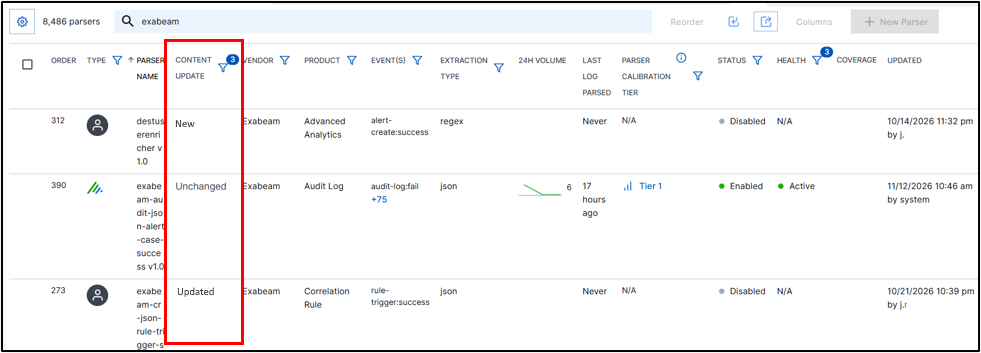
logstream_nov2026_parser_list_content_updates_column_outline.png

The following Content Update statuses are available:

  • New – indicates a parser or enrichment rule that is new as of the most recent content update

  • Updated – indicates a parser or enrichment rule that was modified or enhanced in the most recent content update

  • Unchanged – indicates a parser or enrichment rule that was not added or updated in the most recent content update

Additionally, a new Group By option allows you to group parsers and rules by their content update status:
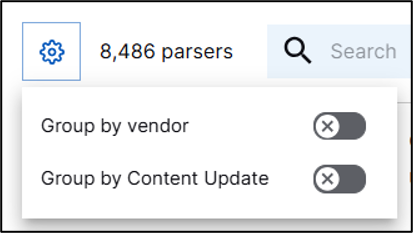
logstream_nov2026_parser_list_group_by.png

Improved Parser Activity Log

The Parser Details Activity Log tab now shows more clearly what changes have been made to a parser.

This more detailed content is visible by expanding the Package Changes table on entries where the parser was updated.
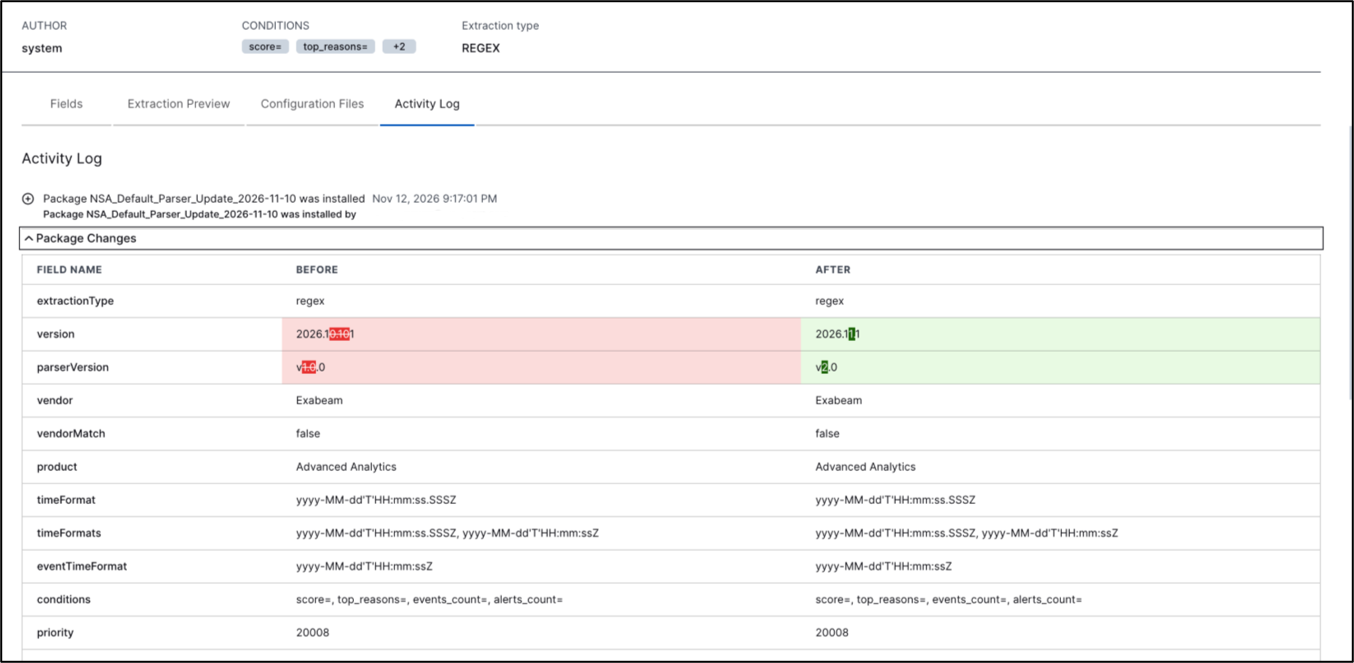
logstream_nov2026_new_collapsible_package_change_activity_log.png

Parser Updates Release Notes

On the Parser Updates tab, users can now click the View Release Notes link, where available, to login to the Exabeam Community and view the release notes detailing content changes.
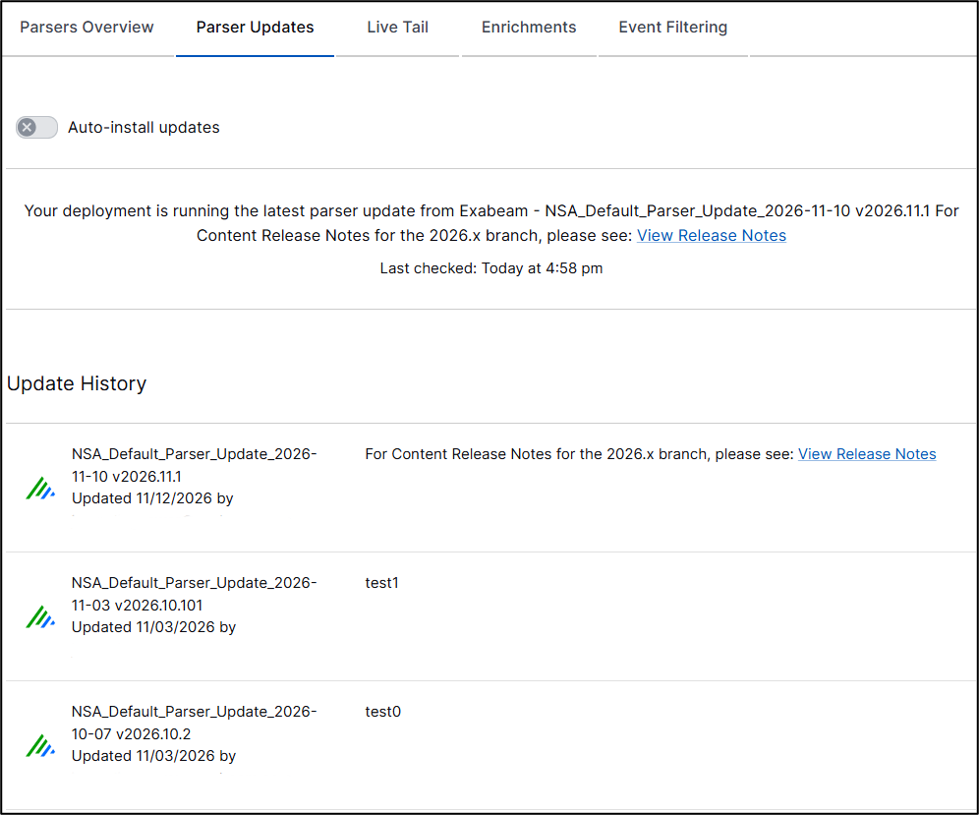
logstream_nov2026_parser_updates_link.png

Parser Edits in Progress Notification

An “unfinished draft” notification has been added that appears when attempting to edit a parser that has previously had edits made, but not saved, by yourself or a previous user. 

This notice allows users to continue editing from where the previous user left off, discard the previous changes and start editing over from the beginning, or cancel the action to back out without editing the parser.
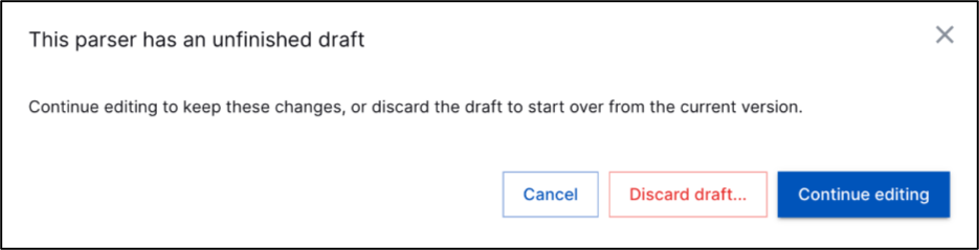
logstream__nov2026_parser_draft_in_progress.png

New-Scale Platform

Feature

Description

Token-based Authentication for Webhooks

Token-based authentication is now available for webhook configuration in addition to basic authentication, OAuth 2.0, and no authentication. This will enable integration support with token-authenticated receivers that require custom headers and prefixes.
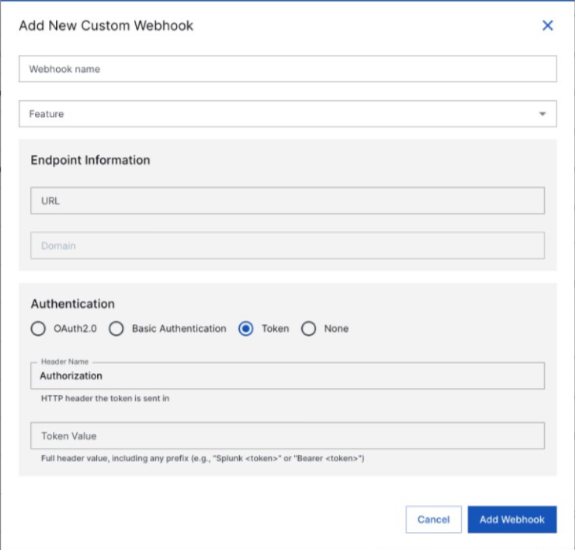
webhook-dialogue.png

For more information, refer to Add a Webhook in the New Scale Security Operations Platform Administration Guide.

Outcomes Navigator

Feature

Description

Analytics Rule Coverage Calculation Enhancement

To more accurately calculate analytics rules coverage, Outcomes Navigator now more accurately determines whether an analytics rule is satisfied:

  • Outcomes Navigator now verifies whether an analytics rule has triggered in the last 30 days as the first step. If an analytics rule has triggered, it is direct evidence that the analytics rule is satisfied. If the analytics rule hasn't triggered in the last 30 days, Outcomes Navigator continues to assess the analytics rule applicable_events and requiredFields as the next step.

  • Outcomes Navigator now honors the and/or logic of the applicable_events analytics rule field.

  • If applicable_events contains no valid fields that Outcomes Navigator can evaluate, the analytics rule is considered unsatisfied.

With these improvements, your analytics rules coverage score may decrease as Outcomes Navigator recalibrates which analytics rules are truly satisfied. You may see some analytics rules previously considered satisfied are now correctly considered unsatisfied, while other analytics rules previously considered unsatisfied are now correctly considered satisfied.

Analytics Rule Details Satisfied Column Enhancements

To better understand why an analytics rule is considered satisfied, there is now more information in the analytics rule details SATISFIED column:

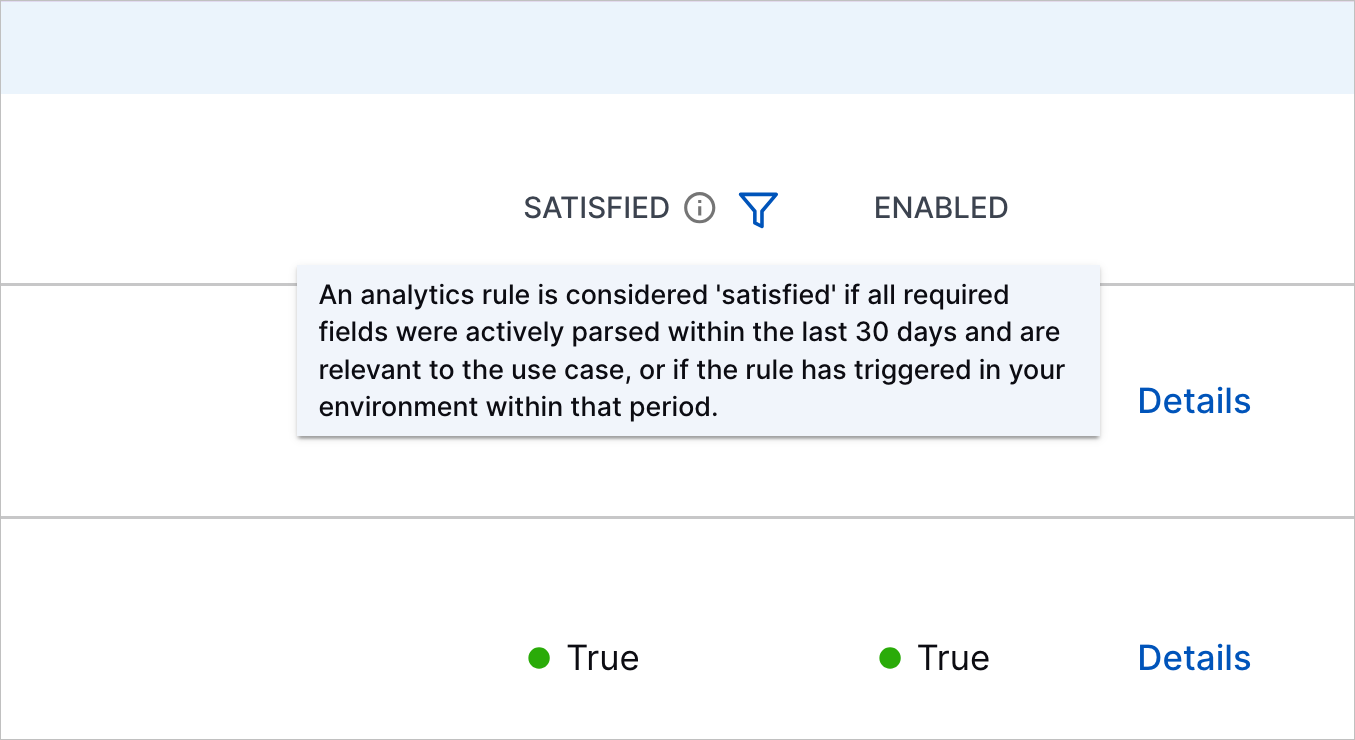
  • In the column header, you can now hover over A grey letter I in the middle of a grey circle. to view an explanation of how Outcomes Navigator determines whether an analytics rule is satisfied.

    The tooltip in the SATISFIED column header stating: An analytics rule is considered 'satisfied' if all required fields were actively parsed wtihin the last 30 days and are relevant to the use case, or if the rule has triggered in your environment within t
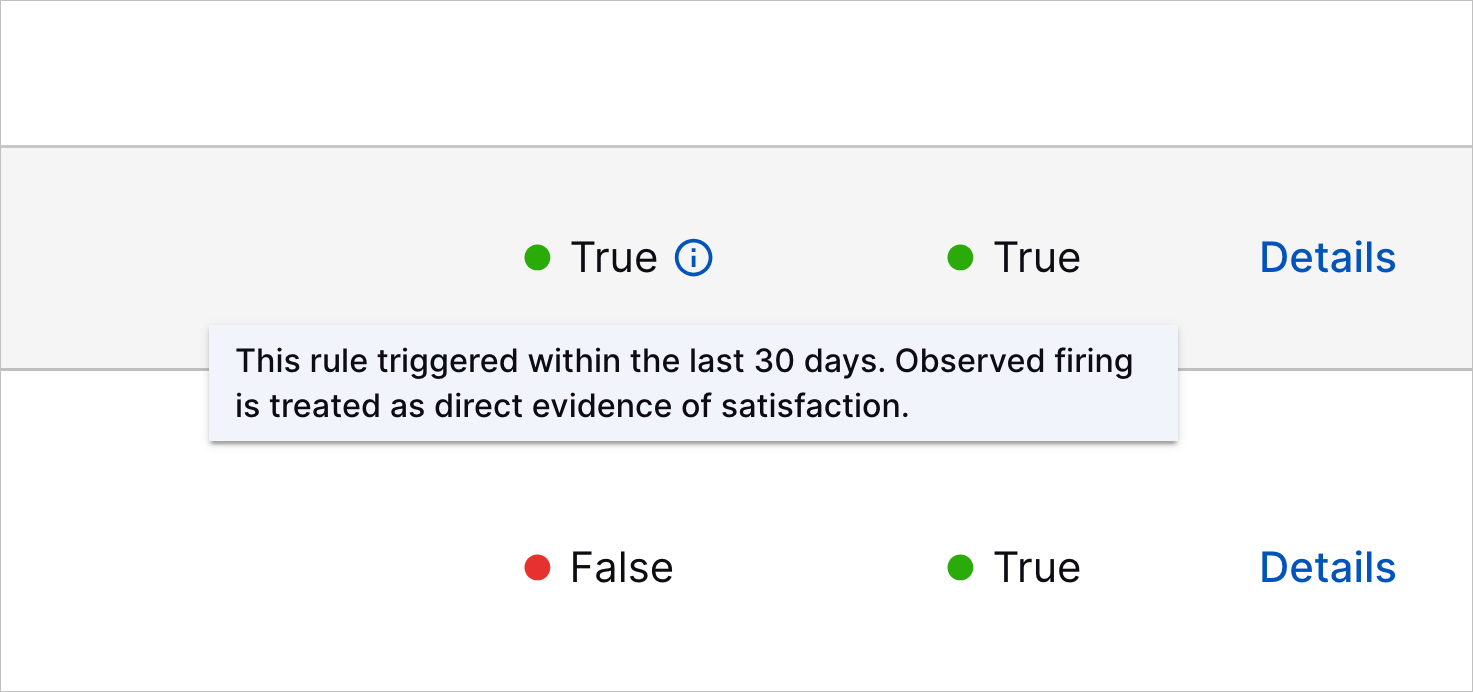
  • You can now identify an analytics rule considered satisfied because it triggered in the last 30 days. Analytics rule that have triggered in the last 30 days are now marked with A blue letter I in the middle of a blue circle.. When you hover over it, a tooltip states: This rule triggered within the last 30 days. Observed firing is treated as direct evidence of satisfaction.

    A tooltip for a True value under the SATISFIED column stating: This rule triggered within the last 30 days. Observed firing is treated as direct evidence of satisfaction.

Search

Feature

Description

Improved Alternate Event Titles

The behavior for generating generic fallback event titles in Timeline and List view results has been improved. Previously, when a full event title was unavailable, or not enough fields had been parsed to generate a full title, the title simply defaulted to a subject value. This behavior has been updated so that the available parsed information is used to generate a more meaningful alternate title for the event.

For more information about viewing results, see Timeline View of Search Results or List View of Search Results in the Search Guide.

New Field Summary Functionality in Search Results

The field summary functionality in Search results now provides faster and more accurate summary information in the following ways:

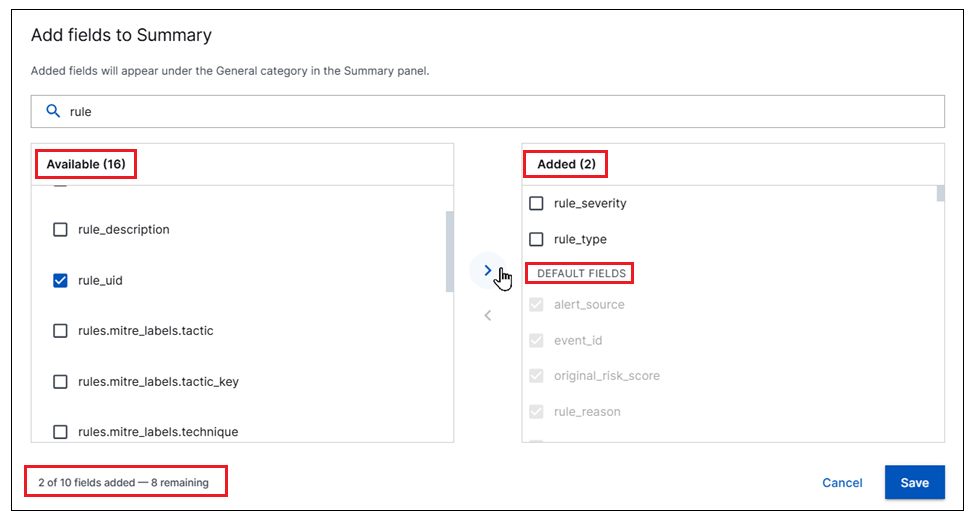
  • Add fields to the Summary panel – If the field you're interested in is not part of the set of commonly-used fields included in the panel by default, an Add fields option is available. It opens a dialog box where you can select up to 10 additional fields for inclusion in the Summary panel.

    add-fields-to-summary.png
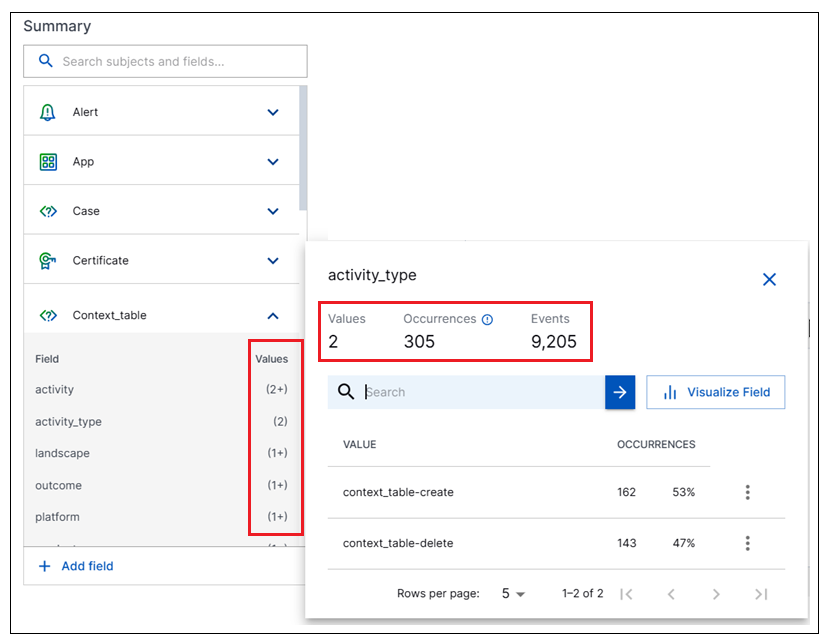
  • Automatically update field statistics for the entire data set – When you first view count values for a specific field in the Summary panel, you see a preliminary count based on the first 500 results. But when you select a specific field, a details dialog box opens and automatically recalculates the number of Values and Occurences across the entire data set.

    results-field-summary-full-dataset.png

For more information about the field summary functionality, see Field Summary in the Search Guide.

Unified Entity Details Panel

To consistently review the details of an entity, an updated entity details panel has been made available, accessible through Search and Attack Surface Insights.

With this streamlined entity details experience, you can now:

  • View the risk score of the most recently created Threat Center case or alert associated with the entity.

    search_nov2026_release_notes_security_score.png
  • Further investigate entities by quickly navigating to associated Threat Center cases and alerts.

    search_nov2026_release_notes_quicknav.png

Site Collectors 3.1

Feature

Description

Additional Installation Prechecks

Site Collectors now have additional installation and upgrade prechecks. These proactive prechecks protect operational health by automatically blocking upgrades and installations that are highly likely to fail, which ensures your deployment remains continuously active and stable. Because you can catch and resolve potential roadblocks before an update begins, you eliminate complex, hours-long troubleshooting to deliver seamless, and predictable improvements.

To protect Site Collector health and maximize agent uptime, the following additional automated prechecks run before any Site Collector or agent upgrade begins. If a critical check fails—such as verifying sufficient disk space in /tmp and the installation directory, or scanning for active flow issues—the upgrade halts immediately to prevent Site Collector and its agents from entering an error state.

Additional Installation Prechecks

  • CheckHostnameNoTrailingDot

  • CheckHostsFileNgscIp

  • CheckMachineId

Additional Upgrade Prechecks

  • CheckNifiFlowFileExists

  • CheckNgscServiceRunning

  • CheckNifiContentRepository

Additional Tools Debug Commands

  • CheckNifiFlowFileExists

  • CheckNifiCollectorsInErrorState

  • CheckNifiZombieCollectors

Refer to the following table for collector versions for Site Collectors 3.1.

Collector / Component

Product Version

Windows Event Log Collector (WELC)

3.1

Windows File Collector

3.1

Windows Archive Collector

3.1

Linux File Collector

3.1

Linux Archive Collector

3.1

Direct Access Agent (DAA) Collector

3.1

Threat Center

Feature

Description

Threat Timeline Alignment

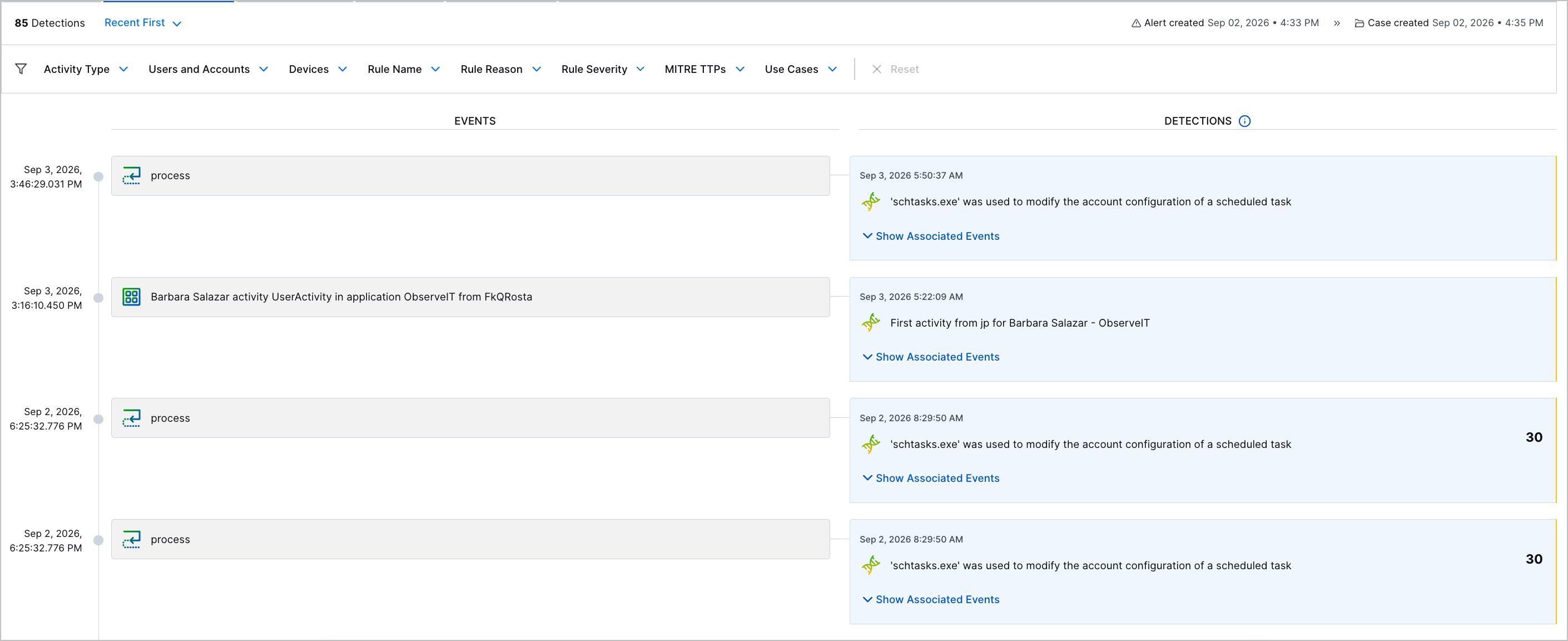
To consistently investigate the historical context of a case or alert, you can now use a similar timeline experience in Threat Center that is in Search.

With a streamlined timeline experience, you can now:

  • See a two-column view, with events in the left column and associated detections in the right column

    The Threat Timeline.
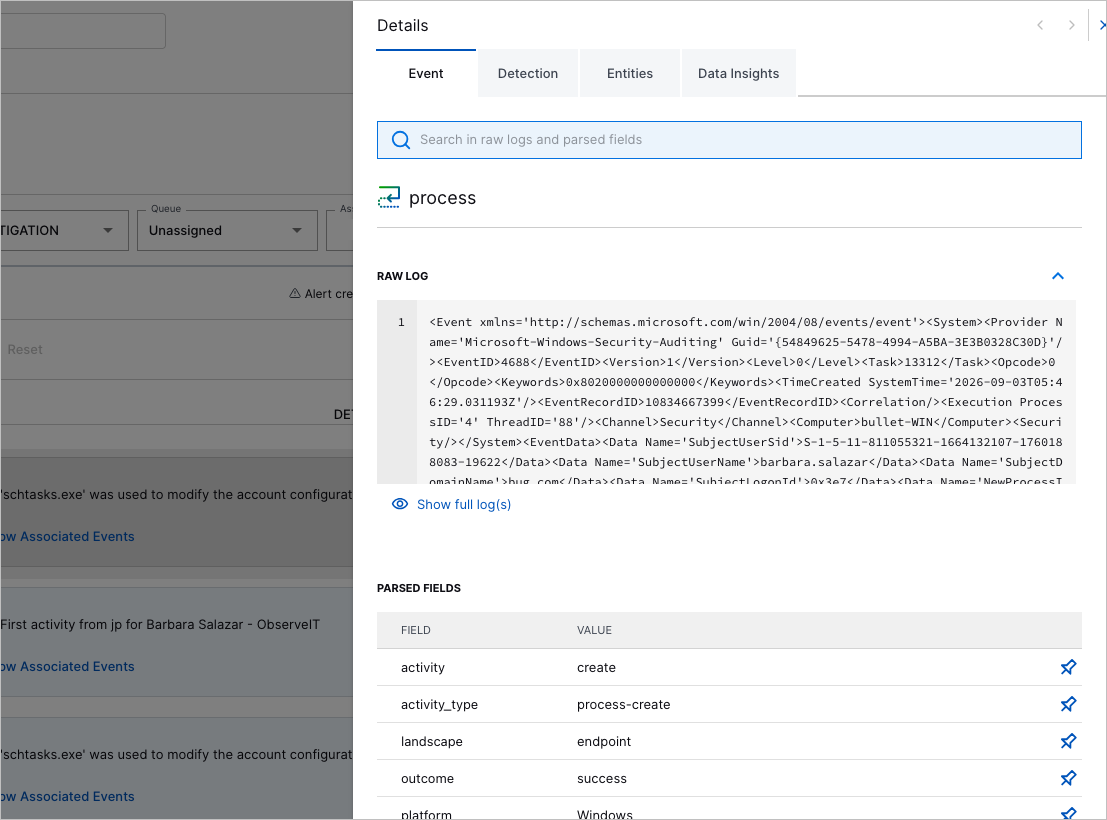
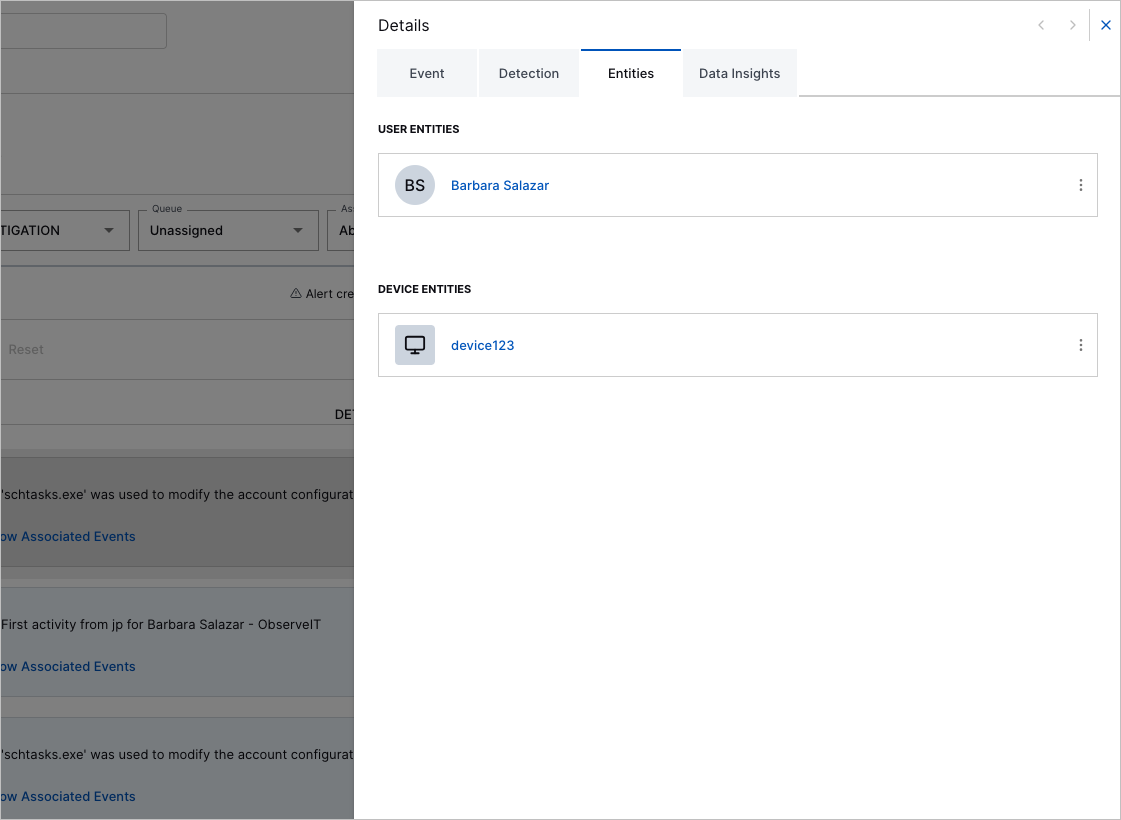
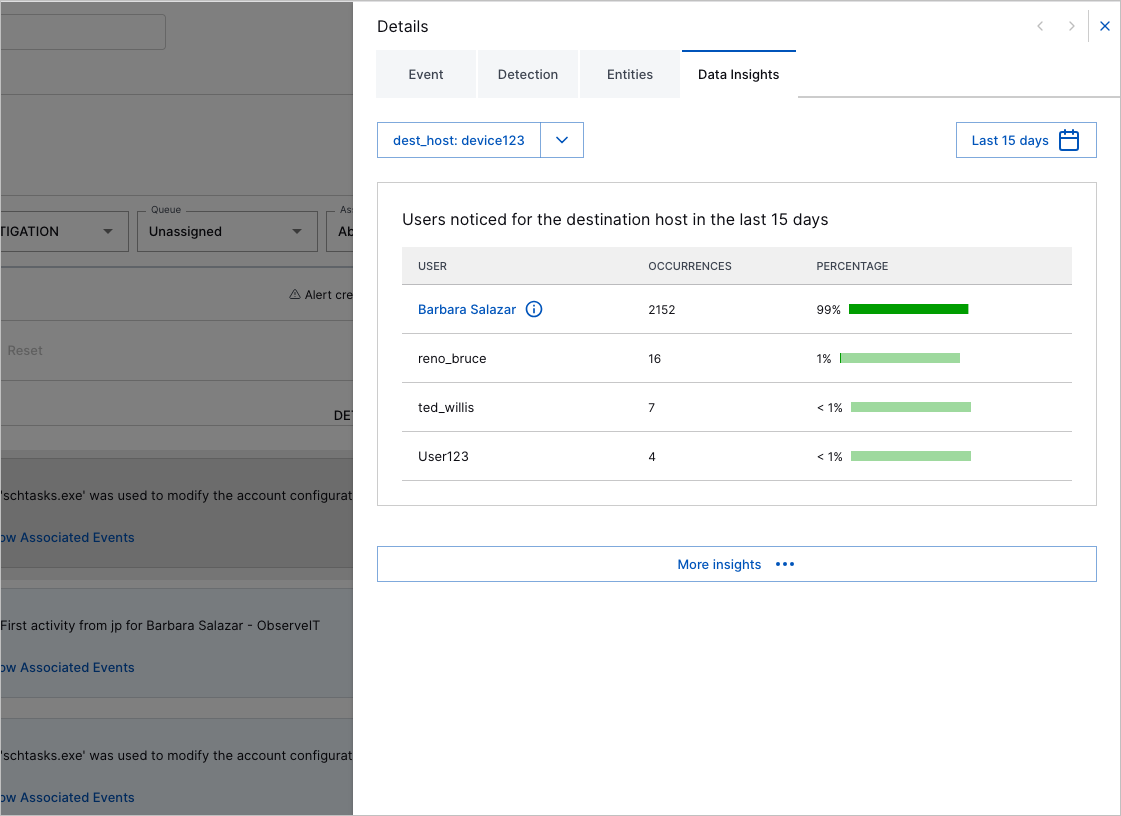
  • View event and entity details directly in Threat Center

    Event information in the threat timeline.
    Entities information in the threat timeline.
    Data Insights in the threat timeline.
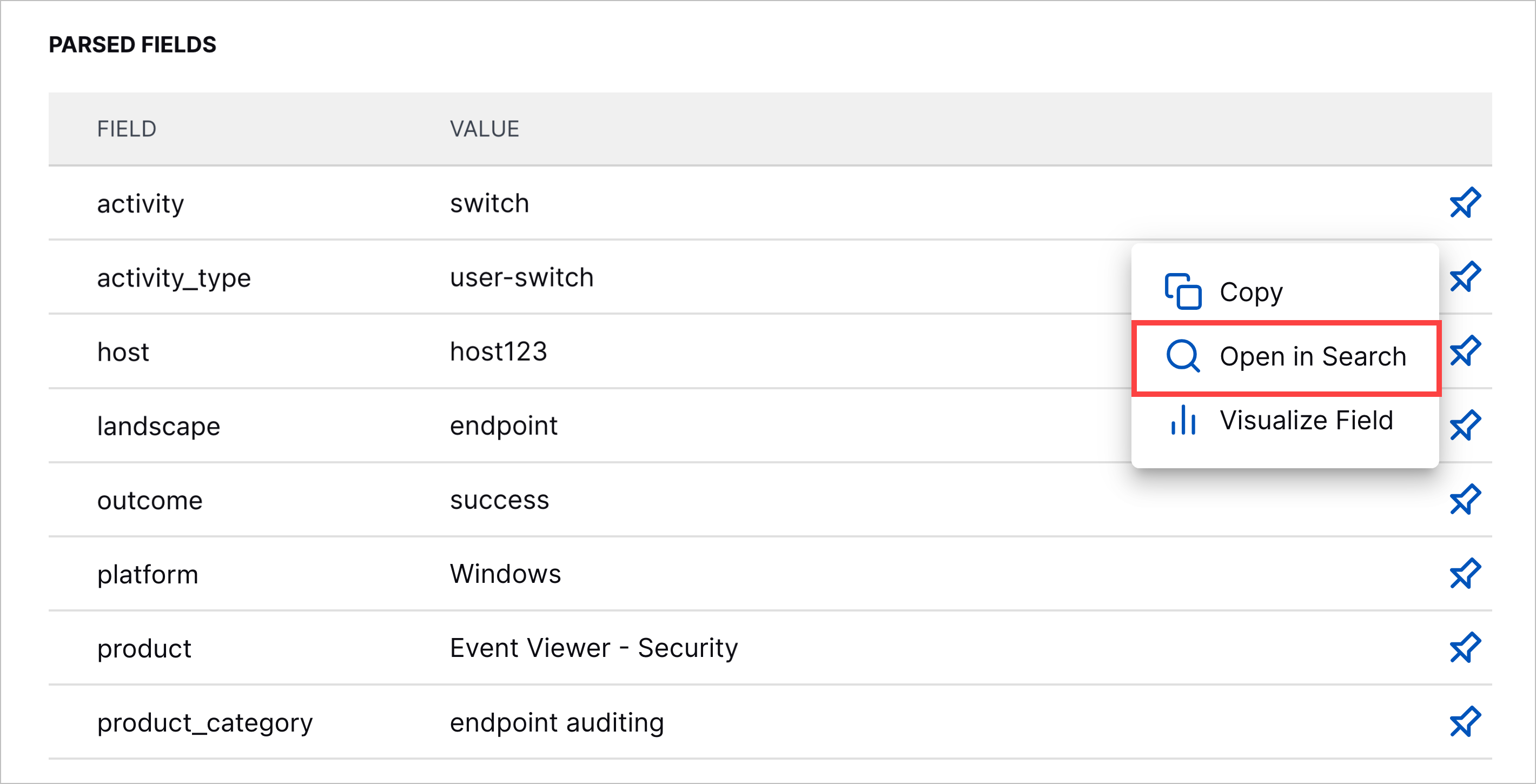
  • Navigate directly to Search from the event and entity details

    The Open in Search menu option for Parsed Fields in event and entity details highlighted in a red rectangle.
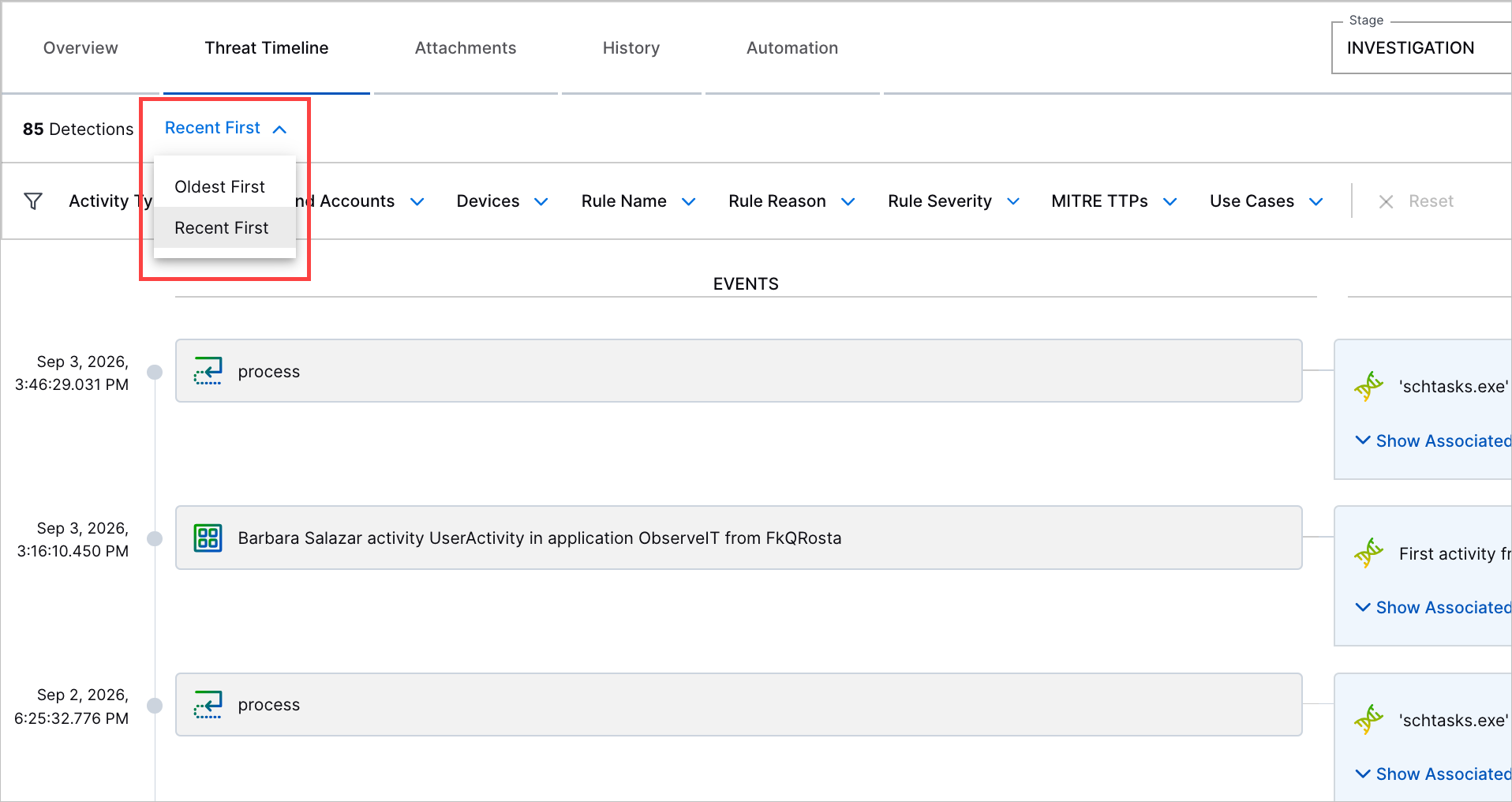
  • Sort the timeline by oldest or most recent event

    The sorting options in the threat timeline highlighted in a red rectangle.
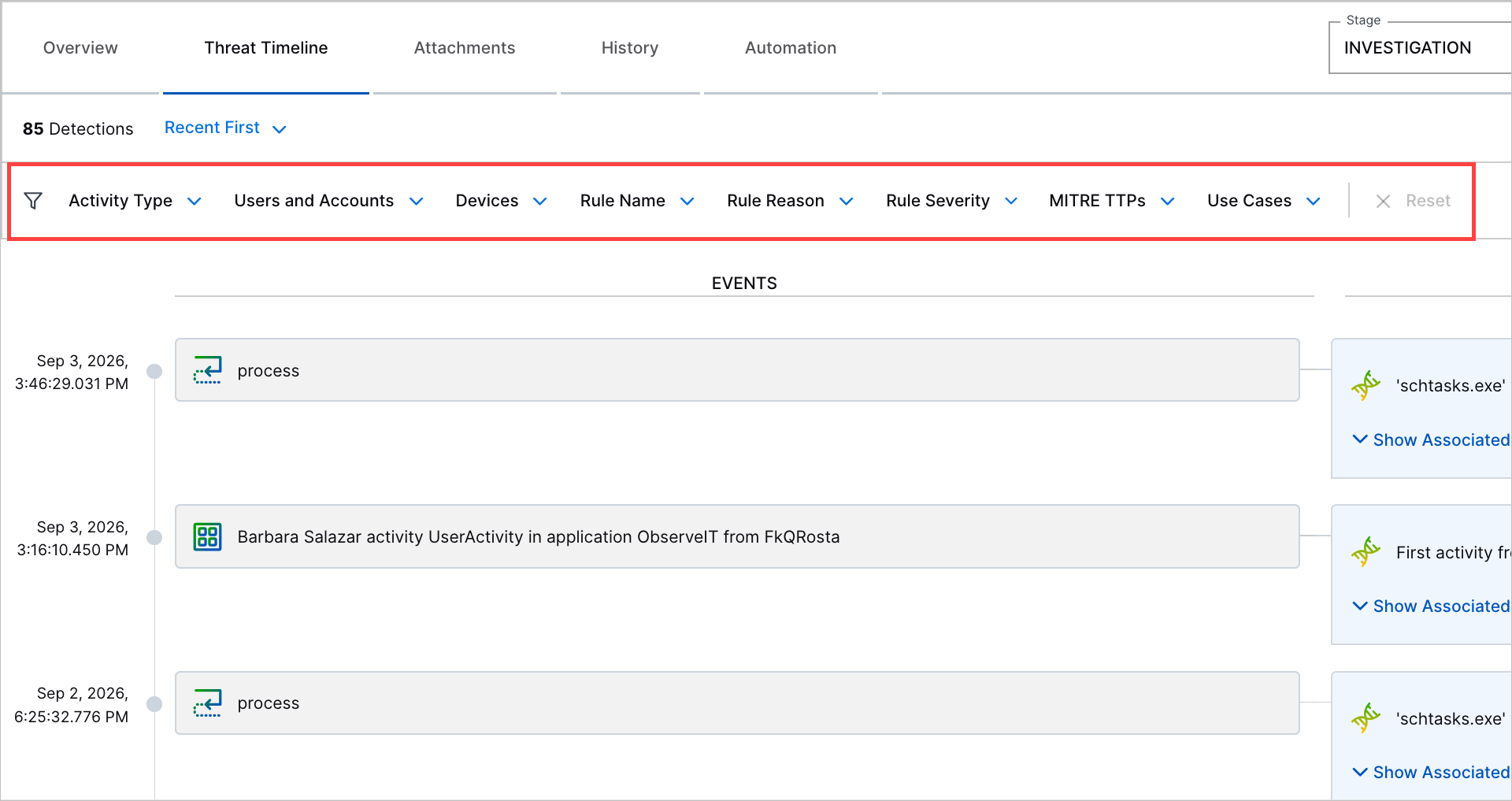
  • Filter the timeline by activity type, user entities and accounts, device entities, rule name, rule reason, rule severity, MITRE ATT&CK® tactics and techniques, and use cases[a]

    The filter options in the threat timeline highlighted in a red rectangle.
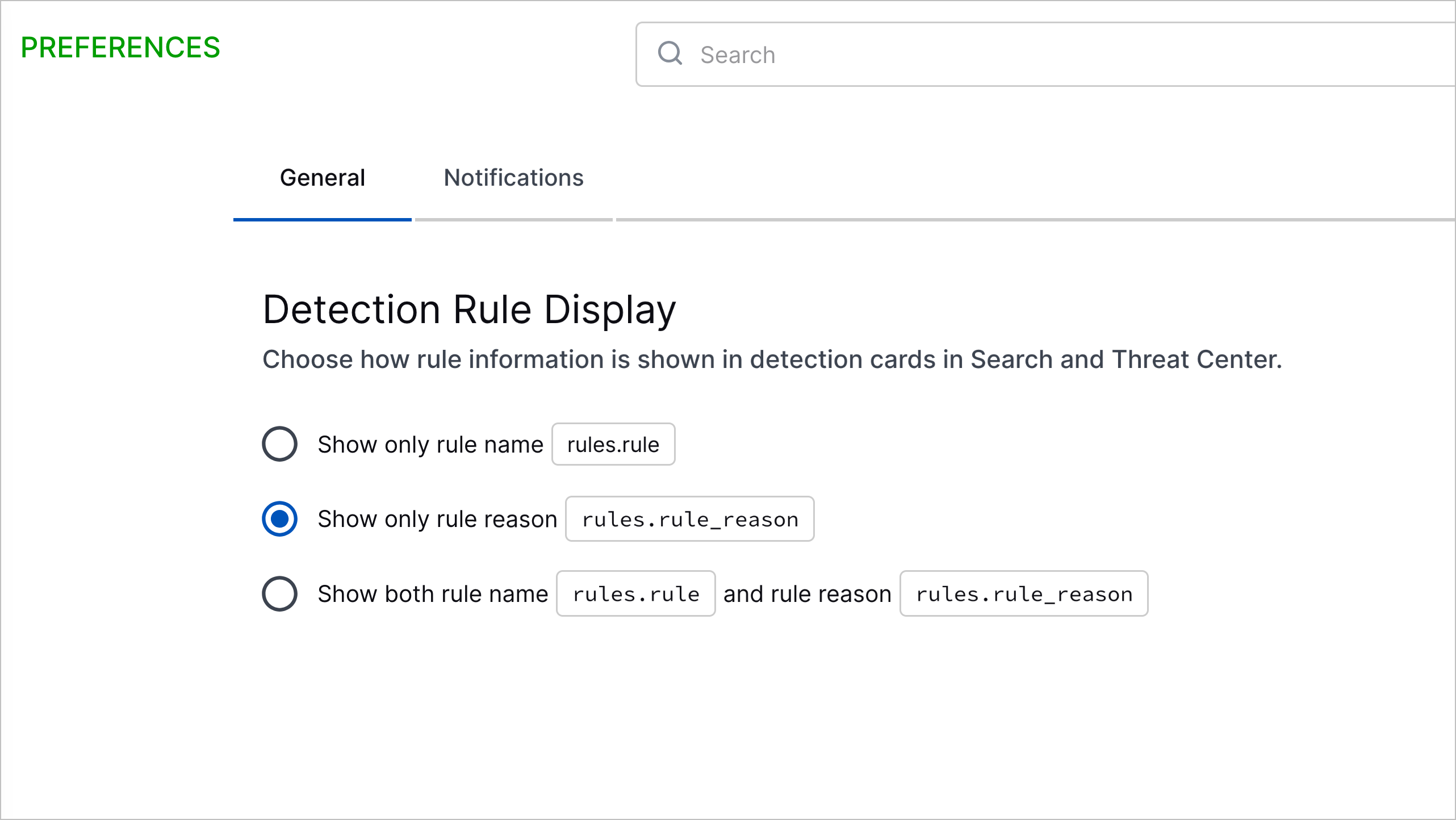
  • Configure how detection rule information is displayed in both Search and Threat Center Threat Timeline with your account preferences

    The General section in account preferences.

Case and Alert Header Enhancement

To easily view and access important case and alert information, you can now always see the risk score and the value by which detections are grouped under the case and alert name.

The severity and grouped by value in an alert header highlighted in a red rectangle.

contextFeature Analytics Rules Display in Overview Rules Triggered

To focus on immediate threats or primary indicators of compromise, you can now choose whether to display contextFeature analytics rules in Rules Triggered on the Overview tab.

To hide contextFeature analytics rules, toggle Context Rules off. To show contextFeature analytics rules, toggle Context Rules on.
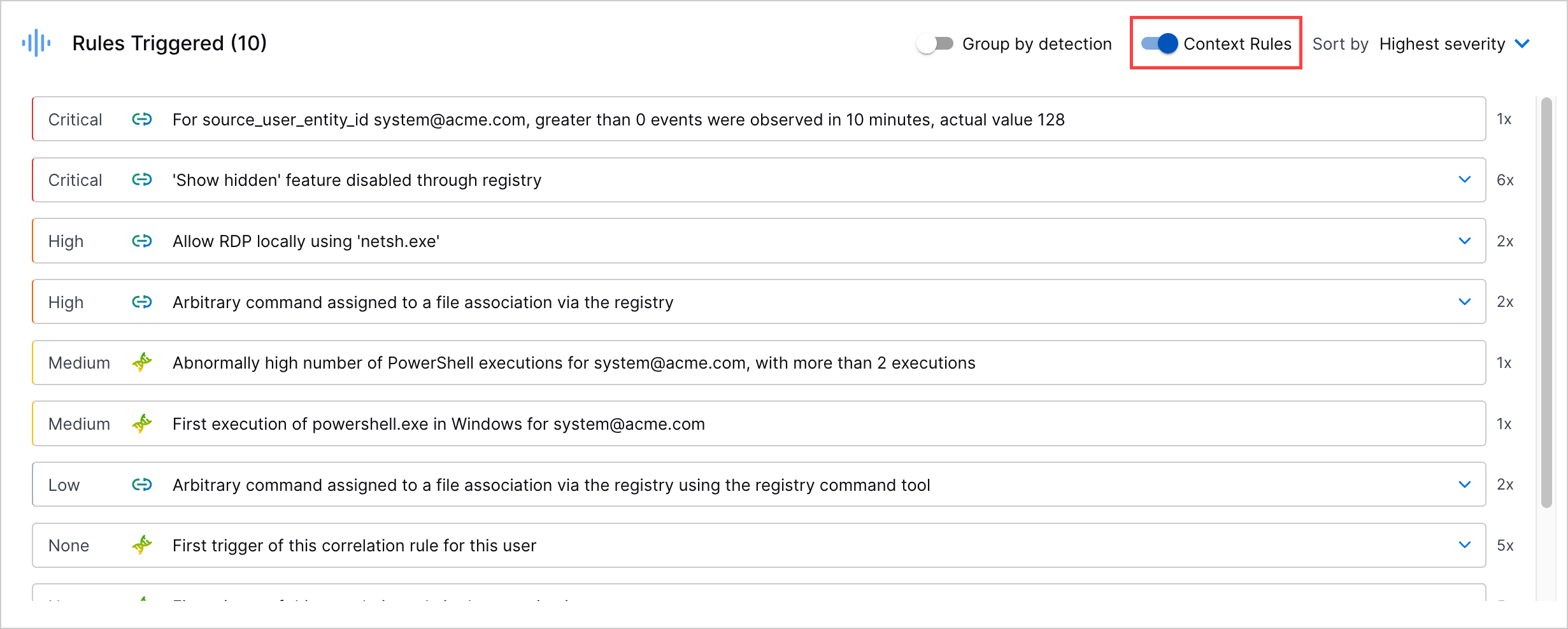
Rules Triggered in the Overview tab with the Context Rules toggle highlighted in a red rectangle.

Hiding contextFeature analytics rules in Rules Triggered also hides contextFeature analytics rules from the Rules filter on the Threat Timeline, and vice versa.

[a] MITRE ATT&CK and ATT&CK are trademarks of The MITRE Corporation ("MITRE"). Exabeam is not affiliated with or sponsored or endorsed by MITRE. Nothing herein is a representation of the views or opinions of MITRE or its personnel.

Threat Detection Management

Feature

Description

Page Selection Enhancement

To make navigating between pages and setting rows per page easier, you can now always see the page settings at the bottom of the analytics rules list.
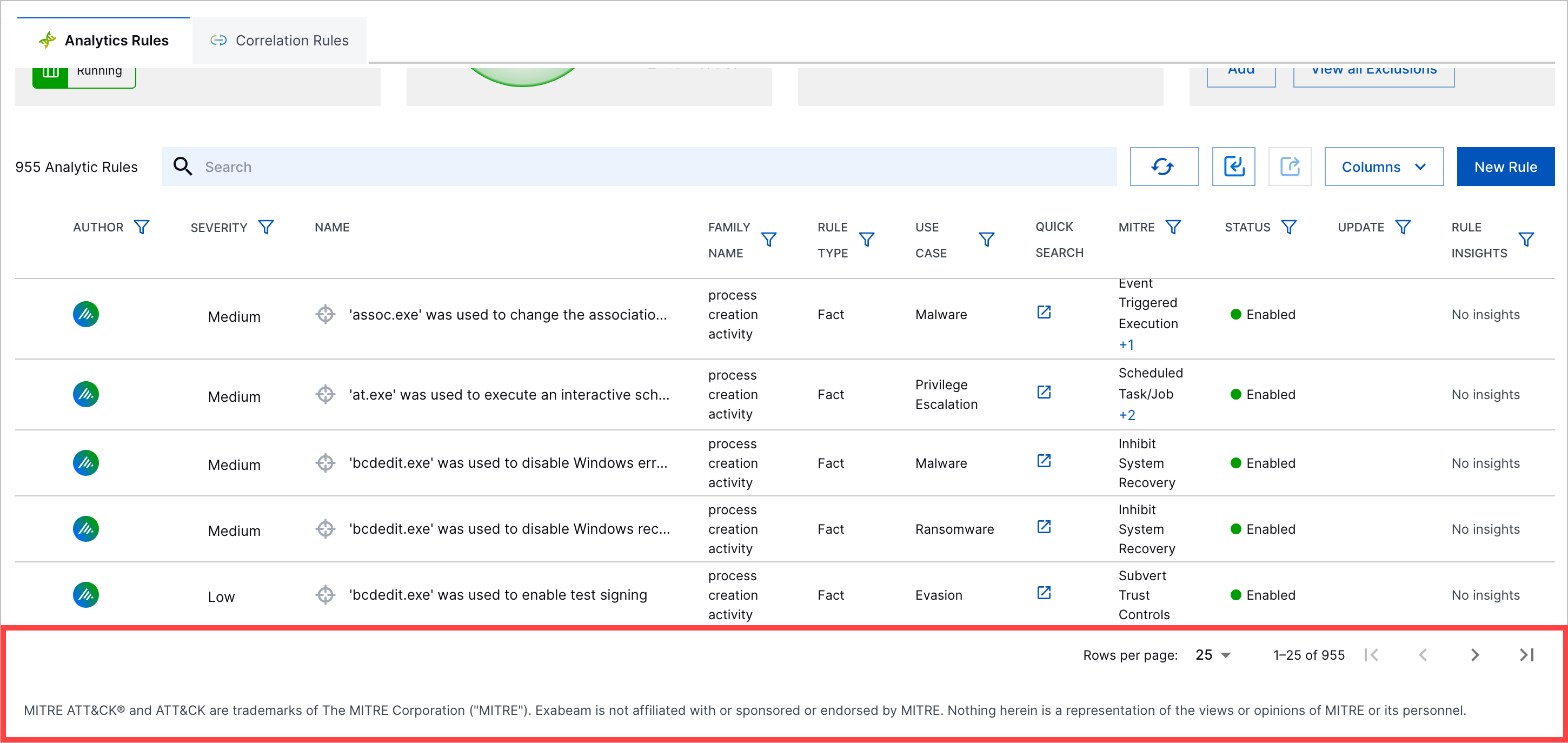
The analytics rules list page settings highlighted in a red rectangle.

contextFeature Analytics Rules Testing Enhancement

To clarify that contextFeature analytics rules only provide context for detections and must trigger in conjunction with other analytics rules, testing for contextFeature analytics rules is now disabled.

A contextFeature analytics rule selected with the tooltip "Context rule does not support Testing" displayed.

New Early Access Pre-Built Analytics Rules

New pre-built analytics rules are released as part of an early access program before becoming generally available. Analytics rules in early access have [Early Access] in their names.

You can now better detect authentication anomalies, privilege escalation, lateral movement, and data exposure with the following early access pre-built analytics rules:

  • Prof-EA-Domain-O-Domain – This is the first time this authentication domain has been observed in a successful endpoint authentication for the organization.

  • Prof-EA-Domain-U-Domain – This is the first time this authentication domain has been observed in a successful endpoint authentication for this user.

  • Prof-AM-U-O-OwnerPlt – This is the first time this user was added to an application as an owner in the organization.

  • Prof-EA-Domain-UD-Domain – This is the first time this authentication domain has been observed in a successful endpoint authentication for users in this department.

  • Prof-EA-Kerberos-RC4-U-ET – Detects the first observed Kerberos service ticket request using RC4 encryption for a user account, excluding machine accounts. This which may indicate Kerberos ticket theft, forgery, downgrade behavior, or legacy weak encryption exposure.

  • Prof-Network-ERDP-O-DE – This is the first time successful RDP activity has been observed on this endpoint.

  • NumDCP-Web-AIA-U-SessionId-AILLMSessionCount – An abnormal number of unique AI/LLM web sessions has been observed for this user. This feature distinct-counts session_id so repeated HTTP transactions with the same session identifier count as one unique value. The number shown in the detection reason is an approximate BEAM numeric magnitude value and is not an exact session count.

  • Prof-SLMA-GuestAccount-O-U – This is the first time a guest account was added to a secure shared link by this user.

  • NumDCP-EL-UC-SIP-U – An abnormal number of unique user names have been observed in endpoint logins from this IP. These events may include both failed and successful communications. CrowdStrike UserIdentity events and invalid, unspecified, loopback, link-local, multicast, and IPv4 limited-broadcast source addresses are excluded from training and action eligibility. Private network addresses remain eligible.

  • Fact-PC-ProxyExecution-WinRMAbuse – Detects execution of winrm.vbs with HTTP or HTTPS URLs. This may indicate abuse of Windows Remote Management scripting components. Localhost URLs also qualify; a URL match alone does not establish malicious activity.

  • Prof-UPM-ServicePrinciple-UPlt-AddPerm – This is the first time these permissions were added to a service principal by this user on this platform.

Updated Pre-Built Analytics Rules

You can now better detect public cloud data exposure, malicious process execution, unauthorized account privilege escalation, and data exfiltration with updated pre-built analytics rules.

To make processing faster and more efficient, trainOnCondition was updated for the following pre-built analytics rules:

  • Prof-FPM-PublicCloud-B-U – This is the first time a cloud storage object was modified to become public in this bucket. By manipulating file permissions to make the object public, attackers can expose the data of important or sensitive files, making them available to read, download or even modify by everyone.

  • Prof-PCnet-U-O-U-netlocalgroup – This is the first time a user account has been added to a group using 'net.exe' for this user.

  • Fact-PCnwp-NWP – A Windows system process has been executed from a folder it should not normally execute from. This sigma rule is authored by Florian Roth (Nextron Systems), Patrick Bareiss, Anton Kutepov, oscd.community, Nasreddine Bencherchali and is licensed under Detection Rule License (DRL), https://github.com/SigmaHQ/sigma/blob/master/LICENSE.Detection.Rules.md. Reference: https://github.com/SigmaHQ/sigma/blob/master/rules/windows/process_creation/proc_creation_win_susp_system_exe_anomaly.yml

  • Prof-RPM-PR-R-Public – This is the first time this role's permissions were modified to make it public.

  • Prof-PCwmic-IR-O-U-usr – This is the first time a user account has been renamed using 'wmic.exe' for this user.

  • Prof-FPM-PublicCloud-P-U – This is the first time this user modified a cloud storage object to become public. By manipulating file permissions to make the object public, attackers can expose the data of important or sensitive files, making them available to read, download or even modify by everyone.

  • Prof-PCnet-U-O-U-netlocalgroupadmin – This is the first time a user account has been added to the administrators group using 'net.exe' for this user.

  • Prof-RegW-FileAssoc-O-U – This is the first time this user has modified a command of a file assocation handler by modifing its registry configuration.

  • Prof-PCnet-U-O-U-netuserdel – This is the first time a user account has been deleted using 'net.exe' for this user.

  • Prof-BPM-Public-O-U – This is the first time this user has attempte to modify the IAM policy or the ACL of an AWS bucket to make it public to all users. These events may include both failed and successful modifications.

  • Prof-PCwmic-IR-O-U-grp – This is the first time a group has been renamed using 'wmic.exe' for this user.

  • Prof-PCnetsh-U-O-U – This is the first time firewall policies have been enumerated using 'netsh.exe' for this user.

To make processing faster and more efficient, featureValue was updated for the following pre-built analytics rules:

  • Prof-PC-CmdArgs-Msbuild-O-CsprojParam – This is the first time the 'msbuild.exe' process has been used to build this C# project.

To make processing faster and more efficient, actOnCondition was updated for the following pre-built analytics rule:

  • Fact-CPM-PCrit-AWSAdmin – A policy with critical administrative permissions has been successfully created or attached to an identity in AWS. Policies in AWS are the documents that dictates what permissions are granted to identities and resources.

  • Fact-CPM-PCrit-AWSAdmin – A policy with critical administrative permissions has been successfully created or attached to an identity in AWS. Policies in AWS are the documents that dictates what permissions are granted to identities and resources.

  • Fact-UI-UOO – A user outside the organization was invited to this platform.

  • Fact-GA-TITOR – An IP address associated with TOR has been observed.

To prevent analytics rules from evaluating confirmed internal email traffic where both sender and recipient domains are available and identified as internal, trainOnCondition and query were updated for the following pre-built analytics rules:

  • NumSP-EMS-Bytes-U-Bytes – An abnormal amount of bytes have been sent in outgoing emails for this user.

  • NumCP-EMR-EC-DU – An abnormal number of incoming emails have been observed for this user.

  • NumSP-EMR-Bytes-DU-Bytes – An abnormal amount of bytes have been received in incoming emails for this user.

To prevent analytics rules from evaluating confirmed internal email traffic where both sender and recipient domains are available and identified as internal, trainOnCondition was updated for the following pre-built analytics rules:

  • Prof-EMR-ED-U-ED – This is the first time this user has received an email from this email domain.

  • Prof-EMS-Country-UD-DCountry – This is the first time a user in this department has sent an email to this country, as determined by geolocation lookup.

  • Prof-EMR-ED-O-ED – This is the first time a user from the organization has received an email from this email domain.

  • Prof-EMS-Country-U-DCountry – This is the first time this user has sent an email to this country, as determined by geolocation lookup.

  • Prof-EMS-Country-O-DCountry – This is the first time a user in the organization has sent an email to this country, as determined by geolocation lookup.

  • Prof-EMS-AC-U-A – An abnormal number of email attachments have been observed in an outgoing email for this user.

  • Prof-EMR-ED-UD-ED – This is the first time a user in this department has received an email from this email domain.

To prevent analytics rules from evaluating confirmed internal email traffic where both sender and recipient domains are available and identified as internal, actOnCondition was updated for the following pre-built analytics rules:

  • Fact-EMS-SrcCode – An email containing a source code file attachment has been sent.

  • Fact-EMS-SrcCode – An email containing a source code file attachment has been sent.

To prevent false positives on TCP/3389 network traffic and accurately detect real, successful Remote Desktop connections, applicable_events. trainOnCondition, and scoreUnless were updated for the following pre-built analytics rule:

  • Prof-Network-ERDP-DE-SE – This is the first time successful RDP activity has been observed from this source endpoint to this destination endpoint.

To ensure normal variations in AI token counts don't trigger false positives and instead group AI token usage into broad magnitude ranges, title, description, featureValue, detectionReason, and mitre were updated for the following pre-built analytics rules:

  • Prof-AI-T-O-Tokens – An abnormal input-token magnitude was observed in successful AI activity for the organization. Token counts are grouped into powers-of-two magnitude ranges. When the input-token count or vendor is unavailable, tokens are estimated from request text at one token per four characters. The reported magnitude value identifies a range rather than an exact token count.

  • Prof-AI-T-U-Tokens – An abnormal number of tokens for a single successful AI request has been observed for this user. If the number of tokens is not available, tokens are estimated at one token per four letters.

To prevent false positives on Linux endpoints with legitimate GNOME Tracker indexing processes, actOnCondition was updated for the following pre-built analytics rule:

  • Fact-PC-CryptoTool – A process with a name that contains "miner" or "mining" was executed.

To avoid counting multiple HTTP requests as separate user sessions and restructure rule logic so it becomes a fallback rule that only triggers when a session ID is missing, title, description, minOrderOfMagnitude, trainOnCondition, detectionReason. and query were updated for the following pre-built analytics rule:

  • NumCP-Web-AIA-U-AILLMSessionCount – An abnormal number of successful AI/LLM web activity events has been observed for this user. This fallback feature counts normalized HTTP-session events when session_id is not available. The number shown in the detection reason is an approximate BEAM numeric magnitude value and is not an exact event count.

To prevent over-triggering on frequent and repetitive occurrences of the same activity, suppressThreshold was updated for the following pre-built analytics rule:

  • Fact-Web-AIA-U-BlockedAILLM – An HTTP communication attempt involving an AI application (e.g., ChatGPT, GitHub Copilot) has been blocked. This may indicate shadow AI usage, attempted policy evasion, or early stage data leak behavior.

To ensure abnormal AI-related activity is accurately detected without missing threats or raising false positives when new AI tools are introduced, trainOnCondition and query were updated for the following pre-built analytics rule:

  • NumSP-Web-AIA-U-AILLMBytesOut – An abnormal volume of outbound data to AI/LLM web applications has been observed for this user.

To prevent over-triggering on minor deviations from normal behavior, minOrderOfMagnitude was changed for the following pre-built analytics rule:

  • NumSP-Web-AIA-U-AILLMBytesOut – An abnormal volume of outbound data to AI/LLM web applications has been observed for this user.

To ensure double slashes in URLs aren't normalized to single slashes, trainOnCondition was updated for the following pre-built analytics rules:

  • Prof-PC-O-COD – This is the first time a process execution of an Office application has opened a remote document from this web domain.

  • Prof-PC-U-COD – This is the first time a process execution of an Office application has opened a remote document from this web domain for this user.

To ensure double slashes in URLs aren't normalized to single slashes, actOnCondition was updated for the following pre-built analytics rule:

  • Fact-PCDotNet-CommandLine – This .NET supporting process was created with an URL in the commandline.

To normalize letter cases and improve reliability, trainOnCondition was updated for the following pre-built analytics rules:

  • Prof-PC-AIT-UD-CURL-Agent – This is the first time an AI agent has been installed using CURL by users in this department.

  • Prof-PC-AIT-U-CURL-Agent – This is the first time an AI agent has been installed using CURL by this user.

  • Prof-PC-AIT-SE-CURL-Agent – This is the first time an AI agent has been installed using CURL on this endpoint.

  • NumSP-Web-AIA-U-AILLMBytesOut – An abnormal volume of outbound data to AI/LLM web applications has been observed for this user.

To normalize letter cases and improve reiability, actOnCondition was updated for the following pre-built analytics rules:

  • Fact-PCpwrshell-ELT – The PowerShell process has been used to clear or delete an event log. This sigma rule is authored by Ecco, Daniil Yugoslavskiy, oscd.community, D3F7A5105 and is licensed under Detection Rule License (DRL), https://github.com/SigmaHQ/sigma/blob/master/LICENSE.Detection.Rules.md. Reference: https://github.com/SigmaHQ/sigma/blob/master/rules/windows/process_creation/proc_creation_win_susp_eventlog_clear.yml

  • Fact-PCesentutl-CDbC – The Esentutl (Extensible Storage Engine Utility) process has been used to copy files with credentials data. This sigma rule is authored by Teymur Kheirkhabarov, Daniil Yugoslavskiy, oscd.community and is licensed under Detection Rule License (DRL), https://github.com/SigmaHQ/sigma/blob/master/LICENSE.Detection.Rules.md. Reference: https://github.com/SigmaHQ/sigma/blob/master/rules/windows/process_creation/proc_creation_win_copying_sensitive_files_with_credential_data.yml

  • Fact-Web-ShellUserAgent – An HTTP communication attempt has been made with a user-agent associated with a command shell. These events may include both failed and successful traffic.

To clarify that the VPN session duration magnitude is tracked, and not the actual session duration, detectionReason was updated for the following pre-built analytics rule:

  • Prof-VPNOut-SDM-U-SD – An abnormal VPN session length has been observed for this user.

To fix grammar, style, and punctuation errors, and to improve clarity, title, description, and detectionReason were updated for the following pre-built analytics rule:

  • Fact-EA-SuspEncServiceNotKrbtgt – Suspicious or weak Kerberos encryption type used to obtain Kerberos TGTs via a non-Kerberos service. These events may include both failed and successful authentication.

To fix grammar and style errors, and to improve clarity, description was updated for the following pre-built analytics rule:

  • Prof-MIRead-U-Plt-U – This is the first time a mailbox throttling event has been observed for this user on this platform. Exchange/Outlook mailbox item activity logs can indicate throttling after a high access volume. This may indicate unusually large-scale email collection.

To fix grammar and style errors, title and description, and detectionReason were updated for the following pre-built analytics rule:

  • Prof-Network-ERDP-DE-SE – This is the first time successful RDP activity has been observed from this source endpoint to this destination endpoint.

To fix grammar and style errors, description was updated for the following pre-built analytics rules:

  • Prof-ACG-Perm-UDPlt-Perm – This is the first time consent with these permissions was granted to an application by users in this department.

  • Fact-PCdns-SIGRed – The DNS process has spawned a child process that it should not normally spawn.

  • Prof-Network-FromExtIP-O-DP – This is the first time a successful connection to this port has been initiated by an external IP for the organization. If the initiator cannot be determined from the event, it is inferred based on port values: the endpoint communicating on the lower port is considered the initiator.

  • NumSP-Network-BytesToExtIP-Failed-SE-Bytes – An abnormal amount of bytes have failed to be sent in communication that initiated from this endpoint to an external IP. If the initiator cannot be determined from the event, it is inferred based on port values: the endpoint communicating on the lower port is considered the initiator.

  • Prof-Network-FromExtIP-O-DZ – This is the first time a successful connection to an endpoint in this network zone has been initiated by an external IP for the organization. If the initiator cannot be determined from the event, it is inferred based on port values: the endpoint communicating on the lower port is considered the initiator.

  • Prof-Network-FromExtIP-O-DE – This is the first time a successful connection to this endpoint has been initiated by an external IP for the organization. If the initiator cannot be determined from the event, it is inferred based on port values: the endpoint communicating on the lower port is considered the initiator.

  • NumSP-Network-BytesFromExtIP-DZ-Bytes – An abnormal amount of bytes have been sent in externally initiated communication to this network zone. If the initiator cannot be determined from the event, it is inferred based on port values: the endpoint communicating on the lower port is considered the initiator. These events may include both failed and successful communications.

  • Prof-ACG-Perm-UPlt-Perm – This is the first time consent with these permissions was granted to an application by this user.

  • Prof-ACG-Perm-Plt-Perm – This is the first time a consent granted with these permissions to applications in this platform.

  • NumSP-Network-BytesToExtIP-SZ-Bytes – An abnormal amount of bytes have been sent in communication that initiated in this network zone to an external IP. If the initiator cannot be determined from the event, it is inferred based on port values: the endpoint communicating on the lower port is considered the initiator. These events may include both failed and successful communications.

  • NumSP-Network-BytesToExtIP-SE-Bytes – An abnormal amount of bytes have been sent in communication that initiated from this endpoint to an external IP. If the initiator cannot be determined from the event, it is inferred based on port values: the endpoint communicating on the lower port is considered the initiator. These events may include both failed and successful communications.

  • Prof-Network-FromExtIP-DZ-DP – This is the first time a successful connection to this port has been initiated by an external IP for this target zone. If the initiator cannot be determined from the event, it is inferred based on port values: the IP\endpoint communicating with the lower port is considered the initiator.

  • NumDCP-Network-DPC-SEDE-DP – An abnormal number of unique target ports have been observed in internal communication that initiated by this endpoint to this destination endpoint. If the initiator cannot be determined from the event, it is inferred based on port values: the endpoint communicating on the lower port is considered the initiator. These events may include both failed and successful communications.

  • Prof-Network-FromExtIP-DE-DP – This is the first time a successful connection to this port has been initiated by an external IP for this target endpoint. If the initiator cannot be determined from the event, it is inferred based on port values: the endpoint communicating on the lower port is considered the initiator.

To fix grammar errors, title and description were updated for the following pre-built analytics rule:

  • NumDCP-FWrite-AuditRule-U-DE – An abnormal number of unique endpoints where this user modified the audit.rules file on Unix systems.

To fix grammar errors, description was updated for the following pre-built analytics rules:

  • Prof-CA-IC-O-U – This is the first time this user has created an image. An abnormal image upload could mean the image was created with a malicious intent. A malicious image could be used to trick users to create a VM that will contain shellcode or malware implanted in advance by an attacker.

  • Prof-CA-RI-O-U – This is the first time this user imported an instance, volume, snapshot or image. An unknown compute resource that was imported maliciously could indicate that the user's available compute data cloud has been compromised. An instance or a volume created from a malicious source could possibly contain shellcode or malware implanted in advance by an attacker.

To fix grammar errors, detectionReason was updated for the following pre-built analytics rule:

  • Fact-EA-KerberosNotPreAuth – A user has successfully authenticated against an endpoint via Kerberos authentication with preauthentication 0.

To fix style errors, title, description, and detectionReason were updated for the following pre-built analytics rule:

  • Prof-Fwrite-U-O-U-KernelModExt – This is the first time a kernel module file was created on Unix systems by this user.

To fix style errors, title and description were updated for the following pre-built analytics rules:

  • NumCP-VPNlnF-EC-U-30Days – An abnormal number of VPN login failures have been observed for this user in 30 days.

  • NumCP-VPNlnF-EC-U – An abnormal number of VPN login failures have been observed for this user.

To fix style errors, description was updated for the following pre-built analytics rules:

  • Fact-PCgup-AF – The Notepad++ updater has been executed from a folder it should not normally execute from. This sigma rule is authored by Florian Roth (Nextron Systems) and is licensed under Detection Rule License (DRL), https://github.com/SigmaHQ/sigma/blob/master/LICENSE.Detection.Rules.md. Reference: https://github.com/SigmaHQ/sigma/blob/master/rules/windows/process_creation/proc_creation_win_susp_gup.yml

  • Fact-PCwsreset-UAC – The WSReset (Windows Store Reset) process has spawned a child process that it should not normally spawn. This sigma rule is authored by E.M. Anhaus (originally from Atomic Blue Detections, Tony Lambert), oscd.community, Florian Roth and is licensed under Detection Rule License (DRL), https://github.com/SigmaHQ/sigma/blob/master/LICENSE.Detection.Rules.md. Reference: https://github.com/SigmaHQ/sigma/blob/master/rules/windows/process_creation/proc_creation_win_uac_bypass_wsreset.yml

  • Fact-EMRC-FwR-ExtDom – An inbox rule has been configured to forward emails to an email address that is in a different domain than the rule's creator.

  • Fact-PCnwp-NWP – A Windows system process has been executed from a folder it should not normally execute from. This sigma rule is authored by Florian Roth (Nextron Systems), Patrick Bareiss, Anton Kutepov, oscd.community, Nasreddine Bencherchali and is licensed under Detection Rule License (DRL), https://github.com/SigmaHQ/sigma/blob/master/LICENSE.Detection.Rules.md. Reference: https://github.com/SigmaHQ/sigma/blob/master/rules/windows/process_creation/proc_creation_win_susp_system_exe_anomaly.yml

  • Fact-EMRC-FwR-IntDom – An inbox rule has been configured to forward emails to an email address that is in the domain of the rule's creator.

  • Prof-ACG-App-Plt-App – This is the first time this application received consent in this platform.

  • Fact-PCnwp-NWP-PPP – A Windows system process has been spawned by a parent process that is in a folder it should not normally execute from. This sigma rule is authored by vburov and is licensed under Detection Rule License (DRL), https://github.com/SigmaHQ/sigma/blob/master/LICENSE.Detection.Rules.md. Reference: https://github.com/SigmaHQ/sigma/blob/master/rules/windows/process_creation/proc_creation_win_susp_proc_wrong_parent.yml

To fix a punctuation error, title, description, and detectionReason were updated for the following pre-built analytics rules:

  • Fact-Web-TIRansomware – An HTTP communication attempt has been made to a ransomware-associated domain. These events may include both failed and successful traffic.

  • Fact-Web-TIPhish-PhishDom – An HTTP communication attempt has been made to a phishing-associated domain. These events may include both failed and successful traffic.

To fix a syntax error, query was updated for the following pre-built analytics rules:

  • NumCP-WebF-EC-SIP – An abnormal number of HTTP 4xx/5xx error responses to internal resources has been observed from this IP.

  • NumCP-WebF-EC-U-Id – An abnormal number of HTTP 4xx/5xx error responses has been observed for this user.

  • NumCP-WebF-EC-WebDomain – An abnormal number of HTTP 4xx/5xx error responses to internal resources has been observed for this web domain.

  • NumDCP-Network-DPC-SEDE-DP – An abnormal number of unique target ports have been observed in internal communication that initiated by this endpoint to this destination endpoint. If the initiator cannot be determined from the event, it is inferred based on port values: the endpoint communicating on the lower port is considered the initiator. These events may include both failed and successful communications.

To standardize syntax style, actOnCondition was updated for the following pre-built analytics rule:

  • Fact-EA-SuspEncServiceNotKrbtgt – Suspicious or weak Kerberos encryption type used to obtain Kerberos TGTs via a non-Kerberos service. These events may include both failed and successful authentication.

To fix a typo, description was updated for the following pre-built analytics rules:

  • NumCP-SA-TP-AC-UO – An abnormal number of AI third-party alerts for the organization have been performed by this user.

  • NumCP-SA-TP-AC-DLP-UO – An abnormal number of DLP violations via AI for the organization have been performed by this user.

To remove a trailing space, description was updated for the following pre-built analytics rule:

  • NumCP-SA-TP-AC-DLP-U – An abnormal number of DLP violations via AI have been observed for this user.

Resolved Issues

Site Collector 3.1: Security Vulnerabilities Remediations

The Site Collectors 3.1 (November 2026) release includes remediated security vulnerabilities. For more information about Exabeam’s commitment to remediating vulnerabilities for Site Collector, see the Vulnerability Remediation Policy.

There are no open known CVEs in any container image (Nifi).

The following table lists the CVEs remediated for the Nifi container and their severity.

Critical

High

Medium

Low

Total: 20

Total: 64

Total:41

Total: 4

CVE-2026-10050

CVE-2026-107726

CVE-2026-33117

CVE-2026-41409

CVE-2026-41635

CVE-2026-41855

CVE-2026-42579

CVE-2026-42581

CVE-2026-42584

CVE-2026-42778

CVE-2026-42779

CVE-2026-45674

CVE-2026-47065

CVE-2026-47691

CVE-2026-56857

CVE-2026-75595

CVE-2026-78663

CVE-2026-8763

CVE-2026-88647

CVE-2026-95210

CVE-2025-14813

CVE-2025-67721

CVE-2026-10051

CVE-2026-107725

CVE-2026-13506

CVE-2026-22747

CVE-2026-22753

CVE-2026-22754

CVE-2026-3505

CVE-2026-40542

CVE-2026-40983

CVE-2026-40984

CVE-2026-40988

CVE-2026-40993

CVE-2026-41003

CVE-2026-41695

CVE-2026-41716

CVE-2026-41720

CVE-2026-41848

CVE-2026-41850

CVE-2026-41851

CVE-2026-42577

CVE-2026-42578

CVE-2026-42583

CVE-2026-42585

CVE-2026-42587

CVE-2026-44249

CVE-2026-44894

CVE-2026-44913

CVE-2026-45416

CVE-2026-48043

CVE-2026-50010

CVE-2026-54399

CVE-2026-54428

CVE-2026-55831

CVE-2026-55833

CVE-2026-5588

CVE-2026-5598

CVE-2026-56745

CVE-2026-56819

CVE-2026-56866

CVE-2026-59898

CVE-2026-59899

CVE-2026-59901

CVE-2026-59903

CVE-2026-63337

CVE-2026-67693

CVE-2026-69219

CVE-2026-69220

CVE-2026-73508

CVE-2026-75516

CVE-2026-75596

CVE-2026-77422

CVE-2026-78659

CVE-2026-78660

CVE-2026-78667

CVE-2026-78669

CVE-2026-85091

CVE-2026-94439

CVE-2026-94440

CVE-2026-95184

CVE-2026-95209

CVE-2026-97031

CVE-2026-97032

CVE-2026-0636

CVE-2026-106123

CVE-2026-106452

CVE-2026-106453

CVE-2026-18401

CVE-2026-22748

CVE-2026-22751

CVE-2026-41417

CVE-2026-41694

CVE-2026-41706

CVE-2026-41711

CVE-2026-41719

CVE-2026-41721

CVE-2026-41852

CVE-2026-41854

CVE-2026-42580

CVE-2026-44911

CVE-2026-45205

CVE-2026-45536

CVE-2026-45673

CVE-2026-46718

CVE-2026-47244

CVE-2026-49099

CVE-2026-49844

CVE-2026-50009

CVE-2026-50020

CVE-2026-50560

CVE-2026-54665

CVE-2026-56746

CVE-2026-59900

CVE-2026-59921

CVE-2026-59949

CVE-2026-63335

CVE-2026-63336

CVE-2026-64607

CVE-2026-6790

CVE-2026-77420

CVE-2026-77421

CVE-2026-8384

CVE-2026-94448

CVE-2026-97030

CVE-2026-10532

CVE-2026-22746

CVE-2026-61634

CVE-2026-9828