
- Site Collector Overview
- Get Started with Site Collectors
- Install Site Collector
- Set Up Collectors
- Sign Up for the Early Access Program: Site Collectors
- Choose the Right Collector based on Data Sources
- Set Up Archive Windows Collector
- Set Up Archive Linux Collector
- Set Up Direct Access Agent (DAA) Windows Event Log Collector
- Set Up EStreamer Collector
- Set Up Fortinet Collector
- Set Up IBM Security QRadar Collector
- Set Up Kafka Collector
- Set Up Splunk Collector
- Set Up Linux File Collector
- Set Up Microsoft SQL Collector
- Set Up MySQL Collector
- Set Up Oracle Collector
- Set Up Syslog Collector
- Set Up Windows Active Directory Collector
- Set Up Windows Event Log Collector
- Set Up Windows File Collector
- Manage Site Collectors
- Apply Antivirus Exclusions
- Migrate to the New-Scale Site Collectors Service
- Modify Collector Configuration
- Modify a Site Collector Instance
- Manage Templates
- Monitor Log Sources
- Add Filters to Set Egress Log Filtering Conditions
- New Site Collector Management Service NGSCD
- Regenerate Certificates for Collectors
- Automatic Renewal of Security Certificates
- Refresh Certificates via User Interface (Site Collector 2.3.0 or Later)
- Set Auto Certificate Refresh via Maintenance Window (Site Collector 2.22.0 or later)
- Generate TLS Certificate for Site Collector 2.2 and Later
- Generate TLS Certificate for Site Collector 2.16.0 and Later
- Regenerate Security Certificates Using CLI
- Recover Certificates
- Troubleshoot Common Issues
- Upgrade Site Collector
- Upgrade the Site Collector Specifications
- Universal Collector Management Framework
- Run Required Prechecks
- Manage Collectors using Site Collector User Interface
- Manage Collectors using Command Line
- Upgrade Collectors using Site Collector User Interface
- Upgrade Collectors using the Command Line
- Automatic Renewal of Security Certificates
- Manual Security Certificate Update
- Recover Certificates
- Vulnerability Remediation Policy
- Delete a Site Collector Instance
- Site Collector Monitoring
- Troubleshoot the Site Collector
- Pre-checks failed during Site Collector installation and upgrade
- Site Collector UI shows the status INSTALLATION_ERROR
- Download Support Packages for Troubleshooting
- How to reboot the Virtual Machine (VM) successfully to apply security updates?
- What information must be added while creating a support ticket to resolve an issue?
- Site Collector UI is not displaying the heartbeats
- Splunk Collector can't be set up
- Splunk Collector is set up however, logs are not reaching DL/AA
- Only a few of the installed Splunk Collectors are processing logs or EPS has dropped by 50% as compared to last hour
- The Windows Active Directory Collector (formerly known as LDAP Collector) is set up, however, the context data is not reaching DL/AA
- The Windows Active Directory Collector (formerly known as LDAP Collector) is stuck in the ‘Update’ mode after deployment
- Installation is initiated; however, the collector shows the status as ‘Setting Up’ for some time
- Data Lake and Advanced Analytics Does Not Show Context Data
- Context Data from Windows Active Directory Collector is Segmented
- Minifi Permission Denied - Logback.xml File Missing and Config File Update - Failed Error Occurred while Installing the Windows Event Log Collector
- Where should I upload proxy certificates if I am running proxy with TLS interception?
- How to upgrade Linux collector instance?
Delete a Site Collector Instance
Before you delete a Site Collector instance, ensure that all agent collectors that belong to the Site Collector instance that you want to delete are healthy and in 'Running' or 'Stopped' state. Select one or more agent collectors at a time and delete those. Then, delete the Site Collector instance.
Use the following steps to delete a Site Collector instance.
Delete all the agent collectors associated with the Site Collector instance that you want to delete.
Use the following steps to delete an agent collector.
On the New-Scale Security Operations Platform home page, click the Collectors tile.
Click Site Collectors.
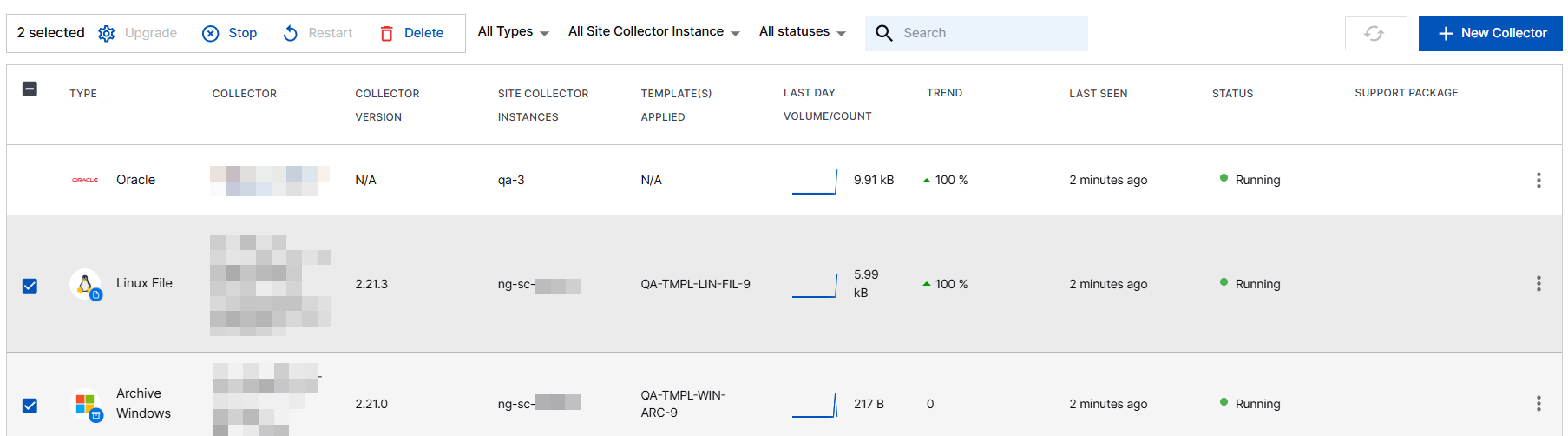
Under Overview, select the agent collectors that belong to the Site Collector instance that you want to delete. You can select and delete one or more agent collectors.
Click Delete.
Note
Check for errors to ensure the parent Site Collector instance still displays its children agent collectors, and retry any failed agent collector uninstalls using the standard uninstall command.
Delete a Site Collector instance.
Use the following steps to delete a Site Collector instance.
On the New-Scale Security Operations Platform home page, click the Collectors tile.
Click Site Collectors.
On Site Collector Instances, select the Site Collector instance that you want to delete.
Click more options (⋮), and click Delete.
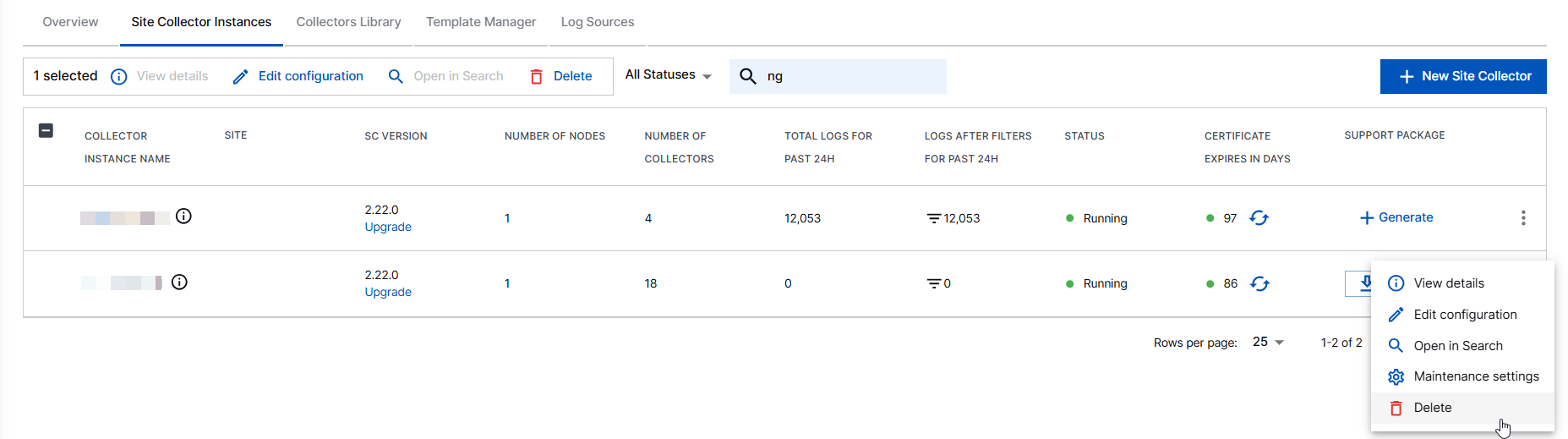
The delete option is also available near the search box.
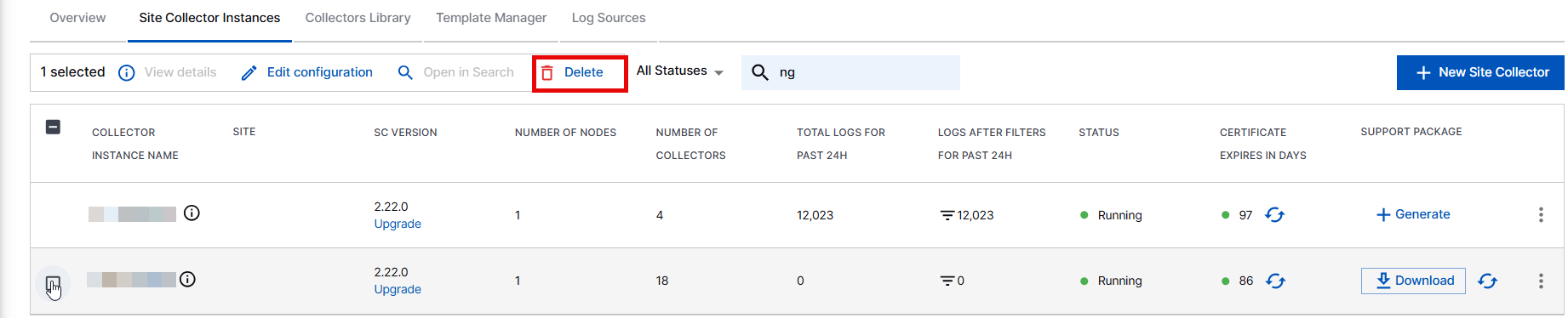
The Site Collector instance is deleted.