- Onboard Cloud Collectors
- Shareable Service Accounts
- Add Accounts for AWS Cloud Collectors
- Add Accounts for Cisco Duo Cloud Collector
- Add Accounts for Google Cloud Collectors
- Add Accounts for Microsoft Cloud Collectors
- Add Accounts for Okta Cloud Collectors
- Add Accounts for Salesforce Cloud Collectors
- Add Accounts for Splunk Cloud Collectors
- Add Accounts for Trend Micro Cloud Collectors
- Add Accounts for Wiz
- Abnormal Security Cloud Collector
- Anomali Cloud Collector
- AWS CloudTrail Cloud Collectors
- AWS CloudWatch Cloud Collector
- AWS CloudWatch Alarms Cloud Collector
- AWS GuardDuty Cloud Collector
- AWS S3 Cloud Collector
- AWS Security Lake Cloud Collector
- AWS SQS Cloud Collector
- Azure Activity Logs Cloud Collector
- Azure Blob Storage Cloud Collector
- Azure Log Analytics Cloud Collector
- Azure Event Hub Cloud Collector
- Azure Storage Analytics Cloud Collector
- Azure Virtual Network Flow Cloud Collector
- Box Cloud Collector
- Broadcom Carbon Black Cloud Collector
- Cato Networks Cloud Collector
- ChatGPT Enterprise Cloud Collector
- Cisco Duo Cloud Collector
- Cisco Meraki Cloud Collector
- Cisco Secure Endpoint Cloud Collector
- Cisco Umbrella Cloud Collector
- Cloudflare Cloud Collector
- Cribl Cloud Collector
- CrowdStrike Cloud Collectors
- Cylance Protect (now Arctic Wolf) Cloud Collector
- DataBahn Cloud Collector
- Dropbox Cloud Collector
- GCP Cloud Logging Cloud Collector
- GCP Pub/Sub Cloud Collector
- GCP Security Command Center Cloud Collector
- Gemini Enterprise Cloud Collector
- GitHub Cloud Collector
- Gmail BigQuery Cloud Collector
- Google Workspace Cloud Collector
- Google Security Operations Cloud Collector
- LastPass Cloud Collector
- Microsoft Copilot Integration
- Microsoft Defender XDR (via Azure Event Hub) Cloud Collector
- Microsoft Entra ID Context Cloud Collector
- Microsoft Entra ID Logs Cloud Collector
- Microsoft 365 Exchange Admin Reports Cloud Collector
- Supported Sources from Microsoft 365 Exchange Admin Reports
- Migrate to the Microsoft 365 Exchange Admin Reports Cloud Collector
- Prerequisites to Configure the Microsoft 365 Exchange Admin Reports Cloud Collector
- Configure the Microsoft 365 Exchange Admin Reports Cloud Collector
- Troubleshooting the Microsoft 365 Exchange Admin Reports Cloud Collector
- Recover Stopped Log Ingestion for Microsoft 365 Exchange Admin Reports Cloud Collector
- Microsoft 365 Management Activity Cloud Collector
- Microsoft Security Alerts Cloud Collector
- Microsoft Sentinel (via Event Hub) Cloud Collector
- Mimecast Cloud Collector
- Mimecast Incydr Cloud Collector
- Netskope Alerts Cloud Collector
- Netskope Events Cloud Collector
- Okta Cloud Collector
- Okta Context Cloud Collector
- OpenAI Cloud Collector
- Palo Alto Networks Cortex Data Lake Cloud Collector
- Palo Alto Networks XDR Cloud Collector
- Phishing Email Inbox Cloud Collector
- PingOne Identity Cloud Collector
- Progress ShareFile Cloud Collector
- Proofpoint On-Demand Cloud Collector
- Proofpoint Targeted Attack Protection Cloud Collector
- Qualys Cloud Collector
- Recorded Future Cloud Collector
- Recorded Future Context Cloud Collector
- Rest API Cloud Collector
- S2W Threat Intelligence Cloud Collector
- Salesforce Cloud Collector
- Salesforce EventLog Cloud Collector
- SentinelOne Alerts Cloud Collector
- SentinelOne Cloud Funnel Cloud Collector
- SentinelOne Threats Cloud Collector
- SentinelOne Cloud Collector
- ServiceNow Cloud Collector
- Slack Cloud Collector
- Snowflake Cloud Collector
- Sophos Central Cloud Collector
- Splunk Cloud Collector
- STIX/TAXII Cloud Collector
- Symantec Endpoint Security Cloud Collector
- Tenable Cloud Collector
- Trend Vision One Cloud Collector
- Trellix Endpoint Security Cloud Collector
- Vectra Cloud Collector
- Webhook Cloud Collectors
- Wiz API Cloud Collector
- Workday Cloud Collector
- Zoom Cloud Collector
- Zscaler ZIA Cloud Collector
- Shareable Service Accounts
Prerequisites to Configure the Gmail BigQuery Cloud Collector
Before you configure the Gmail BigQuery Cloud Collector you must complete the following prerequisites:
Make sure a person with G Suite super-admin rights is present when onboarding the Gmail BigQuery Cloud Collector.
Verify your Google Workspace edition is either Business or Enterprise. Your G Suite administrator can verify the edition type in the Billing tab of the Google Apps admin console (https://admin.google.com). For more information about the Google Apps for Work editions go to: https://apps.google.com/intx/en/pricing.html.
Prepare an authorization file for use during the collector configuration for Service account authentication, as a G Suite administrator. For more information, see Authorize the Gmail BigQuery Cloud Collector to Retrieve Events.
Obtain a Service Credentials JSON file – Create a JSON key for the service account on your Google Cloud Platform. You must enter the JSON file content in the SERVICE CREDENTIALS JSON field while adding a new sharable Google account in Cloud Collectors console during the Cloud Collector configuration.
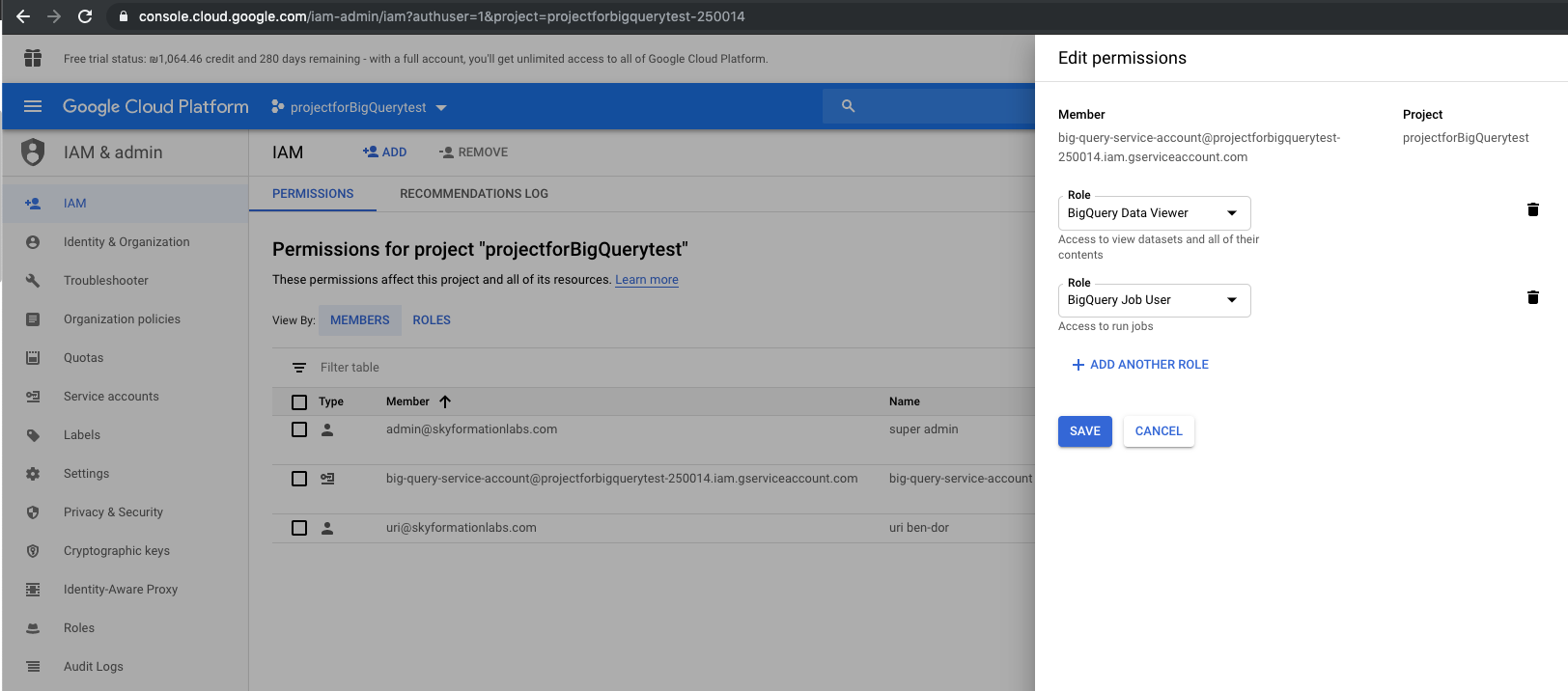
Enable Collection of Gmail Logs – Requires Google Workspace Enterprise edition; Education Standard or Plus. Assign the BigQuery Data Viewer and the BigQuery Job User roles to the service account that you created.
Authorize the Gmail BigQuery Cloud Collector to Retrieve Events
For Service-Account authentication, a G Suite administrator will need to create a file (called Service-Credentials-Json) that authorizes the Gmail BigQuery Cloud Collector (or anyone else who possess it) to communicate with the G Suite account and retrieve relevant logs, events and data for the security monitoring.
To create the Service-Credentials-Json JSON file, ask the G Suite administrator to follow the instructions mentioned here Create a Service-Credentials-Json File for the Gmail BigQuery Cloud Collector.
Use your preferred secured method of transport to send the JSON file to the Exabeam Cloud Collectors administrator to configure the Gmail BigQuery Cloud Collector.
Create a Service-Credentials-Json File for the Gmail BigQuery Cloud Collector
If you use the service-account authentication method, you need to set up communication between the cloud collector and the G-Suite account. To facilitate communication and enable to retrieve audit events, you must create a service-credentials-json file.
Log in to the Google Developers Console with an account that has super-admin permissions.
Select a Google Cloud project from which you want to collect Gmail logs.
Create the service account and download service account JSON file.
In the top-left corner of the console, click Menu.
Click IAM & Admin.
Click Create service account and in the Service account name field, enter a name for the service account.
Select the Furnish a new private key box and ensure the key type is set to JSON.
Select the Enable Domain-wide Delegation box and enter a name in the Product name for the consent screen field.
Click Create. You'll see a message that the service account JSON file has been downloaded to your computer.
Click Close.
Enable Collection of Gmail Logs
To enable collection of Gmail logs, you must have Google Workspace Enterprise edition; Education Standard or Plus. To make changes to permissions and roles, you must also have super-admin access.
Set up service log exports to Workspace BigQuery because Google has merged Gmail logs in BigQuery with Workspace logs and reports in BigQuery.
Assign the BigQuery Data Viewer and the BigQuery Job User roles to the service account.
To assign these roles, from the GCP Admin console, select project > IAM, and then select a service account that you created > edit permissions.